Giới thiệu
This manual provides detailed instructions for the THOKWOK TK-X2 Motorcycle Bluetooth Headset. Please read thoroughly to ensure proper use, optimal performance, and to familiarize yourself with all features and functions.
Có gì trong hộp
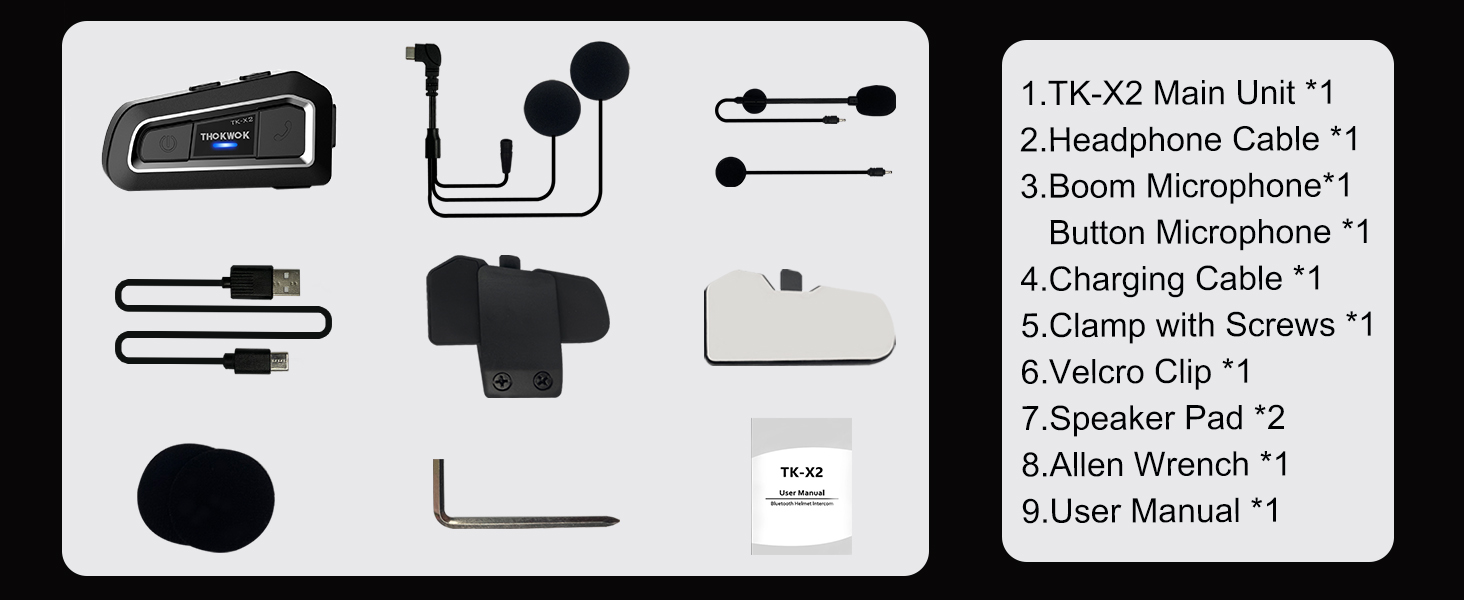
The TK-X2 package includes the following components:
- TK-X2 Main Unit
- Cáp tai nghe
- Boom micro
- Nút Micro
- Cáp sạc
- Clamp với vít
- Velcro Clip
- Speaker Pad (2x)
- Allen Wrench
- Hướng dẫn sử dụng
Cài đặt
Sạc thiết bị
Before first use, fully charge the TK-X2 unit. Connect the provided charging cable to the unit and a USB power source. A full charge typically takes approximately 2.5 hours. The unit will indicate charging status.

Cài đặt
The TK-X2 helmet intercom offers two interchangeable microphones to suit different helmet types:
- Micrô Boom: Ideal for open-face or flip-face (convertible) helmets.
- Micrô dạng nút: Thích hợp cho mũ bảo hiểm che kín mặt.
Choose the appropriate microphone and install the main unit using either the clamp with screws or the velcro clip, ensuring secure attachment to your helmet. Position the speakers inside the helmet's ear pockets for optimal audio quality.

Hoạt động
Bật/Tắt nguồn
To power on the device, long press the power button until you hear an audible prompt. To power off, long press the power button again until the device shuts down.
Ghép nối với điện thoại
To pair your TK-X2 with a smartphone:
- Long press the power button for 4 seconds until the red and blue lights flash alternately, indicating pairing mode.
- On your phone, go to Bluetooth settings and turn on Bluetooth.
- Find "TK-X2" in the list of available devices and select it to connect.
- Once connected, the blue light will flash slowly, and you can play music and make calls.
Phát nhạc
- Phát/Tạm dừng: Click the phone button.
- Bài hát tiếp theo: Click the forward button.
- Bài hát trước: Click the backward button.
- Tăng âm lượng: Hold the forward button.
- Giảm âm lượng: Hold the backward button.
Voice Assistant (Siri/S-Voice)
Long press the phone button for 2 seconds to activate your phone's voice assistant (Siri or S-Voice). You will hear "Voice Dial" as confirmation.
Đài phát thanh FM
Double-click the phone button to start the FM radio. You will hear "Turn on radio". Double-click again to end FM radio.
Intercom Pairing (Multiple Units)
The TK-X2 supports full-duplex intercom for up to 3 riders, with 2 riders able to communicate simultaneously. For optimal performance, clear previous Bluetooth pairing records before initiating new intercom connections.
- Clearing Pairing Records: Turn on all units. Long press the power button for 8 seconds until pink lights flash twice, indicating records are cleared.
- Pairing Two Units:
- Ensure both units are in pairing mode (red and blue lights flashing alternately).
- Click the power button on one unit to initiate pairing. Once successful, blue lights will flash slowly.
- Pairing Three Units:
- First, pair Unit A and Unit B as described above.
- Then, hang up the intercom on Unit B.
- Put Unit B and Unit C into pairing mode (red and blue lights flashing alternately).
- Click the power button on Unit B to initiate pairing with Unit C.
- Once B and C are paired, hang up the intercom on Unit C.
- Double-click the power button on Unit A to connect with Unit C.
Refer to Video 1 (starting from 1:55 mark) for a visual guide on pairing multiple TK-X2 units.
Intercom Usage
- Bắt đầu Intercom: Nhấp vào nút nguồn.
- Hang Up Intercom: Click the power button again.
- When an intercom call is active, music playback will automatically pause. Ending the intercom call will resume music.
Các tính năng chính

1000M Intercom Distance & Universal Pairing: The TK-X2 motorcycle Bluetooth headset enables full-duplex intercom communication up to 1000 meters (without obstacles) for 3 riders, with 2 riders able to converse simultaneously. It also features universal pairing, allowing connection with most Bluetooth intercoms on the market.

Noise Reduction & Upgraded Hi-Fi Stereo Speakers: Equipped with DSP and CVC advanced noise reduction technology and Bluetooth A2DP profile, the TK-X2 provides superior sound quality for both incoming and outgoing audio. Upgraded 40mm Hi-Fi stereo speakers deliver high-fidelity audio with deep bass, ensuring crystal-clear communications and music even at high speeds.

Bluetooth 5.0 & Long Standby Battery: Featuring Bluetooth 5.0 HFP profile, the TK-X2 allows access to Siri and S Voice commands for hands-free calls, music playback, FM radio, and GPS voice guidance. The built-in 650mAh battery offers low power consumption, providing up to 24 hours of music or intercom time and up to 280 hours of standby time.
Exchangeable Microphone & Great Helmet Compatibility: The TK-X2 helmet intercom includes two interchangeable microphones: a boom microphone for open-face or flip-face (convertible) helmets, and a button microphone for full-face helmets, ensuring broad compatibility.

Waterproof Design & Low Battery Alarm: The TK-X2's shell is constructed using an integral casting process, minimizing seams for excellent waterproof functionality, allowing use in any weather. The device broadcasts current battery status ("Battery full", "Battery medium", "Battery low") upon power-on.
BẢO TRÌ
- Vệ sinh: Sử dụng một mềm, damp Dùng khăn mềm để lau sạch thiết bị. Không sử dụng hóa chất mạnh hoặc chất tẩy rửa có tính mài mòn.
- Kho: Bảo quản thiết bị ở nơi khô ráo, thoáng mát khi không sử dụng. Tránh nhiệt độ quá cao.
- Chăm sóc pin: Để kéo dài tuổi thọ pin, tránh xả pin thường xuyên. Hãy sạc thiết bị thường xuyên, ngay cả khi không sử dụng.
- Tiếp xúc với nước: While waterproof, ensure the charging port cover is securely closed before exposure to water to prevent damage.
Xử lý sự cố
| Vấn đề | Giải pháp |
|---|---|
| Thiết bị không bật nguồn. | Đảm bảo pin đã được sạc. Kết nối với bộ sạc và thử lại. |
| Không thể ghép nối với điện thoại. | Ensure the TK-X2 is in pairing mode (red and blue lights flashing alternately). Turn off and on your phone's Bluetooth. Clear previous pairing records on the TK-X2 if necessary. |
| Không có âm thanh từ loa. | Check speaker connections to the main unit. Ensure volume is not set to minimum on both the headset and your connected device. |
| Hệ thống liên lạc nội bộ không kết nối được. | Ensure all units have cleared previous pairing records. Follow the multi-unit pairing instructions carefully. Ensure units are within range. |
| Tuổi thọ pin ngắn. | Ensure the device is fully charged before use. Extreme temperatures can affect battery performance. |
Thông số kỹ thuật
| Tính năng | Chi tiết |
|---|---|
| Tên mẫu | TK-X2 Single |
| Thương hiệu | THOKWOK |
| Công nghệ kết nối | Bluetooth |
| Phiên bản Bluetooth | 5.1 |
| Kiểm soát tiếng ồn | Chống ồn chủ động |
| Khoảng cách liên lạc | Up to 1000m (no obstacles) |
| Người điều khiển hệ thống liên lạc nội bộ Max | 3 (2 talking simultaneously) |
| Battery Life (Music/Intercom) | Lên đến 24 giờ |
| Thời gian chờ | Lên đến 280 giờ |
| Thời gian sạc | 2.5 giờ |
| Mức độ chống nước | Waterproof (IP67 equivalent) |
| Loại điều khiển | Button Control, Voice Control |
| Jack cắm tai nghe | Loại C |
| Vật liệu | Acrylonitrile Butadiene Styrene (ABS) |
| Trọng lượng sản phẩm | 8.4 ounce |
| Kích thước sản phẩm | 3 x 1.6 x 0.83 inch |
| Mã số UPC | 797447004837 |
Bảo hành và Hỗ trợ
For warranty information, technical support, or any inquiries regarding your THOKWOK TK-X2 headset, please refer to the contact information provided on the product packaging or visit the official THOKWOK webđịa điểm. Giữ biên lai mua hàng của bạn để yêu cầu bảo hành.


