Giới thiệu
This manual provides comprehensive instructions for the installation, operation, and maintenance of your Kaadas K7-5 Push-Pull Keyless Smart Lock. Please read this manual thoroughly before using the product to ensure proper function and safety. Keep this manual for future reference.
Sản phẩm trênview và Tính năng
The Kaadas K7-5 is an advanced keyless smart lock designed for convenience and security. It offers multiple access methods and intelligent features.
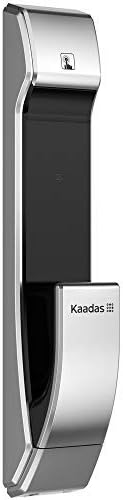
Hình ảnh: Bên view of the Kaadas K7-5 Smart Lock, showcasing thiết kế đẹp mắt.
Các tính năng chính:
- Push-Pull Operation: One-step intuitive door opening experience.
- Khóa tự động: Ensures the door is locked automatically after closing.
- Nhiều phương pháp truy cập: Fingerprint, Password, RFID Card, and Mechanical Key.
- Sweden FPC Fingerprint Sensor: Provides accurate and swift recognition (less than 1 second).
- Fake PIN Code Feature: Allows adding random numbers before and after the real password to prevent exposure.
- Xác thực kép: Strengthens security by requiring two authentication methods (e.g., password + fingerprint/card).
- In-Home Security (Double-locking): Prevents unexpected unlocking attempts from outside when activated.
- Safe Handle Function: Locks the indoor handle to prevent unauthorized opening from inside, useful for child safety or peephole security.
- Unlock Records Query: Allows checking who unlocked the door and when.
- Dự phòng điện khẩn cấp: Use a 5V power bank via Micro USB in case of battery discharge.
- Cảnh báo pin yếu: Voice sound and LED light alert for battery replacement.
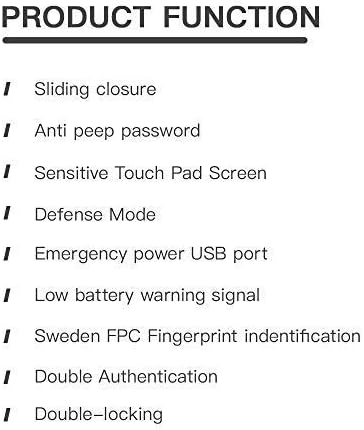
Image: A list detailing key product functions such as sliding closure, anti-peep password, sensitive touch pad, defense mode, emergency power USB port, low battery warning, Sweden FPC fingerprint identification, double authentication, and double-locking.
Thiết lập và cài đặt
The Kaadas K7-5 smart lock requires precise installation for optimal performance and security. It is highly recommended to have this lock installed by a qualified professional.
Những cân nhắc chung khi cài đặt:
- Ensure your door thickness is compatible (typically 38-60mm).
- The lock is designed for universal installation, suitable for various door opening directions.
- Refer to the detailed installation template and hardware provided with your lock.

Image: An exploded diagram showing all components of the Kaadas K7-5 Smart Lock, including the front and back panels, mortise, and various screws and pins for assembly.
Hướng dẫn sử dụng
The Kaadas K7-5 offers multiple ways to unlock your door. Ensure the lock is properly powered with 8 AA alkaline batteries (DC 6V).
1. Mở khóa bằng vân tay
Place your registered finger on the FPC fingerprint sensor. The lock will recognize your fingerprint in less than 1 second and unlock.
2. Unlocking with Password
Enter your registered password on the touch pad. The lock supports 6-12 digit passwords. Press the confirmation key to unlock.
- Mã PIN giả: To prevent others from guessing your password, you can enter random numbers before or after your actual password. For example, if your password is "123456", you can enter "987123456321" where "123456" is embedded within other numbers.
3. Unlocking with RFID Card
Present your registered RFID card to the card reader area on the lock. The lock will verify the card and unlock.
4. Unlocking with Mechanical Key
In case of emergency or battery failure, use the provided mechanical key to manually unlock the door.
5. Khóa tự động
After the door closes, the lock will automatically engage the mortise to secure the door. This eliminates the need to manually check if the door is locked.
6. Chế độ xác thực kép
This mode enhances security by requiring two different authentication methods to unlock the door. For example, you might need to use a password followed by a fingerprint, or a card followed by a password. Refer to the lock's settings menu for activation and configuration.
7. In-Home Security (Double-locking)
When you are inside your home, activate the double-locking feature using the [CLOSE] button on the indoor unit. This prevents any unlocking attempts from the outside, even with valid credentials.
8. Safe Handle Function
When enabled, the indoor handle will be locked. This feature is useful for preventing children from accidentally opening the door or for added security if your door has a peephole that could be exploited.
BẢO TRÌ
Proper maintenance ensures the longevity and reliable operation of your Kaadas K7-5 smart lock.
1. Thay thế pin
The lock will provide a voice sound and LED light warning when the batteries are low. Replace all 8 AA alkaline batteries promptly to avoid interruption of service. Do not mix old and new batteries or different types of batteries.
2. Emergency Power Backup
If the batteries are completely discharged, you can temporarily power the lock using a 5V power bank connected to the Micro USB port located on the exterior unit. This allows you to unlock the door and replace the internal batteries.
3. Vệ sinh
Lau sạch bề mặt bên ngoài của khóa bằng vải mềm, khô. Tránh sử dụng chất tẩy rửa có tính mài mòn, dung môi hoặc hóa chất mạnh, vì chúng có thể làm hỏng lớp phủ và các linh kiện điện tử.
Xử lý sự cố
If you encounter issues with your Kaadas K7-5 smart lock, consider the following common solutions:
- Khóa không phản hồi: Check the batteries. If the batteries are low or dead, replace them or use the emergency power backup.
- Không nhận dạng được dấu vân tay: Đảm bảo ngón tay của bạn sạch và khô. Đăng ký lại dấu vân tay nếu sự cố vẫn tiếp diễn.
- Mật khẩu không hoạt động: Double-check the entered password. Ensure you are not in Fake PIN code mode if you are not intentionally using it.
- Door not locking/unlocking smoothly: Check for any obstructions in the door frame or mortise. Ensure the lock is properly aligned.
- Unusual sounds: If the lock makes unusual sounds, it may indicate a mechanical issue. Contact customer support.
For persistent issues, refer to the full troubleshooting guide available on the Kaadas official webtrang web hoặc liên hệ với bộ phận hỗ trợ khách hàng.
Thông số kỹ thuật
Below are the technical specifications for the Kaadas K7-5 Push-Pull Keyless Smart Lock.
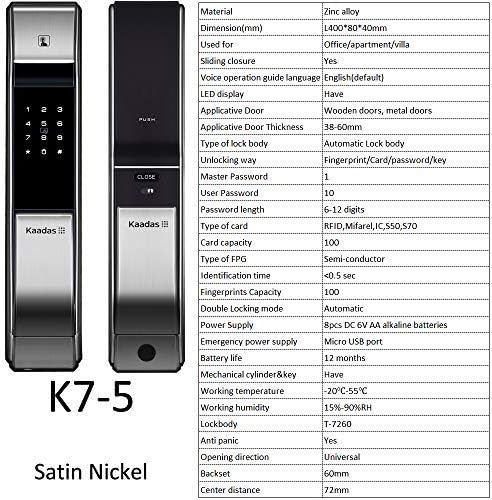
Hình ảnh: Mặt trước và mặt sau views of the Kaadas K7-5 Smart Lock, accompanied by a detailed table of specifications including material, dimensions, unlocking methods, and power supply.
| Vật liệu | Hợp kim kẽm |
| Kích thước (D x R x C) | 400 x 80 x 40 mm (khoảng 15.75 x 3.15 x 1.57 inch) |
| Loại cửa áp dụng | Wooden doors, metal doors |
| Độ dày cửa áp dụng | 38-60mm |
| Type of Lock Body | Automatic Lock body |
| Phương pháp mở khóa | Fingerprint, Card, Password, Key |
| Master Password Capacity | 1 |
| User Password Capacity | 10 |
| Độ dài mật khẩu | 6-12 chữ số |
| Loại thẻ | RFID, Mifare, IC550, 570 |
| Dung lượng thẻ | 100 |
| Loại dấu vân tay | Semi-conductor (FPC) |
| Thời gian nhận dạng | <0.5 giây |
| Fingerprints Capacity | 100 |
| Double Locking Mode | Tự động |
| Nguồn điện | 8pcs DC 6V AA alkaline batteries |
| Cung cấp điện khẩn cấp | Cổng Micro USB |
| Tuổi thọ pin | Khoảng 12 tháng |
| Mechanical Cylinder & Key | Đúng |
| Nhiệt độ làm việc | -20°C đến 55°C |
| Độ ẩm làm việc | Độ ẩm tương đối 15%-90% |
| Thân khóa | T-7260 |
| chống hoảng loạn | Đúng |
| Hướng mở | Phổ quát |
| quay lưng | 60mm |
| Khoảng cách trung tâm | 72mm |

Image: A technical drawing illustrating the dimensions of the Kaadas K7-5 Smart Lock, showing a height of 400mm, width of 80mm, and depth of 40mm. Note: Manual measurements may have slight deviations.
Bảo hành và Hỗ trợ
For information regarding warranty coverage, technical support, or service, please refer to the warranty card included with your product or visit the official Kaadas webtrang web. Bạn cũng có thể liên hệ với điểm mua hàng của mình để được hỗ trợ.
Nhà sản xuất: Kaadas


