Giới thiệu
This manual provides comprehensive instructions for the setup, operation, maintenance, and troubleshooting of your Listen Technologies LR-5200-IR-P1 Advanced Intelligent DSP IR Receiver Package 1. Please read this manual thoroughly before using the device to ensure proper functionality and to maximize its performance.
The LR-5200-IR-P1 package is designed to expand or establish an IR assistive listening system, offering high-performance signal reception and clarity. It includes the LR-5200-IR receiver, an integrated neck loop/lanyard, and a universal ear speaker.
Nội dung gói
The LR-5200-IR-P1 package includes the following components:
- (1) LR-5200-IR Advanced Intelligent DSP IR Receiver
- (1) LA-430 Intelligent Ear Phone/Neck Loop Lanyard
- (1) LA-401 Universal Ear Speaker
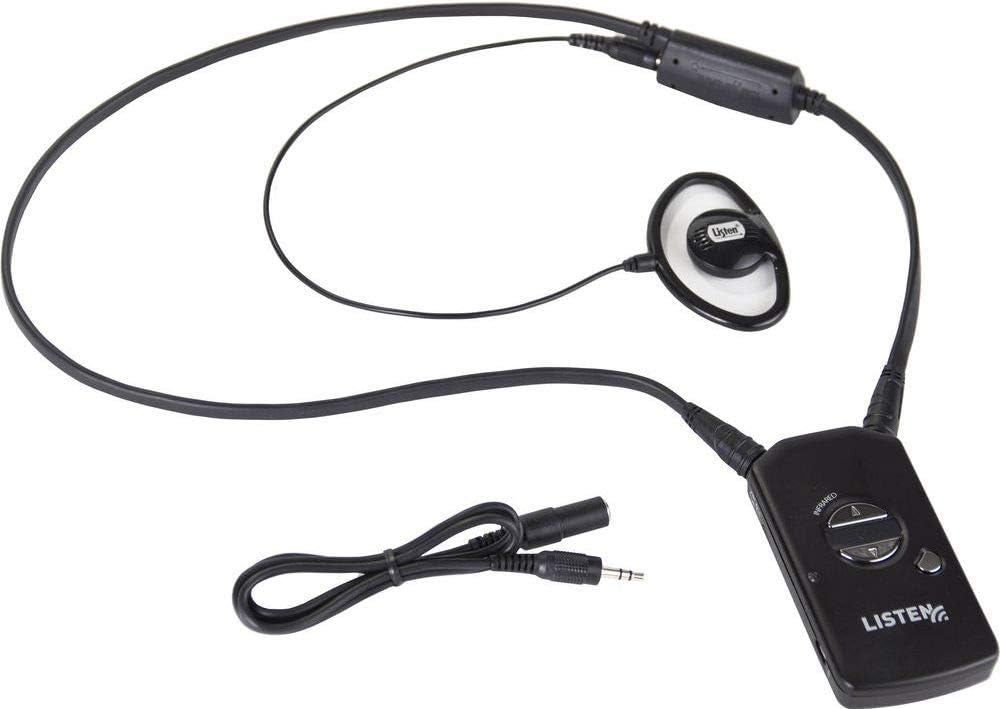
Hình 1: Components of the LR-5200-IR-P1 package. Shown are the LR-5200-IR receiver, the LA-430 neck loop/lanyard, and the LA-401 universal ear speaker, all connected and ready for use.
Cài đặt
1. Sạc thiết bị thu
The LR-5200-IR receiver uses advanced green battery technology. Before first use, ensure the receiver is fully charged.
- Connect the receiver to a compatible Listen Technologies charging station (sold separately) or a USB power source using the appropriate cable.
- The charging indicator light on the receiver will illuminate to show charging status.
- Allow sufficient time for a full charge, typically several hours.
2. Phụ kiện kết nối
The package includes an integrated neck loop/lanyard and a universal ear speaker.
- Ear Speaker: Plug the 3.5mm jack of the LA-401 Universal Ear Speaker into the audio output port on the LR-5200-IR receiver.
- Neck Loop/Lanyard: The LA-430 Intelligent Ear Phone/Neck Loop Lanyard connects to the receiver via its integrated connector. This accessory is designed for users with T-coil enabled hearing aids.
3. Wearing the Receiver
The LR-5200-IR receiver is designed for discreet and comfortable wear.
- Neck Loop/Lanyard: Place the lanyard around your neck. The receiver will hang comfortably at chest level.
- Đai đeo: Alternatively, the receiver can be attached to a belt or waistband using its integrated belt clip for a more discreet option.
Hướng dẫn sử dụng
1. Bật / Tắt nguồn
To power on the LR-5200-IR receiver, press and hold the power button located on the front of the device until the indicator light illuminates. To power off, press and hold the power button again until the light turns off.
2. Chọn kênh
The LR-5200-IR receiver supports multi-channel applications, allowing users to select their desired channel.
- Use the channel up/down buttons (typically marked with arrows) on the receiver to cycle through available IR channels.
- The current channel number may be displayed on a small screen or indicated by LED patterns, depending on the receiver's design.
- Ensure the selected channel matches the broadcast channel of the IR transmitter in your listening environment.
3. Điều chỉnh âm lượng
Adjust the listening volume to a comfortable level using the volume up/down buttons on the receiver.
4. Using with T-Coil Hearing Aids
If you are using a T-coil enabled hearing aid, ensure your hearing aid is set to the "T" or "Telecoil" program. The LA-430 neck loop/lanyard will transmit the audio signal directly to your hearing aid's T-coil, providing a clear listening experience.
BẢO TRÌ
1. Vệ sinh
- Wipe the receiver and accessories with a soft, dry, lint-free cloth.
- Không sử dụng chất tẩy rửa có tính ăn mòn, dung môi hoặc hóa chất mạnh, vì chúng có thể làm hỏng thiết bị.
- For ear speakers, use a mild disinfectant wipe if necessary, ensuring no liquid enters the speaker grille.
2. Chăm sóc pin
- Regularly charge the receiver to maintain battery health.
- Tránh để pin cạn kiệt thường xuyên.
- Store the receiver in a cool, dry place when not in use for extended periods.
3. Lưu trữ
When not in use, store the LR-5200-IR receiver and its accessories in a protective case or a clean, dry environment to prevent damage from dust, moisture, or physical impact.
Xử lý sự cố
| Vấn đề | Nguyên nhân có thể | Giải pháp |
|---|---|---|
| Không có âm thanh từ bộ thu. | Receiver not powered on; Low battery; Incorrect channel selected; Ear speaker/neck loop not connected; Out of range of IR transmitter; Obstruction blocking IR signal. | Ensure receiver is powered on; Charge the battery; Verify correct channel selection; Check ear speaker/neck loop connection; Move closer to the IR transmitter; Remove any obstructions between receiver and transmitter. |
| Âm thanh bị méo mó hoặc không rõ ràng | Weak IR signal; Interference; Volume too high; Damaged ear speaker/neck loop. | Move closer to the IR transmitter; Check for sources of interference; Adjust volume to a lower level; Test with a different ear speaker/neck loop if available. |
| Bộ thu không sạc | Charging cable/station not connected properly; Faulty charging cable/station; Battery issue. | Ensure secure connection; Try a different charging cable or station; Contact support if battery issues persist. |
Thông số kỹ thuật
- Người mẫu: LR-5200-IR-P1
- Nhà sản xuất: Công nghệ lắng nghe
- Công nghệ kết nối: Wired (for accessories)
- Loại điều khiển: Điều khiển bằng tay
- Tính năng đặc biệt: Thiết kế nhỏ gọn
- Thiết bị tương thích: Người nói
- Loại đầu nối: Giắc cắm 3.5mm
- Chế độ đầu ra âm thanh: Bệnh tăng bạch cầu đơn nhân
- Số kênh: 5
- Trọng lượng sản phẩm: 3.8 ounce
- Pin: 1 Lithium Ion battery required (integrated)
- Ngày đầu tiên có sẵn: Ngày 18 tháng 2018 năm XNUMX
Bảo hành và Hỗ trợ
For warranty information and technical support, please refer to the official Listen Technologies webhoặc liên hệ trực tiếp với bộ phận chăm sóc khách hàng của họ. Hãy giữ lại hóa đơn mua hàng để làm bằng chứng bảo hành.
Thông tin liên hệ của Listen Technologies:
- Webđịa điểm: www.listentech.com
- Dịch vụ khách hàng: Tham khảo website for contact numbers or support forms.


