Giới thiệu
This manual provides comprehensive instructions for the Canyon Gaming Gamepad CND-GPW5, a wireless controller designed for PlayStation 4 with an integrated touchpad. Please read this manual carefully before using the product to ensure proper operation and to maximize your gaming experience.

Hình ảnh: Mặt trước view of the Canyon Gaming Gamepad CND-GPW5, showcasing its ergonomic design, dual analog sticks, directional pad, action buttons, and central touchpad.
Nội dung gói
- Canyon Gaming Gamepad CND-GPW5
- Cáp sạc USB
- Hướng dẫn sử dụng (tài liệu này)

Image: The Canyon Gaming Gamepad CND-GPW5 displayed within its retail packaging, highlighting key features like wireless connectivity, touchpad, and vibration feedback.
Cài đặt
1. Sạc tay cầm chơi game
- Connect the small end of the USB charging cable to the charging port on the gamepad.
- Connect the larger end of the USB charging cable to a USB port on your PlayStation 4 console or a compatible USB wall adapter.
- The indicator light on the gamepad will illuminate to show it is charging. It will turn off or change color when fully charged.
2. Pairing with PlayStation 4
- Hãy đảm bảo máy chơi game PlayStation 4 của bạn đã được bật nguồn.
- For initial pairing, connect the gamepad to the PS4 console using the USB charging cable.
- Nhấn nút Nút PS (located in the center of the gamepad). The gamepad will power on and automatically pair with the console.
- Sau khi ghép nối, bạn có thể ngắt kết nối cáp USB để chơi không dây.
- To pair wirelessly after initial setup, simply press the Nút PS on the gamepad. It will attempt to connect to the last paired console.
Hướng dẫn sử dụng
Bố cục và chức năng của tay cầm chơi game

Hình ảnh: Phía sau view of the Canyon Gaming Gamepad CND-GPW5, showing the M1, M2, M3, and M4 programmable buttons, along with regulatory information.
- Cần điều khiển analog: Used for precise movement and camera control.
- Bàn phím điều hướng (D-Pad): Dùng để điều hướng menu và thực hiện các thao tác cụ thể trong trò chơi.
- Các nút hành động (Tam giác, Hình tròn, Dấu chéo, Hình vuông): Perform various in-game actions.
- Các nút vai (L1, R1) và cò súng (L2, R2): For aiming, firing, and other contextual actions.
- Nút PS: Powers on the gamepad, accesses the PS4 home menu, and switches users.
- Nút CHIA SẺ: Shares screenshots and video clips.
- Nút TÙY CHỌN: Truy cập vào menu và tùy chọn trong trò chơi.
- Bàn di chuột: Functions as a clickable surface for navigation and specific game interactions.
- Các nút M1, M2, M3, M4: These are additional programmable buttons located on the rear of the gamepad. Refer to your game's settings or the PS4 system settings for customization options.
Phản hồi rung
The gamepad features vibration feedback to enhance immersion during gameplay. This function is automatically enabled when supported by the game.
BẢO TRÌ
Vệ sinh
- Lau tay cầm chơi game bằng vải mềm, khô.
- Do not use liquid cleaners, solvents, or abrasive materials, as these can damage the surface and internal components.
Kho
- Bảo quản tay cầm chơi game ở nơi khô ráo, thoáng mát, tránh ánh nắng trực tiếp và nhiệt độ cao.
- Tránh đặt vật nặng lên tay cầm chơi game.
Chăm sóc pin
- Để kéo dài tuổi thọ pin, hãy tránh xả hết pin tay cầm chơi game thường xuyên.
- If storing for an extended period, charge the gamepad to approximately 50% before storage.
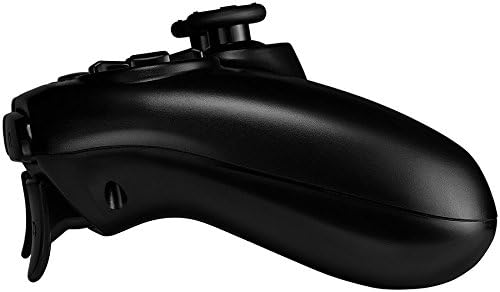
Hình ảnh: Side profile of the Canyon Gaming Gamepad CND-GPW5, illustrating its contoured grip and trigger button placement.
Xử lý sự cố
- Tay cầm chơi game không kết nối được:
- Hãy đảm bảo tay cầm chơi game đã được sạc đầy.
- Connect the gamepad to the PS4 console with the USB cable and press the PS button to re-establish connection.
- Kiểm tra xem có sự nhiễu sóng nào từ các thiết bị không dây khác hay không.
- Buttons or analog sticks unresponsive:
- Restart the gamepad by holding the PS button for 10 seconds, then press it again to power on.
- Ensure the gamepad's firmware is up to date (check Canyon's official website for updates if available).
- Vấn đề sạc:
- Try a different USB cable or USB port on the console/adapter.
- Ensure the charging port on the gamepad is clean and free of debris.
If problems persist, please refer to the support section or contact Canyon customer service.
Thông số kỹ thuật
| Tính năng | Chi tiết |
|---|---|
| Số hiệu mẫu | CND-GPW5 (Item Model Number: 9598241) |
| Kết nối | Không dây |
| Khả năng tương thích | PlayStation 4 |
| Đặc trưng | Touchpad, Vibration Feedback |
| Ắc quy | 1 Pin lithium-ion (bắt buộc) |
| Kích thước sản phẩm (D x R x C) | 50 x 50 x 28cm |
| Cân nặng | 224 gram |
| ASIN | B07G37JCMC |
| Ngày phát hành | Ngày 1 tháng 2020 năm XNUMX |
Bảo hành và Hỗ trợ
For information regarding warranty coverage, please refer to the warranty card included with your product or visit the official Canyon website. For technical support or further assistance, please contact Canyon customer service through their official support channels.
Official Canyon Webđịa điểm: https://canyon.eu/


