1. Sản phẩm hếtview
The Philips SENSEO Switch HD6592/61 is a versatile 2-in-1 coffee machine designed to brew both single-serve pod coffee and a full pot of filter coffee. This manual provides instructions for safe and efficient use of your appliance.

Image 1.1: The Philips SENSEO Switch coffee machine, showcasing its dual functionality for both pod and filter coffee preparation.
Các tính năng chính:
- Dual Brewing System: Prepare single cups of SENSEO pod coffee or a full pot of filter coffee.
- Tự động tắt: Máy sẽ tự động tắt sau một thời gian không hoạt động để tiết kiệm năng lượng.
- Easy Water Tank Filling: The water tank features a clear level indication for precise and convenient filling.
- Hệ thống chống nhỏ giọt: Allows you to pause brewing and pour a cup of filter coffee before the full cycle is complete.
- Các bộ phận an toàn với máy rửa chén: The jug and filter holder are designed for easy cleaning in a dishwasher.
2. Thông tin an toàn
Read this instruction manual carefully before using the appliance and save it for future reference. Always follow basic safety precautions when using electrical appliances to reduce the risk of fire, electric shock, and personal injury.
- Đảm bảo voltage được chỉ ra trên thiết bị tương ứng với vol nguồn điện cục bộ của bạntage trước khi kết nối.
- Không được nhúng thiết bị, phích cắm hoặc dây nguồn vào nước hoặc bất kỳ chất lỏng nào khác.
- Để thiết bị xa tầm tay trẻ em.
- Không vận hành thiết bị nếu phích cắm, dây nguồn hoặc bản thân thiết bị bị hỏng.
- Place the appliance on a stable, flat, heat-resistant surface, away from hot surfaces or open flames.
- Luôn rút phích cắm của thiết bị trước khi vệ sinh hoặc khi không sử dụng.
- Không được mở vỏ thiết bị. Việc sửa chữa chỉ nên được thực hiện bởi nhân viên dịch vụ được ủy quyền.
3. Thiết lập
3.1 Tháo dỡ và vệ sinh ban đầu
- Lấy tất cả vật liệu đóng gói ra khỏi máy pha cà phê.
- Wash the removable parts (water reservoir, jug, filter holder, drip tray) with warm water and a mild detergent. Rinse thoroughly and dry.
- Lau sạch bên ngoài máy bằng adamp vải.
3.2 Lần sử dụng đầu tiên (Chu trình xả)
Trước khi pha cà phê lần đầu tiên, hãy thực hiện chu trình tráng để làm sạch hệ thống bên trong.
- Fill the water reservoir with fresh cold water up to the MAX indication.
- Place the empty jug (for filter coffee) or a cup (for pod coffee) on the drip tray.
- Close the lid of the pod holder (without a pod) or ensure the filter holder is empty and correctly placed.
- Nhấn nút nguồn để bật máy.
- Press the button for filter coffee or the 2-cup button for pod coffee to start a brewing cycle with only water.
- Repeat this process once or twice until the water reservoir is empty.

Hình ảnh 3.1: Phía sau view of the coffee machine, showing the transparent water reservoir with level indicators and the filter coffee carafe in position.

Image 3.2: The coffee machine with the filter coffee section open, illustrating how to access the filter holder and water inlet for filter coffee brewing.
4. Hướng dẫn vận hành
4.1 Brewing SENSEO Pod Coffee
- Ensure the water reservoir is filled with fresh cold water.
- Mở nắp hộp đựng viên nang.
- Place one or two SENSEO coffee pods in the appropriate pod holder. For one cup, use the 1-cup pod holder; for two cups, use the 2-cup pod holder. Ensure the pod is centered.
- Đóng chặt nắp cho đến khi nghe tiếng "cạch".
- Đặt một hoặc hai chiếc cốc lên khay hứng nước.
- Press the 1-cup or 2-cup button to start brewing. The machine will automatically stop when the coffee is ready.

Image 4.1: The SENSEO Switch machine actively brewing two cups of pod coffee, demonstrating the pod coffee function.

Image 4.2: A close-up of the machine brewing a single cup of SENSEO pod coffee, highlighting the single-serve capability.
4.2 Brewing Filter Coffee
- Ensure the water reservoir is filled with fresh cold water up to the desired number of cups for filter coffee.
- Open the filter coffee section.
- Place a paper filter (size 1x4 or similar) into the filter holder.
- Add the desired amount of ground filter coffee into the paper filter.
- Close the filter coffee section and ensure the thermal jug is correctly placed on the heating plate.
- Press the filter coffee button to start brewing. The machine will brew the coffee and keep it warm in the thermal jug.
- The drip stop system allows you to remove the jug temporarily to pour a cup before brewing is complete.

Image 4.3: The SENSEO Switch machine configured for filter coffee, featuring the thermal carafe and filter holder.
4.3 Intensity Select
The machine features an Intensity Select function, allowing you to choose between a regular or a strong coffee. Refer to the control panel for specific buttons related to intensity selection.

Hình 4.4: Hình chiếu từ trên cao view of the control panel, showing the power button, 1-cup and 2-cup buttons for pod coffee, the filter coffee button, and the Intensity Select option.

Image 4.5: A hand interacting with the control panel, demonstrating the ease of selecting brewing options.
5. Bảo trì
5.1 Vệ sinh
Vệ sinh thường xuyên đảm bảo hiệu suất tối ưu và kéo dài tuổi thọ của máy pha cà phê.
- Vệ sinh hàng ngày: After each use, empty and rinse the water reservoir, drip tray, and pod holder. Wipe the exterior with a damp vải.
- Các bộ phận an toàn với máy rửa chén: The jug and filter holder can be safely cleaned in the dishwasher.
- Giá đỡ Pod: Remove the pod holder and rinse it under running water. Use a small brush if necessary to remove any coffee residue.
- Khay ướt: Thường xuyên đổ hết nước và vệ sinh khay hứng nước và vỉ nướng.
5.2 Tẩy cặn
Descaling is crucial to prevent limescale buildup, which can affect brewing performance and taste. The frequency of descaling depends on water hardness and usage.
- Use a descaling solution specifically designed for coffee machines. Follow the instructions provided with the descaling agent.
- Typically, the process involves filling the water reservoir with the descaling solution and running several brewing cycles without coffee.
- Sau khi tẩy cặn, hãy rửa sạch máy bằng cách cho máy chạy vài chu kỳ với nước sạch để loại bỏ hết cặn bẩn còn sót lại sau khi tẩy cặn.
KHAI THÁC. Xử lý sự cố
If you encounter issues with your Philips SENSEO Switch coffee machine, consult the following common troubleshooting steps:
- Máy không bật: Kiểm tra xem dây nguồn đã được cắm chặt vào ổ điện đang hoạt động chưa.
- Cà phê không đang được pha: Ensure the water reservoir is filled, the pod holder/filter holder is correctly placed, and the lid is closed properly.
- Coffee tastes weak: Check if you are using the correct amount of coffee (pods or ground coffee) and if the Intensity Select setting is appropriate. Descaling might also be necessary.
- Rò rỉ nước: Ensure all removable parts are correctly assembled and seated. Check for any cracks or damage to the water reservoir or other components.
- Limescale indicator light is on: Thực hiện chu trình tẩy cặn như mô tả trong phần Bảo trì.
Nếu sự cố vẫn tiếp diễn sau khi đã thử các giải pháp trên, vui lòng liên hệ với bộ phận hỗ trợ khách hàng của Philips để được trợ giúp thêm.
7. Thông số kỹ thuật
Detailed technical specifications for the Philips SENSEO Switch HD6592/61 coffee machine:
| Đặc điểm kỹ thuật | Giá trị |
|---|---|
| Thương hiệu | PHILIPS |
| Số hiệu mẫu | HD6592/61 |
| Màu sắc | Đen |
| Kích thước sản phẩm (D x R x C) | 28 x 15 x 40cm |
| Trọng lượng sản phẩm | 2.4 Kilôgam |
| Dung tích | 1 lít |
| Quyền lực | 1450 Watt |
| Tậptage | 145 vôn |
| Vật liệu | Thép không gỉ |
| Tính năng đặc biệt | Thermal (for carafe) |
| Loại máy pha cà phê | Electric filter coffee maker |
| Phong cách | Senseo Switch |
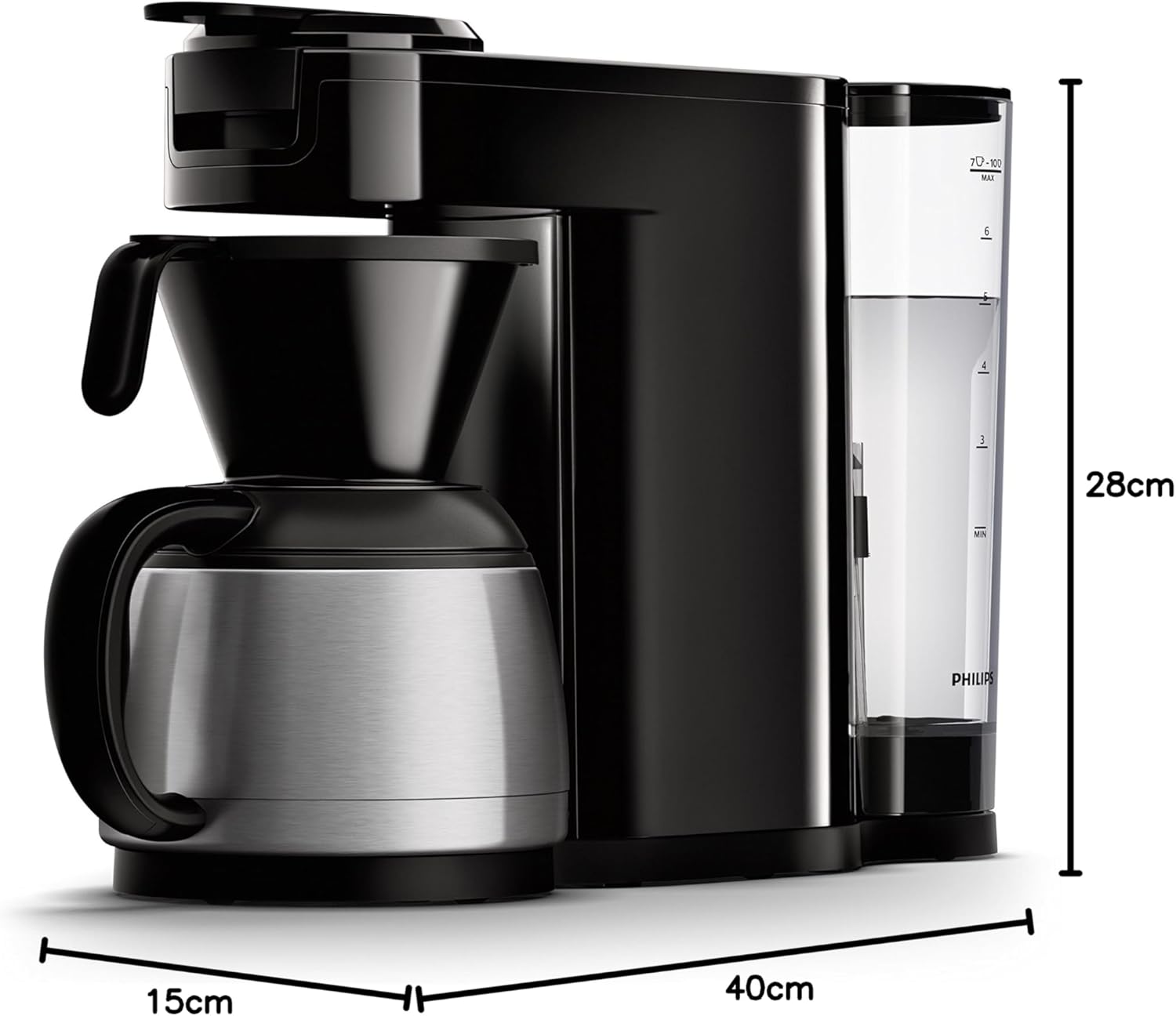
Image 7.1: Diagram illustrating the dimensions of the Philips SENSEO Switch coffee machine.
8. Bảo hành và Hỗ trợ
This Philips appliance comes with a standard manufacturer's warranty. Please refer to the warranty card included in your product packaging for specific terms and conditions, including warranty period and coverage.
For technical support, service, or to register your product, please visit the official Philips webtrang web hoặc liên hệ với bộ phận chăm sóc khách hàng của họ. Hãy giữ lại hóa đơn mua hàng để yêu cầu bảo hành.
Bạn có thể tìm thêm thông tin và hỗ trợ tại trang web chính thức của Philips. webđịa điểm: www.philips.com


