1. Giới thiệu
Thank you for choosing the Petlibro Automatic Pet Feeder. This device is designed to provide consistent and timely meals for your pet, ensuring they are fed according to a set schedule, even when you are away. Please read this manual thoroughly before use to ensure proper operation and maintenance of your feeder.
2. Thông tin an toàn quan trọng
Vui lòng tuân thủ các biện pháp phòng ngừa an toàn sau đây để tránh thương tích hoặc hư hỏng sản phẩm:
- Đọc kỹ tất cả hướng dẫn trước khi vận hành máy cấp liệu.
- Để máy cho ăn tránh xa tầm tay trẻ em và vật nuôi khi không sử dụng hoặc trong quá trình lắp ráp.
- Không nhúng thiết bị chính vào nước hoặc các chất lỏng khác.
- Chỉ sử dụng thức ăn khô cho thú cưng có đường kính từ 5-15mm. Không sử dụng thức ăn ướt, đóng hộp hoặc thức ăn ẩm.
- Hãy đảm bảo đặt máng ăn trên bề mặt bằng phẳng và ổn định.
- Hãy rút phích cắm của máy cấp liệu trước khi vệ sinh hoặc bảo trì.
- Do not attempt to repair or modify the feeder yourself. Contact customer support for assistance.
- Vứt bỏ pin một cách có trách nhiệm theo quy định của địa phương.
3. Nội dung gói hàng
Vui lòng kiểm tra nội dung gói hàng để đảm bảo có đầy đủ tất cả các mục:
- Petlibro Automatic Pet Feeder Main Unit
- Bát đựng thức ăn
- Bộ chuyển đổi nguồn và cáp USB-C
- Desiccant Bag (pre-installed or separate)
- Hướng dẫn sử dụng
4. Sản phẩm hếtview
Familiarize yourself with the different parts of your Petlibro Automatic Pet Feeder:
- Bể chứa thức ăn: Cửa hàng bán thức ăn khô cho thú cưng.
- Nắp: Covers the food tank to keep food fresh.
- Bảng điều khiển: Buttons and display for setting schedules and manual feeding.
- Cửa hàng ăn uống: Where food dispenses into the bowl.
- Bát thức ăn: Detachable bowl for your pet to eat from.
- Cổng nguồn (USB-C): Kết nối với bộ đổi nguồn.
- Ngăn chứa pin: Holds backup batteries (not included).
5. Thiết lập
Follow these steps to set up your Petlibro Automatic Pet Feeder:
5.1 Lắp ráp
- Giải nén: Cẩn thận loại bỏ tất cả các thành phần khỏi bao bì.
- Lắp đặt Food Bowl: Place the food bowl securely at the base of the feeder.
- Install Food Tank: Align the food tank with the base and twist to lock it into place.
- Insert Desiccant Bag: If not pre-installed, open the desiccant compartment (usually under the lid) and insert the desiccant bag to keep food fresh. Replace every 15-30 days.

Image: Step-by-step assembly guide for the Petlibro Automatic Pet Feeder. It shows how to twist open the lid, take out the food bowl, put the desiccant bag into its compartment, install the food tank, put the lid back on, and finally install the food bowl.
5.2 Nguồn điện
The feeder can be powered by a USB-C adapter or backup batteries.
- Nguồn điện chính: Connect the USB-C power adapter to the feeder's power port and plug it into a wall outlet.
- Pin dự phòng (Tùy chọn): Đối với quyền lựctages, install 3 D-cell batteries (not included) into the battery compartment at the bottom of the feeder. This ensures continuous operation.
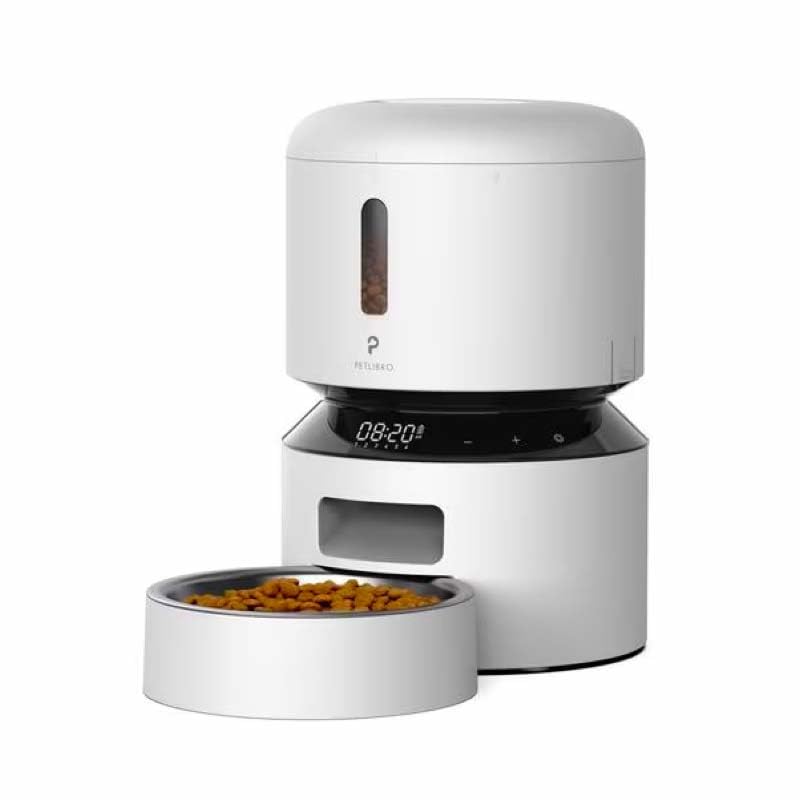
Image: Diagram illustrating the dual power supply system of the Petlibro Automatic Pet Feeder. It shows the USB-C adapter connected for primary power and the battery compartment for backup power. A note indicates that batteries are not included.
6. Hướng dẫn vận hành
Once assembled and powered, you can begin programming your feeder.
6.1 Đổ đầy bình chứa thức ăn
- Mở nắp ngăn chứa thức ăn.
- Pour dry pet food into the tank. Ensure the food is within the recommended size (5-15mm diameter).
- Close the lid securely to maintain freshness.
6.2 Setting Meal Schedules and Portions
The feeder allows you to schedule up to 6 meals per day, with 1 to 50 portions per meal.

Image: A cat eating from the Petlibro Automatic Pet Feeder, illustrating the feeder's function. Text overlays indicate "Portion: 1-50" and "Meals: 1-6", highlighting the customizable feeding schedule.
- Đặt thời gian hiện tại: Use the control panel buttons (e.g., "SET", "UP", "DOWN") to set the current time.
- Thời gian ăn trong chương trình: Press the "MEAL" button to enter meal programming mode. Select the desired meal number (e.g., Meal 1) and set the feeding time.
- Khẩu phần ăn cố định: For each programmed meal, set the number of portions (1-50) using the "PORTION" or "UP/DOWN" buttons.
- Repeat for all meals: Program up to 6 meals as needed.
- Lưu cài đặt: Ensure all settings are saved according to the feeder's specific interface (usually by pressing "SET" or waiting for auto-save).
6.3 Cho ăn bằng tay
To dispense food instantly, press the manual feed button (often labeled "FEED" or a paw icon) on the control panel. Each press typically dispenses one portion.
7. Bảo trì và vệ sinh
Vệ sinh thường xuyên đảm bảo vệ sinh và kéo dài tuổi thọ của máng ăn.
- Rút phích cắm: Always unplug the feeder from the power outlet before cleaning.
- Tháo rời: Remove the food bowl and food tank.
- Thành phần sạch: Wash the food bowl and food tank with mild soap and water. Rinse thoroughly and dry completely before reassembling.
- Lau sạch đơn vị chính: Lau thiết bị chính bằng mềm, damp vải. Không nhúng bộ phận chính vào nước.
- Replace Desiccant: Replace the desiccant bag every 15-30 days to maintain food freshness.
- Lắp ráp lại: Hãy đảm bảo tất cả các bộ phận đều khô ráo trước khi lắp ráp lại bộ phận cấp liệu.
KHAI THÁC. Xử lý sự cố
Nếu bạn gặp sự cố với bộ cấp liệu, hãy tham khảo các vấn đề và giải pháp thường gặp sau đây:
| Vấn đề | Nguyên nhân có thể | Giải pháp |
|---|---|---|
| Máy cấp liệu không hoạt động. | No power connection; batteries depleted or incorrectly installed. | Check power adapter connection; replace batteries or ensure correct polarity. |
| Không phục vụ đồ ăn. | Food tank empty; food jammed; dispenser blocked; incorrect schedule settings. | Refill food tank; clear any food jams; check dispenser for blockages; verify meal schedule and portion settings. |
| Food dispenses too much/too little. | Incorrect portion settings. | Adjust portion settings for each meal. |
| Hiển thị không hoạt động. | Sự cố về nguồn điện; màn hình bị lỗi. | Kiểm tra nguồn điện; nếu sự cố vẫn tiếp diễn, hãy liên hệ với bộ phận hỗ trợ khách hàng. |
9. Thông số kỹ thuật
| Tính năng | Chi tiết |
|---|---|
| Tên sản phẩm | Petlibro Automatic Pet Feeder |
| Người mẫu | Bộ nạp vật nuôi tự động 3L |
| Dung tích | 3 lít |
| Vật liệu | Food-grade ABS plastic |
| Nguồn điện | USB-C adapter (5V/1A); 3 x D-cell batteries (backup, not included) |
| Bữa ăn mỗi ngày | Tối đa 6 bữa ăn |
| Khẩu phần mỗi bữa ăn | 1-50 portions (approx. 5-10g per portion, depending on food density) |
| Kích thước thực phẩm được khuyến nghị | 5-15mm dry kibble |
| Màu sắc | Trắng |
10. Bảo hành và Hỗ trợ
Your Petlibro Automatic Pet Feeder comes with a standard manufacturer's warranty. For detailed warranty information, please refer to the warranty card included in your package or visit the official Petlibro webđịa điểm.
If you have any questions, require technical support, or need assistance with your product, please contact Petlibro customer service. Contact details can typically be found on the product packaging, the official website, or by searching for "Petlibro customer support" online.


