1. Giới thiệu
The Cisco SG500-28MPP-K9 is a 28-port Gigabit Max PoE+ stackable managed switch designed to provide high availability, scalability, and performance for small to medium-sized businesses. This manual provides essential information for the proper installation, configuration, and maintenance of your device, ensuring optimal network performance and reliability.
2. Hướng dẫn thiết lập
2.1. Nội dung gói hàng
Xác minh rằng gói của bạn chứa các mục sau:
- Cisco SG500-28MPP-K9 28-Port Gigabit Max PoE+ Managed Switch
- Dây nguồn
- Rack-mount Kit
- Cáp điều khiển (RJ-45 đến DB-9)
- Documentation CD (or link to online resources)
2.2. Cài đặt vật lý
Thiết bị chuyển mạch này có thể được lắp đặt trên bàn làm việc hoặc gắn vào giá đỡ thiết bị tiêu chuẩn 19 inch.
- Cài đặt máy tính để bàn: Đặt công tắc trên bề mặt phẳng, chắc chắn. Đảm bảo thông gió tốt xung quanh thiết bị.
- Rack-mount Installation: Attach the provided rack-mount brackets to the sides of the switch using the included screws. Secure the switch into the equipment rack.
2.3. Kết nối công tắc
Follow these steps to connect your switch:
- Connect the power cord to the switch's power inlet and then to a grounded electrical outlet.
- Connect your network devices (computers, IP phones, wireless access points) to the switch's Gigabit Ethernet ports using standard Ethernet cables. The switch supports Power over Ethernet Plus (PoE+) on its ports.
- For initial configuration, connect a computer to the switch's console port using the provided console cable, or connect a computer to any Ethernet port and configure its IP address to be in the same subnet as the switch's default IP address (typically 192.168.1.254).
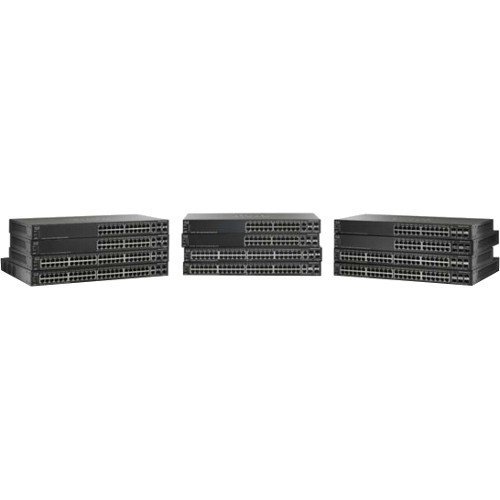
Hình ảnh hiển thị mặt trước view of the Cisco SG500-28MPP-K9 28-Port Gigabit Max PoE+ Managed Switch, highlighting its 28 ports and status indicators.
3. Vận hành công tắc
3.1. Bật nguồn ban đầu
Once connected to power, the switch will automatically power on. Observe the system LED indicators. The 'System' LED should turn green, indicating normal operation. Port LEDs will illuminate when a device is connected and active.
3.2. Cấu hình cơ bản
The Cisco SG500-28MPP-K9 is a managed switch, offering extensive configuration options via a webGiao diện người dùng đồ họa (GUI) hoặc giao diện dòng lệnh (CLI) dựa trên hệ điều hành.
- Web Truy cập GUI: Mở một web browser and enter the switch's default IP address (e.g., http://192.168.1.254). Log in using the default credentials (refer to the documentation for specific defaults, often 'cisco' for both username and password).
- Truy cập CLI: Use a terminal emulation program (e.g., PuTTY) to connect via the console port. Configure the serial connection settings (e.g., 115200 baud, 8 data bits, no parity, 1 stop bit, no flow control).
It is highly recommended to change default passwords immediately after initial access for security purposes.
3.3. Các tính năng chínhview
- Cổng Gigabit Ethernet: Cung cấp kết nối tốc độ cao cho các thiết bị mạng.
- Max PoE+: Delivers Power over Ethernet Plus to connected devices, simplifying deployment of IP phones, wireless access points, and IP cameras.
- Có thể xếp chồng lên nhau: Allows multiple switches to be managed as a single unit, increasing network scalability and simplifying management.
- Managed Features: Supports advanced features such as VLANs, QoS, security, and IPv6 routing for robust network control.
4. Bảo trì
4.1. Cập nhật chương trình cơ sở
Kiểm tra hỗ trợ của Cisco thường xuyên website for the latest firmware updates. Keeping your switch's firmware up-to-date ensures access to new features, performance improvements, and critical security patches. Follow the instructions provided with the firmware update package carefully.
4.2. Vệ sinh
To maintain proper airflow and prevent overheating, periodically clean the switch. Use a soft, dry cloth to wipe the exterior. For dust accumulation in ventilation openings, use compressed air. Ensure the switch is powered off and disconnected from the power source before cleaning.
4.3. Những cân nhắc về môi trường
Operate the switch within its specified environmental ranges for temperature and humidity to ensure longevity and stable performance. Avoid placing the switch in direct sunlight, near heat sources, or in areas with excessive dust or moisture.
KHAI THÁC. Xử lý sự cố
5.1. Các vấn đề thường gặp và giải pháp
- Không có điện:
Triệu chứng: Đèn LED nguồn tắt.
Giải pháp: Check the power cord connection to the switch and the electrical outlet. Ensure the outlet is functional. - Không có kết nối mạng:
Triệu chứng: Devices connected to the switch cannot access the network.
Giải pháp: Verify that Ethernet cables are securely connected to both the switch and the devices. Check port status LEDs; a solid green or blinking green indicates a link. Ensure the switch has a valid IP configuration and is connected to your router/gateway. - Thiết bị PoE không bật nguồn:
Triệu chứng: PoE-powered device (e.g., IP phone) does not receive power.
Giải pháp: Ensure the device is PoE-compatible. Check the switch's PoE status LEDs for the specific port. Verify PoE settings in the switch's management interface. Ensure the total PoE budget of the switch is not exceeded. - Không thể truy cập Web Giao diện người dùng:
Triệu chứng: Browser cannot reach the switch's IP address.
Giải pháp: Verify your computer's IP address is in the same subnet as the switch. Ping the switch's IP address to confirm network reachability. Clear browser cache or try a different browser.
If issues persist after attempting these solutions, refer to the comprehensive troubleshooting guide on the Cisco support webtrang web hoặc liên hệ với bộ phận hỗ trợ kỹ thuật.
6. Thông số kỹ thuật
| Tính năng | Đặc điểm kỹ thuật |
|---|---|
| Người mẫu | SG500-28MPP-K9 |
| Số lượng cổng | Mạng Ethernet 28 Gigabit |
| Loại giao diện | PoE+ |
| Kích thước sản phẩm | 21.5 x 18.7 x 4.3 inch |
| Trọng lượng sản phẩm | 15.31 pound |
| Thương hiệu | Cisco |
| Mã số UPC | 748926547055 |
7. Thông tin bảo hành
This Cisco product is typically covered by a limited hardware warranty. For detailed information regarding the terms, conditions, and duration of your specific warranty, please refer to the warranty documentation included with your purchase or visit the official Cisco website. Warranty coverage may vary based on region and reseller.
8. Hỗ trợ
For further assistance, technical support, or to download the latest drivers and firmware, please visit the official Cisco support website. You can also find extensive documentation, FAQs, and community forums there.
Hỗ trợ của Cisco Webđịa điểm: https://www.cisco.com/go/support


