1. Giới thiệu
The Aligator T100 is a GSM mobile phone designed in a classic desk phone style, offering convenient operation with large buttons and essential mobile phone functions. It serves as an excellent replacement for a fixed-line phone, providing the independence and flexibility of a mobile device. Its high-performance antenna ensures reliable reception even in areas with weak GSM signals.
2. Thông tin an toàn
- Cảnh báo về pin: Use only the original battery provided with the device. Using non-original batteries may cause damage to the phone or lead to battery explosion.
- Giữ thiết bị tránh xa nước và hơi ẩm.
- Do not attempt to disassemble or repair the phone yourself. Refer to qualified service personnel for any repairs.
- Tránh để điện thoại ở nơi có nhiệt độ quá cao.
3. Nội dung gói hàng
Xác minh rằng tất cả các mục đều có trong gói hàng:
- Aligator T100 GSM Mobile Phone unit
- Điện thoại có dây xoắn
- High-performance external antenna
- Bộ sạc chính
- Li-ion 800 mAh battery
- User manual (English, German, Czech, Slovak)

Figure 3.1: Contents of the Aligator T100 package.
4. Sản phẩm hếtview
The Aligator T100 features a robust design with a clear monochrome graphic display and a user-friendly keypad. Key components include the main unit, handset, and an external antenna for enhanced signal reception.

Hình 4.1: Mặt trước view of the Aligator T100.
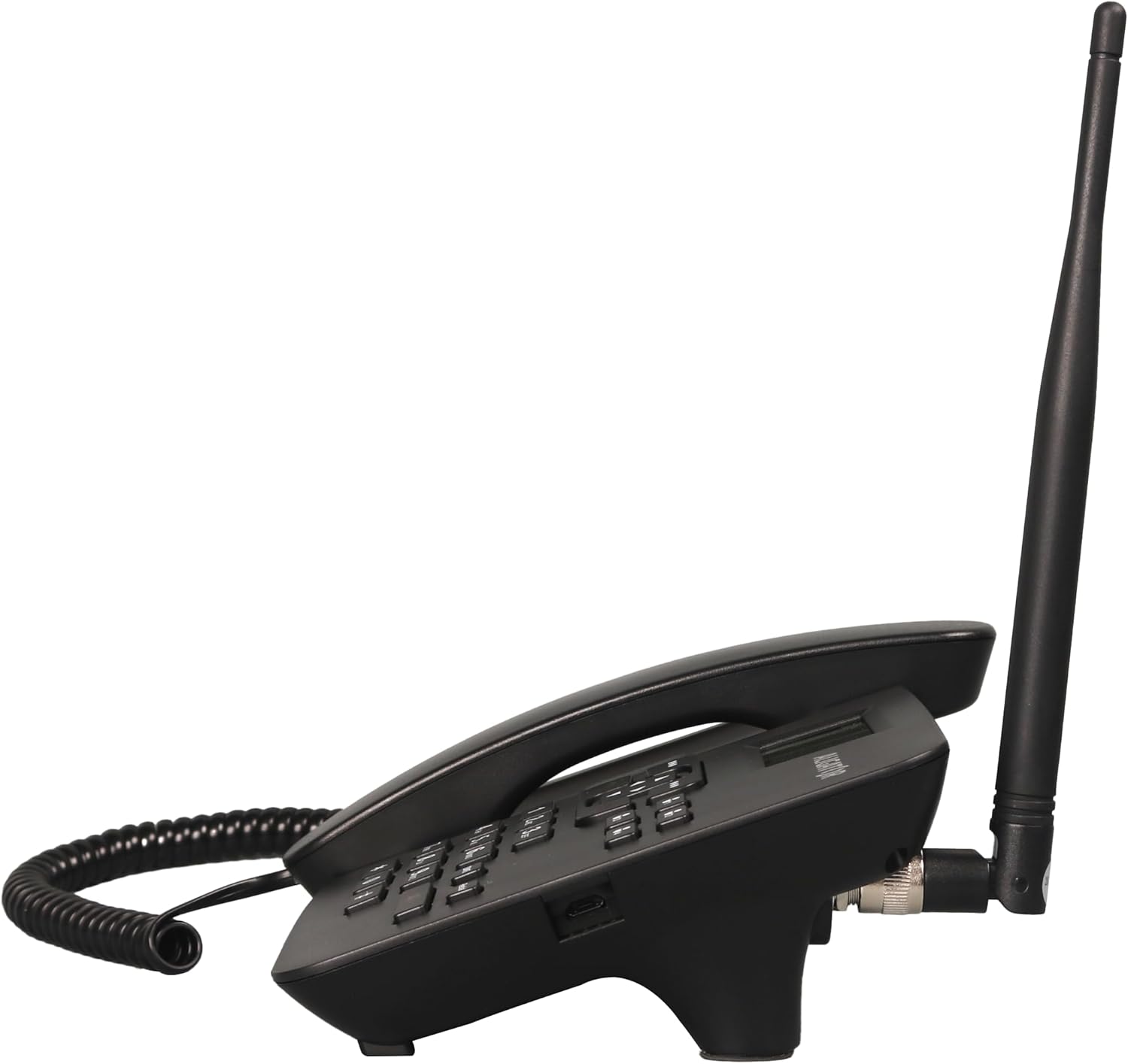
Hình 4.2: Mặt bên view showing the antenna connection.

Hình 4.3: Quay lại view of the Aligator T100.
4.1 Bàn phím và màn hình
The keypad features large, easy-to-read buttons. The monochrome graphic display (128 x 64 points, 53 x 25 mm) has a green background illumination for clear visibility.

Figure 4.4: Close-up of the display and keypad.
5. Thiết lập
5.1 Lắp đặt pin
- Remove the battery compartment cover on the back of the phone.
- Insert the provided Li-ion 800 mAh battery, ensuring the contacts align correctly.
- Thay nắp ngăn chứa pin.
5.2 Lắp đặt thẻ SIM
- Sau khi tháo pin, hãy tìm khe cắm thẻ SIM.
- Insert your GSM SIM card into the designated slot, ensuring proper orientation as indicated by the diagram near the slot.
- Lắp lại pin và nắp pin.
5.3 Gắn ăng-ten
- Locate the TNC-Female connector on the side/back of the phone unit.
- Screw the high-performance external antenna onto this connector until it is securely fastened.
5.4 Sạc ban đầu và bật nguồn
- Connect the mains charger to the phone's charging port and plug it into a power outlet.
- Allow the phone to charge fully before first use. The display will indicate charging status.
- To power on, press and hold the power button (if available) or simply ensure the battery is inserted and the phone is connected to power.
6. Hướng dẫn vận hành
6.1 Thực hiện và nhận cuộc gọi
- Thực hiện cuộc gọi: Lift the handset. You will hear a classic dial tone. Dial the phone number using the keypad. The call will be initiated automatically after a short delay or upon pressing the call button.
- Nhận cuộc gọi: When the phone rings, simply lift the handset to answer the call.
- Kết thúc cuộc gọi: Place the handset back onto the cradle to end the call.
6.2 Using the Keypad and Navigation
The keypad includes standard numeric keys (0-9, *, #) and dedicated function buttons. Use the navigation buttons (up, down, left, right) to navigate through menus on the display.

Figure 6.1: Display and navigation controls.
6.3 Speed Dial / Quick Dial
The Aligator T100 features four quick dial buttons (labeled 1-4) for frequently called numbers. You can program these buttons to dial a contact directly.
- Programming Quick Dial: Refer to the phone's menu for
Tài liệu liên quan - T100

Hướng dẫn sử dụng máy cắt tỉa lông mày ALIGATOR S6700 dành cho người dùng cao cấp
Hướng dẫn sử dụng điện thoại di động ALIGATOR S6700 dành cho người cao tuổi, bao gồm thiết lập, các tính năng như SIM kép và định vị SOS, hệ điều hành Android, kết nối, an toàn và xử lý thân thiện với môi trường.
Aligator Watch Pro X User Manual and Guide
Comprehensive user manual for the Aligator Watch Pro X smartwatch, covering setup, features, connectivity, notifications, watch faces, phone integration, and troubleshooting.
Návod k použití chytrých hodinek ALIGATOR Watch Amoled Pro AW14
Hoàn thành nó để có thể sở hữu ALIGATOR Watch Amoled Pro AW14. Bạn có thể làm như vậy, tôi có thể nhận được điện thoại, využívat funkce và một vấn đề khó khăn.
ALIGATOR A930 GPS Senior 4G: Návod k použití
Kompletní návod k použití pro mobile telefon ALIGATOR A930 GPS Senior 4G, navržený pro Seniory s funkcemi GPS and SOS pro snadné ovládání a bezpečnost.
Aligator Watch Lady Smartwatch User Manual & Guide
Comprehensive user manual for the Aligator Watch Lady smartwatch, covering setup, features, connectivity, troubleshooting, and safety information.
Hướng dẫn sử dụng đồng hồ GPS Aligator Watch.
Hướng dẫn sử dụng toàn diện cho đồng hồ thông minh GPS Aligator Watch, bao gồm thiết lập, tính năng, ghép nối, theo dõi dữ liệu, cài đặt, khắc phục sự cố và thông tin an toàn.