1. Giới thiệu
The Edifier M3600D is a high-performance 2.1 active speaker system designed for multimedia use. Featuring THX certification and a total RMS output of 200 Watts, this system delivers powerful and clear audio. It includes a robust subwoofer and two satellite speakers, offering versatile connectivity options for various audio sources.
2. Có gì trong hộp
- 1 x Loa siêu trầm
- 2 loa vệ tinh
- 1 x Cáp nguồn
- Connecting Cables (for satellites and audio input)
- 1 x Hướng dẫn sử dụng
3. Thiết lập
Follow these steps to set up your Edifier M3600D speaker system:
- Vị trí: Position the subwoofer on the floor, ideally near a wall for enhanced bass. Place the satellite speakers on either side of your listening area, ensuring they are equidistant from you for optimal stereo imaging.
- Kết nối loa vệ tinh: Connect the right and left satellite speakers to the corresponding output ports on the rear of the subwoofer using the provided cables. The right satellite speaker typically features the volume control and input selection.
- Kết nối nguồn âm thanh: Choose your preferred audio input method (Optical, Coaxial, Line In, or AUX) and connect the appropriate cable from your audio source (e.g., computer, TV, smartphone) to the subwoofer's input ports.
- Kết nối nguồn điện: Plug the power cable into the subwoofer's power input, then connect it to a wall outlet.
- Bật nguồn: Turn on the power switch located on the rear of the subwoofer. The system is now ready for operation.

Figure 3.1: Edifier M3600D Multimedia 2.1 Active Speaker System. This image shows the main subwoofer unit alongside the two satellite speakers, illustrating the complete system setup.
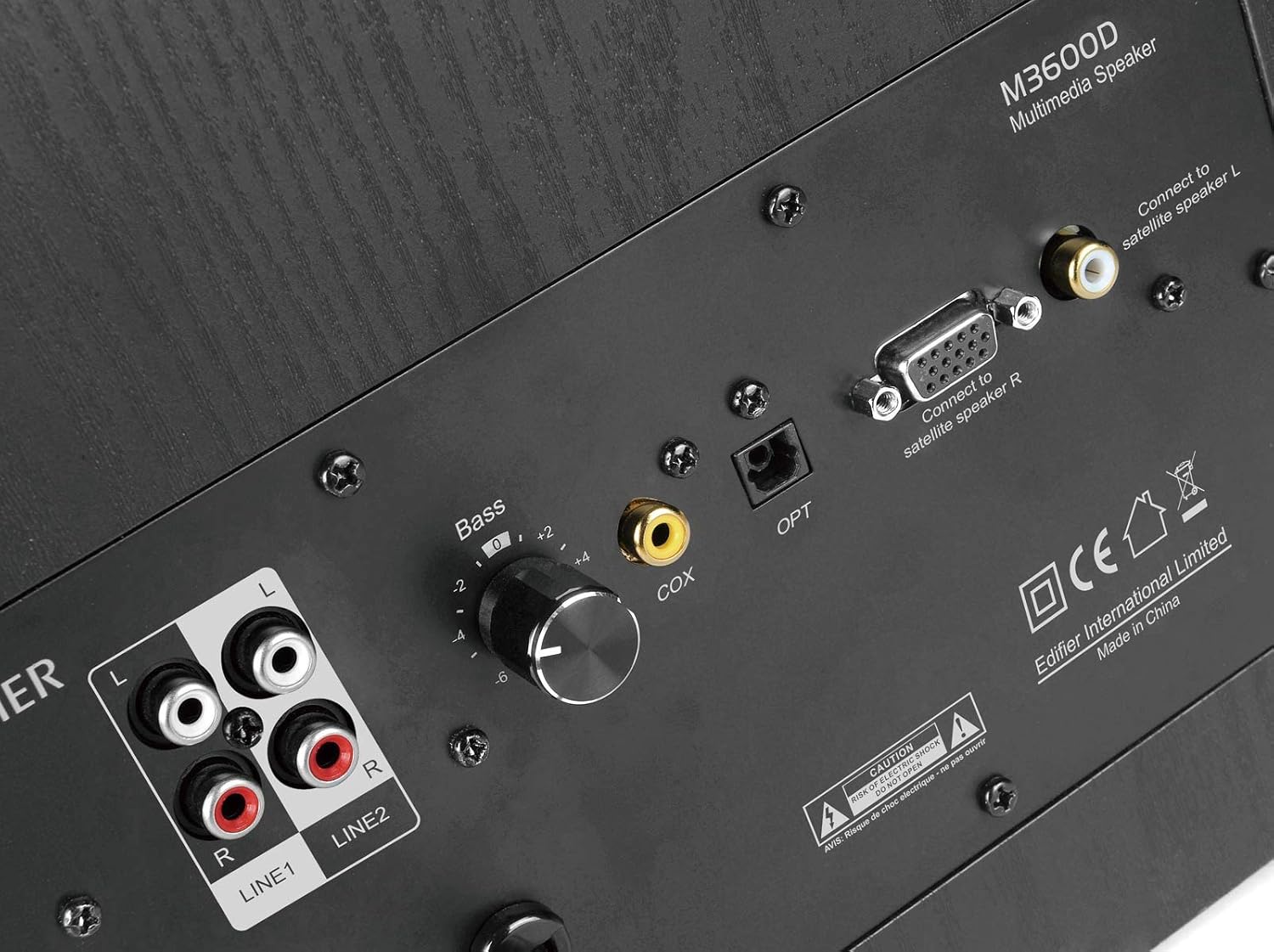
Figure 3.2: Rear panel of the M3600D subwoofer. This image highlights the various input ports (Line In 1, Line In 2, Coaxial, Optical) and the output connections for the satellite speakers, along with the bass control knob and power switch.
4. Hướng dẫn vận hành
Once the system is set up, follow these instructions for operation:
- Bật/Tắt nguồn: Use the main power switch on the rear of the subwoofer to turn the system on or off.
- Kiểm soát âm lượng: The large rotary dial on the front of the right satellite speaker controls the master volume. Rotate clockwise to increase volume and counter-clockwise to decrease it.
- Lựa chọn đầu vào: Press the volume dial on the right satellite speaker to cycle through the available audio inputs (Optical, Coaxial, Line In 1, Line In 2, AUX). An indicator light will show the currently selected input.
- Điều chỉnh âm trầm: Use the 'Bass' control knob located on the rear panel of the subwoofer to adjust the bass level to your preference.
- Đầu ra tai nghe: A 3.5mm headphone jack is available on the right satellite speaker for private listening. Plugging in headphones will mute the speakers.
5. Kết nối
The M3600D offers multiple connectivity options:
- Đầu vào quang học (OPT): For high-quality digital audio connection from devices like TVs, game consoles, or Blu-ray players.
- Coaxial Input (COX): Another digital audio input option, suitable for similar devices as the optical input.
- Line In 1 (RCA): Stereo RCA input for connecting devices with RCA audio outputs.
- Line In 2 (RCA): Additional stereo RCA input for another audio source.
- Đầu vào AUX (3.5mm): A standard 3.5mm auxiliary input for connecting smartphones, tablets, laptops, or MP3 players.
Ghi chú: This system does not support Bluetooth connectivity. For wireless audio, an external Bluetooth adapter would be required (not included).
6. Thông số kỹ thuật
| Tính năng | Đặc điểm kỹ thuật |
|---|---|
| Tên mẫu | M3600D |
| Loại loa | 2.1 Multimedia Speaker System (Subwoofer) |
| Tổng sản lượng điện | 200 Watts RMS (Subwoofer: 130W, Satellites: 2 x 35W) |
| Được chứng nhận THX | Đúng |
| Vật liệu | Wood (MDF cabinet with vinyl wood grain laminate) |
| Đầu vào | Optical, Coaxial, Line In (RCA x2), AUX (3.5mm) |
| Phương pháp kiểm soát | Rotary Volume/Input Dial (on satellite), Bass Knob (on subwoofer) |
| Đường kính loa siêu trầm | 7 cm (Đường kính loa trầm) |
| Kích thước trình điều khiển âm thanh | 17.78 Centimét |
| Màu sắc | Đen |
| Kích thước sản phẩm | 12 x 16.75 x 11 inch |
| Trọng lượng sản phẩm | 21 Bảng Anh |
| Thiết bị tương thích | Smartphone, Tablet, Desktop, Laptop, MP3 Player, Television, Projector |
KHAI THÁC. Xử lý sự cố
If you encounter issues with your M3600D speaker system, please refer to the following common troubleshooting steps:
- Không có âm thanh:
- Ensure the power cable is securely connected and the power switch on the subwoofer is ON.
- Verify that the correct input source is selected on the right satellite speaker.
- Check all audio cables for secure connections between the source, satellites, and subwoofer.
- Increase the volume on both the speaker system and your audio source.
- If using headphones, ensure they are unplugged from the satellite speaker.
- Âm thanh bị méo:
- Giảm âm lượng trên cả hệ thống loa và nguồn âm thanh.
- Check if the audio source itself is producing distorted sound. Try a different source.
- Đảm bảo tất cả các dây cáp được kết nối đúng cách và không bị hư hỏng.
- Adjust the bass control knob on the subwoofer.
- Âm thanh ngắt quãng:
- Kiểm tra các kết nối cáp lỏng lẻo.
- Ensure there are no strong electromagnetic interferences near the speakers.
- Try a different audio cable or input source to isolate the problem.
If the issue persists after trying these steps, please contact Edifier customer support.
8. Bảo trì
To ensure the longevity and optimal performance of your Edifier M3600D speaker system, follow these maintenance guidelines:
- Vệ sinh: Use a soft, dry cloth to clean the surfaces of the speakers and subwoofer. Avoid using abrasive cleaners, waxes, or solvents.
- Vị trí: Place the speakers on a stable, level surface to prevent accidental falls. Avoid placing them in direct sunlight, near heat sources, or in areas with high humidity or dust.
- Thông gió: Đảm bảo thông gió đầy đủ xung quanh loa siêu trầm để tránh quá nhiệt. Không được bịt kín bất kỳ lỗ thông gió nào.
- Quản lý cáp: Giữ cho dây cáp được sắp xếp gọn gàng và không bị xoắn hay căng quá mức để tránh hư hỏng.
- Tắt nguồn khi không sử dụng: For extended periods of inactivity, it is recommended to turn off the system using the main power switch.
9. Bảo hành và Hỗ trợ
The Edifier M3600D Multimedia 2.1 Active Speaker System comes with a Bảo hành có giới hạn 2 năm. This warranty covers manufacturing defects and ensures hassle-free full replacement in the USA and Canada.
For warranty claims, technical assistance, or further inquiries, please contact Edifier USA customer support. Refer to the official Edifier webtrang web hoặc thông tin liên hệ được cung cấp trong bao bì sản phẩm để biết thông tin hỗ trợ mới nhất.


