Giới thiệu
Thank you for choosing the Sephia A11 Portable Bluetooth Speaker. This manual provides essential information for setting up, operating, and maintaining your speaker to ensure optimal performance and longevity. The Sephia A11 offers versatile connectivity options, including Bluetooth, USB, Micro SD, and AUX input, delivering clear and powerful audio in a compact design.
Có gì trong hộp
- Sephia A11 Bluetooth Speaker
- Cáp sạc
- Cáp Aux
- Hướng dẫn sử dụng (tài liệu này)

Image: The Sephia A11 Portable Bluetooth Speaker, showcasing its sleek black design and front grille.
Sản phẩm trênview
Familiarize yourself with the buttons and ports on your Sephia A11 speaker.
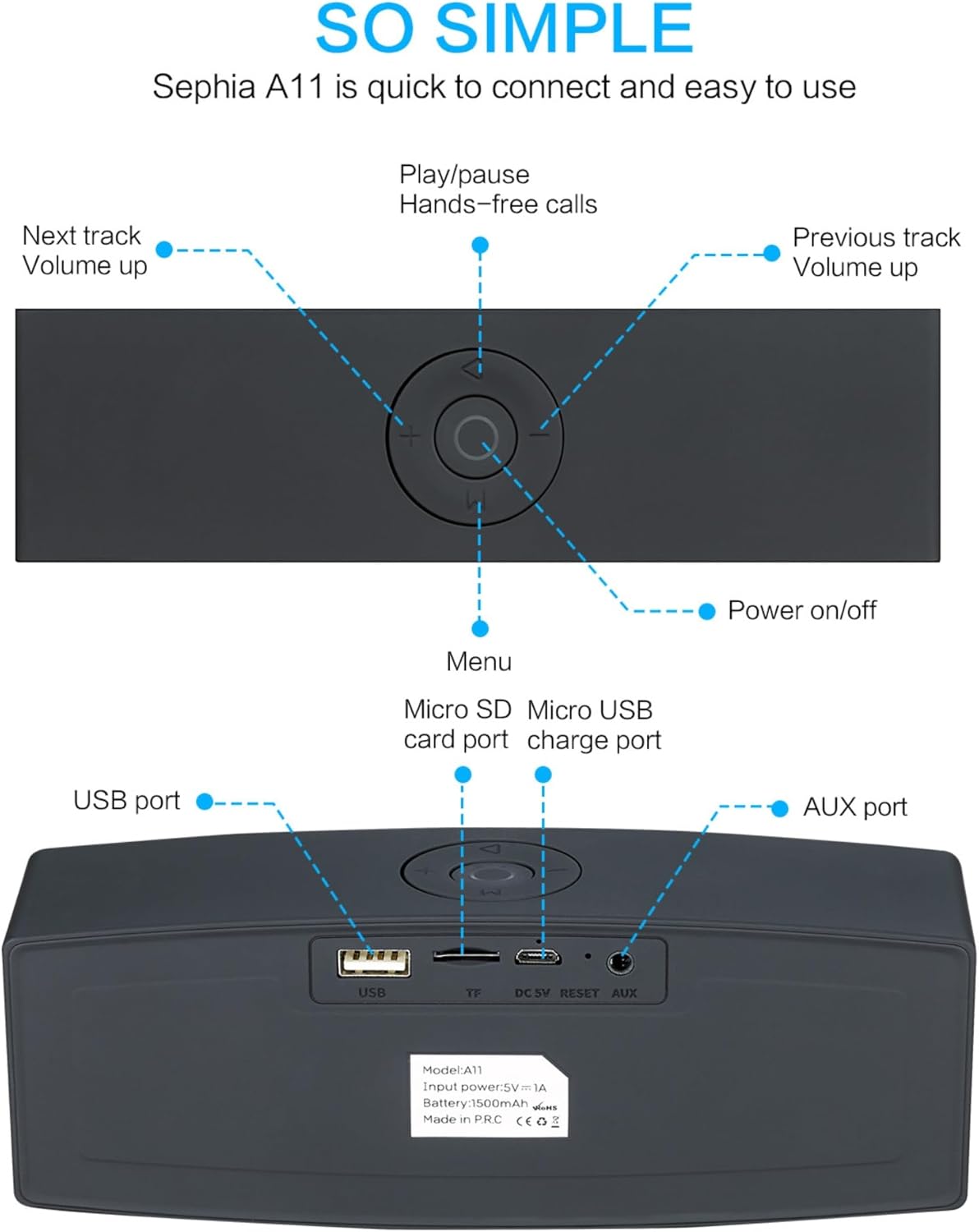
Image: Detailed diagram illustrating the top control panel and rear input/output ports of the Sephia A11 speaker.
Các nút điều khiển phía trên:
- Nút Bật / Tắt nguồn: Nhấn và giữ để bật hoặc tắt loa.
- Nút Phát/Tạm dừng: Press to play or pause audio. Also used for hands-free calls (answer/end).
- Previous Track / Volume Down Button (-): Nhấn nhanh để chuyển sang bài hát trước, nhấn lâu để giảm âm lượng.
- Next Track / Volume Up Button (+): Nhấn nhanh để chuyển sang bài hát tiếp theo, nhấn lâu để tăng âm lượng.
- Nút Menu (M): Press to switch between input modes (Bluetooth, USB, Micro SD, AUX).
Cổng phía sau:
- Cổng USB: Dùng để phát âm thanh từ ổ USB hoặc sạc các thiết bị ngoại vi.
- Khe cắm thẻ Micro SD (TF): Dùng để phát âm thanh từ thẻ Micro SD.
- Micro USB Charge Port (DC 5V): Để sạc loa.
- Nút Đặt lại: Small pinhole for resetting the device if needed.
- Cổng AUX: For wired audio connection using the provided 3.5mm AUX cable.
Cài đặt
1. Sạc loa
- Connect the supplied charging cable to the Micro USB Charge Port (DC 5V) on the rear of the speaker.
- Kết nối đầu còn lại của cáp sạc với bộ chuyển đổi nguồn USB (không kèm theo) hoặc cổng USB của máy tính.
- The charging indicator light will illuminate. Once fully charged, the light will change or turn off (refer to specific model behavior if indicated by LED). A full charge provides up to 8 hours of playtime.
2. Bật / Tắt nguồn
- To power on, press and hold the Power On/Off button on the top panel until you hear an audible prompt or see an indicator light.
- To power off, press and hold the Power On/Off button again until the speaker shuts down.
3. Ghép nối Bluetooth
- Ensure the speaker is powered on and in Bluetooth mode. If not, press the 'M' (Menu) button to switch to Bluetooth mode. The speaker will enter pairing mode, indicated by a flashing LED light and an audible prompt.
- Trên thiết bị di động (điện thoại thông minh, máy tính bảng, máy tính xách tay), hãy bật Bluetooth và tìm kiếm các thiết bị khả dụng.
- Select "Sephia A11" from the list of found devices.
- Once successfully paired, the speaker will provide an audible confirmation, and the LED indicator will stop flashing.
- Loa có phạm vi kết nối Bluetooth lên đến 10 mét (33 feet).
4. Wired Connections (AUX, USB, Micro SD)
- Đầu vào AUX: Connect one end of the supplied 3.5mm AUX cable to the AUX port on the speaker and the other end to the audio output of your device (e.g., MP3 player, computer). The speaker will automatically switch to AUX mode or can be selected using the 'M' button.
- Phát lại qua USB: Lắp ổ flash USB có chứa âm thanh files into the USB port. The speaker will automatically detect and play the audio files.
- Phát lại thẻ Micro SD: Lắp thẻ Micro SD chứa âm thanh files into the Micro SD (TF) slot. The speaker will automatically detect and play the audio files.
Vận hành loa
Phát lại âm thanh
- Phát/Tạm dừng: Press the Play/Pause button to toggle between playing and pausing audio.
- Điều chỉnh âm lượng: Nhấn giữ nút '+' để tăng âm lượng, và nhấn giữ nút '-' để giảm âm lượng.
- Bài hát tiếp theo / trước: Short press the '+' button for the next track, and short press the '-' button for the previous track.

Image: A hand demonstrating how to interact with the top control buttons of the Sephia A11 speaker.
Gọi điện thoại rảnh tay
- When a call comes in while connected via Bluetooth, press the Play/Pause button to answer the call.
- Nhấn nút Phát/Tạm dừng một lần nữa để kết thúc cuộc gọi.
- Micrô tích hợp cho phép giao tiếp rõ ràng.
BẢO TRÌ
- Vệ sinh: Hãy dùng khăn mềm, khô để lau sạch bề mặt loa. Không sử dụng chất tẩy rửa có tính mài mòn, cồn hoặc dung môi hóa học, vì chúng có thể làm hỏng lớp phủ.
- Kho: Bảo quản loa ở nơi khô ráo, thoáng mát, tránh ánh nắng trực tiếp và nhiệt độ cao.
- Chăm sóc pin: Để kéo dài tuổi thọ pin, tránh xả cạn loa thường xuyên. Hãy sạc loa thường xuyên, ngay cả khi không sử dụng trong thời gian dài.
- Khả năng chống nước: Loa này không chống nước. Tránh tiếp xúc với nước hoặc độ ẩm quá cao.
Xử lý sự cố
| Vấn đề | Nguyên nhân có thể | Giải pháp |
|---|---|---|
| Loa không bật. | Pin yếu; Chưa giữ nút nguồn đủ lâu. | Sạc đầy pin loa. Nhấn và giữ nút nguồn trong 3-5 giây. |
| Không có âm thanh phát ra từ loa. | Âm lượng quá nhỏ; Chế độ nhập không đúng; Thiết bị không được kết nối đúng cách. | Increase speaker and device volume. Press 'M' button to select correct input mode. Re-pair Bluetooth or re-connect AUX/USB/SD. |
| Ghép nối Bluetooth không thành công. | Loa không ở chế độ ghép nối; Thiết bị ở quá xa; Có nhiễu. | Ensure speaker is in Bluetooth pairing mode (flashing LED). Move speaker closer to device. Turn off other Bluetooth devices. Try forgetting "Sephia A11" on your device and re-pairing. |
| Chất lượng âm thanh kém. | Low battery; Device volume too high (distortion); Interference. | Charge the speaker. Adjust volume on both speaker and device. Move away from sources of interference. |
Thông số kỹ thuật
| Tên mẫu | A11 |
| Kích thước | 18 x 7 x 5cm |
| Cân nặng | 426 gam |
| Công nghệ kết nối | Bluetooth, USB, Micro SD, AUX |
| Công suất đầu ra của loa | Công suất 6 Watts (2 loa 3W) |
| Đáp ứng tần số | 20 Hz - 20 kHz |
| Loại pin | Pin Lithium Ion |
| Giờ chơi | Lên đến 8 giờ |
| Phạm vi Bluetooth | Lên đến 10 mét (33 feet) |
| Tính năng đặc biệt | Bass Boost, Portable, Hi-Res Audio, Built-in Microphone, Shockproof |

Image: Visual representation of the Sephia A11 speaker's dimensions.
Bảo hành và Hỗ trợ
The Sephia A11 Portable Bluetooth Speaker comes with a Bảo hành 12 tháng kể từ ngày mua, bao gồm cả lỗi sản xuất. Vui lòng giữ lại hóa đơn mua hàng để yêu cầu bảo hành.
For technical support, warranty inquiries, or further assistance, please refer to the contact information provided with your purchase or visit the official Sephia webđịa điểm.


