1. Giới thiệu
This manual provides detailed instructions for the installation, operation, and maintenance of the LevelOne FVT-2202 Fast Ethernet Media Converter. The FVT-2202 is designed to convert 10/100Base-TX Fast Ethernet signals to 100Base-FX fiber optic signals, extending network reach over fiber optic cable. It supports both 10Mbps and 100Mbps network speeds, making it suitable for various network environments.
Vui lòng đọc kỹ hướng dẫn sử dụng này trước khi vận hành thiết bị để đảm bảo thiết bị hoạt động đúng cách và tránh hư hỏng.
2. Nội dung gói hàng
Xác minh rằng gói của bạn chứa các mục sau:
- LevelOne FVT-2202 Fast Ethernet Media Converter
- Power Adapter (5VDC)
- Hướng dẫn sử dụng (tài liệu này)
Nếu có bất kỳ mặt hàng nào bị thiếu hoặc hư hỏng, vui lòng liên hệ ngay với nhà cung cấp.
3. Mô tả vật lý
The LevelOne FVT-2202 is a compact media converter designed for reliable performance. It features standard RJ45 and fiber optic (SC) ports, along with LED indicators for status monitoring.
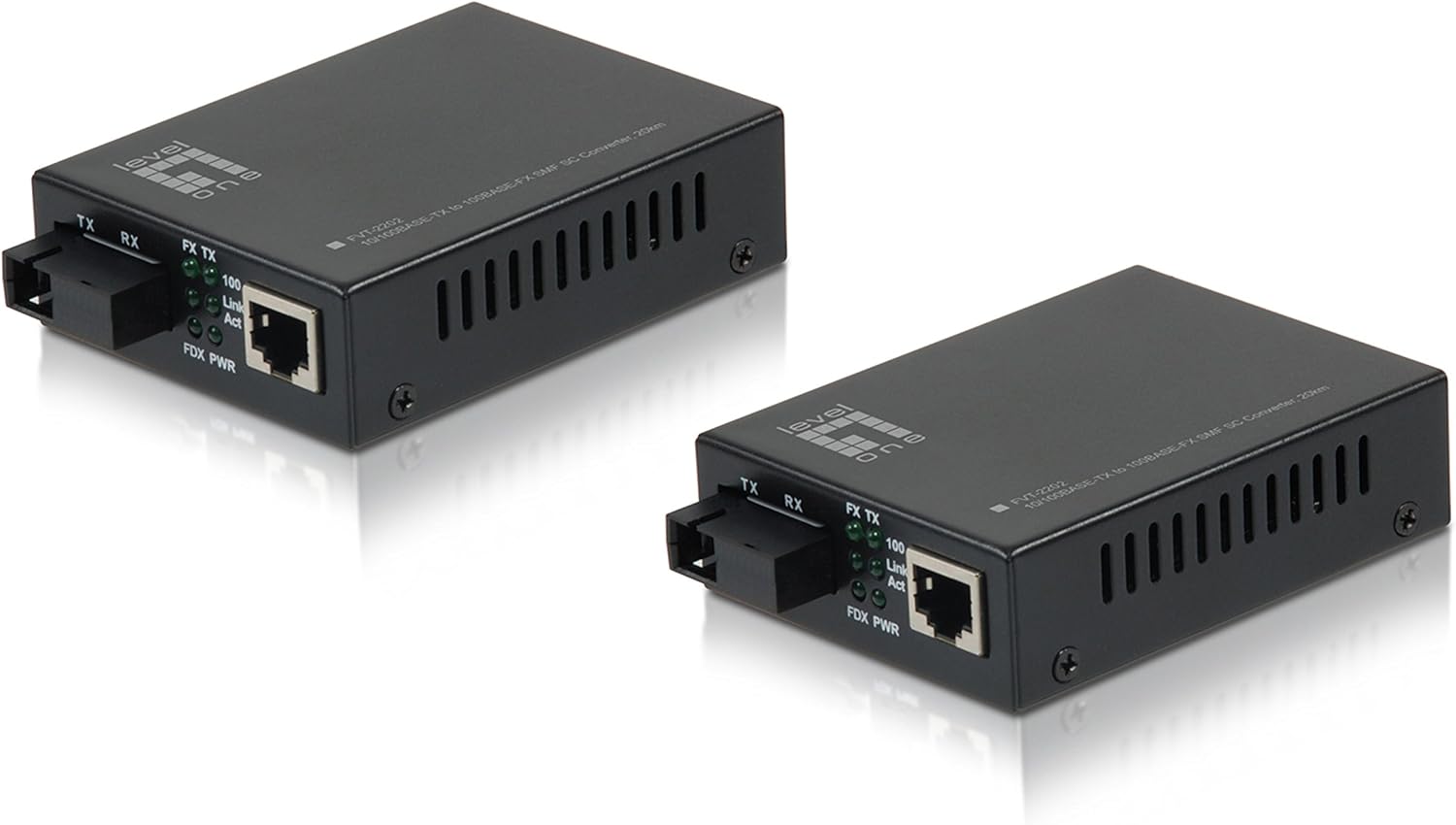
Hình 3.1: Đằng trước view of the LevelOne FVT-2202 Media Converter, showing the RJ45 Ethernet port, SC fiber optic port, and LED indicators for TX, RX, Link/Act, and Power.

Hình 3.2: Ở phía sau view of the LevelOne FVT-2202 Media Converter, highlighting the 5VDC power input and DIP switches for configuration.
3.1. Đèn báo LED
| DẪN ĐẾN | Trạng thái | Sự miêu tả |
|---|---|---|
| PWR | Màu xanh lá cây (Bật) | Thiết bị đang nhận được điện. |
| Liên kết FX / Hành động | Màu xanh lá cây (Bật) | Fiber optic link is established. |
| Liên kết FX / Hành động | Màu xanh lá cây (Nhấp nháy) | Data is being transmitted or received over the fiber optic link. |
| Liên kết / Hành động TX | Màu xanh lá cây (Bật) | Kết nối Ethernet đã được thiết lập. |
| Liên kết / Hành động TX | Màu xanh lá cây (Nhấp nháy) | Data is being transmitted or received over the Ethernet link. |
3.2. Công tắc DIP
The FVT-2202 features DIP switches for advanced configuration. Refer to the markings on the device for specific switch functions, which typically include settings for LFP (Link Fault Pass-through), speed, and duplex mode.
- Chuyển 1: LFP (Link Fault Pass-through) Enable/Disable
- Chuyển 2: Auto-Negotiation Enable/Disable
- Chuyển 3: 100Mbps/10Mbps Speed Selection (when Auto-Negotiation is disabled)
- Chuyển 4: Full-Duplex/Half-Duplex Selection (when Auto-Negotiation is disabled)
Thận trọng:
Ensure the device is powered off before changing DIP switch settings to prevent potential damage or incorrect configuration.
4. Thiết lập và Cài đặt
Follow these steps to properly install and connect your LevelOne FVT-2202 Media Converter:
- Chuẩn bị môi trường: Ensure the installation location is clean, dry, and has adequate ventilation. Avoid areas with extreme temperatures or humidity.
- Tắt nguồn thiết bị: Before making any connections, ensure that all network devices (switches, routers, computers) that will connect to the media converter are powered off.
- Configure DIP Switches (if necessary): If specific network settings are required (e.g., fixed speed/duplex, LFP), adjust the DIP switches on the rear of the converter according to your network requirements. Refer to Section 3.2 for details.
- Kết nối cáp quang: Connect one end of the fiber optic cable (SC connector) to the FX port on the FVT-2202. Connect the other end to your fiber optic network device (e.g., fiber switch, another media converter). Ensure the transmit (TX) and receive (RX) fibers are correctly matched.
- Kết nối cáp Ethernet: Connect a standard RJ45 Ethernet cable from your copper-based network device (e.g., Ethernet switch, computer) to the TX port on the FVT-2202.
- Kết nối bộ đổi nguồn: Plug the provided 5VDC power adapter into the power input jack on the FVT-2202. Then, plug the power adapter into a suitable electrical outlet.
- Bật nguồn thiết bị: Power on the FVT-2202. The PWR LED should illuminate green. Then, power on your connected network devices.
- Xác minh kết nối: Check the Link/Act LEDs for both the FX (fiber) and TX (Ethernet) ports. A solid green light indicates a successful link. Blinking lights indicate data activity.
Quan trọng:
Always handle fiber optic cables with care. Avoid bending them sharply or exposing the connectors to dust and dirt, which can degrade performance.
5. Hoạt động
Once the LevelOne FVT-2202 is properly installed and powered on, it operates automatically as a transparent media converter. It translates Ethernet signals between copper and fiber optic mediums without requiring any software configuration.
5.1. Chức năng cơ bản
- The converter transparently passes Ethernet frames between the RJ45 (copper) and SC (fiber) interfaces.
- It supports both 10Mbps and 100Mbps Fast Ethernet speeds.
- Auto-negotiation is typically enabled by default on the RJ45 port to automatically detect the speed and duplex mode of the connected device.
- The fiber optic port operates at 100Mbps full-duplex.
5.2. Tình trạng giám sát
The LED indicators provide a quick visual status of the converter's operation:
- ĐÈN LED PWR: Confirms the device is powered.
- FX Link/Act LED: Indicates the status of the fiber optic link and data activity.
- TX Link/Act LED: Indicates the status of the Ethernet link and data activity.
Refer to Section 3.1 for a detailed explanation of LED behaviors.
6. Bảo trì
The LevelOne FVT-2202 Media Converter is designed for minimal maintenance. However, following these guidelines can help ensure its longevity and reliable performance:
- Vệ sinh: Keep the device clean and free from dust. Use a soft, dry cloth for cleaning the exterior. Do not use liquid or aerosol cleaners.
- Đầu nối cáp quang: Ensure fiber optic connectors are clean. Dust or dirt on the fiber end-faces can significantly degrade signal quality. Use appropriate fiber optic cleaning tools if necessary.
- Thông gió: Ensure that the ventilation holes on the device are not blocked to prevent overheating.
- Nguồn điện: Use only the power adapter provided with the device. Using an incorrect power adapter can damage the converter.
- Điều kiện môi trường: Vận hành thiết bị trong điều kiện môi trường (nhiệt độ, độ ẩm) được chỉ định để tránh trục trặc.
KHAI THÁC. Xử lý sự cố
If you encounter issues with your LevelOne FVT-2202 Media Converter, refer to the following troubleshooting steps:
| Vấn đề | Nguyên nhân có thể | Giải pháp |
|---|---|---|
| Không có nguồn (Đèn LED PWR tắt) | Bộ đổi nguồn không được kết nối hoặc bị lỗi. | Check power adapter connection to the device and wall outlet. Ensure the outlet is functional. Try a different power adapter if available and compatible. |
| No Fiber Link (FX Link/Act LED Off) | Fiber cable disconnected, damaged, or incorrect TX/RX connection. | Verify fiber cable connections at both ends. Ensure TX/RX are correctly matched. Inspect cable for damage. Clean fiber connectors. Check the remote fiber device. |
| No Ethernet Link (TX Link/Act LED Off) | Ethernet cable disconnected, damaged, or incorrect speed/duplex settings. | Verify Ethernet cable connection. Inspect cable for damage. Ensure the connected device is powered on and functioning. Check DIP switch settings for speed/duplex if auto-negotiation is disabled. |
| Poor Network Performance | Cable issues, duplex mismatch, or excessive network traffic. | Check cable quality and length. Ensure duplex settings are consistent across connected devices (auto-negotiation recommended). Monitor network traffic. |
If the problem persists after trying these solutions, please contact LevelOne technical support for further assistance.
8. Thông số kỹ thuật
| Tên mẫu | FVT-2202 |
| Thương hiệu | Cấp một |
| Tiêu chuẩn mạng | 10/100Base-TX, 100Base-FX |
| Tốc độ truyền dữ liệu | 100 Megabits Per Second (10/100Mbps) |
| Connector Type (Copper) | RJ45 |
| Connector Type (Fiber) | SC (Single-Mode Fiber, 20km range) |
| Loại cáp | Ethernet, Fiber Optic |
| Tính năng đặc biệt | Data Transfer, Link Fault Pass-through (LFP) via DIP switch |
| Màu sắc | Đen |
| Sử dụng trong nhà/ngoài trời | Ngoài trời |
| Sự tuân thủ | RoHS, FCC Part 15 |
| Trọng lượng sản phẩm | 11.3 ounce |
| Kích thước sản phẩm (DxRxC) | 2.8 x 3.7 x 1.02 inch |
| Đầu vào nguồn điện | 5VDC |
9. Bảo hành và Hỗ trợ
LevelOne products are backed by a manufacturer's warranty. For specific warranty terms and conditions, please refer to the warranty card included with your product or visit the official LevelOne webtrang web. Giữ lại biên lai mua hàng làm bằng chứng mua hàng.
For technical support, product registration, or to download the latest drivers and firmware, please visit the LevelOne support portal or contact their customer service department. Contact information can typically be found on the LevelOne webđịa điểm: www.level1.com


