Giới thiệu
The DigiTech TRIO Band Creator Pedal is an innovative device designed to automatically generate bass and drum parts that complement your guitar playing. It listens to your chords and rhythm, then creates a virtual band to accompany you. This manual provides detailed instructions for setting up, operating, maintaining, and troubleshooting your TRIO pedal.
The TRIO offers seven distinct music genres and twelve song styles within each genre, allowing for versatile musical accompaniment. It supports both 3/4 and 4/4 time signatures.
Sản phẩm trênview
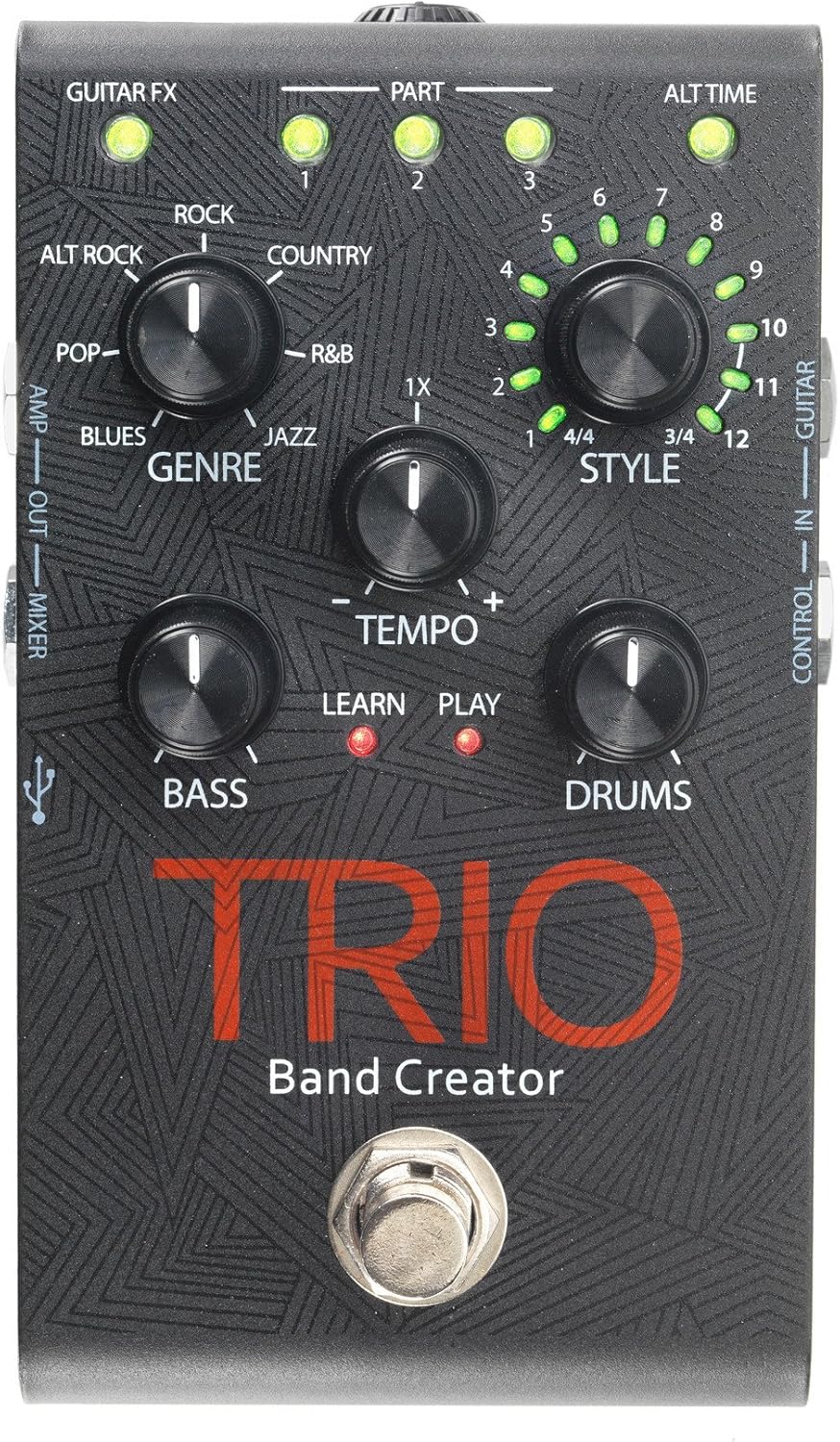
Figure 1: DigiTech TRIO Band Creator Pedal Front Panel. This image displays the pedal's layout, including the Genre, Style, Tempo, Bass, and Drums knobs, the footswitch, and various LED indicators and input/output jacks.
The TRIO pedal features a robust design with intuitive controls. Key components include:
- Genre Knob: Selects one of seven music genres (Blues, Pop, Alternative Rock, Rock, Country, R&B, Jazz).
- Style Knob: Chooses from twelve song styles within the selected genre, and also indicates 3/4 or 4/4 time signatures.
- Núm điều chỉnh nhịp độ: Adjusts the playback speed of the generated band.
- Núm trầm: Controls the volume level of the generated bass line.
- Drums Knob: Controls the volume level of the generated drum track.
- Công tắc chân: Used for teaching the pedal your song, starting/stopping playback, and switching song parts.
- Đèn báo LED: Provide visual feedback for Guitar FX, Part (1, 2, 3), Alt Time, Learn, and Play status.
- Giắc cắm đầu vào / đầu ra: Include Guitar In, Control In, Amp Out, Mixer Out, and Headphone Out.
- Cổng USB: Đối với các bản cập nhật firmware.
Cài đặt
Before using your DigiTech TRIO pedal, ensure all connections are made correctly.
- Kết nối nguồn điện: Connect the included 9V DC power supply (300mA minimum) to the TRIO's power input jack. Plug the power supply into a standard AC outlet.
- Đầu vào guitar: Kết nối cây đàn guitar của bạn với GUITAR TRONG jack on the TRIO pedal using a standard 1/4-inch instrument cable.
- Xuất ra AmpBộ trộn/Bộ lọc:
- Dùng để kết nối với đàn guitar amplifier, use the AMP NGOÀI jack. This output includes your guitar signal and is optimized for guitar amps.
- For connecting to a mixing console, PA system, or headphones, use the HỖN HỢP RA NGOÀI jack. This output provides a full-range signal suitable for these devices.
- Đầu ra tai nghe: Để luyện tập cá nhân, hãy kết nối tai nghe với... TAI NGHE RA NGOÀI jack. Adjust the headphone level using the dedicated control.
- Optional Footswitch (DigiTech FS3X): If using an optional FS3X footswitch for extended control, connect it to the KIỂM SOÁT TRONG cái giắc.
Ensure all cables are securely connected before powering on your amplifier hoặc hệ thống âm thanh.
Hướng dẫn sử dụng
Basic Operation: Creating a Song
- Select Genre: Quay lại THỂ LOẠI knob to choose your desired musical style (e.g., Rock, Blues, Jazz).
- Select Style: Quay lại PHONG CÁCH knob to select a specific song style within the chosen genre. The LEDs around the knob indicate the style number (1-12) and the time signature (3/4 or 4/4).
- Teach the TRIO:
- Press the TRIO's footswitch once. The HỌC HỎI LED will illuminate red.
- Play your guitar chords and rhythm for the first section of your song. Play clearly and consistently for 4-8 measures.
- Press the footswitch again to stop teaching. The HỌC HỎI LED will turn off, and the CHƠI LED will illuminate red. The TRIO will then generate and play the bass and drum parts based on what you played.
- Play with the Band: Once the band starts playing, you can play along with your guitar.
Tính năng nâng cao
- Điều chỉnh nhịp độ: Sử dụng NHỊP ĐỘ knob to increase or decrease the speed of the generated band.
- Adjusting Bass and Drum Levels: Sử dụng TRẦM Và TRỐNG knobs to set the individual volume levels of the bass and drum parts relative to your guitar.
- Song Parts: The TRIO can learn up to three distinct song parts. After teaching the first part, press the footswitch twice quickly to enter "Part 2" learn mode, and three times for "Part 3". You can then switch between these parts during playback by pressing the footswitch. The PART 1, 2, 3 LEDs indicate the active part.
- Alternate Time: Some styles offer an "Alternate Time" option (e.g., half-time or double-time). The ALT TIME LED will illuminate when this option is available and active.
- Guitar FX: Các GUITAR FX LED indicates if the TRIO is applying a subtle guitar effect (e.g., compression, chorus) to your signal, which is often genre-dependent.
- Using the FS3X Footswitch: The optional DigiTech FS3X footswitch provides hands-free control over various functions, such as cycling through song parts, stopping/starting playback, and more. Refer to the FS3X manual for detailed usage.
BẢO TRÌ
Proper care will ensure the longevity and optimal performance of your DigiTech TRIO pedal.
- Vệ sinh: Hãy dùng khăn mềm, khô để lau sạch bề mặt bên ngoài của bàn đạp. Tránh sử dụng các chất tẩy rửa có tính mài mòn, dung môi hoặc sáp, vì chúng có thể làm hỏng lớp sơn và các bộ phận bên trong.
- Kho: Khi không sử dụng trong thời gian dài, hãy bảo quản bàn đạp ở nơi khô ráo, thoáng mát, tránh ánh nắng trực tiếp và nhiệt độ quá cao hoặc quá thấp.
- Nguồn điện: Always use the specified 9V DC power supply. Using an incorrect power supply can damage the unit and void the warranty.
- Kết nối: Kiểm tra định kỳ tất cả các mối nối cáp xem có bị mòn hoặc hư hỏng không. Thay thế các cáp bị hỏng để tránh mất tín hiệu hoặc đoản mạch.
Xử lý sự cố
If you encounter issues with your TRIO pedal, refer to the following common problems and solutions:
| Vấn đề | Nguyên nhân có thể | Giải pháp |
|---|---|---|
| Không có âm thanh phát ra từ bàn đạp. | Incorrect power supply; loose cables; incorrect input/output connections. | Ensure correct 9V DC power supply is used and connected. Check all instrument cables are securely plugged into the correct jacks (Guitar In, Amp Out/Mixer Out). Verify amplifier/mixer is on and volume is up. |
| Band not generating or sounds incorrect. | Poor "teaching" performance; incorrect genre/style selected; low input signal. | Ensure you play clearly and consistently during the "Learn" phase. Try re-teaching the song part. Experiment with different Genres and Styles. Ensure your guitar's volume is adequate. |
| Bass or Drums are too loud/quiet. | Bass/Drums knob setting. | Điều chỉnh TRẦM Và TRỐNG knobs to your desired levels. |
| Tempo is too fast/slow. | Tempo knob setting. | Điều chỉnh NHỊP ĐỘ knob to increase or decrease the playback speed. |
| LEDs not illuminating. | No power; pedal malfunction. | Check power connection. If power is confirmed and LEDs still don't light up, contact customer support. |
Thông số kỹ thuật
| Tính năng | Chi tiết |
|---|---|
| Số hiệu mẫu | TRIOV01 |
| Trọng lượng sản phẩm | 1.32 pound |
| Kích thước gói hàng | 17.24 x 9.25 x 6.5 inch |
| Màu sắc | Đen |
| Giao diện phần cứng | HP-HSC |
| Định dạng tín hiệu | Tương tự |
| Nguồn điện | Điện có dây |
| Tậptage | 9 vôn |
| Ampcơn thịnh nộ | 300 triệuamps |
Bảo hành và Hỗ trợ
Để biết thông tin bảo hành và hỗ trợ kỹ thuật, vui lòng tham khảo trang web chính thức của DigiTech webhoặc liên hệ với bộ phận chăm sóc khách hàng của họ. Giữ lại hóa đơn mua hàng để làm bằng chứng cho bất kỳ yêu cầu bảo hành nào.
You can often find additional resources, FAQs, and firmware updates on the manufacturer's support pages.