1. Sản phẩm hếtview
The LANBON L6 WiFi Smart IR Repeater is an advanced device designed to extend the control of your infrared (IR) devices through your WiFi network. It allows you to control traditional IR-controlled appliances such as TVs, air conditioners, and set-top boxes from anywhere using a mobile application, providing convenient remote access and smart home integration.
Các tính năng chính:
- Đèn báo LED: Provides visual feedback on device status.
- Truy cập từ xa: Control your IR devices from anywhere via the mobile app.
- Kết nối WiFi: Integrates seamlessly with your existing home WiFi network.
- Điều khiển hồng ngoại đa năng: Compatible with a wide range of IR-controlled appliances.

Hình 1.1: Trên cùng view of the LANBON L6 WiFi Smart IR Repeater. This image shows the compact, black, oval design of the device, with a subtle LED indicator at the front, signifying its operational status.

Hình 1.2: Mặt bên view of the LANBON L6 WiFi Smart IR Repeater. This perspective highlights the device's low-profile and elegant curved form factor, featuring a glossy black upper shell and a matte white base.
2. Getting Started: Setup and Installation
Follow these steps to set up your LANBON L6 WiFi Smart IR Repeater and connect it to your home network.
2.1. Bật nguồn
- Place the LANBON L6 in a central location within the room where you intend to control IR devices, ensuring it has a clear line of sight to the appliances.
- Connect the provided power adapter to the LANBON L6 and plug it into a standard wall outlet.
- The LED indicator on the device will illuminate, indicating it is powered on and ready for configuration.
2.2. Mobile App Configuration
The LANBON L6 is configured and controlled via a dedicated mobile application. Ensure your smartphone is connected to the same 2.4GHz WiFi network that the L6 will use.
- Download the official LANBON smart home application from your device's app store (e.g., Apple App Store or Google Play Store).
- Mở ứng dụng và tạo tài khoản hoặc đăng nhập nếu bạn đã có tài khoản.
- Follow the in-app instructions to add a new device. Select the LANBON L6 IR Repeater from the list of available devices.
- The app will guide you through connecting the L6 to your home WiFi network. This typically involves entering your WiFi password.
- Once connected, the LED indicator on the L6 will change to a steady state, confirming successful network connection.
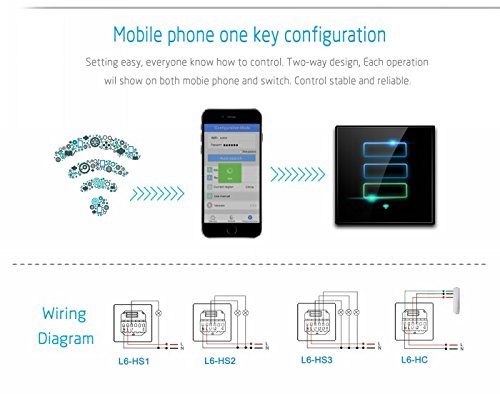
Figure 2.1: Mobile phone one-key configuration. This image illustrates the simplified process of connecting the LANBON L6 to your home network using the mobile application, emphasizing ease of setup.
3. Operating Your LANBON L6
Once your LANBON L6 is set up, you can begin controlling your IR devices and managing your smart home environment.
3.1. Controlling Devices Directly
The mobile application allows direct control of your IR devices without the need for a separate host server. You can add and manage various IR appliances within the app.
- Open the LANBON app on your smartphone.
- Navigate to the device list and select the LANBON L6.
- Add new IR devices (e.g., TV, AC) by selecting their type and brand from the app's database. The app will guide you through the process of pairing the L6 with your IR device, often by testing various remote codes.
- Once paired, you can use the virtual remote control within the app to operate your appliances.
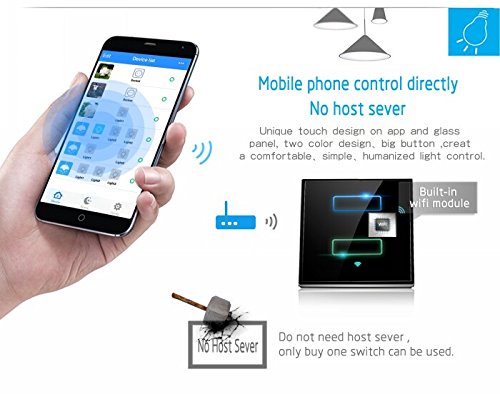
Figure 3.1: Mobile phone control directly. This image demonstrates the user-friendly interface of the mobile app, allowing direct control of various smart devices, including IR appliances, from your smartphone.
3.2. Unique Room Classification System
The LANBON app features a unique room classification system, allowing you to organize your devices by room for easier management and control. This system helps in quickly locating and operating devices within specific areas of your home.
- Within the app, access the 'Device List' or 'Room Management' section.
- Create new rooms (e.g., Living Room, Bedroom, Hall).
- Assign your paired IR devices to their respective rooms.
- Sau đó bạn có thể view and control devices based on their assigned room, simplifying your smart home experience.
- The system also allows for one-key operation to turn all devices in a specific room on or off.
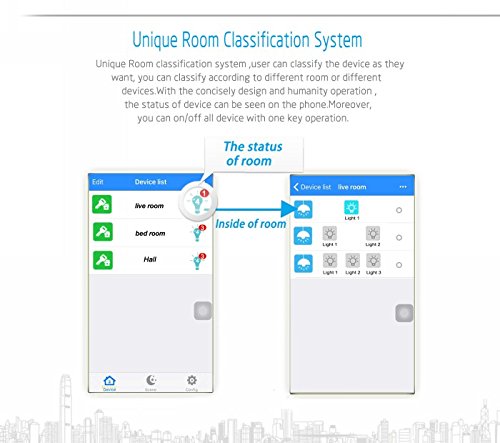
Figure 3.2: Unique Room Classification System. This visual demonstrates how the app allows users to categorize and manage devices by room, providing an organized and intuitive control interface.
4. Connectivity and Signal Optimization
The LANBON L6 is designed for stable and reliable WiFi connectivity. For optimal performance, consider the following:
4.1. Stable WiFi Signal
Ensure your LANBON L6 is placed within a strong WiFi signal area. A stable connection is crucial for uninterrupted remote control and responsiveness. If the WiFi signal is weak in certain areas, consider using a WiFi repeater or extender to boost coverage.
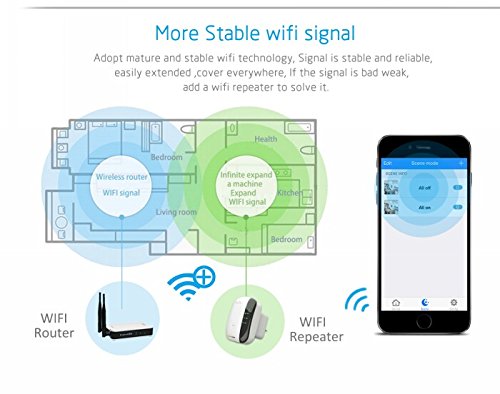
Figure 4.1: More Stable WiFi Signal. This diagram illustrates how a WiFi repeater can expand the coverage of your wireless network, ensuring a strong and stable signal for your LANBON L6 and other smart devices throughout your home.
5. Thông số kỹ thuật
| Tính năng | Sự miêu tả |
|---|---|
| Thương hiệu | LANBON |
| Người mẫu | L6 |
| Tính năng đặc biệt | LED Indicator, Remote Access |
| Loại đầu nối | RJ45 (for network connection, though primary is WiFi) |
| Màu sắc | Đen |
| Trọng lượng sản phẩm | 400 gam |
| Kích thước gói hàng | 16.9 x 13.7 x 4.9cm |
| Nước xuất xứ | Trung Quốc |
| ASIN | B07428RTM5 |
KHAI THÁC. Xử lý sự cố
If you encounter issues with your LANBON L6, refer to the following common problems and solutions:
6.1. Device Not Connecting to WiFi
- Kiểm tra mật khẩu WiFi: Ensure you have entered the correct WiFi password in the app.
- Mạng 2.4GHz: Confirm your router is broadcasting a 2.4GHz network and your phone is connected to it during setup. The L6 may not support 5GHz networks.
- Khoảng cách bộ định tuyến: Move the L6 closer to your WiFi router during initial setup.
- Khởi động lại bộ định tuyến: Try restarting your WiFi router.
- Đặt lại thiết bị: Refer to the app or device instructions for how to reset the L6 to factory settings and try the setup process again.
6.2. IR Devices Not Responding
- Đường ngắm: Ensure the LANBON L6 has a clear line of sight to the IR receiver of your appliance. Obstructions can block the IR signal.
- Khoảng cách: The L6 should be within effective range of the IR device (typically 5-8 meters, depending on the environment).
- Correct IR Code: In the app, ensure you have selected the correct brand and model for your IR device. If the default codes don't work, try alternative codes provided by the app or use the learning function if available.
- Quyền lực: Verify that both the LANBON L6 and the IR appliance are powered on.
6.3. App Not Responding or Crashing
- Cập nhật ứng dụng: Ensure your LANBON app is updated to the latest version.
- Khởi động lại ứng dụng: Đóng và mở lại ứng dụng.
- Khởi động lại điện thoại: Khởi động lại điện thoại thông minh của bạn.
- Xóa bộ nhớ đệm: On Android, try clearing the app's cache. On iOS, reinstalling the app might be necessary.
7. Bảo trì và chăm sóc
To ensure the longevity and optimal performance of your LANBON L6 WiFi Smart IR Repeater, follow these simple maintenance guidelines:
- Vệ sinh: Gently wipe the device with a soft, dry cloth. Do not use liquid cleaners, aerosols, or abrasive chemicals, as they may damage the surface or internal components.
- Vị trí: Keep the device in a dry environment, away from direct sunlight, excessive heat, and moisture. Avoid placing it near strong electromagnetic fields.
- Thông gió: Ensure the device is not covered or placed in an enclosed space that could hinder proper ventilation.
- Nguồn điện: Chỉ sử dụng bộ đổi nguồn gốc đi kèm với thiết bị.
8. Thông tin an toàn
Please read and adhere to the following safety precautions to prevent damage to the device or personal injury:
- Do not disassemble, repair, or modify the device yourself. This may cause electric shock, fire, or damage to the product.
- Để thiết bị xa tầm tay trẻ em và vật nuôi.
- Không để thiết bị tiếp xúc với nước hoặc bất kỳ chất lỏng nào khác.
- Tránh làm rơi hoặc để thiết bị chịu tác động mạnh.
- If the device emits smoke, unusual odors, or makes strange noises, immediately unplug it from the power outlet and contact customer support.
9. Bảo hành và Hỗ trợ
LANBON products are manufactured to the highest quality standards. For information regarding warranty coverage, technical support, or service, please refer to the warranty card included with your product or visit the official LANBON website. You can also contact the seller or distributor from whom you purchased the product for assistance.
Vui lòng giữ lại bằng chứng mua hàng của bạn để yêu cầu bảo hành.