1. Giới thiệu
This manual provides comprehensive instructions for the safe and effective use of the PCE Instruments PCE-170 A Light Meter. This device is designed for measuring illuminance (lux or foot-candles) in various environments, such as offices, factories, and outdoor settings. It features a wide measurement range, fast response time, and a compact design for ease of use.
Vui lòng đọc kỹ hướng dẫn này trước khi vận hành thiết bị và giữ lại để tham khảo sau này.
2. Thông tin an toàn
Hãy tuân thủ các biện pháp phòng ngừa an toàn sau đây để tránh bị thương và hư hỏng thiết bị:
- Không để thiết bị tiếp xúc với nhiệt độ quá cao, độ ẩm hoặc ánh nắng trực tiếp.
- Tránh rung động hoặc va chạm mạnh.
- Không được tự ý mở hoặc sửa đổi thiết bị. Hãy giao việc bảo dưỡng cho nhân viên kỹ thuật có chuyên môn.
- Keep the light sensor clean and free from obstructions to ensure accurate readings.
- Nếu không sử dụng thiết bị trong thời gian dài, hãy tháo pin ra để tránh rò rỉ.
- Vứt bỏ pin và thiết bị theo quy định của địa phương.
3. Sản phẩm hếtview
The PCE-170 A Light Meter consists of a main unit with a display and control buttons, and an integrated light sensor.

Hình 1: Đằng trước view of the PCE-170 A Light Meter, showing the display, control buttons, and light sensor at the top.
3.1 Thành phần
- Cảm biến ánh sáng: Located at the top of the device, protected by a white dome. This silicon photodiode measures incident light.
- Màn hình LCD: A 5-digit display showing measurement values, units (lux/fc), and function indicators (e.g., AUTO RANGE, HOLD, MIN, MAX).
- Nút nguồn (Bật/Tắt): Bật hoặc tắt thiết bị.
- Nút CAL: Used for zero adjustment.
- Nút HOLD: Đóng băng giá trị đọc hiện tại trên màn hình.
- fc/lx Button: Toggles between foot-candle (fc) and lux (lx) measurement units.
- Nút PHẠM VI: Manually selects measurement ranges or activates auto-ranging.
- Ngăn chứa pin: Located at the rear, houses the 9V battery.

Hình 2: Cận cảnh view of the LCD display, showing a reading of "534 lx" and "AUTO RANGE 4 000".
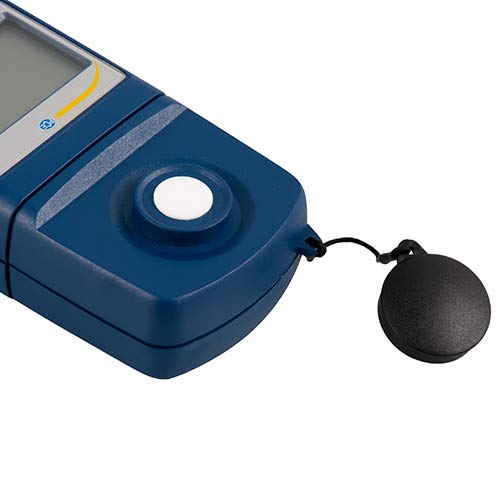
Hình 3: Chi tiết view of the light sensor at the top of the device, with its protective cap removed.
4. Thiết lập
4.1 Lắp đặt pin
- Xác định vị trí nắp ngăn chứa pin ở mặt sau của thiết bị.
- Slide the cover open or unscrew it, depending on the model.
- Insert one 9V battery, observing the correct polarity (+/-).
- Lắp lại nắp ngăn chứa pin một cách an toàn.
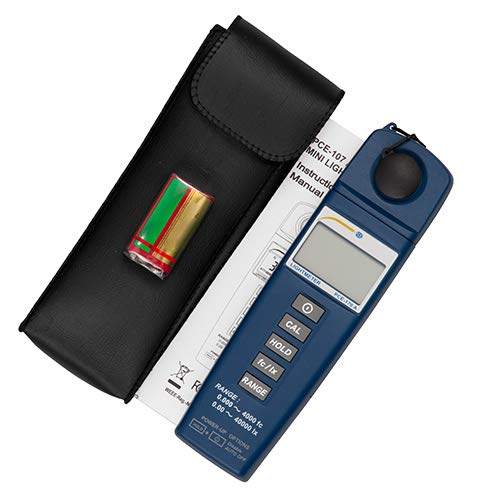
Hình 4: The PCE-170 A Light Meter shown with its carrying case and the included 9V battery, ready for installation.
4.2 Bật nguồn ban đầu
Nhấn nút Quyền lực button to turn on the device. The display will illuminate and show a reading. If the battery symbol appears, replace the battery.
5. Hướng dẫn vận hành
5.1 Thực hiện một phép đo
- Bật thiết bị bằng cách sử dụng Quyền lực cái nút.
- Ensure the light sensor is clean and unobstructed.
- Position the light sensor at the location where illuminance is to be measured. Ensure the sensor is facing the light source directly for accurate readings.
- The current illuminance value will be displayed on the LCD.

Hình 5: A user measuring light levels in an office environment with the PCE-170 A Light Meter.
5.2 Changing Measurement Units (fc/lx)
Nhấn nút fc/lx button to toggle between foot-candles (fc) and lux (lx) units. The selected unit will be indicated on the display.
5.3 Chức năng HOLD
Nhấn nút GIỮ Nhấn nút này để giữ nguyên giá trị đo hiện tại trên màn hình. Nhấn lại nút để bỏ giữ và tiếp tục đo trực tiếp.
5.4 Zero Adjustment (CAL)
Để thực hiện điều chỉnh về không:
- Place the light sensor in a completely dark environment (e.g., cover it with the protective cap or place it in a dark box).
- Nhấn nút CAL button. The display should show "0.00" or a value very close to zero.
- If the display does not show zero, repeat the process.
5.5 Lựa chọn phạm vi
The device typically operates in auto-ranging mode. To manually select a range or cycle through available ranges, press the Range button. The display will indicate the active range. Press and hold the Range button to return to auto-ranging mode.
5.6 Min/Max Function (Power-Up Option)
The PCE-170 A supports Min/Max recording. To activate this feature, refer to the power-up options indicated on the device label (e.g., press and hold a specific button during power-on). This function records the minimum and maximum illuminance values detected during a measurement session.
6. Bảo trì
6.1 Vệ sinh
Wipe the device with a soft, dry cloth. Do not use abrasive cleaners or solvents. Keep the light sensor clean and free of dust or smudges, as this can affect measurement accuracy.
6.2 Lưu trữ
When not in use, store the PCE-170 A Light Meter in its carrying case in a cool, dry place, away from direct sunlight and extreme temperatures. Remove the battery if storing for extended periods.
KHAI THÁC. Xử lý sự cố
| Vấn đề | Nguyên nhân có thể | Giải pháp |
|---|---|---|
| Thiết bị không bật. | Pin chết hoặc lắp không đúng cách. | Kiểm tra cực tính của pin hoặc thay thế bằng pin 9V mới. |
| Màn hình hiển thị "OL" (Quá tải). | Light intensity exceeds the current measurement range. | Switch to a higher measurement range using the Range button, or move to a less intensely lit area. |
| Các bài đọc không chính xác. | Dirty sensor, incorrect zero adjustment, or sensor not facing light source correctly. | Clean the sensor, perform zero adjustment in darkness, and ensure the sensor is properly oriented. |
| Màn hình trống hoặc nhấp nháy. | Pin yếu. | Thay pin 9V. |
8. Thông số kỹ thuật
| Tham số | Giá trị |
|---|---|
| Phạm vi đo lường | 0.00 ... 40,000 lux / 0.000 ... 4000 fc |
| Nghị quyết | 0.01 lux / 0.001 fc |
| Sự chính xác | ±3% of measurement value + 5 digits |
| Chỉ báo quá tải | "OL" |
| Tỷ lệ đo lường | Mỗi 2 giây |
| Nhiệt độ hoạt động | 0 ... 40°C / 32 ... 104°F |
| Cảm biến ánh sáng | Silicon photodiode, corrected cosine angle |
| Trưng bày | LCD 5 chữ số |
| Nguồn điện | Pin 9V (bao gồm) |
| Kích thước | 33 x 54 x 196 mm / 1.3 x 2.1 x 7.7 in |
| Cân nặng | 180 g / <1 lb (approx. 9.17 ounces) |
8.1 Phạm vi giao hàng
The standard delivery package includes:
- 1 x PCE-170 A Lux Meter
- 1 pin 9V
- 1 x Hộp đựng
- 1 x Hướng dẫn sử dụng (tài liệu này)
9. Bảo hành và Hỗ trợ
PCE Instruments provides a warranty for this product against defects in materials and workmanship. For specific warranty terms and conditions, please refer to the warranty card included with your purchase or visit the official PCE Instruments website. For technical support, service, or calibration inquiries, please contact PCE Instruments customer service.
PCE Instruments US: Ghé thăm cửa hàng