1. Giới thiệu
Thank you for choosing the HTC USB Type-C Hi-Res Earphones, Model 99H20317-00. These earphones are designed to provide a high-quality audio experience with their advanced features and ergonomic design. This manual provides essential information for the proper setup, operation, maintenance, and troubleshooting of your new earphones.
Các tính năng chính bao gồm:
- Concert hall design for unparalleled sound.
- Larger 13mm speakers for a fuller sound profile.
- Enhanced port optimization for improved bass reproduction.
- Lighter and thinner aerospace polymer diaphragm to increase sound frequency response.
- Ergonomic design for maximum comfort during extended use.
2. Thông tin an toàn
Please read and follow these safety guidelines to ensure safe and optimal use of your earphones:
- Bảo vệ thính giác: Tránh nghe nhạc ở âm lượng lớn trong thời gian dài để ngăn ngừa tổn thương thính giác.
- Sự nhận thức về môi trường: Không sử dụng tai nghe trong những trường hợp không thể nghe được âm thanh xung quanh có thể gây nguy hiểm, chẳng hạn như khi lái xe, đạp xe hoặc đi bộ trên đường.
- Vệ sinh: Clean the earphones regularly with a soft, dry cloth. Do not use liquid cleaners or solvents.
- Tiếp xúc với nước: These earphones are not waterproof. Avoid exposure to water or excessive moisture.
- Những đứa trẻ: Keep out of reach of small children due to small parts that could pose a choking hazard.
3. Nội dung gói hàng
Xác minh rằng tất cả các mục đều có trong gói hàng của bạn:
- HTC USB Type-C Hi-Res Earphones (Model: 99H20317-00)
- Additional ear tips (if included)
- Hướng dẫn sử dụng (tài liệu này)
4. Thiết lập
These earphones are designed for simple plug-and-play operation.
- Kết nối: Insert the USB Type-C connector of the earphones into the USB Type-C port of your compatible device (Smartphone, Laptop, Tablet).
- Nhận dạng thiết bị: Your device should automatically recognize the earphones. If prompted, select the earphones as the audio output device.
- Điều chỉnh âm lượng: Begin playback at a low volume and gradually increase to a comfortable listening level.
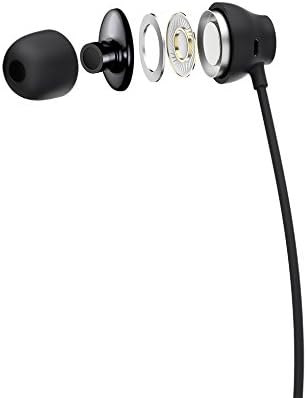
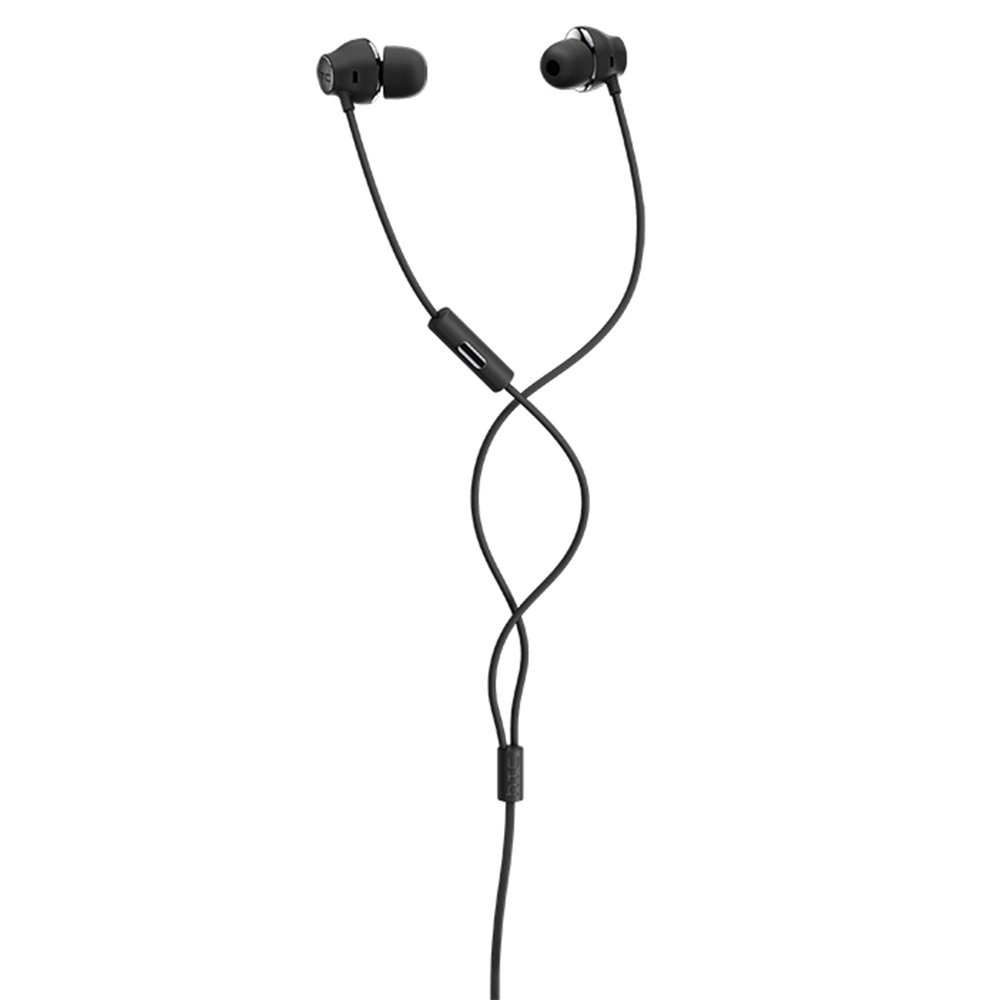
Figure 1: HTC USB Type-C Hi-Res Earphones connected to a device.
5. Hướng dẫn vận hành
Once connected, your earphones are ready for use.
- Phát lại âm thanh: Play audio from your connected device. The sound will be routed through the earphones.
- Quản lý cuộc gọi: For devices supporting call functions, you can typically answer/end calls using the device's interface.
- Kiểm soát ứng dụng: This model supports control via an application. Refer to your device's app store for any official HTC audio control applications that may offer additional features or sound customization.
6. Bảo trì và chăm sóc
Proper care extends the lifespan of your earphones:
- Vệ sinh đầu tai: Gently remove ear tips and clean them with a mild soap solution and water. Ensure they are completely dry before reattaching.
- Vệ sinh thân tai nghe: Wipe the earphone body and cable with a soft, dry, lint-free cloth. Do not use abrasive materials or harsh chemicals.
- Kho: When not in use, store the earphones in a clean, dry place, preferably in a protective pouch to prevent tangling and damage.
- Quản lý cáp: Avoid tightly winding the cable or subjecting it to sharp bends, which can damage internal wires.
Hình 2: Phát nổ view of earphone components, highlighting the 13mm speaker and aerospace polymer diaphragm.
KHAI THÁC. Xử lý sự cố
Nếu bạn gặp sự cố, hãy tham khảo các sự cố và giải pháp phổ biến sau:
| Vấn đề | Nguyên nhân có thể | Giải pháp |
|---|---|---|
| Không có âm thanh | Earphones not properly connected; device volume too low; incorrect audio output selected on device. | Ensure the USB Type-C connector is fully inserted. Increase device volume. Check device audio settings to confirm earphones are selected as output. |
| Chất lượng âm thanh kém | Dirty ear tips; damaged cable; low-quality audio source. | Clean ear tips. Inspect the cable for visible damage. Try a different audio source or file. |
| Earphones uncomfortable or fall out | Kích thước nút tai không phù hợp. | Try different sized ear tips (if provided) to find the best fit for your ears. |
8. Thông số kỹ thuật
| Tính năng | Chi tiết |
|---|---|
| Thương hiệu | HTC |
| Số hiệu mẫu | 99H20317-00 |
| Công nghệ kết nối | Có dây (USB Type-C) |
| Kích thước loa | 13mm |
| Vật liệu | Synthetic leather (ear tips/housing accents) |
| Cân nặng | 50 gram |
| Kích thước sản phẩm | 0.1 x 0.1 x 0.1 cm (packaging/shipping dimensions, actual earphone size is compact) |
| Phương pháp kiểm soát | Ứng dụng |
| Hỗ trợ Bluetooth | KHÔNG |
| Pin cần thiết | KHÔNG |
| Thiết bị tương thích | Smartphone, Laptop, Tablet with USB Type-C audio output |
| Màu sắc | Màu xám đậm |
| Vị trí tai | Trong tai |
9. Bảo hành và Hỗ trợ
For warranty information and technical support, please refer to the documentation provided with your purchase or visit the official HTC support webtrang web. Giữ lại bằng chứng mua hàng để yêu cầu bảo hành.


