1. Giới thiệu
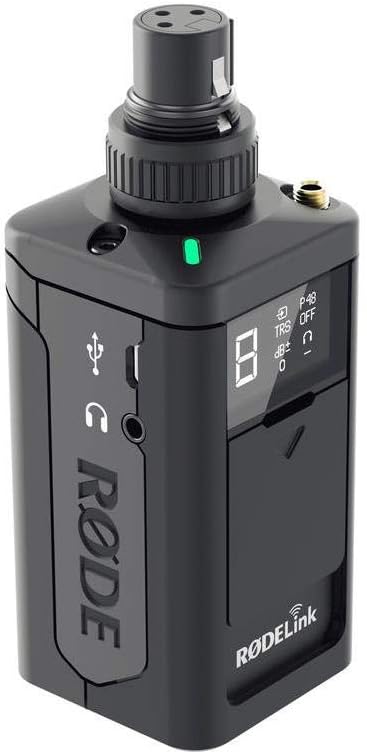
The RØDELink TX-XLR is a versatile wireless plug-on XLR transmitter designed for professional audio applications. It seamlessly integrates with your RØDELink digital wireless system, offering reliable audio transmission and the convenience of one-touch synchronization. This unit is capable of supplying P48 phantom power, making it compatible with a wide range of condenser microphones. Its flexible power options include 2 x AA batteries, Sony NP-F series batteries, or continuous power via micro USB.

Hình 1.1: Mặt trước view of the Rode RodeLink TX-XLR Wireless Plug-On XLR Transmitter, showcasing its compact design and XLR connector.
2. Tính năng
- Tính linh hoạt của nguồn điện: Operates on 2 x AA batteries, Sony NP-F series batteries, or continuous power via micro USB.
- Anten bên trong: Features an integrated antenna for a streamlined design and robust wireless performance.
- Dual Input Connections: Equipped with an XLR input with a locking collar and a 3.5mm TRS locking jack socket for versatile microphone connectivity.
- Phantom Power (P48): Provides 48V phantom power for condenser microphones.
- Kích thước nhỏ gọn: Measures 120mm x 45mm x 45mm, making it highly portable.
- Kết cấu chắc chắn: Built with durable metal material for reliability in various environments.
- Digital Wireless System: Part of the RØDELink digital wireless system for secure and clear audio transmission.
3. Thông tin an toàn
Please read and understand all safety instructions before using the TX-XLR transmitter. Failure to follow these guidelines may result in injury, damage to the device, or voiding of the warranty.
- Không để thiết bị tiếp xúc với nước hoặc độ ẩm quá mức.
- Tránh nhiệt độ quá cao hoặc quá thấp. Vận hành và bảo quản thiết bị trong điều kiện môi trường được khuyến nghị.
- Use only specified power sources (AA batteries, NP-F batteries, or micro USB power).
- Do not attempt to disassemble or modify the unit. Refer all servicing to qualified RØDE personnel.
- Để xa tầm tay trẻ em.
- Vứt bỏ pin một cách có trách nhiệm theo quy định của địa phương.
4. Thiết lập
4.1 Powering the TX-XLR
The TX-XLR offers multiple power options:
- Pin AA: Open the battery compartment and insert two (2) AA batteries, ensuring correct polarity.
- Sony NP-F Battery: The unit is designed to accept a Sony NP-F series battery. Align the battery with the compartment and slide it into place until it clicks.
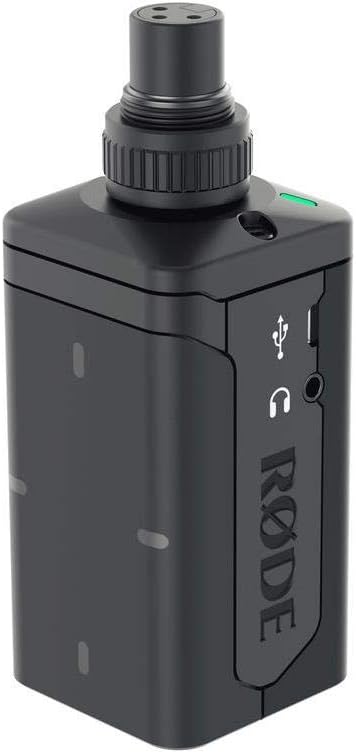
- Micro USB: Connect a micro USB cable to the micro USB port on the side of the unit and to a suitable USB power source (e.g., computer, USB wall adapter). This provides continuous power and can also charge rechargeable NP-F batteries if inserted.
Hình 4.1: Mặt bên view of the TX-XLR, highlighting the micro USB port for power and the 3.5mm headphone monitoring jack.
4.2 Kết nối micrô
The TX-XLR features an XLR input with a locking collar. Simply plug your XLR microphone into the top of the unit. For microphones requiring phantom power, ensure the P48 phantom power setting is enabled on the TX-XLR (refer to Section 5.1 for controls).
Additionally, a 3.5mm TRS locking jack socket is available for connecting lavalier microphones or other devices with a 3.5mm output.

Figure 4.2: Front panel of the TX-XLR, showing the OLED display and control buttons for easy access to settings.
4.3 Pairing with a RØDELink Receiver
The TX-XLR utilizes one-touch sync for quick and easy pairing with a compatible RØDELink receiver (e.g., RX-CAM). Follow these steps:
- Ensure both the TX-XLR and the RØDELink receiver are powered on.
- On the TX-XLR, navigate to the pairing menu using the control buttons.
- On the receiver, activate its pairing mode.
- The units should automatically detect and pair with each other. The display on both units will confirm a successful connection.
5. Hoạt động
5.1 Điều khiển và Màn hình
The TX-XLR features an intuitive OLED display and control buttons for managing settings:
- Nút nguồn: Press and hold to turn the unit on/off. A short press may activate/deactivate mute.
- Các nút điều hướng (Trái/Phải): Được sử dụng để điều hướng qua các tùy chọn menu và điều chỉnh giá trị.
- Chọn nút: Xác nhận lựa chọn hoặc vào menu phụ.
- Màn hình OLED: Shows current channel, battery status, audio levels, phantom power status (P48), and other settings.
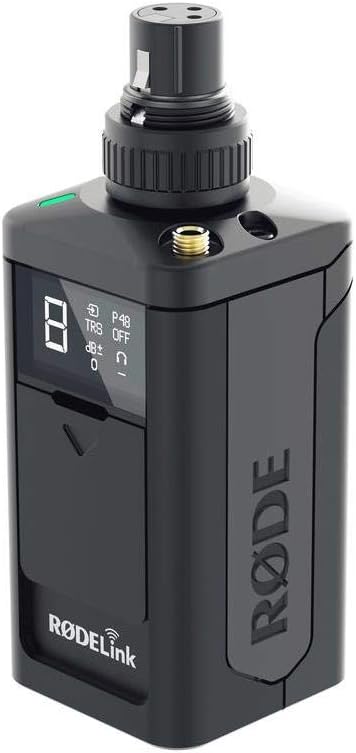
Hình 5.1: Góc cạnh view of the TX-XLR, providing a clear look at the display and the tactile control buttons.
5.2 Adjusting Audio Gain
To optimize your audio levels, you can adjust the gain on the TX-XLR. Use the navigation buttons to access the gain setting on the display and increase or decrease the input sensitivity as needed. Monitor your audio levels on the receiver or a connected monitoring device to prevent clipping.
5.3 Kích hoạt nguồn ảo
If using a condenser microphone that requires 48V phantom power, navigate to the P48 setting on the TX-XLR's display and activate it. Ensure your microphone is connected before enabling phantom power.
6. Bảo trì
6.1 Vệ sinh
To clean the TX-XLR, use a soft, dry cloth. Do not use abrasive cleaners, solvents, or harsh chemicals. Avoid getting moisture into any openings.
6.2 Lưu trữ
When not in use for extended periods, remove batteries from the unit to prevent leakage. Store the TX-XLR in a cool, dry place, away from direct sunlight and extreme temperatures.
Hình 6.1: Phía sau view of the TX-XLR, illustrating the battery compartment for AA or NP-F series batteries.
KHAI THÁC. Xử lý sự cố
| Vấn đề | Nguyên nhân có thể | Giải pháp |
|---|---|---|
| Không có điện | Dead batteries; Incorrect battery insertion; USB cable not connected or faulty. | Replace batteries; Check battery polarity; Ensure USB cable is securely connected to a working power source. |
| Không có đầu ra âm thanh | Transmitter not paired; Microphone not connected; Phantom power off (for condenser mics); Gain too low; Muted. | Re-pair transmitter and receiver; Check microphone connection; Enable P48 phantom power; Increase gain; Check mute status. |
| Poor audio quality / Dropouts | Interference; Out of range; Low battery. | Move away from other wireless devices; Reduce distance between transmitter and receiver; Replace or charge batteries. |
| Nguồn ảo không hoạt động | P48 setting disabled; Faulty microphone or cable. | Enable P48 in settings; Test with a different microphone or XLR cable. |
8. Thông số kỹ thuật
| Tính năng | Chi tiết |
|---|---|
| Tên mẫu | TX-XLR |
| Nguồn điện | 2 x AA battery, NP-F series battery, or micro USB |
| Ăng-ten | Nội bộ |
| Kết nối đầu vào | XLR with locking collar, 3.5mm TRS locking jack socket |
| Trở kháng đầu vào | 1kΩ (XLR), 10kΩ (3.5mm) |
| Kích thước (D x R x C) | 120mm x 45mm x 45mm (Product Dimensions: 17.78 x 7.62 x 12.7 cm) |
| Trọng lượng sản phẩm | 222 gam |
| Vật liệu | Kim loại |
| Dải tần số | 20Hz - 20kHz |
| Công nghệ kết nối | Không dây, USB |
| Tính năng đặc biệt | Runs on Plug-In Power, Wireless Connectivity |
9. Bảo hành và Hỗ trợ
RØDE products are designed and manufactured to the highest quality standards. For information regarding warranty coverage, product registration, and technical support, please visit the official RØDE webtrang web hoặc liên hệ với bộ phận dịch vụ khách hàng của họ.
Always refer to the official RØDE webtrang web cung cấp thông tin mới nhất và các nguồn hỗ trợ.


