Giới thiệu
This manual provides detailed instructions for the setup, operation, maintenance, and troubleshooting of your Instapark PWT-07 Digital Programmable Water Timer. Please read this manual thoroughly before using the device to ensure proper function and longevity.
Thông tin an toàn
- Use only 1.5V AA alkaline batteries. Do not mix old and new batteries, or different battery types.
- Hãy đảm bảo ngăn chứa pin được đóng kín chắc chắn để duy trì khả năng chống nước đạt chuẩn IP66.
- Do not expose the timer to extreme temperatures or direct sunlight for prolonged periods, which may affect battery life and device performance.
- Disconnect the timer from the faucet and drain it before freezing temperatures to prevent damage.
- This device is designed for outdoor use with standard ¾” (GHS) threaded faucets.
Nội dung gói
Xác minh rằng tất cả các mục đều có trong gói hàng:
- Instapark PWT-07 Water Timer
- Hướng dẫn sử dụng (tài liệu này)
- Thẻ bảo hành
Note: 2 AA alkaline batteries are required and not included.
Tính năng sản phẩm
- Single-station digital programmable faucet water timer.
- Impulse solenoid valve for reliable operation.
- Compatible with standard ¾” (GHS) threaded outdoor hose faucets.
- User-friendly interface with a single oversized rotary dial and 4 pushbuttons.
- Large, easy-to-read LCD display (2.1” x 1”).
- Xếp hạng chống nước: IP66.
- Built-in rain delay function (24, 48, or 72 hours).
- Manual watering option without interrupting programmed schedules.
- Detachable battery compartment for easy battery replacement.
- Low power consumption, up to 4,000 on/off cycles per battery set.
Cài đặt
1. Lắp đặt pin
The Instapark PWT-07 requires two (2) 1.5V AA alkaline batteries (not included).
- Xác định vị trí ngăn chứa pin ở mặt sau của bộ hẹn giờ.
- Trượt nắp ngăn chứa pin xuống dưới để mở.
- Lắp hai pin kiềm AA mới, đảm bảo đúng cực (+/-).
- Trượt nắp ngăn chứa pin trở lại vị trí cũ cho đến khi nghe thấy tiếng kêu tách.
- The LCD display should illuminate, indicating successful battery installation. If the display shows a low battery indicator, remove the batteries, wait for the screen to go completely dark, then reinsert them.
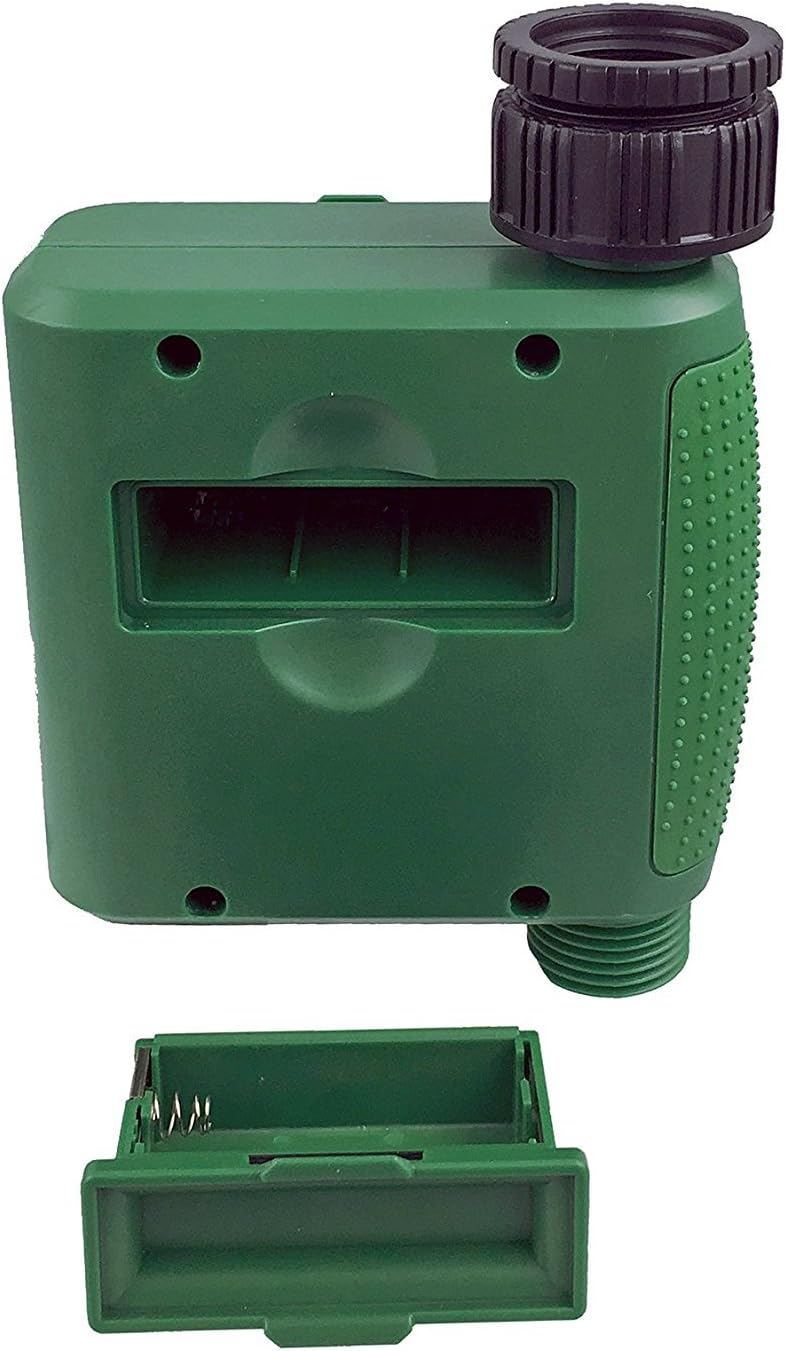
Hình 1: Ngăn chứa pin sau khi tháo nắp.
2. Lắp đặt bộ hẹn giờ
Attach the timer to your outdoor faucet:
- Hãy đảm bảo vòi nước sạch sẽ và không bị tắc nghẽn.
- Screw the timer's inlet (top connector) onto a standard ¾” (GHS) outdoor hose faucet. Hand-tighten only to prevent damage. Do not overtighten.
- Connect your garden hose or irrigation system to the timer's outlet (bottom connector). Hand-tighten securely.
- Turn on the faucet fully. The timer is designed to operate under pressure.

Figure 2: Instapark PWT-07 mounted on a faucet.
Hướng dẫn sử dụng
The timer features a large rotary dial and four buttons: BỘ, +, -, Và THỦ CÔNG.

Hình 3: Bảng điều khiển và màn hình LCD.
1. Cài đặt thời gian hiện tại
- Xoay nút xoay để ĐẶT ĐỒNG HỒ.
- Sử dụng + Và - các nút để điều chỉnh giờ hiện tại. Nhấn BỘ để xác nhận.
- Sử dụng + Và - buttons to adjust the current minute. Press BỘ để xác nhận.
2. Programming Watering Schedule
The timer allows you to set a start time, duration, and frequency for watering.
Đặt thời gian bắt đầu:
- Xoay nút xoay để THỜI GIAN BẮT ĐẦU.
- Sử dụng + Và - buttons to set the desired watering start hour. Press BỘ để xác nhận.
- Sử dụng + Và - buttons to set the desired watering start minute. Press BỘ để xác nhận.
Thiết lập thời lượng (thời gian):
- Xoay nút xoay để BAO LÂU.
- Sử dụng + Và - buttons to set the watering duration (from 5 seconds to 360 minutes). Press BỘ để xác nhận.
Thiết lập tần suất:
- Xoay nút xoay để TẦN SUẤT.
- Sử dụng + Và - buttons to select the watering frequency (e.g., every 10 seconds, 30 seconds, 1 minute, 3 minutes, 5 minutes, 1 hour, 2 hours, 4 hours, 12 hours, 1 day, 2 days, 3 days, 4 days, 5 days, 6 days, 7 days). Press BỘ để xác nhận.
After setting all parameters, turn the rotary dial to CHẠY to activate the programmed schedule.
3. Tưới nước bằng tay
Để tưới nước thủ công mà không ảnh hưởng đến lịch trình đã lập trình của bạn:
- Đảm bảo mặt số được đặt thành CHẠY or TẮT.
- Nhấn nút THỦ CÔNG nút. Màn hình sẽ hiển thị thời gian tưới nước thủ công mặc định.
- Sử dụng + Và - buttons to adjust the desired manual watering duration.
- Nhấn BỘ to start manual watering. The timer will run for the selected duration and then automatically shut off.
- Để dừng tưới nước thủ công sớm, hãy nhấn nút THỦ CÔNG nút một lần nữa.
4. Chức năng hoãn trận đấu do mưa
The rain delay function allows you to pause your watering schedule for a set period without losing your program settings.
- Đảm bảo mặt số được đặt thành CHẠY.
- Nhấn và giữ - button for 3 seconds. The display will show "DELAY" and a default delay duration.
- Sử dụng + Và - buttons to select a delay duration of 24, 48, or 72 hours.
- Nhấn BỘ to activate the rain delay. The timer will resume its programmed schedule after the delay period ends.
- To cancel the rain delay, press and hold the - một lần nữa trong 3 giây.
BẢO TRÌ
- Thay thế pin: Replace batteries when the low battery indicator appears on the LCD. Always use new AA alkaline batteries.
- Vệ sinh: Xóa hẹn giờ với quảng cáoamp vải. Không sử dụng chất tẩy rửa có tính mài mòn hoặc dung môi.
- Mùa đông: Before the first frost, disconnect the timer from the faucet. Remove the batteries and store the timer indoors in a dry, frost-free location. Failure to do so may result in damage from freezing water.
- Màng lọc: Periodically check the filter screen inside the inlet connector for debris. Clean if necessary to ensure proper water flow.
Xử lý sự cố
| Vấn đề | Nguyên nhân có thể | Giải pháp |
|---|---|---|
| Timer does not turn on / LCD is blank. | Pin chết hoặc lắp không đúng cách. | Replace with new AA alkaline batteries, ensuring correct polarity. If still blank, remove batteries, wait for screen to fully clear, then reinsert. |
| Water does not turn on at scheduled time. |
|
|
| Water does not turn off. |
|
|
| Nước rò rỉ từ các mối nối. |
|
|
| Low battery indicator flashes even with new batteries. | Firmware not booting correctly after battery change. | Remove batteries, wait for the LCD screen to go completely dark (may take a few minutes), then reinsert new batteries. |
Thông số kỹ thuật
| Người mẫu | PWT-07 |
| Nguồn điện | 2 pin kiềm AA 1.5V (không bao gồm) |
| Loại van | Van điện từ xung |
| Áp suất nước làm việc | 14.5 đến 116 psi |
| Dòng điện chờ | <100 µA |
| Watering Frequency Settings | 10s, 30s, 1m, 3m, 5m, 1h, 2h, 4h, 12h, 1d, 2d, 3d, 4d, 5d, 6d, 7d (16 settings) |
| Watering Duration Settings | 5s, 10s, 15s, 20s, 25s, 30s, 35s, 40s, 45s, 50s, 55s, 1-360m |
| Định dạng hiển thị thời gian | 24 giờ |
| Xếp hạng chống thấm nước | IP66 |
| Vật liệu | Nhựa ABS |
| Kích thước sản phẩm | 4.25"D x 6"W x 2.6"H |
| Trọng lượng sản phẩm | 14.2 Ounce |
Bảo hành và Hỗ trợ
The Instapark PWT-07 Digital Programmable Water Timer is backed by a standard 1-year manufacturer's warranty from the date of purchase. This warranty covers defects in materials and workmanship under normal use.
For warranty claims, technical support, or any questions regarding your product, please contact Instapark customer service. Please have your purchase receipt and product model number (PWT-07) available when contacting support.
Contact information for Instapark customer service can typically be found on the manufacturer's webtrang web hoặc tài liệu mua hàng của bạn.


