1. Sản phẩm hếtview
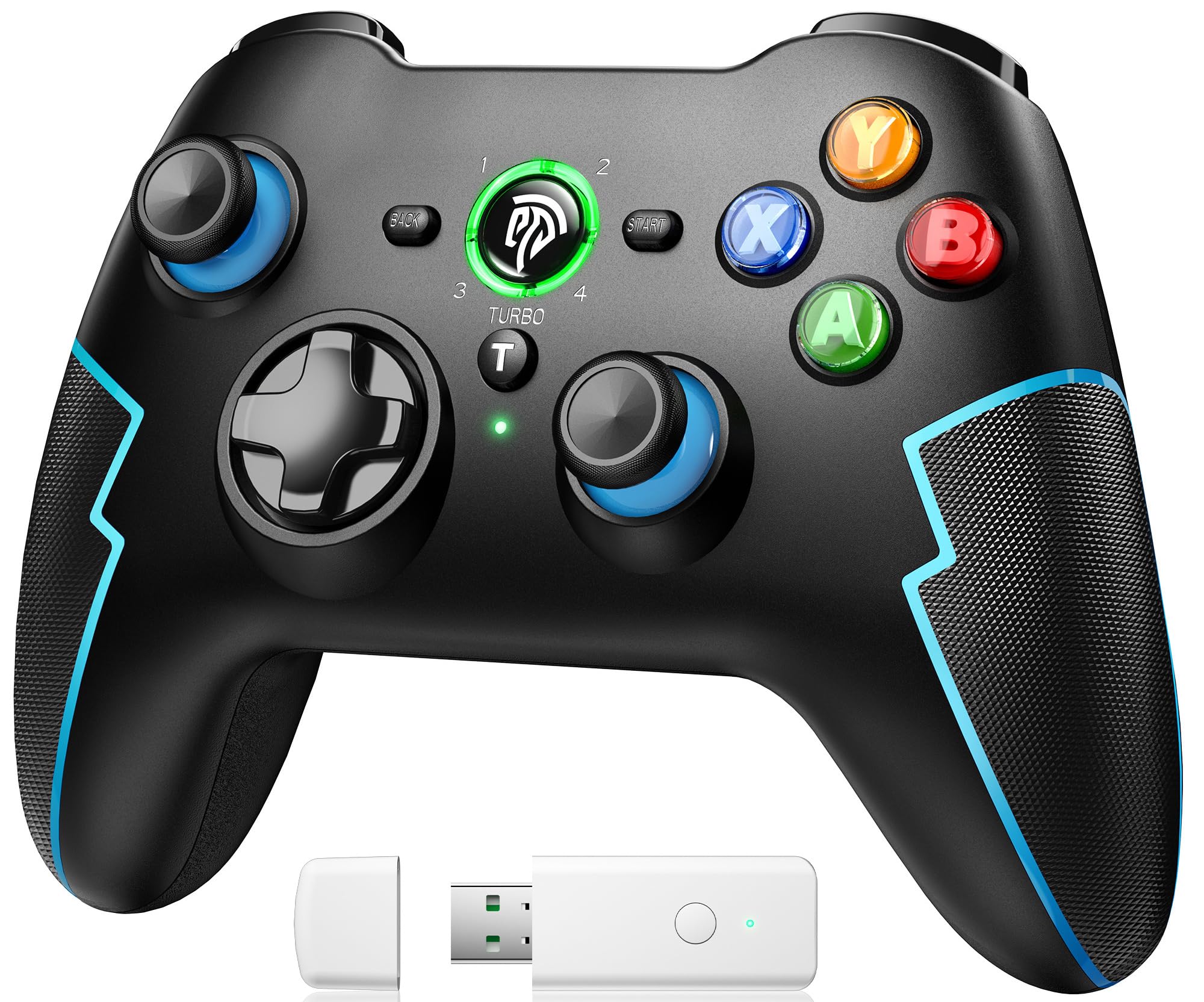
The EasySMX 9013PRO is a versatile wireless game controller designed for a superior gaming experience across multiple platforms. It features advanced Hall effect triggers, a customizable Turbo function, and dual vibration motors for immersive feedback. Its ergonomic design ensures comfort during extended gaming sessions.
Các tính năng chính:
- Khả năng tương thích đa nền tảng: Supports PC, PS3, Nintendo Switch, Android TV Box, mobile phones, tablets, and laptops.
- Ba chế độ kết nối: Offers flexible connectivity via Bluetooth, 2.4 GHz wireless dongle, or wired USB.
- High-Quality Hall Linear Triggers: Provides precise and responsive control with zero dead zones and a smooth, realistic feel, enhancing accuracy in various game genres.
- Chức năng Turbo: Customize the Turbo button for rapid-fire actions, reducing finger fatigue and giving a competitive edge in action and arcade games.
- Rung động kép: Built-in dual electric motors deliver realistic haptic feedback, making in-game actions like slides and shots more immersive.
- Pin sạc: Equipped with a 600mAh rechargeable battery, offering up to 8 hours of continuous gameplay on a 2-hour charge. Includes an automatic power-off function to conserve energy.
- Thiết kế công thái học: Asymmetrical joystick layout and a soft, non-slip grip area ensure optimal comfort and secure handling.

2. Thiết lập
2.1 Sạc bộ điều khiển
Before first use, fully charge the controller. Connect the provided USB cable to the controller's charging port and the other end to a USB power source (e.g., PC, USB wall adapter). The indicator lights will show charging status and turn solid when fully charged. A full charge takes approximately 2 hours.

2.2 Chế độ kết nối
The EasySMX 9013PRO offers three ways to connect to your devices:
- 2.4 GHz Wireless (USB Dongle):
For PC, PS3, and Android TV Box. Insert the 2.4 GHz USB dongle into an available USB port on your device. The controller will automatically connect, providing an ultra-low latency gaming experience.

The controller connected via 2.4G wireless to a PC using the USB dongle. - Kết nối Bluetooth:
Compatible with Nintendo Switch, mobile phones, tablets, and laptops. Enable Bluetooth on your device. On the controller, press and hold the TRANG CHỦ button until the indicator lights flash rapidly, indicating pairing mode. Select "EasySMX 9013PRO" from your device's Bluetooth settings to connect.

The controller connected via Bluetooth to a Nintendo Switch console. - Kết nối có dây:
For PC, PS3, and Android TV. Connect the controller directly to your device using a USB cable. The controller will be recognized automatically.

The controller connected via wired USB to a PC setup.
3. Hướng dẫn vận hành
3.1 Chức năng Turbo
The Turbo function allows for rapid, continuous input of a button press. To activate, press and hold the TURBO button, then press the desired action button (e.g., A, B, X, Y). To deactivate, repeat the process.

3.2 Rung kép
The controller features dual vibration motors that provide tactile feedback during gameplay. The intensity of the vibration can be adjusted to suit your preference. Refer to your device's or game's settings for vibration intensity adjustments, if available.

3.3 Bộ kích hoạt tuyến tính Hall
The Hall effect linear triggers offer precise and smooth input, ideal for racing games where subtle acceleration and braking are crucial, or for action games requiring accurate skill deployment. These triggers provide a longer lifespan due to their non-contact electromagnetic induction mechanism.

3.4 nút có thể lập trình
The controller may feature programmable buttons (often located on the back) that allow you to map complex commands or frequently used actions for quick access. Refer to the specific instructions for programming these buttons, usually involving a 'Macro' button or a combination of button presses.

3.5 Chức năng chụp màn hình
For compatible devices like the Nintendo Switch, the controller includes a dedicated screenshot button to capture in-game moments. Press the screenshot button (often located near the HOME button) to save an image of your screen.

4. Bảo trì
- Vệ sinh: Sử dụng vải mềm, khô để vệ sinh bộ điều khiển. Tránh sử dụng hóa chất mạnh hoặc vật liệu mài mòn.
- Kho: Bảo quản bộ điều khiển ở nơi khô ráo, thoáng mát, tránh ánh nắng trực tiếp và nhiệt độ cao.
- Chăm sóc pin: To prolong battery life, avoid fully discharging the controller frequently. Charge it regularly, even if not in use for extended periods. The automatic power-off feature helps conserve battery when idle.
- Tránh sát thương vật lý: Do not drop, disassemble, or apply excessive force to the controller.
KHAI THÁC. Xử lý sự cố
- Bộ điều khiển không kết nối:
- Đảm bảo bộ điều khiển đã được sạc.
- For 2.4 GHz, verify the USB dongle is properly inserted and recognized by the device.
- Đối với Bluetooth, hãy đảm bảo Bluetooth đã được bật trên thiết bị của bạn và bộ điều khiển đang ở chế độ ghép nối. Thử ghép nối lại.
- For wired, ensure the USB cable is securely connected to both the controller and the device.
- Khởi động lại cả bộ điều khiển và thiết bị.
- Buttons or Joysticks Unresponsive/Drifting:
- Đảm bảo bộ điều khiển được sạc đầy.
- Calibrate the joysticks and triggers through your device's system settings (e.g., Windows Control Panel for game controllers, Nintendo Switch system settings).
- Lau sạch xung quanh các nút bấm và cần điều khiển để loại bỏ mọi mảnh vụn.
- Tuổi thọ pin ngắn:
- Đảm bảo bộ điều khiển được sạc đầy trước khi sử dụng.
- Reduce vibration intensity if possible, as it consumes more power.
- The battery may degrade over time with extensive use.
- Chức năng Turbo không hoạt động:
- Hãy đảm bảo bạn đang nhấn đúng nút. TURBO button simultaneously with the desired action button.
- Some games or platforms may not fully support the Turbo function.
6. Thông số kỹ thuật
| Tính năng | Chi tiết |
|---|---|
| Thương hiệu | Dễ dàngSMX |
| Tên mẫu | EasySMX Wireless PC Controller |
| Số hiệu mẫu | ESM-9013-Blue |
| Năm mẫu | 2019 |
| Kích thước sản phẩm | 18 x 8 x 13.5cm |
| Trọng lượng sản phẩm | 310 gam |
| Nguồn điện | Pin sạc (600mAh) |
| Công nghệ kết nối | Wireless (2.4 GHz, Bluetooth), Wired |
| Hệ điều hành tương thích | Android, Windows |
| Thiết bị tương thích | Smartphone, Video Game Console (PC, PS3, Switch, Android TV Box, Mobile, Tablet, Laptop) |
| Tính năng đặc biệt | Ergonomic, Wireless, Multi-purpose, Hall Trigger, Turbo, Dual Vibration |
| Số lượng nút | 16 |
7. Bảo hành và Hỗ trợ
For warranty information, technical support, or further assistance, please refer to the official EasySMX webTrang web hoặc tài liệu được cung cấp kèm theo khi bạn mua hàng. Hãy giữ lại bằng chứng mua hàng để yêu cầu bảo hành.
You can visit the EasySMX store on Amazon for more products and information: Cửa hàng EasySMX trên Amazon


