Hướng dẫn an toàn quan trọng
ĐỌC KỸ TẤT CẢ CÁC HƯỚNG DẪN TRƯỚC KHI SỬ DỤNG.
- Luôn rút phích cắm quạt khỏi ổ điện trước khi vệ sinh, bảo dưỡng hoặc di chuyển.
- Không được cho ngón tay hoặc bất kỳ vật gì khác vào bên trong lưới tản nhiệt khi quạt đang hoạt động.
- Không vận hành bất kỳ quạt nào có dây hoặc phích cắm bị hỏng. Vứt bỏ quạt hoặc trả lại cơ sở dịch vụ được ủy quyền để kiểm tra và/hoặc sửa chữa.
- Không chạy dây dưới thảm. Không phủ dây bằng thảm trải sàn, thảm chạy hoặc các vật liệu phủ tương tự. Sắp xếp dây cách xa khu vực đi lại và nơi không bị vấp ngã.
- Không sử dụng quạt ở nơi ẩm ướt hoặcamp Các địa điểm như phòng tắm hoặc khu giặt ủi.
- Quạt này chỉ dùng được trong nhà. Không sử dụng ngoài trời.
- Keep the fan away from curtains, drapes, or any objects that may get caught in the fan blades.
- Giám sát trẻ em khi quạt đang hoạt động.
Sản phẩm trênview
The Optimus 18-inch High Velocity Industrial Floor Fan is designed to provide powerful air circulation in various indoor environments. Its robust construction and high-velocity motor make it suitable for workshops, garages, and large rooms.
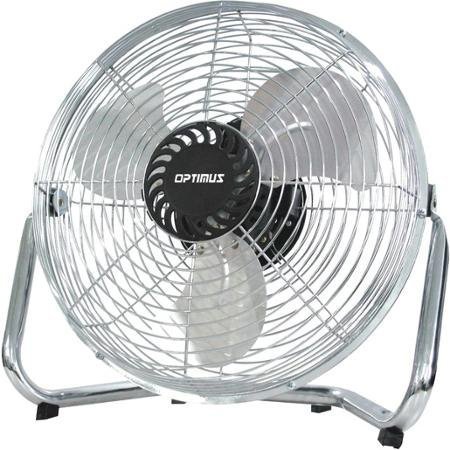
Image: Optimus 18-inch High Velocity Industrial Floor Fan. This image shows the fan with its silver metallic finish and sturdy floor stand.
Các tính năng chính:
- 18-inch diameter for wide air distribution.
- Industrial-grade high velocity airflow.
- Durable metallic finish.
- Floor standing design for stable placement.
- Multiple power levels for adjustable airflow.
Hướng dẫn thiết lập
- Tháo quạt ra: Cẩn thận lấy quạt và tất cả các bộ phận ra khỏi bao bì. Giữ lại bao bì để bảo quản hoặc vận chuyển trong tương lai.
- Assemble the Floor Stand:
- Attach the fan head to the floor stand using the provided screws and tools. Ensure all connections are secure.
- Verify the fan head can pivot smoothly on the stand.
- Vị trí: Place the fan on a firm, level surface. Ensure there is adequate space around the fan for proper air circulation and to prevent obstruction of the air intake/output. Keep the fan at least 3 feet away from walls or furniture.
- Kết nối nguồn điện: Ensure the fan is in the "OFF" position before plugging it into a standard 120V AC electrical outlet.
Hướng dẫn sử dụng
This fan features push-button controls for easy operation. A remote control may also be included for convenience.
- Bật/Tắt nguồn: Locate the power button on the control panel. Press the button once to turn the fan ON. Press it again to turn the fan OFF.
- Điều chỉnh tốc độ quạt: The fan has 4 power levels. After turning the fan ON, repeatedly press the speed control button to cycle through the available speed settings (Low, Medium, High, Max). The fan will operate at the selected speed.
- Điều chỉnh hướng luồng khí: The fan head can be tilted manually to direct airflow upwards or downwards. Gently tilt the fan head to the desired angle. Do not force the fan head beyond its intended range of motion.
BẢO TRÌ
Regular cleaning and maintenance will ensure optimal performance and extend the life of your fan.
- Vệ sinh Quạt:
- Luôn rút phích cắm quạt khỏi nguồn điện trước khi vệ sinh.
- Sử dụng một mềm, damp cloth to wipe the exterior surfaces of the fan. Do not use abrasive cleaners or harsh chemicals, as these may damage the finish.
- To clean the fan blades, carefully remove the front grille (if detachable, refer to assembly instructions for details). Wipe the blades with a soft cloth. Ensure the grille is securely reattached before operating the fan.
- Đảm bảo tất cả các bộ phận đều khô hoàn toàn trước khi cắm lại quạt.
- Kho: Khi không sử dụng trong thời gian dài, hãy bảo quản quạt ở nơi khô ráo, thoáng mát. Nên cất giữ quạt trong bao bì gốc để tránh bụi bẩn và hư hỏng.
Xử lý sự cố
| Vấn đề | Nguyên nhân có thể | Giải pháp |
|---|---|---|
| Quạt không quay. | Not plugged in; power outlet not working; fan switch is off. | Ensure fan is securely plugged into a working outlet. Check household fuse/circuit breaker. Press the power button to turn the fan on. |
| Lưu lượng gió thấp. | Fan speed set too low; obstructed intake/output; dirty blades. | Increase fan speed. Clear any obstructions. Clean fan blades and grilles as per maintenance instructions. |
| Tiếng ồn hoặc tiếng lạch cạch bất thường. | Loose parts; fan not on a level surface; foreign object in blades. | Unplug the fan and check for any loose screws or components. Place the fan on a stable, level surface. Carefully inspect for and remove any foreign objects. |
Thông số kỹ thuật
| Tính năng | Chi tiết |
|---|---|
| Thương hiệu | Optimus |
| Tên mẫu | Tốc độ cao |
| Số hiệu mẫu sản phẩm | 306c1b92-f36b-4ccc-ac62-2ad33d5c9efb |
| Đường kính | 18 inch |
| Màu sắc | Bạc |
| Phong cách | Công nghiệp |
| Nguồn điện | Điện có dây |
| Số mức công suất | 4 |
| Phương pháp kiểm soát | Nút điều khiển |
| Sử dụng trong nhà/ngoài trời | Trong nhà |
| Các thành phần bao gồm | Floor Stand, Remote Control |
| Đặc điểm kỹ thuật đạt | OSHA |
Bảo hành và Hỗ trợ
Optimus products are manufactured to high-quality standards. This product is covered by a limited warranty against defects in materials and workmanship from the date of purchase. Please refer to the warranty card included with your product for specific terms and conditions.
For technical support, troubleshooting assistance, or warranty claims, please contact Optimus customer service. Contact information can typically be found on the product packaging or the official Optimus webđịa điểm.
Vui lòng giữ lại bằng chứng mua hàng để bảo hành.


