Giới thiệu
This guide provides essential information for new owners of the Samsung Galaxy S5 smartphone. It covers fundamental operations, key features, and tips to help you effectively utilize your device. This manual is specifically tailored for the American version of the Galaxy S5 smartphone sold in the United States.
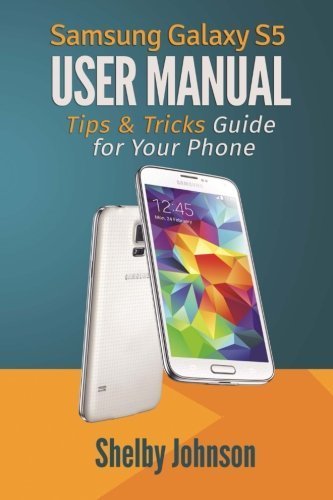
Image: A Samsung Galaxy S5 smartphone, showcasing its display and physical buttons. This image illustrates the general appearance of the device.
Thiết lập và cấu hình ban đầu
Begin your experience with the Samsung Galaxy S5 by performing the initial setup steps.
Bắt đầu
- Bật nguồn: Press and hold the power button located on the right side of the device until the Samsung logo appears.
- Lựa chọn ngôn ngữ: Làm theo lời nhắc trên màn hình để chọn ngôn ngữ bạn muốn.
- Kết nối Wi-Fi: Connect to a Wi-Fi network to facilitate setup and software updates.
- Thiết lập tài khoản Google: Đăng nhập bằng tài khoản Google của bạn hoặc tạo tài khoản mới. Điều này rất quan trọng để truy cập Cửa hàng Google Play và các dịch vụ khác của Google.
- Thiết lập tài khoản Samsung: Optionally, sign in or create a Samsung account for additional features and services.
Transferring Contacts
There are several methods to transfer your contacts to your new Galaxy S5:
- Google Account Sync: If your previous phone's contacts were synced with a Google account, they will automatically transfer upon signing into the same account on your S5.
- Samsung Smart Switch: Use the Smart Switch application to transfer data, including contacts, from an old device to your Galaxy S5. This can be done wirelessly or via a USB cable.
- SIM Card Import: If contacts are stored on your SIM card, navigate to Contacts > Menu > Import/Export > Import from SIM card.
Vận hành Galaxy S5 của bạn
Understand the core functionalities and advanced features of your Samsung Galaxy S5.
Máy quét vân tay
The Galaxy S5 features a fingerprint scanner integrated into the home button for enhanced security and convenience.
- Cài đặt: Đi đến Settings > Finger Scanner > Fingerprint Manager to register your fingerprints. You will need to swipe your finger over the home button multiple times for accurate registration.
- Cách sử dụng: Use your registered fingerprint to unlock your device or authorize purchases.
Chức năng cơ bản của điện thoại
- Gọi điện: Nhấn vào Điện thoại Nhấp vào biểu tượng, nhập số điện thoại và nhấn nút gọi.
- Gửi tin nhắn: Nhấn vào Tin nhắn Nhấn vào biểu tượng tin nhắn mới, nhập người nhận và nội dung tin nhắn.
- Duyệt Internet: Sử dụng cài đặt sẵn internet browser or Google Chrome to access webcác trang web.
Advanced Features: S Voice and S Beam
- Giọng S: Activate S Voice by double-pressing the home button. Use voice commands to make calls, send messages, set alarms, and more.
- Chùm S: S Beam allows for quick sharing of large files between NFC-enabled Samsung devices. Ensure both devices have NFC and S Beam enabled in Settings > NFC and payment > S Beam. Touch the backs of the devices together and tap the screen to share content.
Máy ảnh và ghi hình
The Galaxy S5 camera offers various modes and settings for capturing photos and videos.
- Chụp hình: Mở Máy ảnh app, frame your shot, and tap the shutter button.
- Quay video: In the Camera app, switch to video mode and tap the record button to start and stop recording.
- Chế độ máy ảnh: Explore modes like Selective Focus, Panorama, and Virtual Tour Shot for diverse photographic experiences.
BẢO TRÌ
Regular maintenance helps ensure the longevity and optimal performance of your Samsung Galaxy S5.
- Cập nhật phần mềm: Periodically check for and install software updates via Cài đặt > Giới thiệu về thiết bị > Cập nhật phần mềm. Updates often include performance improvements and security patches.
- Chăm sóc pin: To maximize battery life, avoid extreme temperatures and consider enabling power-saving modes when needed.
- Quản lý lưu trữ: Thường xuyên xóa những thứ không cần thiết files and uninstall unused applications to free up storage space. Go to Cài đặt > Lưu trữ to manage your device's memory.
- Vệ sinh: Use a soft, lint-free cloth to gently clean the screen and body of the device. Avoid harsh chemicals.
Xử lý sự cố
Phần này đề cập đến những vấn đề thường gặp mà bạn có thể gặp phải với Galaxy S5.
Thiết bị không phản hồi
- Khởi động lại: Nhấn và giữ nút nguồn khoảng 10 giây để buộc khởi động lại.
- Kiểm tra pin: Ensure the battery is charged. Connect the device to a charger and wait a few minutes before attempting to power it on.
Sự cố kết nối (Wi-Fi/Bluetooth)
- Bật/Tắt: Turn Wi-Fi or Bluetooth off and then back on from the Quick Settings panel or Cài đặt thực đơn.
- Quên mạng đi: For Wi-Fi issues, try forgetting the network and reconnecting. Go to Cài đặt > Wi-Fi, tap and hold the network, then select Quên mạng đi.
- Restart Router/Access Point: If other devices are also affected, restart your Wi-Fi router.
Application Crashes or Freezes
- Ứng dụng Buộc Dừng: Đi đến Cài đặt > Ứng dụng > Trình quản lý ứng dụngChọn ứng dụng gặp sự cố và nhấn vào Buộc dừng.
- Xóa bộ nhớ đệm: In the Application manager, select the app and tap Xóa bộ nhớ đệm.
- Cập nhật ứng dụng: Đảm bảo ứng dụng được cập nhật lên phiên bản mới nhất từ Cửa hàng Google Play.
Thông số kỹ thuật
Key technical specifications for the Samsung Galaxy S5.
| Tính năng | Chi tiết |
|---|---|
| Người mẫu | Samsung Galaxy S5 |
| ASIN | B01FIXDMDA |
| Nhà xuất bản | RAM Internet Media |
| Tác giả | Shelby Johnson |
| Định dạng | Book (User Guide) |
Note: This manual focuses on software features and general usage. For detailed hardware specifications, please refer to official Samsung documentation.
Bảo hành và Hỗ trợ
Information regarding product warranty and customer support is typically provided with the device packaging or available on the official Samsung website. This guide does not contain specific warranty details or direct support contact information.
For official support, please visit the Hỗ trợ Samsung webđịa điểm hoặc liên hệ với dịch vụ khách hàng của họ.