1. Giới thiệu
The Intermec PM43 is a mid-range industrial label printer designed for reliable performance and ease of use. This printer supports both direct thermal and thermal transfer printing methods, making it versatile for various labeling applications. It features a user-friendly interface, available with either a color touch-screen or universal icons, to simplify operation and reduce training requirements. This manual provides essential information for setting up, operating, maintaining, and troubleshooting your PM43 printer.

Hình 1: Mặt trước view of the Intermec PM43 printer, showing the control panel and media output slot.
2. Thiết lập
2.1 Giải nén và đặt
Carefully remove the printer from its packaging. Ensure all packing materials are removed. Place the printer on a stable, flat surface with adequate space around it for ventilation and access to ports and media loading areas.
2.2 Kết nối nguồn điện
- Ensure the printer's power switch is in the OFF (O) position.
- Connect the power cord to the printer's AC inlet.
- Cắm đầu kia của dây nguồn vào ổ cắm điện được nối đất.
2.3 Connecting to a Host System
The PM43 printer supports USB and Ethernet connectivity.
- Kết nối USB: Kết nối cáp USB từ cổng USB của máy in vào cổng USB khả dụng trên máy tính của bạn.
- Kết nối Ethernet: Kết nối cáp Ethernet từ cổng Ethernet của máy in với bộ định tuyến hoặc bộ chuyển mạch mạng của bạn.

Figure 2: Rear panel of the PM43 printer, illustrating the power inlet, power switch, USB ports, and Ethernet port.
2.4 Tải phương tiện
The PM43 printer can use various media types, including labels, tags, and continuous media. For thermal transfer printing, a ribbon is also required.
- Mở nắp khay giấy của máy in.
- Place the roll of labels onto the media supply spindle, ensuring the labels feed from the bottom of the roll.
- Thread the media through the guides and under the printhead assembly.
- If using thermal transfer, load the ribbon onto the ribbon supply spindle and thread it according to the internal diagrams.
- Đóng nắp phương tiện.

Hình 3: Nội bộ view of the PM43 printer, highlighting the media and ribbon loading mechanisms.
3. Hướng dẫn vận hành
3.1 Bật / Tắt nguồn
- To power on, flip the power switch on the rear panel to the ON (I) position. The printer will perform a self-test.
- Để tắt nguồn, hãy gạt công tắc nguồn sang vị trí TẮT (O).
3.2 In ấn cơ bản
Once the printer is connected and media is loaded, you can send print jobs from your host system. Ensure the correct printer drivers are installed on your computer.
- Mở tài liệu hoặc ứng dụng mà bạn muốn in.
- Select the Intermec PM43 printer from the print dialog.
- Adjust print settings (e.g., label size, print density) as needed.
- Bắt đầu quá trình in.
3.3 Using the User Interface
The PM43 features either a color touch-screen or a universal-icon interface for direct control and configuration. Navigate through menus to adjust settings such as media calibration, network configuration, and printer status.
4. Bảo trì
4.1 Vệ sinh đầu in
Regular cleaning of the printhead is crucial for maintaining print quality and extending the printhead's lifespan. Use a lint-free cloth or a printhead cleaning pen with isopropyl alcohol.
- Power off the printer and disconnect the power cord.
- Mở nắp phương tiện.
- Gently wipe the printhead element from the center outwards.
- Hãy đợi đầu in khô hoàn toàn trước khi đóng nắp và bật nguồn máy in.
4.2 Replacing Media and Ribbon
Replace media rolls and thermal transfer ribbons as they run out. Refer to section 2.4 for loading instructions. Always ensure the correct media and ribbon types are used for optimal performance.
KHAI THÁC. Xử lý sự cố
This section addresses common issues you might encounter with your PM43 printer.
5.1 Chất lượng in kém
- Faded or incomplete print: Clean the printhead (see section 4.1). Ensure the ribbon (if thermal transfer) is correctly loaded and not depleted. Adjust print density settings.
- Smudged print: Verify media type is compatible. Ensure printhead pressure is correctly set.
5.2 Kẹt phương tiện
- Tắt nguồn máy in.
- Open the media cover and carefully remove any jammed media.
- Ensure media is loaded correctly and guides are properly adjusted.
- Close the cover and power on.
5.3 Các vấn đề về kết nối
- Printer not detected: Check all cable connections (USB/Ethernet). Restart the printer and host system. Verify driver installation.
- Các vấn đề về mạng: Confirm network cable is connected. Check network settings on the printer and host system.
6. Thông số kỹ thuật
The following table outlines the key technical specifications for the Intermec PM43 printer.
| Tính năng | Đặc điểm kỹ thuật |
|---|---|
| Tên mẫu | PM43 |
| Công nghệ in ấn | Truyền nhiệt trực tiếp / Truyền nhiệt |
| Màu In | Đơn sắc (Đen) |
| Tốc độ in tối đa | 12 inch một giây |
| Độ phân giải in tối đa | 203dpi |
| Các loại phương tiện được hỗ trợ | Black Mark, Continuous Label, Fanfold, Gap, Label, Linered Label, Linerless, Notch, Roll Fed, Tag |
| Kích thước phương tiện tối đa | 4 x 6 inch |
| Kết nối | USB-Ethernet |
| Ký ức | 128MB |
| Phương pháp kiểm soát | Touch-screen or Universal-icon interface |
| Kích thước sản phẩm | 25 x 18 x 16 inch |
| Trọng lượng sản phẩm | 1 pound |
| Nguồn điện | Nguồn cung cấp AC |
| Language Emulation | DSim, Fingerprint, IPL, XML |
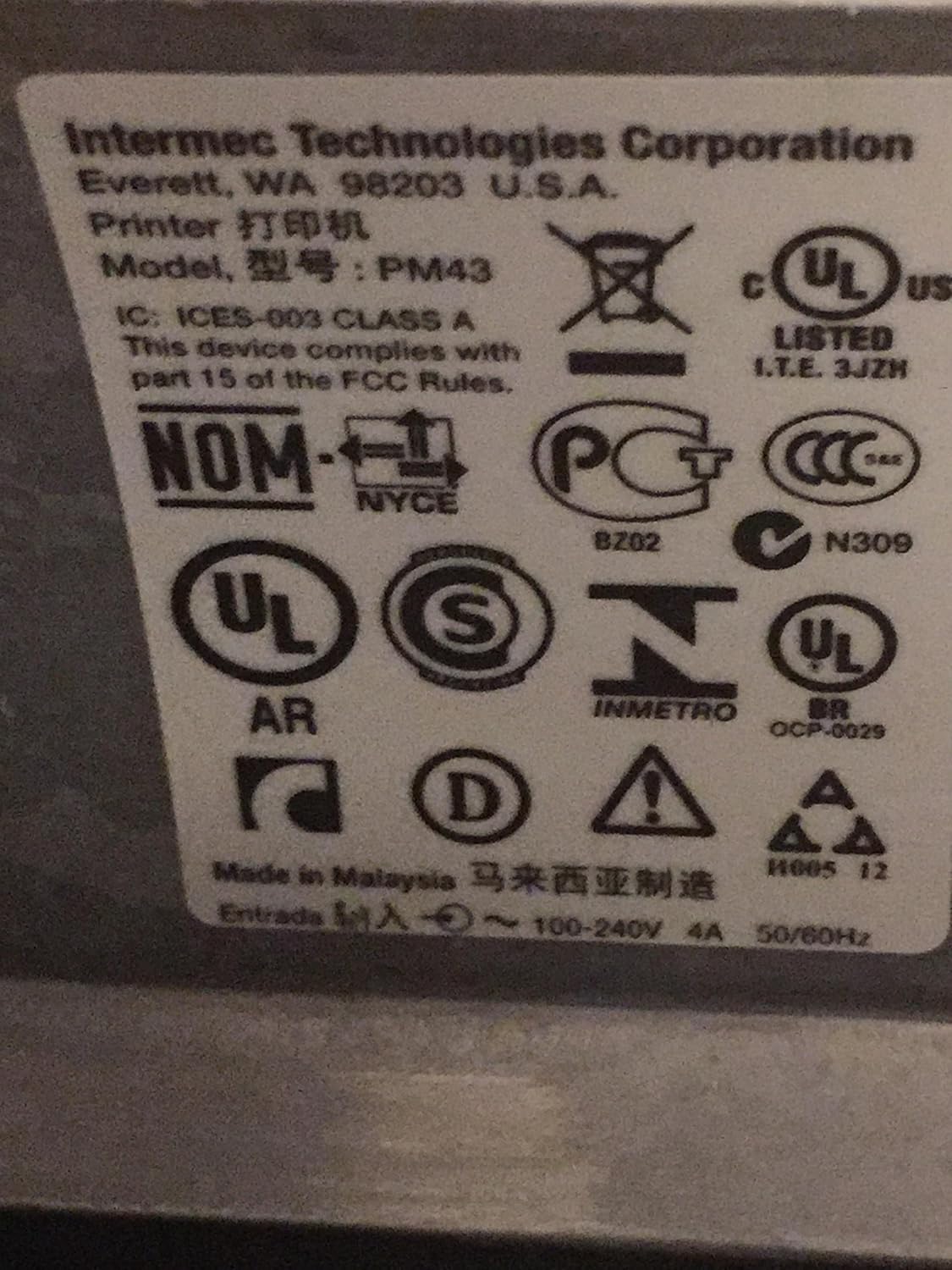
Figure 4: Regulatory and compliance labels found on the Intermec PM43 printer.
7. Thông tin bảo hành
The Intermec PM43 printer is covered by a limited warranty. For specific terms and conditions, please refer to the warranty documentation included with your product or visit the official Intermec support webđịa điểm.
8. Hỗ trợ
For further assistance, technical support, or to download the latest drivers and firmware, please visit the official Intermec support website or contact your authorized Intermec dealer. Ensure you have your printer's model number (PM43A01000000201) and serial number available when seeking support.


