Giới thiệu
This manual provides essential instructions for the safe and efficient operation of your ICOM IC-7300 Direct Sampling Shortwave Radio. Please read this manual thoroughly before using the transceiver to ensure proper functionality and to prevent damage.
The ICOM IC-7300 is a high-performance HF/50MHz transceiver featuring RF direct sampling technology. It includes a 4.3-inch color touchscreen LCD, a real-time spectrum scope, and a built-in automatic antenna tuner. It supports various modes including SSB, CW, RTTY, AM, and FM, with a maximum output power of 100 Watts.
Thông tin an toàn
- Do not operate the transceiver in explosive atmospheres.
- Đảm bảo nối đất thích hợp để tránh bị điện giật.
- Avoid exposing the unit to direct sunlight, rain, or extreme temperatures.
- Use only the specified power supply (13.8V DC).
- Do not open the transceiver casing; hãy giao việc bảo trì cho nhân viên có chuyên môn.
Nội dung gói
Xác minh rằng tất cả các mục đều có trong gói hàng:
- ICOM IC-7300 Radio Unit
- Microphone cầm tay HM-219
- Cáp nguồn DC
- Phần cứng cài đặt
- Hướng dẫn sử dụng (tài liệu này)
Cài đặt
1. Kết nối nguồn điện
Connect the supplied DC power cable to the transceiver's DC IN connector and to a stable 13.8V DC power source. Ensure correct polarity (red to positive, black to negative) to prevent damage.
2. Kết nối Ăng-ten
Connect a suitable HF/50MHz antenna to the ANT connector on the rear panel. For optimal performance and to protect the transceiver, use an antenna designed for the operating frequencies and ensure it is properly matched.
3. Kết nối Micro
Plug the HM-219 hand microphone into the MIC connector on the front panel.
4. Bật nguồn ban đầu
Nhấn nút QUYỀN LỰC button to turn on the transceiver. The ICOM logo will appear on the display, followed by the operating screen.

Image: Front panel of the ICOM IC-7300, displaying the main operating screen with frequency, mode, and spectrum scope.
Hướng dẫn sử dụng
Hoạt động cơ bản
- Lựa chọn tần số: Sử dụng lớn ĐA DẠNG dial to change the operating frequency. You can also directly input frequencies using the touchscreen keypad.
- Lựa chọn chế độ: Tap the mode indicator on the touchscreen (e.g., USB, LSB) to cycle through available modes (SSB, CW, RTTY, AM, FM).
- Điều chỉnh âm lượng: Sử dụng AF/RF/SQL knob to adjust the audio output level.
- Truyền: Nhấn nút CHUYỂN GIAO button or the PTT button on the microphone to transmit. Ensure your antenna is tuned before transmitting.
Sử dụng màn hình cảm ứng
The 4.3-inch color touchscreen provides intuitive access to various functions and settings.
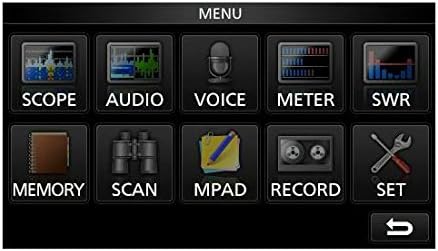
Image: The main menu screen of the IC-7300, accessible via the touchscreen, showing various function icons.
- Spectrum Scope: Vỗ nhẹ PHẠM VI ĐẾN view the real-time spectrum scope, which displays signal activity across a selected frequency range.
- Hiển thị đồng hồ: Vỗ nhẹ MÉT ĐẾN view various operational parameters such as output power, ALC, SWR, and voltage.
- Cài đặt: Vỗ nhẹ BỘ to access detailed configuration options for the transceiver.
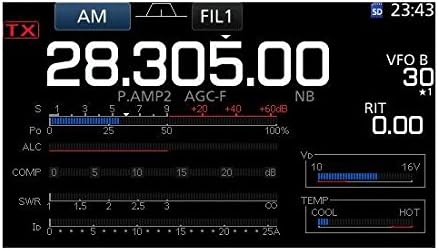
Hình ảnh: Một chi tiết view of the IC-7300's display in AM mode, showing frequency, filter settings, and various operational meters.
Built-in Auto Tuner
The IC-7300 includes an internal automatic antenna tuner. To activate, press the TỰ ĐỘNG TUNE button. The tuner will automatically adjust to achieve the lowest possible SWR for your connected antenna. This function is effective for SWR values up to approximately 3:1.
BẢO TRÌ
- Vệ sinh: Hãy dùng khăn mềm, khô để lau sạch bên ngoài máy thu phát. Không sử dụng chất tẩy rửa có tính ăn mòn hoặc dung môi.
- Thông gió: Ensure the ventilation holes on the top and sides of the unit are not obstructed to prevent overheating.
- Kho: When not in use for extended periods, store the transceiver in a dry, dust-free environment.
Xử lý sự cố
| Vấn đề | Nguyên nhân có thể | Giải pháp |
|---|---|---|
| Không có điện | Power cable disconnected; incorrect voltage; blown fuse. | Check power cable connections; verify 13.8V DC supply; inspect and replace fuse if necessary. |
| Không có đầu ra âm thanh | Volume too low; speaker/headphone disconnected; squelch set too high. | Adjust AF/RF/SQL knob; check speaker/headphone connection; reduce squelch level. |
| Không thể truyền | Antenna not connected; high SWR; PTT button not pressed. | Connect antenna; use auto tuner or external tuner to reduce SWR; ensure PTT is engaged. |
| Tiếp nhận kém | Antenna issue; incorrect mode/frequency; high noise level. | Check antenna connection and type; verify operating mode and frequency; adjust noise reduction (NB, NR) settings. |
Thông số kỹ thuật
| Tính năng | Chi tiết |
|---|---|
| Số hiệu mẫu | IC-7300 |
| Dải tần số (RX) | 0.030 - 74.800 MHz |
| Công suất đầu ra | 100 W (SSB, CW, RTTY, FM); 25 W (AM) |
| Loại máy thu | Trực tiếp Samplinh |
| Số lượng kênh | 101 |
| Nguồn cung cấp Voltage | 13.8 V DC (±15%) |
| Kích thước (Rộng × Cao × Sâu) | 9.4 x 3.7 x 9.4 inch (240 × 94 × 238 mm) |
| Cân nặng | 8.4 pound (3.8 kg) |
| Tính năng đặc biệt | 4.3-inch Color Touchscreen LCD, Real-time Spectrum Scope, Built-in Auto Tuner |
Bảo hành và Hỗ trợ
Để biết thông tin bảo hành và hỗ trợ kỹ thuật, vui lòng tham khảo ICOM chính thức webhoặc liên hệ với đại lý ICOM được ủy quyền. Giữ lại hóa đơn mua hàng để làm bằng chứng bảo hành.
Online resources and additional support may be available at the ICOM America Store on Amazon.
Thông tin tuân thủ
Thiết bị này tuân thủ Phần 15 của Quy định FCC. Hoạt động phải tuân theo hai điều kiện sau: (1) Thiết bị này không được gây nhiễu có hại và (2) thiết bị này phải chấp nhận bất kỳ nhiễu nào nhận được, bao gồm nhiễu có thể gây ra hoạt động không mong muốn.


