1. Sản phẩm hếtview
The Sunricher SR-1009EA is a high-performance 4-channel constant voltage RF receiver designed for controlling various LED lighting applications. It functions as an LED controller, capable of managing single color, dual color, RGB, and RGBW LED strips or fixtures. This receiver operates within a 12-36V DC input range and provides a maximum output of 8 Amps per channel, totaling 32 Amps. It is compatible with a wide range of Sunricher remote controls and wall-mounted controllers, offering flexible control options for multi-zone lighting systems.
Các tính năng chính bao gồm:
- 4-channel, 8A per channel constant voltage RF receiver.
- Đầu vào rộng voltagPhạm vi điện áp: 12-36V DC.
- Compatibility with various single color, dual color, RGB, and RGBW RF remote controls.
- Supports multi-zone control, allowing separate or synchronized operation of multiple receivers.
- Each receiver can be paired with up to 8 different remote controls.
- Ability to adjust brightness for individual R, G, B, and W channels to create a vast spectrum of colors.
- Can be controlled via iOS or Android mobile applications when paired with a compatible WiFi-RF converter (e.g., Sunricher SR-2818 WiTr).
2. Product Diagram and Connections
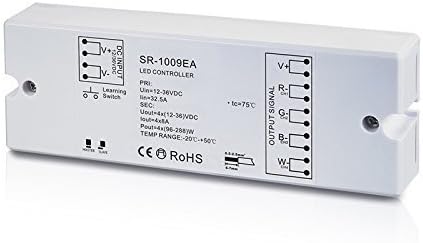
Hình 1: Sunricher SR-1009EA LED Controller showing DC input, output signal terminals (V+, R-, G-, B-, W-), and a learning switch. The diagram also indicates electrical specifications and operating temperature range.
The diagram above illustrates the physical layout and connection points of the SR-1009EA receiver. It features clearly labeled terminals for power input and LED output, along with a learning switch for pairing with remote controls.
3. Thiết lập và Cài đặt
Before installation, ensure all power is disconnected to prevent electrical shock. This device is designed for indoor use unless an IP67 rated version is specifically used.
3.1 Kết nối dây
- Đầu vào DC: Connect your 12-36V DC power supply to the "DC INPUT" terminals. Ensure correct polarity: connect the positive (+) wire of the power supply to the V+ terminal and the negative (-) wire to the V- terminal.
- Đầu ra LED: Connect your LED lighting (single color, dual color, RGB, or RGBW) to the "OUTPUT SIGNAL" terminals.
- For single color LEDs: Connect the positive (+) wire of the LED to V+ and the negative (-) wire to any of R-, G-, B-, or W- (typically W- for white).
- For dual color LEDs: Connect the common positive (+) wire of the LED to V+ and the individual negative (-) wires for warm white and cool white to two of the R-, G-, B-, W- terminals.
- For RGB LEDs: Connect the common positive (+) wire of the LED to V+ and the R, G, B negative (-) wires to the R-, G-, B- terminals respectively.
- For RGBW LEDs: Connect the common positive (+) wire of the LED to V+ and the R, G, B, W negative (-) wires to the R-, G-, B-, W- terminals respectively.
Ghi chú: Ensure the total current draw of your connected LEDs does not exceed 8A per channel or 32.5A total for the receiver.
- Tiếp đất: If applicable, connect the ground wire to the designated ground terminal.
3.2 Pairing with Remote Controls
The SR-1009EA receiver can be paired with compatible Sunricher RF remote controls or wall controllers. Follow the specific pairing instructions provided with your Sunricher remote control. Generally, this involves pressing the "Learning Switch" button on the receiver and then initiating the pairing sequence on the remote control within a short timeframe.
Each receiver can be controlled by up to 8 different remote controls, offering flexibility for multi-user or multi-location control.
3.3 App Control Setup (Optional)
To control the SR-1009EA via a mobile application, a Sunricher WiFi-RF converter (e.g., SR-2818 WiTr) is required. Connect the WiFi-RF converter to your home network and pair it with the SR-1009EA receiver according to the converter's instructions. Download the appropriate Sunricher app from your mobile device's app store (iOS or Android) and follow the in-app instructions to add and control your lighting system.
4. Hướng dẫn vận hành
Once the SR-1009EA receiver is properly installed and paired with a remote control or WiFi-RF converter, you can begin operating your LED lighting system.
- Bật/Tắt nguồn: Use the designated power button on your paired remote control or within the mobile app to turn the connected LEDs on or off.
- Điều chỉnh độ sáng: Adjust the overall brightness of the LEDs using the dimmer controls on your remote or app. For RGB/RGBW LEDs, individual R, G, B, and W channel brightness can be fine-tuned to create millions of color variations.
- Color Selection (RGB/RGBW): Select desired colors from a color wheel or preset color buttons on your remote/app.
- Chế độ động: Activate built-in dynamic changing patterns (e.g., fading, jumping, flashing) if supported by your remote control. Some remotes allow customization of these patterns.
- Kiểm soát vùng: If you have multiple SR-1009EA receivers configured into different zones, use the zone selection features on your remote or app to control each zone independently or synchronize them for unified control.
5. Bảo trì và chăm sóc
To ensure the longevity and optimal performance of your Sunricher SR-1009EA receiver, follow these maintenance guidelines:
- Vệ sinh: Lau nhẹ thiết bị bằng khăn mềm, khô. Không sử dụng chất tẩy rửa có tính mài mòn, dung môi hoặc hóa chất mạnh.
- Môi trường: Operate the receiver within its specified temperature range of -20℃ to +50℃. Avoid exposing the device to extreme temperatures, high humidity, or direct sunlight.
- Thông gió: Ensure adequate airflow around the device, especially if installed in an enclosed space, to prevent overheating.
- Kết nối: Kiểm tra định kỳ tất cả các kết nối dây điện để đảm bảo chúng an toàn và không bị ăn mòn.
KHAI THÁC. Xử lý sự cố
If you encounter issues with your SR-1009EA receiver, refer to the following common troubleshooting steps:
- Đèn LED không phản hồi:
- Check if the power supply is connected correctly and providing the correct voltagđiện áp (12-36V DC).
- Verify all wiring connections between the power supply, receiver, and LEDs are secure and have correct polarity.
- Ensure the remote control is paired correctly with the receiver. Re-pair if necessary.
- Kiểm tra pin trong điều khiển từ xa của bạn.
- Confirm the total load of the LEDs does not exceed the receiver's maximum output (8A per channel, 32.5A total).
- Hoạt động không liên tục:
- Kiểm tra xem có kết nối nào bị lỏng không.
- Ensure the receiver is not exposed to excessive heat or moisture.
- Minimize interference from other RF devices.
- Incorrect Color Output (RGB/RGBW):
- Verify that the R, G, B, W wires from the LED strip are connected to the corresponding R-, G-, B-, W- terminals on the receiver.
- Ensure the LED strip type (e.g., common anode) matches the receiver's output configuration.
If the problem persists after following these steps, contact Sunricher customer support or your product supplier for further assistance.
7. Thông số kỹ thuật
| Tham số | Giá trị |
|---|---|
| Số hiệu mẫu | SR-1009EA |
| Nhà sản xuất | Sunricher |
| Đầu vào Voltage (PRI) | 12-36V DC |
| Max Input Current (PRI) | 32.5A |
| Đầu ra Voltage (SEC) | 4 x (12-36V DC) |
| Output Current (SEC) | 4x8A |
| Output Power (SEC) | 4 x (96-288W) |
| Phạm vi nhiệt độ hoạt động | -20℃ đến +50℃ |
| Cân nặng | 150 gram |
| Sự tuân thủ | CE, RoHS |
8. Bảo hành và Hỗ trợ
Thông tin bảo hành: Specific warranty terms for the Sunricher SR-1009EA receiver are typically provided by the retailer or manufacturer at the time of purchase. Please retain your proof of purchase for warranty claims. For detailed warranty policies, refer to the documentation included with your product or visit the official Sunricher webđịa điểm.
Hỗ trợ khách hàng: For technical assistance, troubleshooting beyond this manual, or warranty inquiries, please contact your product supplier or the official Sunricher customer support. Contact information can usually be found on the manufacturer's webtrên trang web hoặc trên hóa đơn mua hàng của bạn.


