Giới thiệu
This manual provides comprehensive instructions for the operation and maintenance of your ONN X5 HiFi Music Player. Please read this manual thoroughly before using the device to ensure proper functionality and to maximize your listening experience. The ONN X5 is designed to deliver high-fidelity audio playback in a compact and user-friendly format.
Sản phẩm trênview
The ONN X5 is a portable HiFi music player featuring a 2.0-inch TFT screen and an aluminum alloy shell. It supports a wide range of audio formats, including lossless files, and offers expandable storage via a MicroSD card.
Các tính năng chính:
- Âm thanh độ trung thực cao: Supports WAV, FLAC, ALAC, APE, OGG lossless formats, and high-definition music up to 24Bit/192 KHz.
- Trưng bày: 2.0-inch TFT screen (176x220 pixels) for clear navigation and information display.
- Kho: 8GB internal memory, expandable up to 32GB with a MicroSD/TF card.
- Thiết kế bền bỉ: Lightweight aluminum alloy body (60g) for enhanced durability and reduced external interference noise.
- Giao diện người dùng: Intuitive key-based operation.
- Các tính năng bổ sung: FM Radio support.
- Ắc quy: High-capacity rechargeable lithium polymer battery.
- Hỗ trợ đa ngôn ngữ: English, Russian, Korean, German, Japanese, Polish, Indonesian, Chinese.
Bố trí thiết bị:

Hình ảnh: Mặt trước view of the ONN X5 HiFi Music Player, showing its display and control buttons. The screen displays track information, audio quality (e.g., 24BIT, 88HHZ), and playback status.

Hình ảnh: Bên view of the ONN X5 HiFi Music Player, illustrating the location of the MicroSD card slot on the right side of the device.

Hình ảnh: Mặt trước và mặt sau view of the ONN X5 HiFi Music Player. The back panel shows the model number "X5" and branding information.
Cài đặt
1. Sạc thiết bị:
- Connect the ONN X5 to a power source using the provided USB cable.
- Đèn báo pin trên màn hình sẽ hiển thị trạng thái sạc.
- A full charge is recommended before first use. The device uses a high-capacity rechargeable lithium polymer battery.
2. Inserting a MicroSD/TF Card:
- Locate the MicroSD/TF card slot on the side of the player.
- Nhẹ nhàng lắp thẻ MicroSD/TF tương thích (dung lượng tối đa 32GB) vào khe cắm cho đến khi nghe thấy tiếng tách.
- Hãy đảm bảo thẻ được lắp đúng cách để tránh bị hư hỏng.

Image: Contents of the ONN X5 package, showing the player, USB charging cable, and other accessories. This illustrates the components available for setup.
3. Chuyển nhạc Files:
- Connect the ONN X5 to your computer using the USB cable.
- Thiết bị sẽ hiển thị dưới dạng ổ đĩa lưu trữ di động.
- Kéo và thả âm thanh mong muốn của bạn files (MP3, WMA, APE, FLAC, WAV, ALAC, OGG) into the player's internal storage or the MicroSD card.
- Hãy ngắt kết nối thiết bị khỏi máy tính một cách an toàn trước khi tháo cáp USB.
Hướng dẫn sử dụng
Bật/Tắt nguồn:
- To power on, press and hold the power button (usually marked with a universal power symbol) until the screen illuminates.
- Để tắt nguồn, nhấn và giữ nút nguồn cho đến khi thiết bị tắt.
Điều hướng:
The ONN X5 uses physical buttons for navigation. Refer to the device layout for button identification.
- âm lượng: Điều chỉnh âm lượng.
- M (Thực đơn): Truy cập menu và xác nhận lựa chọn.
- Arrow Buttons (< / >): Navigate through menus, select tracks, or fast forward/rewind during playback.
- Nút nguồn: Also functions as a play/pause button during music playback.
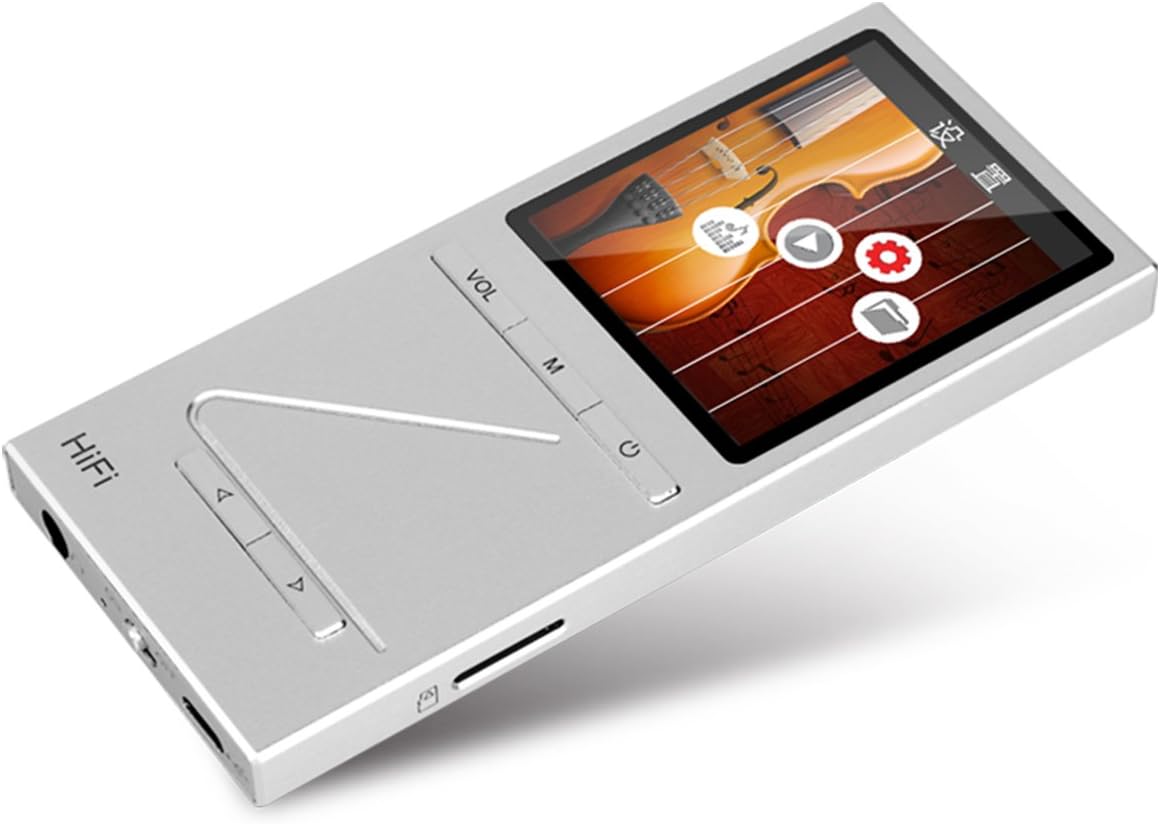
Hình ảnh: Góc cạnh view of the ONN X5 HiFi Music Player, showing the screen with various menu icons, indicating the user interface for navigation.
Phát nhạc:
- From the main menu, navigate to "Music" or "FileS".
- Browse through your folders and select a track to play.
- Press the Power/Play button to start or pause playback.
- Use the arrow buttons to skip tracks or fast forward/rewind.
- Adjust volume using the VOL button.
Đài FM:
- Chọn mục "Đài FM" từ menu chính.
- Sử dụng các nút điều hướng để quét tìm các đài hoặc dò tần số thủ công.
- Ensure headphones are connected as they often act as the antenna for FM radio.
Cài đặt ngôn ngữ:
Thiết bị hỗ trợ nhiều ngôn ngữ. Để thay đổi ngôn ngữ:
- Go to "Settings" from the main menu.
- Select "Language" and choose your preferred language from the list (English, Russian, Korean, German, Japanese, Polish, Indonesian, Chinese).
BẢO TRÌ
- Vệ sinh: Sử dụng vải mềm, khô để vệ sinh thiết bị. Tránh sử dụng chất tẩy rửa dạng lỏng hoặc vật liệu mài mòn.
- Kho: Bảo quản máy nghe nhạc ở nơi khô ráo, thoáng mát, tránh ánh nắng trực tiếp và nhiệt độ cao.
- Chăm sóc pin: Để kéo dài tuổi thọ pin, tránh xả pin thường xuyên. Hãy sạc thiết bị thường xuyên, ngay cả khi không sử dụng trong thời gian dài.
- Tránh tác động: The aluminum alloy shell provides durability, but avoid dropping the device or subjecting it to strong impacts.
- Tiếp xúc với nước: Thiết bị này không chống nước. Tránh tiếp xúc với nước hoặc độ ẩm cao.
Xử lý sự cố
Device Will Not Power On:
- Hãy đảm bảo pin đã được sạc đầy. Kết nối thiết bị với nguồn điện và để sạc ít nhất 30 phút trước khi thử bật nguồn lại.
- Try performing a hard reset (if applicable, refer to manufacturer's specific instructions for hard reset, usually involves holding power button for an extended period).
Không có âm thanh:
- Kiểm tra mức âm lượng và đảm bảo rằng nó không bị tắt tiếng.
- Verify that headphones or external speakers are properly connected.
- Test with different headphones or audio output devices.
- Đảm bảo âm thanh file Không bị hỏng hoặc ở định dạng không được hỗ trợ.
Không thể chuyển đổi Files:
- Hãy đảm bảo cáp USB được kết nối chắc chắn với cả máy phát nhạc và máy tính.
- Hãy thử cắm vào cổng USB khác trên máy tính hoặc sử dụng cáp USB khác.
- Verify that the device is recognized by your computer as a removable drive.
- Check if the MicroSD card is properly inserted and not full.
Màn hình không phản hồi / Bị treo:
- Nhấn và giữ nút nguồn trong khoảng 10-15 giây để buộc khởi động lại.
- If the issue persists, ensure the battery is charged.
Thông số kỹ thuật
| Tính năng | Chi tiết |
|---|---|
| Số hiệu mẫu | X5 |
| Thương hiệu | Vâng |
| Kích thước màn hình | 2.0 Inches TFT (176x220 PIXEL) |
| Bộ nhớ trong | 8GB |
| Lưu trữ mở rộng | MicroSD/TF card up to 32 GB |
| Định dạng âm thanh được hỗ trợ | APE, FLAC, ALAC, WAV, WMA, OGG, MP3 (up to 24Bit/192 KHz) |
| Công nghệ kết nối | Phụ trợ, USB |
| Tính năng đặc biệt | Đài phát thanh FM |
| Ắc quy | 1 Lithium Ion battery required (High-capacity rechargeable lithium polymer) |
| Trọng lượng sản phẩm | 7 ounce (khoảng 0.2 Kilôgam) |
| Kích thước gói hàng | 6.21 x 4.7 x 1.2 inch |
| Nhà sản xuất | SZTZWY |
Bảo hành và Hỗ trợ
For detailed warranty information, please refer to the warranty card included with your purchase or visit the official ONN product support website. For technical assistance or further inquiries, please contact ONN customer support through their official channels.


