1. Giới thiệu
The Edifier P180 is a stereo earbud headset designed for clear audio and convenient communication. Featuring an inline microphone and control, it offers a comfortable listening experience for various devices.

Figure 1: Edifier P180 Wired Earbud Headset
2. Có gì trong hộp
- Edifier P180 Earbud Headset
- Cáp
3. Các tính năng chính
- Classic Comfort: Ergonomic design for comfortable wear without irritating the ear canal.
- Chất lượng âm thanh tuyệt vời: Equipped with 16mm neodymium magnetic monomers for high-fidelity audio playback.
- Integrated Microphone and Control: 3.5mm stereo earphones with a built-in microphone and remote button for mobile phone communication.
- Chức năng: Single button control for picking up/hanging up calls and skipping songs (device dependent for iOS/Android).
- Thiết kế bền bỉ: Constructed with quality materials for longevity.

Figure 2: Ergonomic design for comfortable fit.
4. Thiết lập
- Giải nén: Carefully remove the Edifier P180 headset from its packaging.
- Thanh tra: Check the earbuds and cable for any visible damage.
- Kết nối: Insert the 3.5mm audio jack into the headphone port of your compatible device (smartphone, tablet, computer, etc.). Ensure the jack is fully inserted for proper audio and microphone function.
- Chức vụ: Place the earbuds comfortably in your ears. The ergonomic design is intended to rest well without causing irritation.
5. Hướng dẫn vận hành
The Edifier P180 features an inline control button for easy management of calls and music playback.
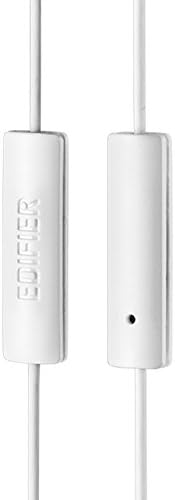
Figure 3: Inline microphone and control button.
- Trả lời / Kết thúc cuộc gọi: Nhấn nút điều khiển một lần để trả lời cuộc gọi đến. Nhấn lại lần nữa để kết thúc cuộc gọi đang diễn ra.
- Phát/Tạm dừng nhạc: Nhấn nút điều khiển một lần để phát hoặc tạm dừng âm thanh.
- Bỏ qua bài hát: Double-press the control button to skip to the next track. Triple-press to go to the previous track (functionality may vary by device and operating system).
- Trợ lý giọng nói: Long-press the control button to activate your device's voice assistant (e.g., Siri, Google Assistant).
Video 1: Sản phẩm chính thức đã ra mắtview of the Edifier P180 Classic Earbud Headsets, demonstrating features and usage.
6. Bảo trì
- Vệ sinh: Lau nhẹ tai nghe và dây cáp bằng khăn mềm, khô. Tránh sử dụng hóa chất mạnh hoặc vật liệu mài mòn.
- Kho: Khi không sử dụng, hãy bảo quản tai nghe ở nơi sạch sẽ, khô ráo, tránh nhiệt độ quá cao hoặc quá thấp và ánh nắng trực tiếp. Tránh làm rối dây cáp.
- Tránh độ ẩm: Do not expose the headset to water or excessive moisture, as this can damage the internal components.
KHAI THÁC. Xử lý sự cố
- Không có âm thanh:
- Hãy đảm bảo giắc cắm 3.5mm được cắm hoàn toàn vào cổng âm thanh của thiết bị.
- Kiểm tra cài đặt âm lượng của thiết bị.
- Test the earbuds with another device to rule out a device-specific issue.
- Micrô không hoạt động:
- Đảm bảo giắc cắm 3.5 mm được cắm chặt.
- Kiểm tra cài đặt đầu vào micro của thiết bị.
- Hãy thử kiểm tra micro với một thiết bị hoặc ứng dụng khác.
- Âm thanh ngắt quãng:
- Check the cable for any kinks or damage.
- Hãy đảm bảo giắc cắm âm thanh sạch sẽ và không bị tắc nghẽn.
8. Thông số kỹ thuật
| Tính năng | Đặc điểm kỹ thuật |
|---|---|
| Số hiệu mẫu | P180 |
| Đáp ứng tần số | 20 Hz - 20,000 Hz |
| Jack cắm tai nghe | Giắc cắm 3.5 mm |
| Công nghệ kết nối | Có dây |
| Trọng lượng sản phẩm | 1.76 ounce (50 gram) |
| Kích thước sản phẩm | 2.01 x 5.59 x 0.91 inch |
| Vật liệu | Neodymium |
| Loại điều khiển | Inline Control Button |
| Trở kháng | 32 Ohm |
| Kiểm soát tiếng ồn | Cách âm |
9. Bảo hành & Hỗ trợ
The Edifier P180 headset is backed by a Bảo hành 1 năm. For any support inquiries or warranty claims, please refer to the contact information provided with your purchase or visit the official Edifier webđịa điểm.


