Giới thiệu
The DigiTech TRIO is an innovative electric guitar multi-effect pedal designed to be your personal band. It listens to your guitar playing and automatically generates accompanying bass and drum parts. This manual provides comprehensive instructions for setting up, operating, and maintaining your TRIO pedal, ensuring you get the most out of its unique features.
Các tính năng chính
- Seven Music Genres and Twelve Song Styles Per Genre to Choose From
- The TRIO can learn up to three different song parts that can be recalled on-the-fly
- Adjustable Tempo & Alternate Half Time/Double Time Variants Bass & Drum Level Controls
- Hands-Free Control Using a DigiTech FS3X Footswitch (optional)
- Amp & Mixer Outputs Headphone Output w/Level Control Power Supply Included
Hướng dẫn thiết lập
Follow these steps to set up your DigiTech TRIO pedal:
- Connect the included 9V DC power supply to the QUYỀN LỰC input on the pedal and plug it into a power outlet.
- Kết nối đàn guitar điện của bạn với... GUITAR TRONG Kết nối bằng giắc cắm sử dụng cáp nhạc cụ tiêu chuẩn 1/4 inch.
- Kết nối AMP NGOÀI jack to your guitar ampKết nối đầu vào của bộ khuếch đại bằng một dây cáp nhạc cụ 1/4 inch khác.
- For connecting to a mixer or PA system, use the HỖN HỢP RA NGOÀI cái giắc.
- Để luyện tập cá nhân, hãy kết nối tai nghe với... TAI NGHE RA NGOÀI cái giắc.
- Optionally, connect a DigiTech FS3X Footswitch to the KIỂM SOÁT TRONG jack for extended hands-free control.
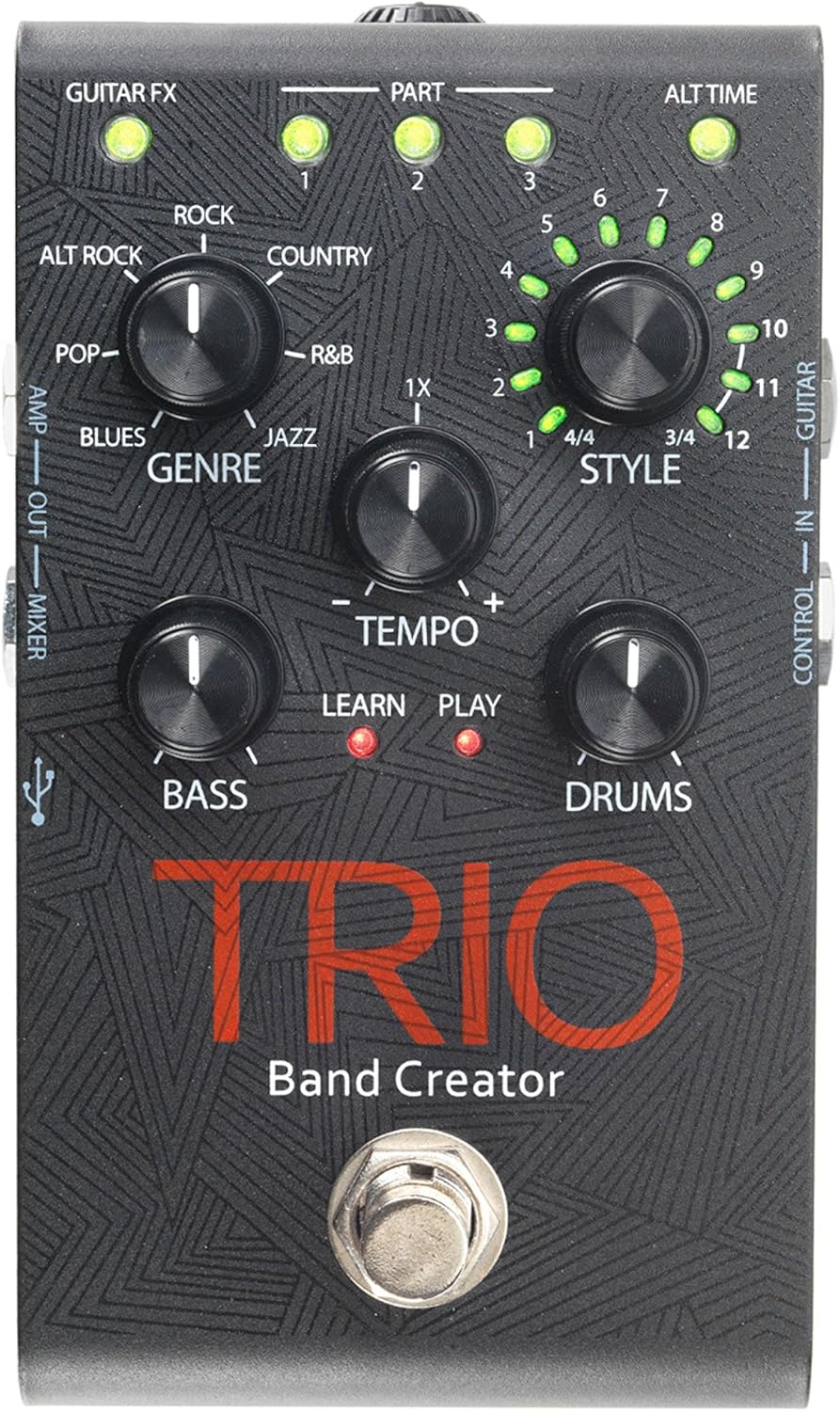
Hình 1: Trên cùng view of the DigiTech TRIO pedal, showing the main controls and footswitch.
Hướng dẫn sử dụng
Basic Operation: Teaching the TRIO a Song
- Nhấn nút BAN NHẠC footswitch once to enter 'Listen' mode. The HỌC HỎI Đèn LED sẽ sáng.
- Play your desired chord progression and rhythm clearly. The TRIO will analyze your playing.
- Nhấn nút BAN NHẠC footswitch again to stop 'Listen' mode. The CHƠI LED will illuminate, and the TRIO will immediately begin playing generated bass and drum parts.
- You can now play along with your virtual band.
Genre and Style Selection
- Sử dụng THỂ LOẠI knob to select from Blues, Pop, Alternative Rock, Rock, Country, R&B, and Jazz. The genre affects the overall feel of the generated bass and drum parts.
- Sử dụng PHONG CÁCH knob to choose from twelve different song styles available for each genre. This allows for further customization of the rhythm and feel.
- Các ALT TIME button allows you to switch between 3/4 and 4/4 time signatures.
Looping and Song Parts
- The TRIO can learn up to 3 different song parts. To record a new part, select an empty PHẦN slot (1, 2, or 3) using the corresponding buttons.
- Follow the 'Basic Operation' steps to teach the TRIO the new song part.
- During playback, you can switch between learned song parts on-the-fly by pressing the corresponding PHẦN cái nút.
- Các LỖI LỖI footswitch allows you to record and playback your own guitar loops. Press once to start recording, press again to stop recording and start playback, and press and hold to clear the loop.
Adjusting Levels and Tempo
- Các NHỊP ĐỘ knob adjusts the playback speed of the band and loops.
- Các TRẦM knob controls the volume level of the generated bass line.
- Các TRỐNG knob controls the volume level of the generated drum track.
- Các VÒNG LẶP knob controls the volume level of your recorded guitar loop.

Hình 2: Góc cạnh view of the DigiTech TRIO pedal, highlighting the control knobs and input/output jacks.
Điều khiển và kết nối
The DigiTech TRIO pedal features a user-friendly layout with clearly labeled controls and versatile connection options:
Bảng điều khiển phía trước:
- GUITAR FX: Activates built-in guitar effects tailored to the selected genre.
- PART 1, 2, 3: Buttons to select and recall different learned song parts.
- ALT TIME: Toggles between 3/4 and 4/4 time signatures.
- TEMPO Knob: Adjusts the overall playback speed.
- Núm điều chỉnh THỂ LOẠI: Selects the musical genre (Blues, Pop, Alt Rock, Rock, Country, R&B, Jazz).
- STYLE Knob: Selects one of twelve styles within the chosen genre.
- LOOP Knob: Controls the volume of your recorded guitar loop.
- Núm BASS: Kiểm soát âm lượng của dòng âm trầm được tạo ra.
- DRUMS Knob: Kiểm soát âm lượng của bản nhạc trống được tạo ra.
- Công tắc chân LOOPER: Records/plays/clears guitar loops.
- BAND Footswitch: Enters 'Listen' mode to learn chords/rhythm, or starts/stops band playback.
Side and Rear Panel Connections:
- GUITAR TRONG: 1/4-inch input for your electric guitar.
- AMP NGOÀI: 1/4-inch output to your guitar ampchất lót.
- MIXER OUT: 1/4-inch output for connecting to a mixer or PA system.
- TAI NGHE RA NGOÀI: Ngõ ra âm thanh nổi 1/8 inch dành cho tai nghe.
- KIỂM SOÁT TRONG: 1/4-inch input for optional DigiTech FS3X Footswitch.
- QUYỀN LỰC: 9V DC input for the included power supply.
- USB: Mini-USB port for firmware updates.

Hình 3: Phía sau view of the DigiTech TRIO pedal, showing the power input and headphone jack.
Thông số kỹ thuật
| Tính năng | Chi tiết |
|---|---|
| Trọng lượng sản phẩm | 10.6 ounce (0.3 kg) |
| Kích thước sản phẩm | 4.63 x 3.19 x 2.13 inch (11.76 x 8.10 x 5.41 cm) |
| Số hiệu mẫu sản phẩm | BỘ BA |
| Pin | 1 9V battery required (for internal use, not primary power) |
| Giao diện phần cứng | Âm thanh 1/4 inch |
| Định dạng tín hiệu | Tương tự |
| Nguồn điện | Corded Electric (9V DC adapter included) |
| Tậptage | 9 vôn |
| Ampcơn thịnh nộ | 300 triệuamps |
BẢO TRÌ
- Giữ bàn đạp sạch sẽ bằng cách lau bằng vải mềm, khô. Tránh sử dụng chất tẩy rửa có tính mài mòn hoặc dung môi.
- Bảo quản bàn đạp ở nơi khô ráo, thoáng mát, tránh ánh nắng trực tiếp và nhiệt độ cao.
- Hãy đảm bảo tất cả các dây cáp được kết nối chắc chắn để tránh mất tín hiệu hoặc hư hỏng.
- Tránh làm rơi bàn đạp hoặc để bàn đạp chịu những va đập mạnh.
Xử lý sự cố
- Không có âm thanh: Kiểm tra tất cả các kết nối cáp (đàn guitar, amp, power). Ensure the pedal is powered on and the volume knobs are not set to zero.
- Chất lượng âm thanh kém: Hãy kiểm tra xem thiết bị của bạn và amplifier are functioning correctly. Check for damaged cables.
- Band Not Generating Correctly: Ensure you are playing clear, distinct chords during the 'Listen' phase. Try different genres and styles to see if a different setting better interprets your playing.
- Footswitch Unresponsive: Disconnect and reconnect the power supply. If using an optional FS3X footswitch, ensure it is properly connected.
Bảo hành và Hỗ trợ
Để biết thông tin bảo hành và hỗ trợ kỹ thuật, vui lòng tham khảo trang web chính thức của DigiTech webtrang web hoặc liên hệ với bộ phận chăm sóc khách hàng của họ. Hãy giữ lại hóa đơn mua hàng để yêu cầu bảo hành.


