Giới thiệu
The Behringer NEKKST K8 is an ultra-linear 150-Watt reference-class studio monitor designed for accurate sound reproduction. It features an 8-inch woofer and a 1-inch silk dome tweeter, utilizing advanced waveguide technology for optimal acoustic dispersion and a wide 'sweet zone'. This monitor operates in a true bi-amping mode with two separate amplifiers for enhanced sound clarity.

Hình ảnh: Mặt trước view of the Behringer NEKKST K8 Studio Monitor, showcasing the 8-inch woofer and 1-inch tweeter.
Hướng dẫn an toàn quan trọng
Please read and follow all safety instructions before operating the Behringer NEKKST K8 studio monitor. Retain these instructions for future reference.
- Nguy cơ điện giật: Do not open the device. Refer all servicing to qualified service personnel.
- Không để thiết bị này tiếp xúc với mưa hoặc hơi ẩm.
- Không sử dụng thiết bị này gần nước.
- Chỉ lau sạch bằng vải khô.
- Không chặn bất kỳ lỗ thông gió nào. Lắp đặt theo hướng dẫn của nhà sản xuất.
- Không lắp đặt gần bất kỳ nguồn nhiệt nào như bộ tản nhiệt, thanh nhiệt, bếp lò hoặc các thiết bị khác (bao gồm amplò phản ứng) tạo ra nhiệt.
- Bảo vệ dây nguồn khỏi bị dẫm lên hoặc kẹp, đặc biệt là ở phích cắm, ổ cắm tiện lợi và điểm chúng thoát ra khỏi thiết bị.
- Chỉ sử dụng các phụ kiện/tập tin đính kèm do nhà sản xuất chỉ định.
- Rút phích cắm của thiết bị này khi có sấm sét hoặc khi không sử dụng trong thời gian dài.

Image: Safety and regulatory labels found on the Behringer NEKKST K8, indicating electrical warnings and compliance information.
Cài đặt
Tháo dỡ
Carefully unpack your NEKKST K8 monitor. Inspect the unit for any signs of damage that may have occurred during transit. Retain the original packaging for future transport or storage.
Kết nối
The NEKKST K8 offers both balanced XLR and unbalanced RCA input options. Connect your audio source (e.g., audio interface, mixer) to the appropriate input on the rear panel of the monitor.
- Đầu vào XLR: For balanced audio signals, providing optimal noise rejection.
- Đầu vào RCA: For unbalanced audio signals, commonly used with consumer audio equipment.
Ensure the monitor is powered off before making any connections.
Placement and Room Compensation
Proper placement of your studio monitors is crucial for accurate sound reproduction. The NEKKST K8 features 'ROOM COMPENSATION' switches on the rear panel to help optimize its performance for your specific acoustic environment.
- Free Field: Use this setting when the monitor is placed away from walls and corners.
- Tường: Select this setting if the monitor is placed close to a wall.
- Góc: Choose this setting if the monitor is placed in a corner, which typically results in increased bass response.
Experiment with these settings to achieve the most balanced sound in your listening space.
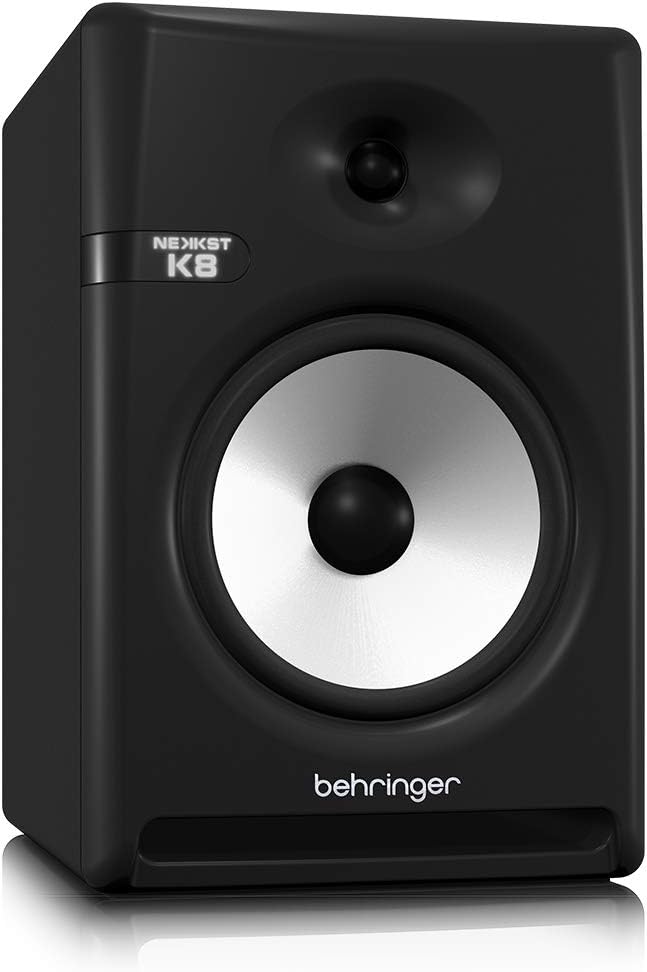
Image: Rear panel of the Behringer NEKKST K8, displaying XLR and RCA inputs, along with various control switches for room compensation and frequency adjustments.

Hình ảnh: Chi tiết view of the NEKKST K8's rear control panel, highlighting the input trim, frequency adjustments, and room compensation switches.
Kết nối nguồn điện
Connect the provided power cord to the AC IN socket on the rear panel and then to a suitable power outlet. Ensure the power switch is in the OFF position before connecting to power.
Hoạt động
Bật/Tắt nguồn
After all connections are made, switch the power button on the rear panel to the ON position. It is recommended to power on your monitors last and power them off first to prevent any pops or clicks through your speakers.
Input Trim Adjustment
The 'INPUT TRIM' knob on the rear panel allows you to adjust the input sensitivity of the monitor. Start with the knob at a lower setting and gradually increase it to achieve a comfortable listening level without distortion. This control helps match the output level of your audio source to the monitor's input.
Frequency Adjustments
The NEKKST K8 provides 'HIGH FREQUENCY' and 'LOW FREQUENCY' switches for fine-tuning the monitor's response to your listening environment and personal preference. These switches allow you to cut or boost specific frequency ranges.
- TẦN SỐ CAO: Adjusts the treble response. Options typically include flat, -2 dB, +2 dB.
- LOW FREQUENCY: Adjusts the bass response. Options typically include flat, -2 dB, -4 dB, -6 dB. This can be useful for compensating for room acoustics or when using a subwoofer.
Refer to the markings on the rear panel for specific dB adjustments.
BẢO TRÌ
Vệ sinh
To clean the exterior of your NEKKST K8 monitor, use a soft, dry cloth. Do not use liquid cleaners, abrasive cleaners, or solvents, as these can damage the finish or internal components. Ensure the monitor is unplugged before cleaning.
Kho
If storing the monitor for an extended period, it is recommended to use the original packaging to protect it from dust and physical damage. Store in a cool, dry place away from direct sunlight and extreme temperatures.
Xử lý sự cố
| Vấn đề | Nguyên nhân có thể | Giải pháp |
|---|---|---|
| Không có âm thanh |
|
|
| Âm thanh bị méo |
|
|
| Hum hoặc tiếng ồn |
|
|
If the problem persists after trying these solutions, please contact Behringer customer support.
Thông số kỹ thuật
| Tên mẫu | K8 |
| Loại loa | Màn hình |
| Đường kính loa trầm | 8 inch |
| Đường kính loa tweeter | 1 inch |
| Công suất đầu ra tối đa của loa | 150 Watt |
| Cái gì?tage | 150 watt |
| Đáp ứng tần số | 20000 Hz (Upper limit; full range typically wider) |
| Công nghệ kết nối | RCA, XLR |
| Chế độ đầu ra âm thanh | Âm thanh nổi |
| Nguồn điện | Điện có dây |
| Kích thước sản phẩm | 13.4"D x 13.4"W x 18.8"H |
| Trọng lượng sản phẩm | 19.18 Bảng Anh |
| Vật liệu | Nhựa, Kim loại, Vải |
| Nhà sản xuất | Music Tribe US |
| Mã số UPC | 748252139344 |
Thông tin bảo hành
The Behringer NEKKST K8 Studio Monitor comes with a Limited Warranty. For detailed information regarding warranty terms, conditions, and registration, please refer to the official Behringer webtrang web hoặc thẻ bảo hành đi kèm với sản phẩm của bạn.
Ủng hộ
For further assistance, technical support, or to download the latest drivers and software, please visit the official Behringer webtrang web hoặc liên hệ với bộ phận dịch vụ khách hàng của họ.
Bạn cũng có thể ghé thăm Cửa hàng Behringer trên Amazon để biết thông tin sản phẩm và phụ kiện.