1. Giới thiệu
The Aputure Amaran HR672S is a high-performance LED video light panel designed for professional photography and videography. Featuring a high Color Rendering Index (CRI) of 95+, it ensures accurate and vibrant color reproduction. This light panel operates at a fixed color temperature of 5500K, providing a daylight-balanced output. It includes a wireless remote control for convenient adjustments and can be powered by either an AC adapter or NP-F series batteries.
2. Thông tin an toàn
- Do not operate the light panel with wet hands or in damp môi trường.
- Đảm bảo nguồn điện voltage matches the product's requirements (110-240V).
- Tránh để ánh sáng LED chiếu trực tiếp vào mắt vì có thể gây khó chịu hoặc tổn thương.
- Keep the light panel away from flammable materials.
- Do not disassemble or modify the product. Refer servicing to qualified personnel.
- Always use the provided power adapter and recommended batteries.
- Đảm bảo thông gió thích hợp trong quá trình vận hành để tránh quá nóng.
3. Nội dung gói hàng
Xác minh rằng tất cả các mục được liệt kê dưới đây đều có trong gói hàng của bạn:
- 1 x Aputure Amaran HR672S LED Light Panel
- 1 x Điều khiển từ xa không dây
- 1 x Power Adapter (AC 110-240V to DC 15V)
- 1 x Light Bracket with 1/4 to 3/8 Screw
- 1 x White Diffusion Filter
- 1 x Orange Diffusion Filter
- 1 x Túi đựng
- 1 cuốn sách hướng dẫn sử dụng (tiếng Anh)
- 2 x NP-F970 Batteries (if included in specific kit)
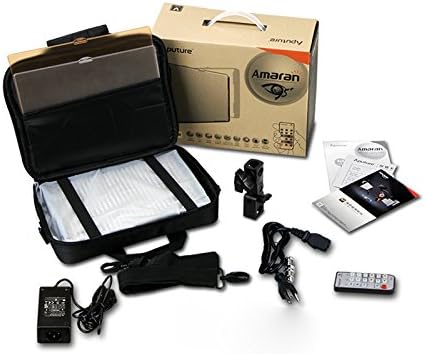
Image: All components included in the Aputure Amaran HR672S LED Video Light Panel package, neatly arranged.
4. Sản phẩm hếtview
4.1 Mặt trước View
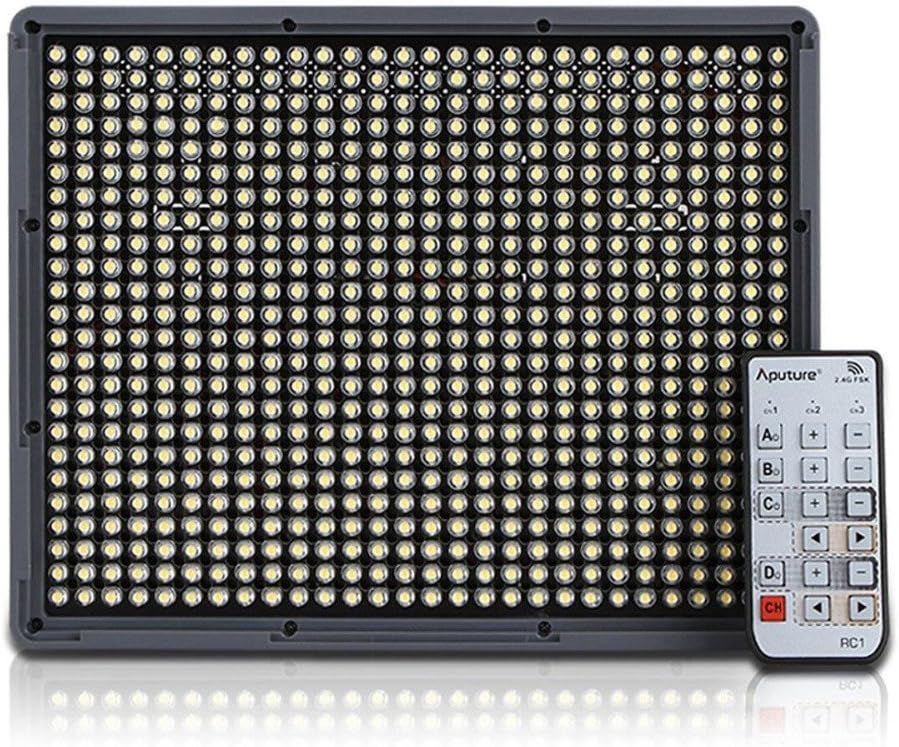
Image: The front face of the Aputure Amaran HR672S LED light panel, showing the array of 672 LED bulbs.
4.2 Back Panel Controls and Battery Slots

Image: The rear of the light panel, displaying the digital display, power switch, dimmer knob, channel/group buttons, and dual NP-F battery slots.
4.3 Diffusion Filter Installation

Image: A hand demonstrating the process of sliding a diffusion filter into the designated slot on the light panel.
5. Thiết lập
5.1 Mounting the Light Panel
- Attach the provided light bracket to the 1/4-inch screw thread at the bottom of the HR672S light panel.
- Secure the light bracket onto a standard light stand or tripod using the 1/4-inch or 3/8-inch screw adapter. Tighten securely.
- Adjust the angle of the light panel using the tilt mechanism on the bracket.
5.2 Powering the Light Panel
The HR672S can be powered in two ways:
- Nguồn điện AC: Connect the DC 15V power adapter to the DC input port on the back of the light panel. Plug the adapter into a suitable wall outlet (110-240V).
- Công suất pin: Insert two fully charged NP-F series batteries (e.g., NP-F970) into the battery slots on the back of the light panel. Ensure they click into place. The light will automatically draw power from the batteries when AC power is not connected or is interrupted.
5.3 Attaching Diffusion Filters
Slide either the white or orange diffusion filter into the grooves on the front of the light panel. The white filter provides softer light, while the orange filter can be used for color correction or creative effects.
6. Hoạt động
6.1 Bật/Tắt nguồn
Locate the power switch on the back of the light panel. Flip it to the 'ON' position to power on the device. Flip it to 'OFF' to power off.
6.2 Điều chỉnh độ sáng
Rotate the dimmer knob on the back panel to adjust the light intensity. The brightness level will be displayed on the digital screen.
6.3 Sử dụng điều khiển từ xa không dây
The HR672S comes with a 2.4GHz wireless remote control for convenient operation.
- Thiết lập kênh: Press the 'Channel' button on the light panel to cycle through available channels (1-3). Ensure the remote control is set to the same channel.
- Thiết lập nhóm: Press the 'Group' button on the light panel to assign it to a group (A, B, C, D). The remote control can then control lights assigned to specific groups or all groups simultaneously.
- Hoạt động từ xa: Use the corresponding buttons on the remote to power on/off, adjust brightness, and select channels/groups.
6.4 Nhiệt độ màu
The Aputure Amaran HR672S has a fixed color temperature of 5500K. No adjustment is needed or possible for color temperature on this model.
7. Bảo trì
- Vệ sinh: Hãy dùng khăn mềm, khô để lau sạch bảng đèn. Không sử dụng chất tẩy rửa có tính ăn mòn hoặc dung môi.
- Kho: When not in use, store the light panel in its carrying bag in a cool, dry place, away from direct sunlight and moisture.
- Chăm sóc pin: If using batteries, remove them if the light will not be used for an extended period. Store batteries in a cool, dry place.
- Kiểm tra cáp: Regularly inspect power cables and connections for any signs of damage. Replace damaged cables immediately.
KHAI THÁC. Xử lý sự cố
| Vấn đề | Nguyên nhân có thể | Giải pháp |
|---|---|---|
| Đèn không bật sáng | No power supply; Batteries depleted; Power switch off | Check AC adapter connection; Replace/recharge batteries; Ensure power switch is 'ON' |
| Điều khiển từ xa không hoạt động | Incorrect channel/group; Remote battery depleted; Obstruction | Match channel/group on light and remote; Replace remote battery; Ensure clear line of sight |
| Ánh sáng nhấp nháy | Unstable power; Faulty connection; Overheating | Ensure stable power source; Check all cable connections; Allow light to cool down |
| Light output is too harsh | No diffusion filter used | Attach the white diffusion filter to soften the light |
9. Thông số kỹ thuật
| Tính năng | Chi tiết |
|---|---|
| Người mẫu | Amaran HR672S |
| CRI | 95+ |
| Quyền lực | 45W |
| Góc chùm tia | 25 độ |
| Nhiệt độ màu | 5500K |
| Đầu vào nguồn điện | Điện áp xoay chiều 110-240V |
| Nguồn điện | Điện áp một chiều 15V |
| Tần số từ xa | 2.4GHz |
| Kênh từ xa | 3 |
| Remote Groups | 4 (A/B/C/D) |
| Luminous Flux (0.5m) | 18800 lux |
| Luminous Flux (1m) | 6040 lux |
| Trọng lượng sản phẩm | 4 pound (khoảng 1.81 kg) |
| Kích thước gói hàng | 10.9 x 8.8 x 4.8 inch (khoảng 27.7 x 22.4 x 12.2 cm) |
| Pin cần thiết | 2 Lithium Ion (NP-F series) |
10. Bảo hành và Hỗ trợ
Aputure products are covered by a limited warranty. For specific warranty terms and conditions, please refer to the warranty card included with your product or visit the official Aputure website. For technical support, troubleshooting assistance, or service inquiries, please contact Aputure customer support through their official channels.
Tài nguyên trực tuyến:
- Aputure chính thức Webđịa điểm: www.aputure.com
- Trang hỗ trợ sản phẩm: Vui lòng tham khảo trang chính thức. webtrang web dành cho các trang hỗ trợ sản phẩm cụ thể.


