1. Giới thiệu
This manual provides essential information for the safe and efficient operation of your COTEC SP2000-224 Pure Sine Wave Inverter. This advanced inverter offers high efficiency and power density, featuring selectable output voltage and frequency, all housed within a robust aluminum casing. Please read this manual thoroughly before installation and use to ensure proper function and longevity of the device.
2. Thông tin an toàn
Luôn tuân thủ các biện pháp an toàn sau đây để tránh thương tích và hư hỏng cho bộ biến tần hoặc thiết bị được kết nối:
- Thông gió: Đảm bảo thông gió đầy đủ xung quanh bộ biến tần. Không được bịt kín các lỗ thông gió.
- Môi trường: Install the inverter in a dry, cool, and well-ventilated area, away from direct sunlight, heat sources, and flammable materials.
- Tiếp đất: Properly ground the inverter chassis to prevent electrical shock.
- Đầu vào DC: Connect the inverter only to a 24V DC battery bank. Ensure correct polarity (positive to positive, negative to negative). Reverse polarity will damage the unit.
- Đầu ra AC: Do not overload the inverter. Ensure the total wattage of connected AC devices does not exceed the inverter's rated output.
- Bảo dưỡng: Do not attempt to open or service the inverter yourself. Refer all servicing to qualified personnel.
- Tiếp xúc với nước: Keep the inverter away from water, rain, or excessive moisture.
3. Tính năng sản phẩm
The COTEC SP2000-224 Inverter incorporates several advanced features for reliable power conversion:
- Đầu ra sóng sin chuẩn cho các thiết bị điện tử nhạy cảm.
- Power ON / OFF remote control capability via a dedicated green terminal.
- Full input and output isolation for enhanced safety.
- Temperature and load-controlled cooling fan for efficient heat dissipation.
- User-friendly interface with 3-color LED status indicators.
- Output frequency selectable between 50 Hz and 60 Hz via DIP switch.
- Đầu ra voltage selectable via DIP switch.
- Power saving mode adjustable via a variable resistor.
- Comprehensive input protection: Reverse Polarity (via fuse), Under Voltage, Quá âm lượngtage.
- Comprehensive output protection: Short Circuit, Overload, Over Temperature.
- Certifications: E13, UL, CE, FCC approved.
4. Thiết lập và Cài đặt
Việc lắp đặt đúng cách rất quan trọng đối với hiệu suất và độ an toàn của biến tần.
4.1 Cài đặt vật lý
Mount the inverter securely in a location that meets the safety requirements mentioned in Section 2. Ensure sufficient space around the unit for airflow.
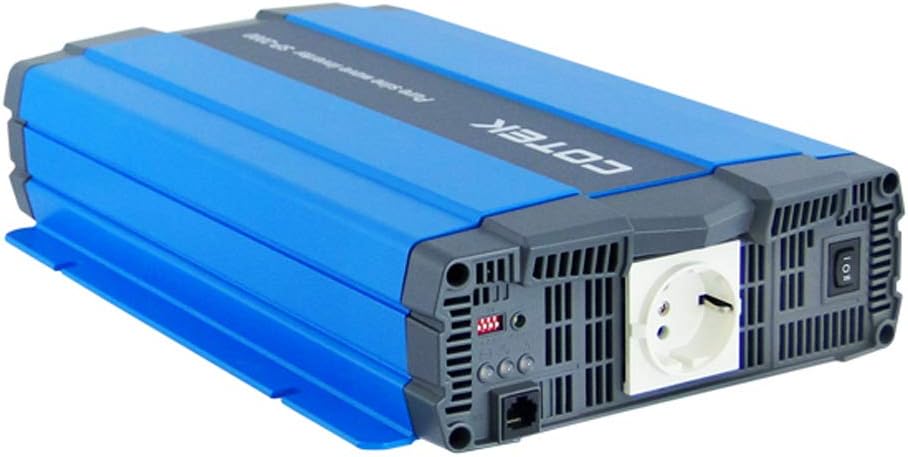
Hình 4.1: Góc cạnh view of the COTEC SP2000-224 Pure Sine Wave Inverter, showcasing its robust blue and gray casing.
4.2 Kết nối đầu vào DC
Connect the inverter to a 24V DC battery bank using appropriate gauge cables. Ensure the positive (+) terminal of the inverter connects to the positive terminal of the battery, and the negative (-) terminal of the inverter connects to the negative terminal of the battery. Install an appropriate fuse or circuit breaker in the positive DC line close to the battery.

Hình 4.2: Ở phía sau view of the inverter, highlighting the DC input terminals (red for positive, black for negative), the chassis ground screw, and the remote control terminal.
4.3 Chassis Ground Connection
Connect the chassis ground terminal (labeled 'CHASSIS GROUND') to a reliable earth ground point. This is a critical safety step.
4.4 AC Output and Controls
The inverter features a standard AC outlet and control switches on its front panel.

Hình 4.3: Đằng trước view of the inverter, displaying the AC output socket, the main power switch, LED indicators, and DIP switches for configuration.
4.5 Cài đặt công tắc DIP
The inverter features DIP switches for configuring output frequency and voltage. Refer to the specifications table (Section 7) or the product label for specific settings. Ensure the inverter is powered off before adjusting DIP switches.
- Tần số đầu ra: Select 50 Hz or 60 Hz based on your regional requirements.
- Đầu ra Voltage: Chọn mức đầu ra AC mong muốntage (e.g., 230VAC for this model).
5. Hướng dẫn vận hành
5.1 Bật / Tắt nguồn
After all connections are secure and verified, switch the main power button on the inverter to the 'ON' position. The LED indicators will illuminate to show the inverter's status. To power off, switch the button to 'OFF'. A remote control terminal is also available for external ON/OFF control.
5.2 Đèn báo LED
The 3-color LED indicators provide visual feedback on the inverter's operational status and any potential faults. Consult the product documentation or the specifications table for a detailed explanation of each LED state.
5.3 Chế độ tiết kiệm điện
The power saving mode can be adjusted via a variable resistor. This feature helps reduce quiescent current draw when no load or a very light load is connected, conserving battery power.
5.4 Connecting AC Loads
Plug your AC appliances into the inverter's AC output socket. Ensure the total power consumption does not exceed the inverter's continuous power rating (2000W for this model). For inductive loads (e.g., motors, refrigerators), consider their surge power requirements, which can be significantly higher than their running power.
6. Bảo trì
Regular maintenance ensures optimal performance and extends the lifespan of your inverter.
- Vệ sinh: Giữ cho bộ biến tần luôn sạch sẽ và không bám bụi. Dùng khăn khô để lau bên ngoài. Không sử dụng chất tẩy rửa dạng lỏng.
- Thông gió: Periodically check that the cooling fan and ventilation openings are clear of obstructions.
- Kết nối: Inspect all DC and AC connections regularly to ensure they are tight and free from corrosion. Loose connections can cause overheating and poor performance.
- Bảo trì pin: Follow the manufacturer's recommendations for your battery bank's maintenance.
KHAI THÁC. Xử lý sự cố
Nếu bộ biến tần không hoạt động đúng cách, hãy tham khảo các sự cố và giải pháp thường gặp sau đây:
- Không có công suất đầu ra:
- Check DC input connections and battery voltage.
- Verify the inverter's power switch is ON.
- Check for blown DC input fuses (if applicable).
- Chỉ báo quá tải:
- Giảm tổng tải kết nối với biến tần.
- Disconnect and reconnect the load to reset the inverter.
- Over Temperature Indication:
- Đảm bảo thông gió đầy đủ xung quanh bộ biến tần.
- Check if the cooling fan is operating.
- Reduce the load if operating in a hot environment.
- Pin yếutage Alarm/Shutdown:
- Recharge the battery bank.
- Check battery connections for looseness or corrosion.
For persistent issues, contact COTEC customer support.
8. Thông số kỹ thuật
The following table details the technical specifications for the COTEC SP2000 series, with specific values for the SP2000-224 model highlighted where applicable.

Hình 8.1: Detailed technical specifications for the COTEC SP-2000 series, including the SP2000-224 model.
| Tính năng | Đặc điểm kỹ thuật |
|---|---|
| Thương hiệu | COTEK |
| Tên mẫu | SP2000 (SP2000-224 variant) |
| Công suất định mức | 2000W |
| Surge Power (1 Sec) | 4000W |
| Đầu vào DC Voltage | 24VDC (Operating Range: 21.0-33.0VDC) |
| Đầu ra AC Voltage | 230VAC (selectable) |
| Tần số đầu ra | 50/60 Hz (có thể lựa chọn) |
| Dạng sóng đầu ra | Pure Sine Wave (THD<3% at nominal load) |
| Hiệu suất (Tối đa) | 93% |
| Làm mát | Temperature & load controlled fan |
| Nhiệt độ hoạt động | -20°C đến +40°C |
| Nhiệt độ lưu trữ | -30°C đến +70°C |
| Kích thước (Rộng x Cao x Sâu) | 17.44 x 9.76 x 3.27 inch (443 x 248 x 83 mm) |
| Trọng lượng sản phẩm | 1 pounds (approximate, actual unit weight may vary) |
| Kích thước gói hàng | 19 x 12 x 6 inch |
| Chứng nhận | E13, UL, CE, FCC approved |
8.1 Bản vẽ cơ khí
For detailed physical dimensions and mounting information, refer to the mechanical drawings below.
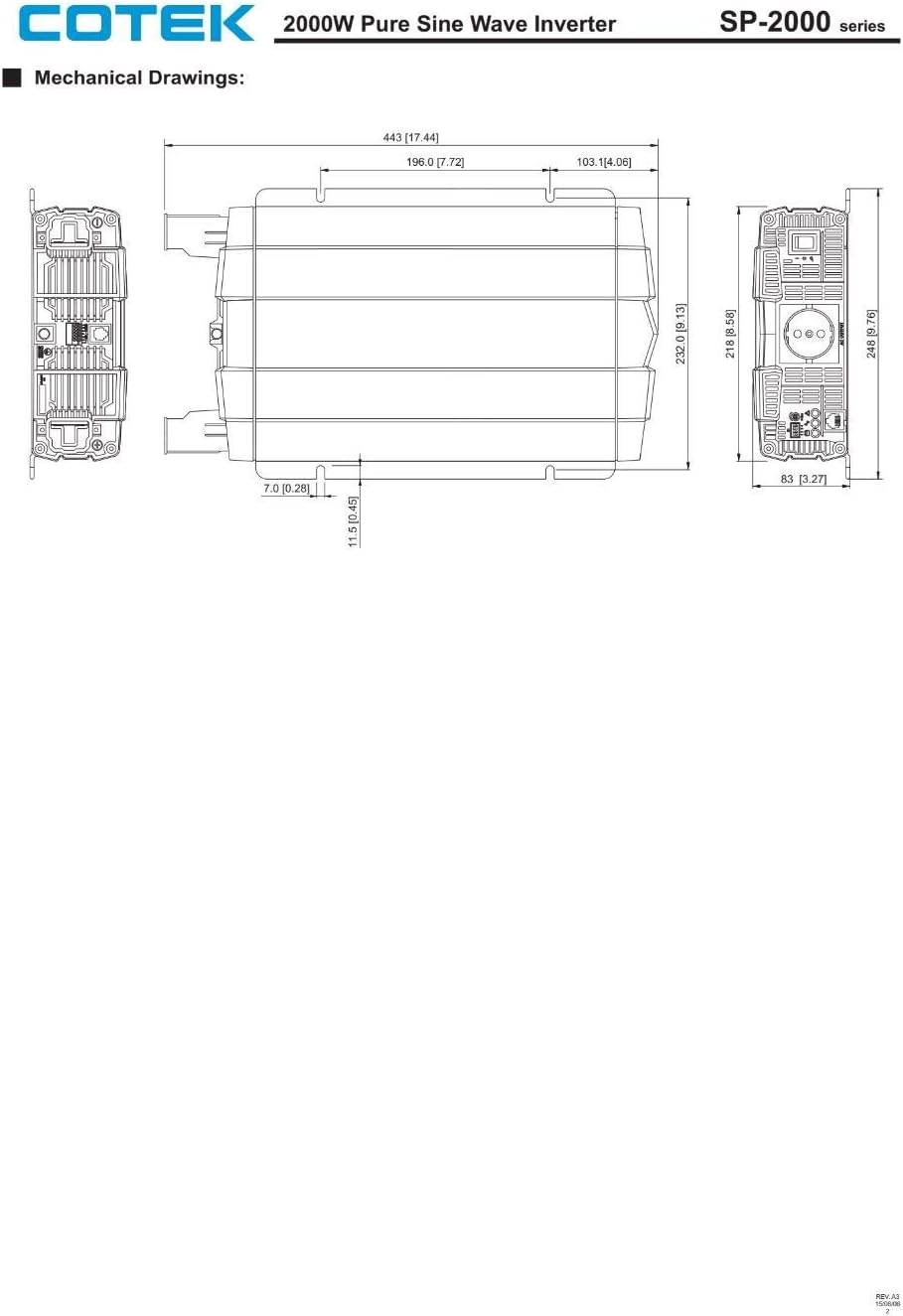
Hình 8.2: Mechanical drawings providing precise dimensions for installation planning.
9. Bảo hành và Hỗ trợ
COTEC products are designed for reliability and performance. For warranty information, technical support, or service inquiries, please refer to the warranty card included with your product or visit the official COTEC webtrang web. Giữ lại biên lai mua hàng làm bằng chứng mua hàng khi yêu cầu bảo hành.


