1. Giới thiệu
The Bogen 1126-BG-UTI1 is a single-zone paging controller designed to integrate a paging system with a telephone system. It provides a reliable interface for making announcements over a public address system from a telephone. This manual provides detailed instructions for the proper installation, operation, and maintenance of your Bogen paging controller.
2. Thông tin an toàn quan trọng
Vui lòng đọc và hiểu tất cả hướng dẫn an toàn trước khi vận hành thiết bị này. Giữ lại hướng dẫn này để tham khảo sau.
- Nguồn điện: Chỉ kết nối thiết bị với nguồn điện có điện áp được chỉ định.tage.
- Độ ẩm: Không để thiết bị tiếp xúc với mưa hoặc hơi ẩm.
- Thông gió: Đảm bảo thông gió thích hợp. Không chặn các lỗ thông gió.
- Bảo dưỡng: Hãy giao việc bảo dưỡng cho nhân viên kỹ thuật có trình độ chuyên môn. Không tự ý sửa chữa sản phẩm này.
- Vệ sinh: Chỉ lau sạch bằng vải khô.
3. Nội dung gói hàng
Xác minh rằng tất cả các mục đều có trong gói hàng:
- Bogen 1126-BG-UTI1 Single Zone Paging Controller Unit
- Bộ đổi nguồn
- Hướng dẫn sử dụng (tài liệu này)
- Bộ phụ kiện lắp đặt (nếu có)
4. Sản phẩm hếtview
The Bogen 1126-BG-UTI1 features various ports and indicators for seamless integration and operation. Familiarize yourself with the unit's components before installation.
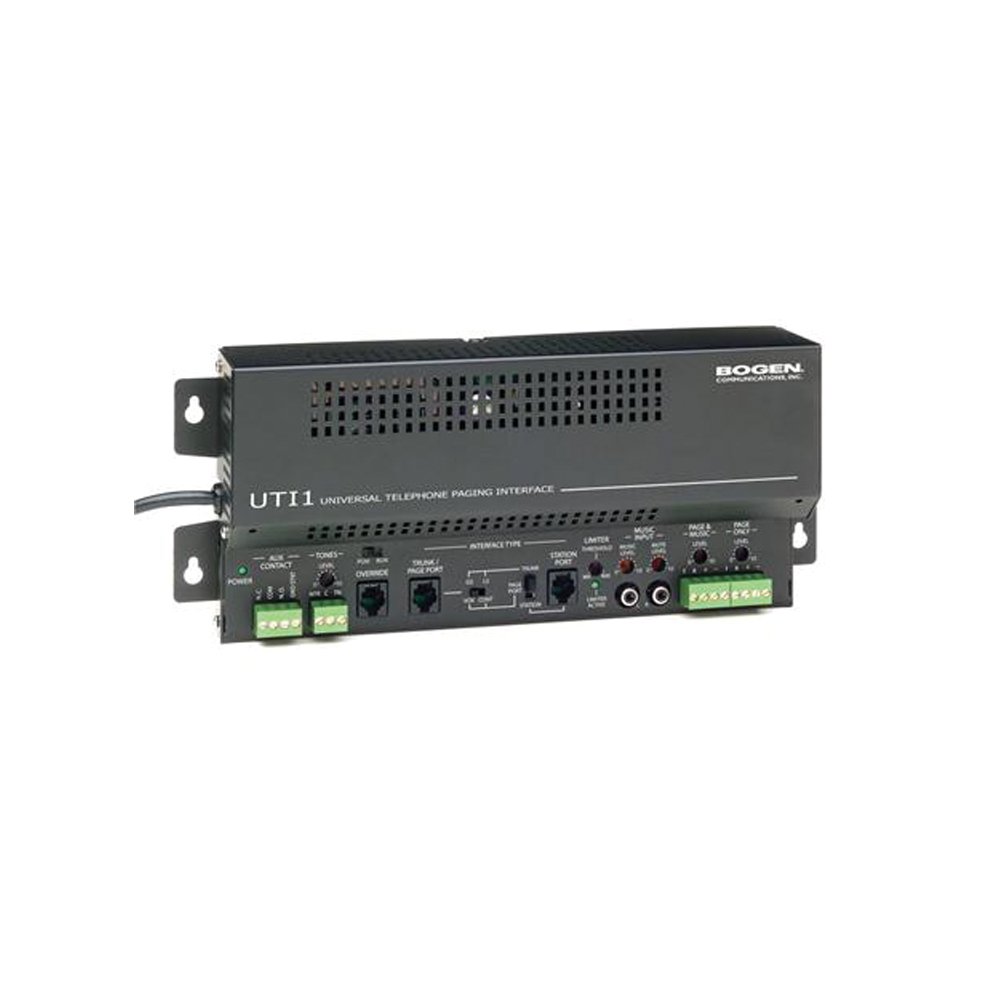
Hình 1: Đằng trước view of the Bogen Single Zone Paging Controller. This image displays the main unit, highlighting its compact design and essential connection points for audio input and output, as well as power. The various ports and indicators are visible, crucial for understanding the device's functionality and connectivity.
4.1 Bảng điều khiển phía trước
- Đèn LED nguồn: Cho biết trạng thái nguồn điện.
- Kiểm soát mức đầu vào: Adjusts the audio input sensitivity.
- Kiểm soát mức đầu ra: Điều chỉnh âm lượng đầu ra.
4.2 Bảng điều khiển phía sau
- Telephone Line Input: RJ-11 jack for connecting to the telephone system.
- Đầu ra âm thanh: RCA or screw terminal connections for connecting to an ampchất lót.
- Công suất đầu vào: Jack for connecting the power adapter.
- MOH Output: Music On Hold output (if applicable).
5. Thiết lập và Cài đặt
Follow these steps to properly install your paging controller:
- Lắp đặt: Choose a suitable location for the controller, away from excessive heat or moisture. Secure the unit using appropriate mounting hardware if desired.
- Connect to Telephone System: Connect an RJ-11 cable from your telephone system's paging port or a suitable analog extension to the "Telephone Line Input" on the controller. Consult your telephone system's manual for specific paging port details.
- Kết nối tới Ampngười lót: Connect the "Audio Output" of the paging controller to an available input on your paging amplifier. Ensure correct polarity if using screw terminals.
- Kết nối nguồn: Plug the provided power adapter into the "Power Input" jack on the controller, then plug the adapter into a standard electrical outlet. The Power LED should illuminate.
- Initial Level Adjustment: Start with the Input Level and Output Level controls set to their minimum positions.
6. Hướng dẫn vận hành
Once installed, the Bogen 1126-BG-UTI1 is ready for operation.
6.1 Making a Page
- From a telephone connected to the system, dial the designated paging access code or extension.
- Wait for the confirmation tone or voice prompt from the paging controller.
- Speak clearly into the telephone handset to make your announcement.
- Hang up the telephone when finished.
6.2 Điều chỉnh mức âm thanh
- Mức độ đầu vào: Slowly increase the "Input Level Control" until the paging audio is clear and distortion-free. If the audio is too loud or distorted, decrease this level.
- Output Level: Adjust the "Output Level Control" to achieve the desired volume through the paging speakers. This should be done in conjunction with the ampđiều khiển âm lượng của lifier.
7. Bảo trì
The Bogen 1126-BG-UTI1 is designed for reliable operation with minimal maintenance.
- Vệ sinh: Periodically wipe the unit with a soft, dry cloth. Do not use liquid cleaners or aerosols.
- Thông gió: Ensure that ventilation openings remain clear of dust and debris.
- Kết nối: Occasionally check all cable connections to ensure they are secure.
KHAI THÁC. Xử lý sự cố
Nếu gặp sự cố, vui lòng tham khảo hướng dẫn khắc phục sự cố sau:
| Vấn đề | Nguyên nhân có thể | Giải pháp |
|---|---|---|
| Không có đèn báo nguồn. | Power adapter not connected or faulty; no power at outlet. | Check power adapter connection. Verify outlet has power. Test with another adapter if available. |
| No paging audio. | Incorrect telephone system connection; amplifier off or muted; audio levels too low. | Verify telephone line and audio output connections. Ensure amplifier is on and not muted. Adjust Input and Output Level controls. |
| Paging audio is distorted. | Input or output levels set too high. | Reduce Input Level and/or Output Level controls. |
| Cannot access paging from telephone. | Incorrect paging access code; telephone system not configured correctly. | Confirm the correct paging access code with your telephone system administrator. Verify telephone system programming. |
If the problem persists after attempting these solutions, contact Bogen technical support.
9. Thông số kỹ thuật
| Tính năng | Chi tiết |
|---|---|
| Số hiệu mẫu | 1126-BG-UTI1 |
| Thương hiệu | Bogen |
| Kích thước gói hàng | 15 x 9 x 7 inch |
| Trọng lượng sản phẩm | 6.7 pound |
| ASIN | B00P1AOL2C |
| Nhà sản xuất | Bogen |
| Paging Zones | Khu đơn |
| Khả năng tương thích | Telephone systems with analog paging port or extension |
10. Bảo hành và Hỗ trợ
Bogen products are designed for durability and performance. For specific warranty information, please refer to the warranty card included with your product or visit the official Bogen website. Technical support is available to assist with any questions or issues you may encounter.
- Hỗ trợ trực tuyến: Thăm nom www.bogen.com/support for FAQs, documentation, and contact information.
- Thông tin liên lạc: Refer to the Bogen website for current telephone numbers and email addresses for technical assistance.


