1. Giới thiệu
This manual provides comprehensive instructions for the Monoprice MS-WN513N2 Wireless N300 4-Port Broadband Router. This device is designed to provide a high-speed wireless network connection for your home or small office, offering reliable internet access and advanced security features. Please read this manual thoroughly before operating the device.
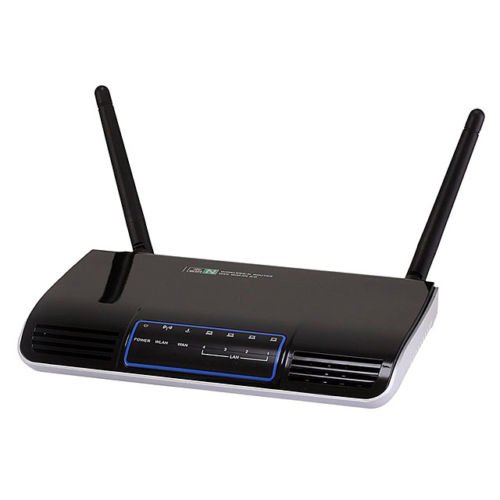
Hình ảnh 1.1: Mặt trước view of the Monoprice MS-WN513N2 Wireless N300 Router. The router is black with indicator lights on the front panel.
2. Tính năng
The Monoprice MS-WN513N2 router offers a range of features to enhance your network experience:
- Wireless N300 Performance: Complies with 802.11b/g/n standards, offering wireless transmission speeds up to 300 Mbps.
- 4-Port Broadband Router: Includes four (4) LAN ports for wired connections.
- Bảo mật nâng cao: Supports 64-bit/128-bit WEP, WPA/WPA2, and WPA-PSK/WPA2-PSK authentication.
- Hỗ trợ IPv6: Compatible with Internet Protocol Version 6.
- Chất lượng dịch vụ (QoS): Bandwidth control for prioritizing network traffic.
- WPS (Cài đặt bảo vệ Wi-Fi): Simplifies wireless security configuration.
- Nhiều chế độ hoạt động: Can be configured as a Gateway, Wireless Bridge, or Wireless ISP (WISP).
- DNS động (DDNS): Supports dynamic domain name system configuration.
- UPnP Support: Universal Plug and Play for easy device discovery.
- Tường lửa: Integrated firewall for network protection.
- Automatic MDI/MDIX: Automatic cable detection for Ethernet ports.
3. Nội dung gói hàng
Vui lòng kiểm tra xem có đầy đủ các mục trong gói hàng của bạn không:
- Monoprice MS-WN513N2 Wireless N300 Router
- Bộ đổi nguồn (DC 5V)
- Cáp Ethernet
- Hướng dẫn cài đặt nhanh (nếu có)
4. Vật lý trênview
4.1 Chỉ báo mặt trước
The front panel features LED indicators that provide status information:
- Đèn LED nguồn: Cho biết bộ định tuyến có đang bật nguồn hay không.
- ĐÈN LED mạng LAN: Hiển thị trạng thái kết nối internet.
- Đèn LED LAN (1-4): Hiển thị trạng thái hoạt động trên các cổng mạng LAN có dây tương ứng.
- Đèn LED WLAN: Cho biết hoạt động của mạng không dây.
4.2 Cổng và nút ở mặt sau
The rear panel contains all physical connection points:
- Cổng nguồn DC 5V: Kết nối với bộ đổi nguồn đi kèm.
- Cổng WAN: Connects to your modem or internet service provider's network.
- Cổng LAN (1-4): Connect to wired devices such as computers, gaming consoles, or switches.
- Nút WPS: Khởi tạo thiết lập bảo mật Wi-Fi để kết nối không dây dễ dàng.
- Đặt lại lỗ: Used to restore the router to factory default settings. Insert a paperclip and hold for 5-10 seconds.
- Cổng ăng-ten: Two (2) ports for connecting the external antennas.
5. Thiết lập
5.1 Kết nối phần cứng
- Kết nối Ăng-ten: Screw the two external antennas onto the antenna ports on the rear panel.
- Kết nối Modem: Connect one end of an Ethernet cable to your modem's LAN port and the other end to the Mạng lưới cổng của bộ định tuyến.
- Kết nối nguồn: Kết nối bộ chuyển đổi nguồn với bộ định tuyến Cổng nguồn DC 5V và cắm bộ chuyển đổi vào ổ cắm điện.
- Bật nguồn: Wait for the router to power on. The Power LED should illuminate. Allow a few minutes for the router to boot up and establish a connection.
- Kết nối máy tính (Tùy chọn): For initial configuration, it is recommended to connect a computer directly to one of the router's Mạng LAN các cổng sử dụng cáp Ethernet.
5.2 Cấu hình ban đầu (Web Giao diện)
- Bộ định tuyến truy cập: Mở một web browser on a connected computer. In the address bar, type the router's default IP address (commonly
192.168.1.1or192.168.0.1) và nhấn Enter. Tham khảo nhãn ở mặt dưới của bộ định tuyến để biết địa chỉ IP chính xác và thông tin đăng nhập mặc định. - Đăng nhập: Nhập tên người dùng và mật khẩu mặc định (ví dụ:
admincho cả hai). - Chạy Trình hướng dẫn thiết lập: bộ định tuyến của web interface will typically present a Quick Setup Wizard. Follow the on-screen prompts to configure your internet connection type (e.g., PPPoE, Dynamic IP, Static IP) and basic wireless settings (SSID, password).
- Thay đổi thông tin xác thực mặc định: For security, it is highly recommended to change the default login username and password for the router's web giao diện.
6. Hoạt động
6.1 Cấu hình mạng không dây
To configure your wireless network:
- Điều hướng đến Cài đặt không dây phần trong web giao diện.
- SSID: Change the default Wireless Network Name (SSID) to a unique name.
- Chế độ bảo mật: Lựa chọn WPA2-PSK as the recommended security mode.
- Mật khẩu: Set a strong, unique password (at least 8 characters, including letters, numbers, and symbols).
- Kênh: The router can automatically select the best 2.4 GHz channel. You can also manually select a fixed channel (e.g., 1, 6, or 11) to avoid interference.
- Lưu thay đổi của bạn.
6.2 Thiết lập bảo mật
The router provides various security features:
- Tường lửa: The built-in firewall helps protect your network from external threats. Ensure it is enabled.
- Lọc MAC: You can restrict network access to specific devices based on their MAC addresses.
- Kiểm soát của phụ huynh: Some routers offer features to block specific websites or limit internet access times for certain devices.
- WPS: Use the WPS button for quick, secure connections with WPS-compatible devices.
6.3 Tính năng nâng cao
Explore the advanced settings in the web interface for more control:
- Chất lượng dịch vụ (QoS): Prioritize bandwidth for applications like gaming or video streaming.
- Cổng chuyển tiếp: Configure specific ports to allow external access to devices on your local network (e.g., for gaming servers).
- DNS động (DDNS): If you have a dynamic public IP address, DDNS allows you to access your network using a consistent domain name.
- IPv6: Configure IPv6 settings if your ISP supports it.
- Chế độ hoạt động: Change the router's mode to Wireless Bridge or WISP if needed for specific network setups.
7. Bảo trì
7.1 cập nhật chương trình cơ sở
Periodically check the Monoprice website for firmware updates. Firmware updates can improve performance, add new features, and fix security vulnerabilities. Follow the instructions provided with the firmware update carefully to avoid damaging the device.
7.2 Đặt lại Bộ định tuyến
If you forget your login password or experience persistent issues, you can restore the router to its factory default settings:
- Khi bộ định tuyến đã được bật nguồn, hãy tìm vị trí của... Đặt lại lỗ trên bảng điều khiển phía sau.
- Use a paperclip or a thin, pointed object to press and hold the reset button inside the hole for approximately 5-10 seconds.
- Release the button when the router's LEDs flash or restart.
- The router will reboot with factory default settings. You will need to reconfigure it using the web giao diện.
KHAI THÁC. Xử lý sự cố
Dưới đây là các giải pháp cho những vấn đề thường gặp:
- Không có kết nối mạng:
- Check if the WAN LED is lit. If not, ensure the Ethernet cable from the modem is securely connected to the router's WAN port.
- Khởi động lại modem và bộ định tuyến của bạn.
- Kiểm tra lại cài đặt kết nối internet trong bộ định tuyến. web giao diện.
- Không thể truy cập Web Giao diện:
- Hãy đảm bảo máy tính của bạn được kết nối với bộ định tuyến thông qua cáp Ethernet hoặc Wi-Fi.
- Verify the router's IP address. Try
192.168.1.1or192.168.0.1. - Xóa bộ nhớ đệm của trình duyệt hoặc thử một trình duyệt khác.
- If you forgot the password, perform a factory reset.
- Tốc độ không dây chậm:
- Ensure your devices support 802.11n for optimal speeds.
- Check for interference from other 2.4 GHz devices (cordless phones, microwaves). Try changing the wireless channel.
- Hãy đảm bảo bộ định tuyến được đặt ở vị trí trung tâm và không bị che khuất.
- Cập nhật trình điều khiển bộ chuyển đổi không dây của thiết bị.
- Mất kết nối không dây:
- Check for signal strength and interference.
- Đảm bảo chương trình cơ sở của bộ định tuyến được cập nhật.
- Verify that the wireless security settings are correctly configured.
9. Thông số kỹ thuật
| Tính năng | Đặc điểm kỹ thuật |
|---|---|
| Người mẫu | MS-WN513N2 |
| Tiêu chuẩn không dây | IEEE 802.11n (Draft 2.0), IEEE 802.11g, IEEE 802.11b |
| Wireless Signal Rates (802.11n) | Up to 300 Mbps (270, 243, 216, 162, 135, 130, 108, 81, 65, 54, 40.5, 27, 13.5 Mbps) |
| Wireless Signal Rates (802.11g) | 54, 48, 36, 24, 18, 12, 9, 6Mbps |
| Wireless Signal Rates (802.11b) | 11, 5.5, 2, 1 Mb / giây |
| Dải tần số | 2.4 - 2.4835 GHz |
| Truyền tải không dây | Lên đến 20 dBm |
| Công nghệ điều chế | DBPSK, DQPSK, CCK, OFDM, 16-QAM, 64-QAM |
| Cổng | 4x LAN Ports, 1x WAN Port, 2x Antenna Ports, 1x DC 5V Power Port |
| Nút | WPS Button, Reset Hole |
| Bảo vệ | 64/128-bit WEP, WPA/WPA2, WPA-PSK/WPA2-PSK |
| Nguồn điện | Điện áp một chiều 5V |
| Giao thức được hỗ trợ | IPv6, PPPoE |
10. Bảo hành và Hỗ trợ
Để biết thông tin về bảo hành và hỗ trợ kỹ thuật, vui lòng tham khảo trang web chính thức của Monoprice. webTruy cập trang web hoặc liên hệ trực tiếp với bộ phận chăm sóc khách hàng của Monoprice. Giữ lại hóa đơn mua hàng để yêu cầu bảo hành.
Giá đơn Webđịa điểm: www.monoprice.com


