1. Giới thiệu
Cảm ơn bạn đã muaasing the SAMSON MS100 Studio Monitor Stands. These professional-grade stands are designed to provide stable and isolated support for your studio monitors, ensuring optimal audio performance. The MS100 features a telescoping column for height adjustment and an adjustable vise-style speaker bracket to accommodate various monitor sizes. Please read this manual thoroughly to ensure proper setup and safe operation.
2. Thông tin an toàn
Luôn tuân thủ các biện pháp phòng ngừa an toàn sau đây để tránh thương tích hoặc hư hỏng thiết bị:
- Ensure all components are securely fastened before placing monitors on the stands.
- Do not exceed the maximum weight capacity of the stands (consult product specifications or manufacturer for specific limits).
- Đặt giá đỡ trên bề mặt bằng phẳng, ổn định để tránh bị đổ.
- Keep children and pets away from the stands, especially during adjustment.
- Avoid placing stands in high-traffic areas where they could be accidentally knocked over.
3. Nội dung gói hàng
Xác minh rằng gói của bạn chứa các mục sau:
- 2 x SAMSON MS100 Studio Monitor Stands (each comprising a base, telescoping column, and speaker bracket)
- Carpet spikes (typically pre-installed or included for optional attachment to the base)
- Assembly hardware (screws, washers, and any necessary tools if provided)
- Hướng dẫn sử dụng (tài liệu này)
4. Lắp ráp và thiết lập
Follow these steps to assemble and set up your MS100 Studio Monitor Stands:
- Attach the Column to the Base: Securely fasten the main telescoping column to the heavy base using the provided hardware. Ensure it is tightened firmly to prevent wobbling.
- Install Carpet Spikes (Optional): If using on carpeted surfaces, ensure the carpet spikes are securely threaded into the bottom of the base. These spikes help to isolate the stand and improve stability.
- Attach the Speaker Bracket: Mount the adjustable vise-style speaker bracket to the top of the telescoping column. Ensure all screws are tightened.
- Điều chỉnh chiều cao: Loosen the locking mechanism on the telescoping column. Adjust the column to the desired height between 30 and 50 inches (76.2 cm - 127 cm). Once the desired height is reached, securely tighten the locking mechanism.
- Place Studio Monitor: Carefully place your studio monitor onto the speaker bracket. Adjust the vise-style clamps to securely hold the monitor in place without overtightening. Ensure the monitor is centered and stable.
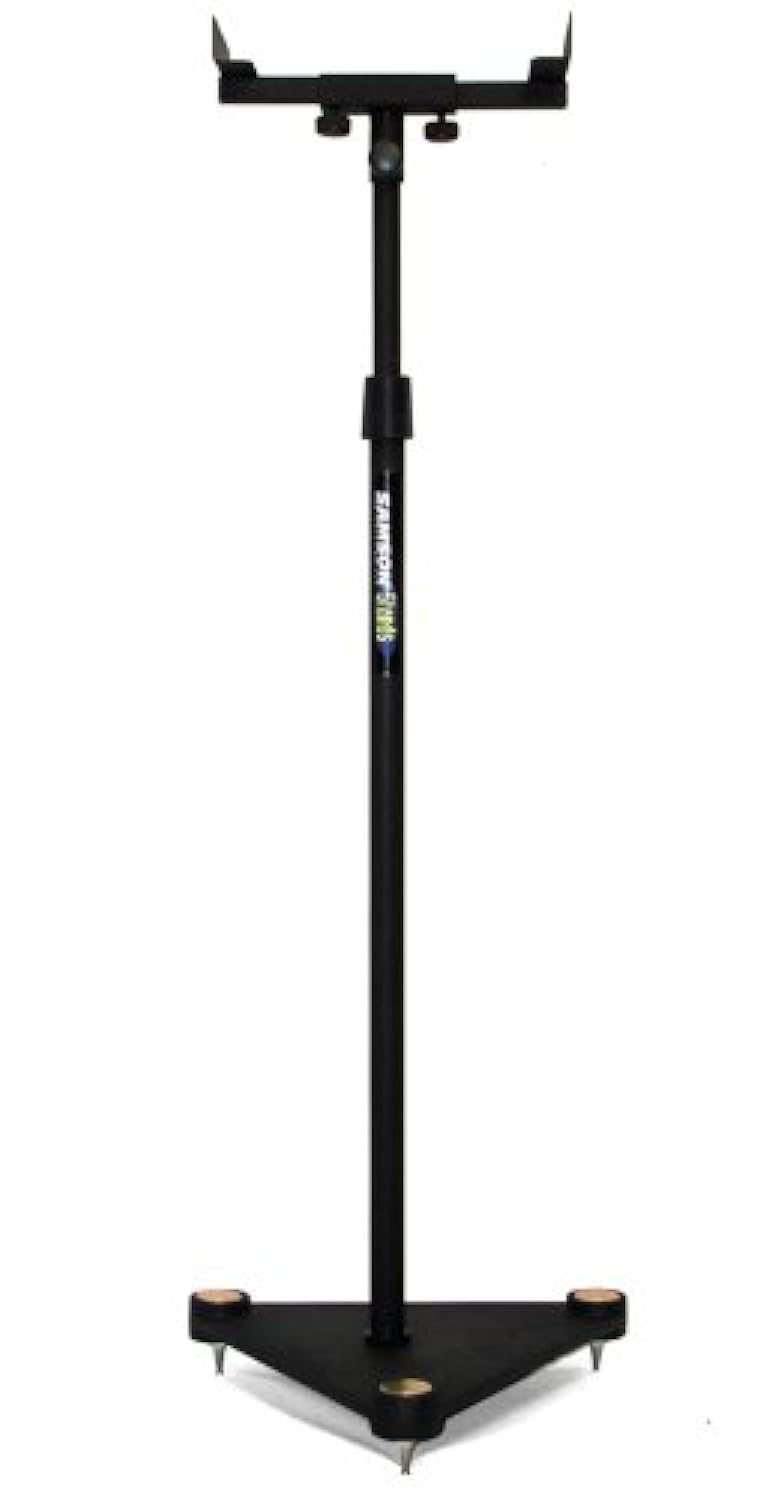
Image description: A fully assembled SAMSON MS100 Studio Monitor Stand with a studio monitor resting on its adjustable bracket. The stand is black with a heavy base, demonstrating its stable design.
5. Hướng dẫn vận hành
Once assembled, the MS100 stands are ready for use. Position them in your studio or listening environment to achieve optimal sound staging and isolation. Ensure monitors are securely seated on the brackets and the stands are stable before use.
- Vị trí đặt màn hình: Place your studio monitors on the adjustable vise-style brackets. Ensure the monitors are balanced and the clamps are tightened just enough to hold them securely without causing damage.
- Điều chỉnh chiều cao: For optimal listening, the acoustic axis of your monitors should be at ear level when you are in your primary listening position. Adjust the telescoping column as described in Section 4, Step 4, to achieve this.
- Kiểm tra độ ổn định: Periodically check that all connections are tight and the stands remain stable, especially after moving them or adjusting height.
6. Bảo trì
The SAMSON MS100 Studio Monitor Stands require minimal maintenance:
- Vệ sinh: Wipe down the stands with a soft, dry cloth to remove dust. Avoid abrasive cleaners or solvents.
- Điều tra: Kiểm tra định kỳ tất cả các bu lông và mối nối để đảm bảo chúng vẫn chắc chắn. Siết chặt lại nếu cần thiết.
- Kho: If storing the stands for an extended period, ensure they are clean and dry. They can be disassembled for more compact storage if desired.
KHAI THÁC. Xử lý sự cố
If you encounter any issues with your MS100 Studio Monitor Stands, refer to the following common solutions:
- Đứng không vững:
- Ensure the column is securely fastened to the base.
- Verify the height adjustment locking mechanism is fully tightened.
- Check that the stand is on a level surface. Adjust carpet spikes if applicable.
- Monitor Not Secure:
- Ensure the vise-style clamps are tightened sufficiently to hold the monitor.
- Verify your monitor's dimensions are compatible with the bracket.
8. Thông số kỹ thuật
| Số hiệu mẫu | MS100 |
| Điều chỉnh chiều cao | 30" - 50" (76.2 cm - 127 cm) |
| Speaker Bracket Type | Adjustable Vise-Style |
| Loại cơ sở | Heavy Base with Carpet Spikes |
| Product Dimensions (single stand) | 27.4 x 15.4 x 2.7 inch (69.6 x 39.1 x 6.9 cm) |
| Item Weight (single stand) | 1.32 pound (0.6 kg) |
Lưu ý: Thông số kỹ thuật có thể thay đổi mà không cần báo trước.
9. Thông tin bảo hành
The SAMSON MS100 Studio Monitor Stands are covered by a Bảo hành linh kiện và nhân công 3 năm from the date of purchase. This warranty covers manufacturing defects and workmanship under normal use. It does not cover damage caused by misuse, accidents, unauthorized modifications, or improper installation.
For warranty service, please retain your proof of purchase and contact SAMSON customer support.
10. Hỗ trợ khách hàng
If you have any questions, require technical assistance, or need to inquire about warranty service, please contact SAMSON customer support through their official webtrang web hoặc nhà bán lẻ nơi bạn mua sản phẩm.
SAMSON Official Webđịa điểm: www.samsontech.com
Please note that specific contact details may vary by region. Refer to the official webtrang web để có thông tin cập nhật nhất.


