1. Giới thiệu
Welcome to the user manual for your new Salora SM508 mobile phone. This guide provides essential information to help you set up, operate, maintain, and troubleshoot your device. Please read this manual carefully to ensure proper use and to maximize the performance and longevity of your phone.
2. Sản phẩm hếtview
The Salora SM508 is a compact and reliable basic mobile phone designed for essential communication. It features a color display, a comfortable keypad, and dual SIM support.
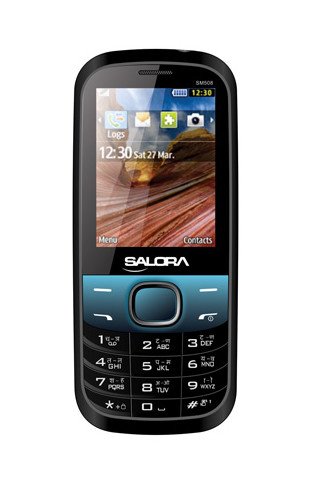
Hình ảnh này hiển thị mặt trước view of the Salora SM508 mobile phone. It features a color display at the top, a central navigation button, and a standard alphanumeric keypad below. The phone has a black body with blue accents around the navigation cluster.
3. Thiết lập
3.1 Lắp thẻ SIM
- Tắt điện thoại và tháo nắp lưng.
- Cẩn thận tháo pin.
- Locate the SIM card slots. The Salora SM508 supports dual SIM cards.
- Insert your SIM card(s) into the designated slot(s) with the gold contacts facing down. Ensure they are securely seated.
3.2 Inserting Battery
- Hãy căn chỉnh các điểm tiếp xúc của pin sao cho khớp với các điểm tiếp xúc trong ngăn chứa pin của điện thoại.
- Gently press the 1800 mAh Li-Ion battery into place until it clicks.
- Đậy nắp lưng lại, đảm bảo nắp được gắn chặt.
3.3 Inserting Memory Card (Optional)
- With the back cover and battery removed, locate the memory card slot.
- Insert a microSD card (up to 8GB) into the slot with the gold contacts facing down.
- Thay pin và nắp lưng.
3.4 Sạc thiết bị
- Kết nối bộ sạc với cổng sạc trên điện thoại của bạn.
- Cắm bộ sạc vào ổ cắm điện.
- The battery indicator on the screen will show the charging status. Charge the phone fully before first use.
3.5 Khởi động/Tắt nguồn lần đầu
- Để bật nguồn: Nhấn và giữ nút Nguồn/Kết thúc cuộc gọi cho đến khi màn hình sáng lên.
- Để Tắt Nguồn: Nhấn và giữ nút Nguồn/Kết thúc cuộc gọi cho đến khi các tùy chọn tắt nguồn xuất hiện, sau đó chọn 'Tắt nguồn'.
4. Hướng dẫn vận hành
4.1 Điều hướng cơ bản
- Use the navigation keys (up, down, left, right) to move through menus and options.
- Press the central 'OK' or 'Select' button to confirm a selection.
- Use the 'Back' or 'Clear' button to return to the previous screen or delete characters.
4.2 Thực hiện và nhận cuộc gọi
- Gọi điện thoại: Nhập số điện thoại bằng bàn phím và nhấn nút Gọi màu xanh lá cây.
- Để nhận cuộc gọi: Khi điện thoại đổ chuông, hãy nhấn nút Gọi màu xanh lá cây để trả lời.
- Để kết thúc cuộc gọi: Nhấn nút Kết thúc cuộc gọi màu đỏ.
4.3 Gửi và nhận tin nhắn SMS
- Điều hướng đến menu 'Tin nhắn'.
- Select 'Write Message' or 'New SMS'.
- Nhập tin nhắn của bạn bằng bàn phím.
- Thêm số điện thoại của người nhận hoặc chọn từ danh bạ.
- Nhấn 'Gửi'.
4.4 Sử dụng máy ảnh
- Mở ứng dụng máy ảnh từ menu chính.
- The phone features a 1.3 MP primary (rear) camera.
- Dùng màn hình để căn chỉnh khung hình chụp.
- Press the 'OK' or 'Capture' button to take a photo.
4.5 Đa phương tiện và Kết nối
- Jack âm thanh: The phone includes a 3.5 mm audio jack for connecting headphones or external speakers.
- Bluetooth: Enable Bluetooth from the settings menu to connect to compatible devices for file transfer or hands-free communication.
- GPRS: The phone supports GPRS for basic internet connectivity. Consult your network provider for data plan details.
5. Bảo trì
5.1 Vệ sinh thiết bị của bạn
- Use a soft, dry, lint-free cloth to clean the phone's screen and body.
- Tránh sử dụng các hóa chất mạnh, dung môi tẩy rửa hoặc chất tẩy rửa mạnh.
- Do not allow water or liquids to enter the phone.
5.2 Chăm sóc pin
- Tránh để pin tiếp xúc với nhiệt độ quá cao hoặc quá thấp.
- Không làm thủng, tháo rời hoặc làm chập mạch pin.
- If the battery is damaged or swollen, discontinue use immediately and replace it with an authorized Salora battery.
5.3 Lưu trữ
- Hãy bảo quản điện thoại ở nơi khô ráo, thoáng mát, tránh ánh nắng trực tiếp và hơi ẩm.
- Nếu lưu trữ trong thời gian dài, hãy đảm bảo pin được sạc một phần (khoảng 50%) để kéo dài tuổi thọ của pin.
KHAI THÁC. Xử lý sự cố
If you encounter issues with your Salora SM508, please refer to the following common solutions:
- Điện thoại không bật:
Hãy đảm bảo pin đã được sạc đầy. Kết nối bộ sạc và chờ vài phút trước khi thử bật nguồn. Kiểm tra xem pin đã được lắp đúng cách chưa. - Không có tín hiệu mạng:
Check if your SIM card is correctly inserted. Ensure you are in an area with network coverage. Try restarting the phone. - Không thể thực hiện/nhận cuộc gọi:
Verify that your SIM card is active and has sufficient balance/plan. Check network signal strength. Ensure call barring or flight mode is not enabled. - Vấn đề sạc:
Ensure the charger is properly connected to both the phone and the power outlet. Try using a different compatible charger. Check the charging port for any debris. - Bàn phím không phản hồi:
Restart the phone. If the issue persists, ensure no physical damage to the keypad.
If the problem persists after trying these steps, please contact Salora customer support.
7. Thông số kỹ thuật
Below are the detailed technical specifications for the Salora SM508 mobile phone:
| Tính năng | Đặc điểm kỹ thuật |
|---|---|
| Thương hiệu | Salora |
| Người mẫu | SM508 |
| Hệ điều hành | Android 5.1, Android v5 1 OS (Note: This specification appears to be an error in the source data for a basic phone with a keypad interface. The phone operates on a proprietary feature phone OS.) |
| Kích thước màn hình | 6.1 Centimetres (2.4" TFT Screen) |
| Nghị quyết | 320 x 240 pixel |
| Camera chính | 1.3 MP (Rear) |
| Ắc quy | 1800 mAh, Li-Ion |
| Dung lượng lưu trữ bộ nhớ | Có thể mở rộng lên đến 8GB |
| Hỗ trợ SIM | SIM kép |
| Công nghệ kết nối | Bluetooth, GPRS |
| Jack âm thanh | 3.5mm |
| Giao diện thiết bị - Chính | Bàn phím |
| Yếu tố hình thức | Thanh |
| Màu sắc | Đen, Xanh |
| Trọng lượng sản phẩm | 140 gam |
| Kích thước gói hàng | 14 x 9.4 x 6.2cm |
| Ngày đầu tiên có sẵn | Ngày 18 tháng 2014 năm XNUMX |
8. Bảo hành và Hỗ trợ
8.1 Thông tin bảo hành
The Salora SM508 comes with a Bảo hành của nhà sản xuất 1 năm cho thiết bị kể từ ngày mua. Các phụ kiện trong hộp, bao gồm cả pin, được bảo hành bởi Bảo hành 6 tháng của nhà sản xuất kể từ ngày mua. Bảo hành này bao gồm các lỗi sản xuất và các vấn đề phát sinh trong quá trình sử dụng thông thường.
Vui lòng giữ lại biên lai mua hàng để làm bằng chứng mua hàng khi yêu cầu bảo hành.
8.2 Hỗ trợ khách hàng
For any technical assistance, warranty claims, or further inquiries regarding your Salora SM508 mobile phone, please contact Salora customer support directly. Refer to the packaging or the official Salora webtrang web để biết thông tin liên lạc mới nhất.


