1. Giới thiệu
This manual provides essential information for the safe and effective installation, operation, and maintenance of your Vimar 14015 Serie Plana 2-Pole White Switch. This product is a 2-pole switch designed for electrical circuits, rated at 16 Amperes and 250 Volts. It features an illuminable and replaceable push button, making it suitable for various residential and commercial applications.
2. Thông tin an toàn
Vui lòng đọc kỹ tất cả hướng dẫn an toàn trước khi lắp đặt và sử dụng. Không tuân theo các hướng dẫn này có thể gây ra điện giật, hỏa hoạn hoặc thương tích nghiêm trọng.
- Ngắt nguồn: Always ensure the main power supply to the circuit is turned off at the circuit breaker or fuse box before attempting any installation, wiring, or maintenance.
- Thợ điện có trình độ: Installation should only be performed by a qualified electrician or competent person in accordance with all local and national electrical codes and regulations.
- Tậptage và Hiện tại: Không vượt quá vol đã chỉ địnhtage (250V) and current (16A) ratings of the switch.
- Xếp hạng IP40: This switch has an International Protection Rating of IP40, meaning it is protected against solid objects larger than 1mm but offers no protection against liquids. Do not install in areas where it may be exposed to water or high humidity.
- Vật liệu: The switch is constructed from metal. Ensure proper grounding if required by local codes.
3. Nội dung gói hàng
- 1 x Vimar 14015 Serie Plana 2-Pole White Switch
4. Cài đặt
Follow these steps for proper installation of the Vimar 14015 switch.
4.1 Cài đặt trước
- Tắt nguồn: Locate the circuit breaker or fuse controlling the area where the switch will be installed and turn off the power. Verify power is off using a voltage thử nghiệm.
- Chuẩn bị dây điện: Ensure the existing wiring is suitable for a 2-pole, 16A, 250V switch.
4.2 Đấu dây
The Vimar 14015 switch is designed for 2-way circuits and features quick connect terminals. Refer to the diagram below for terminal identification.
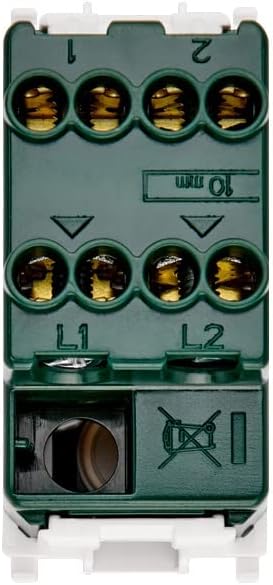
Hình 1: Quay lại view of the Vimar 14015 switch with wiring terminals. Terminals L1 and L2 are for incoming power lines, and terminals 1 and 2 are for outgoing load connections in a 2-way circuit.
- Connect the incoming live wires to terminals labeled L1 Và L2.
- Connect the outgoing load wires to terminals labeled 1 Và 2.
- Ensure all connections are secure and wires are fully inserted into the quick connect terminals.
4.3 Lắp đặt
This switch is designed for surface mount installation.

Hình 2: Mặt bên view of the Vimar 14015 switch, indicating its compact design and model identification.
- Carefully place the switch into the appropriate mounting box or frame.
- Secure the switch using the provided screws or clips, ensuring it is flush and stable.
4.4 Sau khi cài đặt
- Khôi phục điện: Sau khi lắp đặt hoàn tất và mọi kết nối đều an toàn, hãy cấp lại nguồn điện cho bộ ngắt mạch.
- Chức năng kiểm tra: Press the switch button to verify proper ON-OFF operation and check if the illumination functions correctly.
5. Hướng dẫn vận hành
The Vimar 14015 switch operates with a simple push-button mechanism.

Hình 3: Mặt trước view of the Vimar 14015 switch, showing the push-button actuator.
- ON/OFF Function: Press the upper part of the button to turn the connected device or light ON. Press the lower part of the button to turn it OFF.
- Chiếu sáng: If the switch is configured for illumination, a light indicator will be visible on the button when the switch is in a specific state (e.g., ON or OFF, depending on wiring).
- Replaceable Button: The button is designed to be replaceable. If replacement is needed, ensure power is disconnected before attempting to remove or install a new button.
6. Bảo trì
The Vimar 14015 switch requires minimal maintenance.
- Vệ sinh: To clean the switch, wipe it with a soft, dry cloth. Do not use abrasive cleaners, solvents, or excessive moisture, as this can damage the finish or internal components.
- Không có bộ phận nào người dùng có thể tự sửa chữa: There are no user-serviceable parts inside the switch other than the replaceable button. Do not attempt to disassemble the switch.
KHAI THÁC. Xử lý sự cố
If you encounter issues with your Vimar 14015 switch, refer to the following common problems and solutions.
- Switch Not Working:
- Ensure the main power supply to the circuit is ON.
- Verify that all wiring connections (L1, L2, 1, 2) are secure and correctly installed.
- Check the connected load (e.g., light bulb) to ensure it is functional.
- Đèn không hoạt động:
- Confirm that the switch is correctly wired for illumination.
- If the illumination is provided by a separate component (e.g., an LED module), ensure it is correctly installed and functional.
If problems persist after attempting these troubleshooting steps, contact a qualified electrician or Vimar customer support.
8. Thông số kỹ thuật
| Đặc điểm kỹ thuật | Giá trị |
|---|---|
| Thương hiệu | Vimar |
| Số hiệu mẫu | SERIE PLANA (14015) |
| Chế độ hoạt động | BẬT |
| Xếp hạng hiện tại | 16 Amps |
| Hoạt động Voltage | 250 vôn |
| Loại liên hệ | Thường mở |
| Loại đầu nối | Kết nối nhanh |
| Loại mạch | 2 chiều |
| Loại bộ truyền động | Nút nhấn |
| Bảo vệ quốc tế Rating | IP40 |
| Số lượng vị trí | 2 |
| Phương pháp kiểm soát | Chạm |
| Màu sắc | Trắng |
| Cái gì?tage | 200 watt |
| Vật liệu | Kim loại |
| Kiểu lắp đặt | Lắp đặt bề mặt |
| Kích thước sản phẩm (D x R x C) | 0.88 x 1.51 x 1.92 inch |
| Trọng lượng sản phẩm | 1.06 ounce |
9. Bảo hành và Hỗ trợ
Vimar products are manufactured to high-quality standards. For specific warranty information, please refer to the documentation provided with your purchase or visit the official Vimar website. For technical support or assistance, please contact Vimar customer service through their official channels.


