1. Giới thiệu
The Lorex LW2731AC1 is an add-on wireless camera designed to expand your existing Lorex 7-Inch LCD Wireless Home Monitoring System. This camera provides additional surveillance capabilities, allowing you to monitor more areas of your home or property. It features day and night viewing, two-way audio communication, and a secure digital wireless signal for reliable performance.
This manual provides essential information for the proper installation, operation, and maintenance of your LW2731AC1 add-on camera.
2. Nội dung gói hàng
Xác minh rằng tất cả các thành phần đều có trong gói:
- 1 x Indoor/Outdoor Wireless Camera (LW2731AC1)
- 1 bộ chuyển đổi nguồn cho máy ảnh
3. Tính năng sản phẩm
The LW2731AC1 camera is equipped with several features to enhance your monitoring experience:
- VGA (640 x 480) Resolution Sensor: Provides clear video footage.
- 52 độ ViewGóc ing: Offers a focused field of view for specific areas.
- 40ft IR Night Vision: Enables monitoring in low-light or complete darkness, with black and white video.
- Bộ lọc cắt IR: Ensures accurate color reproduction during daylight conditions.
- Advanced Day/Night Mode: Automatically switches between color (day) and black and white (night) modes for optimal clarity.
- Passive Infrared (PIR) Motion Detection: Detects movement to trigger recording or alerts.
- Âm thanh hai chiều: Built-in microphone and speaker allow for listening and speaking through the camera.
- Secure Digital Wireless Signal: Utilizes Frequency Hopping Spread Spectrum (FHSS) technology for private and secure video and audio transmission.
- Thiết kế chịu được thời tiết: Suitable for both indoor and outdoor installation. For outdoor use, install under shelter to protect from direct exposure to rain or snow.

Hình 3.1: Góc phía trước view of the Lorex LW2731AC1 Add-on Camera, showing the lens, IR LEDs, and antenna.

Hình 3.2: Cận cảnh mặt trước view of the camera, highlighting the lens, infrared LEDs, and the motion sensor below.
4. Thiết lập
4.1 Cài đặt vật lý
- Chọn vị trí: Select a suitable location for your camera. Consider the desired viewing area, proximity to a power outlet, and wireless signal strength to your Lorex 7-Inch LCD monitor. For outdoor use, ensure the camera is installed under shelter to protect it from direct weather exposure.
- Gắn máy ảnh: Use the provided mounting hardware to securely attach the camera to a wall or ceiling. Adjust the camera's angle to cover the desired area.
- Kết nối nguồn: Plug the camera's power adapter into the camera and then into a standard electrical outlet. The camera requires a local power outlet for operation.
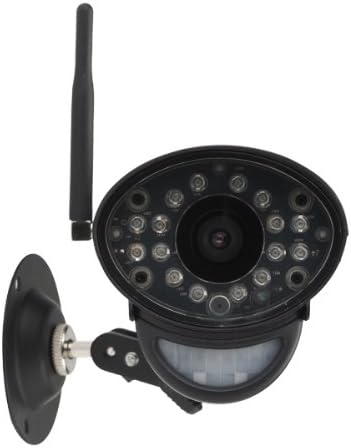
Hình 4.1: Mặt trước view of the camera with its adjustable mounting bracket, ready for installation.
4.2 Pairing with Your Monitoring System
To integrate the LW2731AC1 add-on camera with your Lorex 7-Inch LCD monitoring system, follow the pairing instructions provided with your main monitoring system. Typically, this involves:
- Access the menu on your Lorex 7-Inch LCD monitor.
- Navigate to the 'Camera Pairing' or 'Add Camera' section.
- Select an unused channel for the new camera.
- Follow the on-screen prompts, which usually instruct you to press a 'Pair' or 'Sync' button on the back of the camera within a specified timeframe (e.g., 30 seconds).
- Once successfully paired, the camera's video feed will appear on the selected channel of your monitor.
Note: Refer to your Lorex 7-Inch LCD monitoring system's manual for specific pairing instructions, as steps may vary slightly by model.
5. Hoạt động
Once paired, the LW2731AC1 camera operates in conjunction with your Lorex 7-Inch LCD monitoring system. Refer to your main system's manual for detailed instructions on:
- ViewChế độ ing: How to switch between single camera view, scan mode (automatic switching), and quad split-screen mode (if supported by your monitor).
- Cài đặt phát hiện chuyển động: Adjusting sensitivity and recording triggers for the camera's passive infrared motion sensor.
- Âm thanh hai chiều: Using the talk-back function to communicate through the camera.
- Ghi và Phát lại: Managing video recordings stored on your monitoring system's SD card.
The camera's digital wireless signal ensures a private and secure connection, minimizing interference and unauthorized access to your video feed.
6. Bảo trì
6.1 Vệ sinh máy ảnh
To maintain optimal image quality, periodically clean the camera lens and housing:
- Hãy đảm bảo máy ảnh đã tắt nguồn trước khi vệ sinh.
- Use a soft, lint-free cloth to gently wipe the lens. If necessary, dampthấm nhẹ miếng vải vào nước hoặc dung dịch lau kính nhẹ.
- Wipe the camera housing with a soft, damp vải. Tránh sử dụng hóa chất mạnh hoặc chất tẩy rửa có tính mài mòn.
6.2 Cân nhắc về môi trường
While the camera is weather-resistant, extreme conditions can affect its performance and lifespan:
- Avoid installing the camera in direct sunlight for prolonged periods, as this can cause overheating.
- Protect the camera from direct exposure to heavy rain, snow, or hail. Install under an overhang or eave when used outdoors.
- Ensure the power adapter is protected from moisture.
KHAI THÁC. Xử lý sự cố
If you encounter issues with your LW2731AC1 add-on camera, consider the following common solutions:
- Không có tín hiệu video:
- Ensure the camera is powered on and its power adapter is securely connected to a working outlet.
- Verify the camera is within range of your Lorex 7-Inch LCD monitor. Obstructions like thick walls or multiple floors can reduce wireless range.
- Attempt to re-pair the camera with your monitoring system (refer to Section 4.2).
- Check for sources of interference (e.g., other wireless devices, microwaves) near the camera or monitor.
- Chất lượng hình ảnh kém:
- Vệ sinh ống kính máy ảnh (tham khảo Mục 6.1).
- Ensure adequate lighting in the monitored area during the day.
- For night vision, ensure there are no obstructions directly in front of the camera's IR LEDs.
- Phát hiện chuyển động không hoạt động:
- Check the motion detection settings on your Lorex 7-Inch LCD monitor to ensure it is enabled and sensitivity is appropriately set.
- Ensure the camera's motion sensor is not obstructed.
- Sự cố âm thanh hai chiều:
- Verify the volume settings on your Lorex 7-Inch LCD monitor.
- Ensure there are no physical obstructions blocking the camera's microphone or speaker.
If problems persist, consult the support section of the Lorex website or contact Lorex customer support for further assistance.
8. Thông số kỹ thuật
| Tính năng | Đặc điểm kỹ thuật |
|---|---|
| Số hiệu mẫu | LW2731AC1 |
| Độ phân giải quay video | 640x480 (VGA) |
| Lĩnh vực View | 52 Độ |
| Tầm nhìn ban đêm | Lên đến 40ft (12m) |
| Công nghệ kết nối | Wireless (FHSS) |
| Nguồn điện | Điện có dây |
| Âm thanh | Âm thanh hai chiều (Mic và loa tích hợp) |
| Phát hiện chuyển động | Hồng ngoại thụ động (PIR) |
| Sử dụng trong nhà/ngoài trời | Indoor, Outdoor (Weather-Resistant) |
| Kích thước (D x R x C) | 9.6 x 3.6 x 3.4 inch (24.4 x 9.1 x 8.6 cm) |
| Trọng lượng sản phẩm | 1.05 pound (0.48 kg) |
| Màu sắc | Đen |
| Bảo vệ quốc tế Rating | IP67 |
9. Bảo hành và Hỗ trợ
For information regarding product warranty, technical support, and additional resources, please visit the official Lorex website. You can typically find FAQs, software downloads, and contact information for customer service there.
Webđịa điểm: www.lorex.com


