Giới thiệu
This manual provides detailed instructions for the operation and maintenance of your PENTAX Q10 digital interchangeable lens camera. The PENTAX Q10 is a super-compact and lightweight camera designed to deliver high-quality photography with a 12.4MP CMOS image sensor and improved autofocus performance.
Có gì trong hộp
- PENTAX Q10 Camera Body
- 02 Standard Zoom Lens (5-15mm)
- Pin Lithium-Ion có thể sạc lại
- Bộ sạc pin
- Cáp USB
- Dây đeo
- Body Mount Cap
- Lens Caps (front and rear)
- CD-ROM phần mềm
- Hướng dẫn sử dụng (tài liệu này)
máy ảnh kết thúcview

Hình 1: Mặt trước View (Lens Removed) - This image displays the front of the Pentax Q10 camera body with the lens detached, revealing the image sensor and the Q-mount for interchangeable lenses. The 'PENTAX' logo is visible at the top, and 'SR' (Shake Reduction) is indicated on the grip.
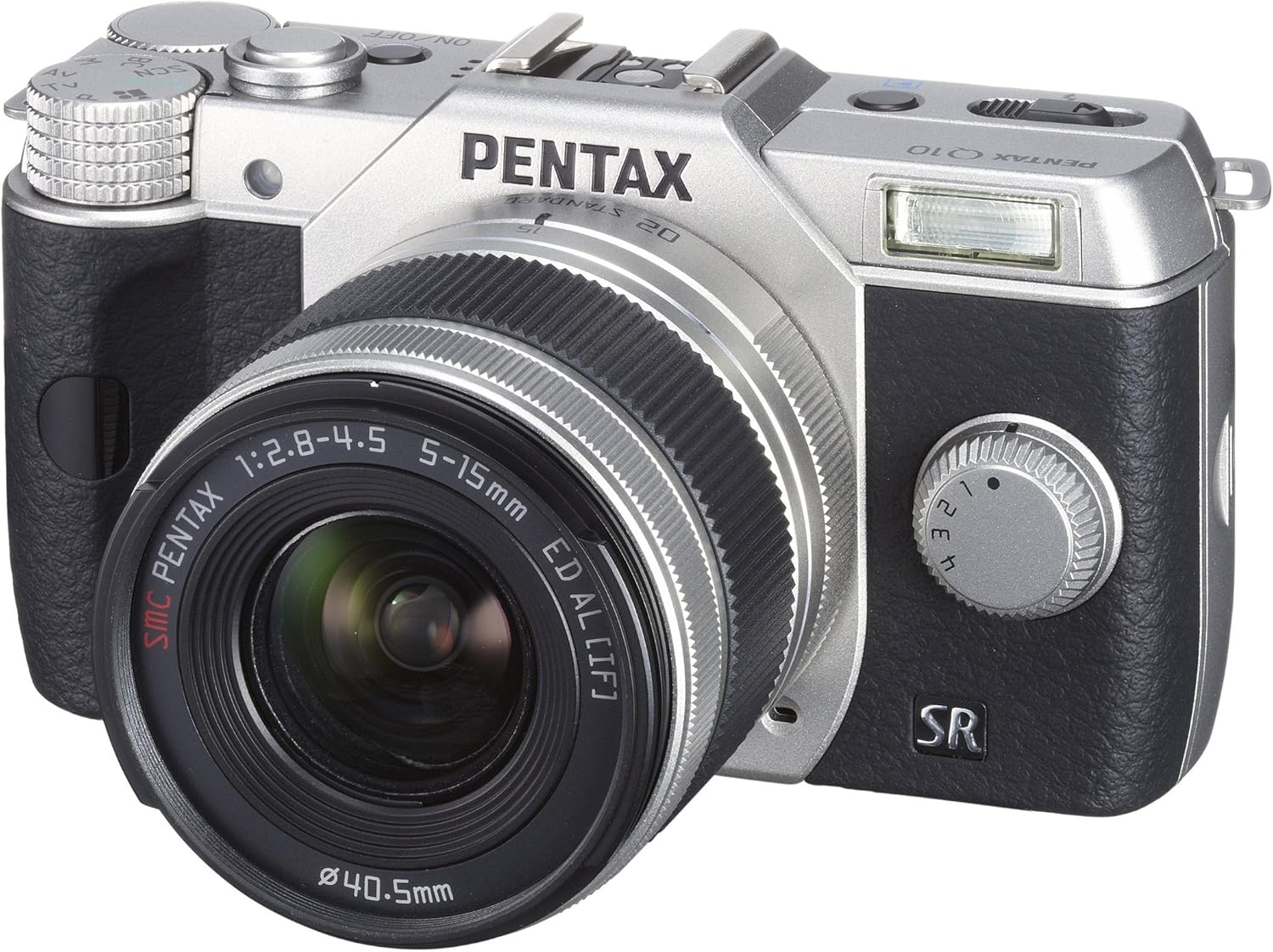
Hình 2: Mặt trước View with Lens Attached - The Pentax Q10 camera is shown with the 02 Standard Zoom Lens (5-15mm) mounted. This view highlights the compact size of the camera with its standard kit lens.

Hình 3: Trên cùng View - This overhead view of the Pentax Q10 shows the main controls on the top panel, including the mode dial (with Auto, P, Av, Tv, M, SCN settings), the power ON/OFF button, the shutter release button, and the hot shoe for external flash units.

Hình 4: Mặt trước View with Flash Activated - The Pentax Q10 is depicted with its built-in pop-up flash extended, ready for use. This view also shows the 02 Standard Zoom Lens attached.

Hình 5: Phía sau View - The back of the Pentax Q10 camera features the 3-inch LCD screen, along with various control buttons such as the playback button, delete button, ISO, OK, WB, and menu navigation buttons.
Thiết lập cơ bản
1. Sạc pin
Insert the provided rechargeable battery into the battery charger. Connect the charger to a power outlet. The charging indicator light will show the charging status. Once fully charged, remove the battery.
2. Lắp pin và thẻ nhớ
Open the battery/memory card compartment cover located at the bottom of the camera. Insert the charged battery with the correct orientation until it clicks into place. Insert an SD/SDHC/SDXC memory card into the card slot until it locks. Close the compartment cover securely.
3. Gắn ống kính
Align the red dot on the lens with the red dot on the camera's lens mount. Rotate the lens clockwise until it clicks into place. To remove the lens, press the lens release button on the camera body and rotate the lens counter-clockwise.
4. Cài đặt ban đầu
Upon first power-on, the camera may prompt you to set the date, time, and language. Follow the on-screen instructions using the control buttons and LCD screen.
Vận hành máy ảnh
Bật/Tắt nguồn
Nhấn nút BẬT/TẮT button located on the top panel to power the camera on or off.
Chế độ chụp
Xoay nút xoay chế độ ở phía trên máy ảnh để chọn chế độ chụp mong muốn:
- Tự động: Fully automatic shooting for ease of use.
- P (Chương trình AE): Camera sets aperture and shutter speed, but allows for program shift.
- Av (Aperture Priority AE): Bạn thiết lập khẩu độ, máy ảnh thiết lập tốc độ màn trập.
- Tv (Shutter Priority AE): Bạn cài đặt tốc độ màn trập, máy ảnh cài đặt khẩu độ.
- M (Thủ công): Bạn thiết lập cả khẩu độ và tốc độ màn trập.
- SCN (Chế độ cảnh): Pre-set modes for specific situations (e.g., Portrait, Landscape, Night Scene, Macro, Blue Sky, Forest, Blur control).
Chụp ảnh
- Chọn chế độ chụp bằng nút xoay chọn chế độ.
- Hãy căn chỉnh khung hình bằng màn hình LCD.
- Press the shutter release button halfway down to focus. The camera will confirm focus.
- Press the shutter release button fully to take the picture.
Quay Video
The PENTAX Q10 supports Full 1080p HD video recording at 30 frames per second with H.264 compression. To record video:
- Switch the camera to movie mode (if available on the mode dial or via menu setting).
- Press the dedicated movie recording button (if present) or the shutter release button to start recording.
- Nhấn lại nút để dừng ghi.
Hoạt động flash
The camera features a built-in pop-up flash. To activate the flash, slide the flash release lever. The flash has various modes (e.g., Auto, Flash On, Red-eye Reduction) which can be selected via the camera's menu or dedicated flash button.
Hệ thống lấy nét tự động
The PENTAX Q10 utilizes a contrast detection autofocus system with 25 autofocus points. Available AF modes include Continuous, Face Detection, Multi-area, Selective single-point, Single, and Tracking. Select the appropriate AF mode from the camera's menu to suit your shooting conditions.
Ổn định hình ảnh
The camera incorporates a sensor-shift shake reduction system to minimize blur caused by camera shake, especially in low light conditions or when using longer focal lengths.
BẢO TRÌ
Vệ sinh thân máy ảnh
Lau thân máy ảnh bằng vải mềm, khô. Đối với vết bẩn cứng đầu, hãy lau nhẹampen the cloth with water or a mild cleaning solution specifically designed for electronics. Avoid using strong solvents.
Vệ sinh ống kính
Use a lens blower to remove dust from the lens surface. For smudges, use a specialized lens cleaning cloth and lens cleaning fluid. Never touch the lens surface with your fingers.
Làm sạch cảm biến
The PENTAX Q10 features an integrated DRII (Dust Removal II) dust reduction system. If dust spots appear on your images, consult a professional service center for sensor cleaning. Attempting to clean the sensor yourself can cause damage.
Chăm sóc pin
Store batteries in a cool, dry place. Do not expose them to extreme temperatures. If the camera will not be used for an extended period, remove the battery.
Xử lý sự cố
Máy ảnh không bật nguồn
- Đảm bảo pin được sạc đầy và lắp đúng cách.
- Kiểm tra xem các điểm tiếp xúc của pin có sạch không.
Không thể chụp ảnh
- Kiểm tra xem thẻ nhớ đã được lắp vào và có đủ dung lượng trống chưa.
- Check if the lens is properly attached and unlocked.
- Ensure the camera is not in playback mode.
- If the flash is set to a slow sync mode, the shutter may not release immediately.
Hình ảnh bị mờ
- Đảm bảo ống kính sạch.
- Check if the camera is properly focused.
- Use a faster shutter speed or increase ISO in low light conditions.
- Confirm that the image stabilization (SR) is active if needed.
Lỗi thẻ nhớ
- Lắp lại thẻ nhớ.
- Hãy thử một thẻ nhớ khác tương thích.
- Định dạng thẻ nhớ (lưu ý: thao tác này sẽ xóa toàn bộ dữ liệu).
Thông số kỹ thuật
| Tên mẫu | Pentax Q10 |
| Cảm biến hình ảnh | 12.4 MP Backlit CMOS (1/2.3-inch) |
| Độ phân giải tĩnh hiệu quả | 12.4MP |
| Ngàm ống kính | Pentax Q-mount |
| Ổn định hình ảnh | dịch chuyển cảm biến |
| Độ phân giải video | Full HD 1080p (1920x1080) at 30fps (H.264) |
| Trưng bày | 3-inch LCD (460,000 dots) |
| Độ nhạy ISO | Tiêu chuẩn ISO tối thiểu mở rộng 100 |
| Tốc độ màn trập | 1/8000 đến 30 giây |
| Hệ thống lấy nét tự động | Contrast Detection (25 points) |
| Chụp liên tục | Lên đến 5 khung hình/giây |
| Phương tiện lưu trữ | Thẻ nhớ SD/SDHC/SDXC |
| Kết nối | HDMI (Type C Mini), USB |
| Trọng lượng (Xấp xỉ) | 0.44 Pounds (Body only) |
Lưu ý: Thông số kỹ thuật có thể thay đổi mà không cần báo trước.
Bảo hành và Hỗ trợ
Thông tin bảo hành
The PENTAX Q10 camera comes with a Bảo hành linh kiện và nhân công 1 năm from the date of purchase. Please retain your proof of purchase for warranty claims. This warranty covers manufacturing defects and workmanship under normal use.
Hỗ trợ khách hàng
For technical assistance, service, or further inquiries, please visit the official Pentax support webtrang web hoặc liên hệ với bộ phận dịch vụ khách hàng của họ. Thông tin liên hệ thường có thể được tìm thấy trên trang web của nhà sản xuất webtrang web hoặc trong thẻ bảo hành đi kèm với sản phẩm của bạn.


