1. Giới thiệu
Thank you for choosing the TFA 30.5027.02 Digital Thermometer/Hygrometer. This device is designed to accurately measure and display indoor temperature and humidity, providing a clear indication of the comfort level in your environment. Its ultra-flat design and high-gloss surface make it a discreet and functional addition to any room. Please read this manual carefully to ensure proper setup and operation.
2. Thông tin an toàn
- Giữ lại hướng dẫn sử dụng này để tham khảo sau này.
- Thiết bị này chỉ được sử dụng trong nhà.
- Do not expose the device to extreme temperatures, direct sunlight, moisture, or strong vibrations.
- Không nhúng thiết bị vào nước hoặc các chất lỏng khác.
- Do not attempt to open or modify the device. This will void the warranty.
- Để pin ngoài tầm với của trẻ em. Nếu nuốt phải, tìm kiếm sự chăm sóc y tế ngay lập tức.
- Vứt bỏ pin đã qua sử dụng theo quy định của địa phương.
- Làm sạch thiết bị bằng một miếng vải mềm,amp vải. Không sử dụng chất tẩy rửa có tính mài mòn hoặc dung môi.
3. Nội dung gói hàng
Vui lòng kiểm tra xem tất cả các thành phần đều có mặt và không bị hư hỏng:
- 1x TFA 30.5027.02 Digital Thermometer/Hygrometer
- 1x CR2 Lithium Battery (pre-installed or separate)
- 1x Hướng dẫn sử dụng (tài liệu này)
4. Sản phẩm hếtview
The TFA 30.5027.02 features a clear digital display showing current temperature and humidity. It also includes a comfort level indicator and a maximum/minimum value memory function.

Hình 1: Đằng trước view of the TFA 30.5027.02 Digital Thermometer/Hygrometer. The display shows temperature in Celsius and relative humidity percentage, along with a comfort level icon.
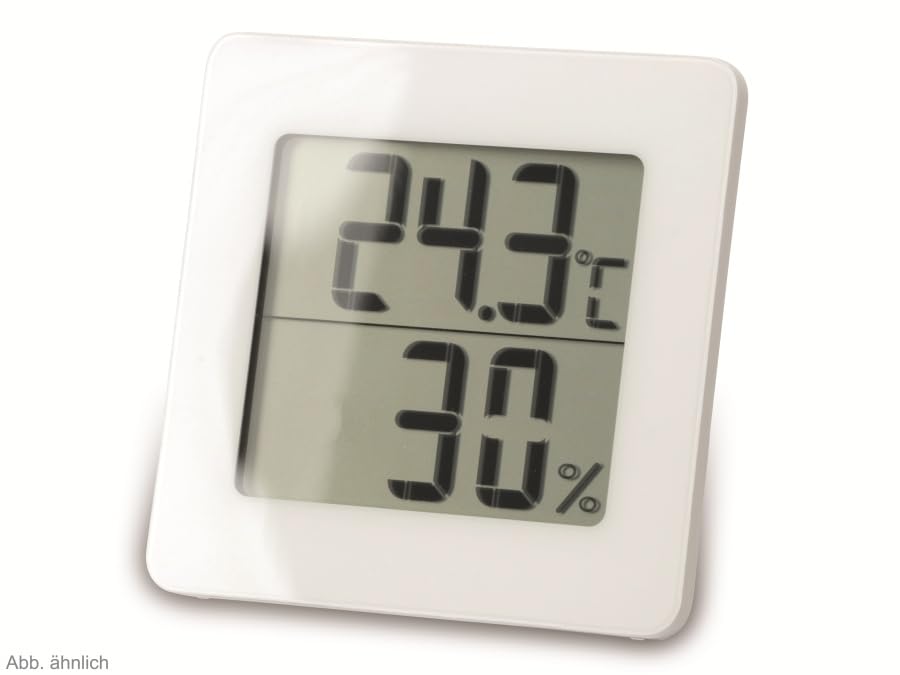
Hình 2: Luân phiên view of the TFA 30.5027.02 showing different temperature and humidity readings, demonstrating the device's clear digital display.
Các tính năng chính:
- Digital display for temperature (°C) and humidity (% RH)
- Ultra-flat design with high-gloss finish
- Comfort level indicator (smiley icon)
- Maximum and minimum value memory function
- Có thể gắn tường
5. Thiết lập
5.1 Lắp đặt pin
- Xác định vị trí nắp ngăn chứa pin ở mặt sau của thiết bị.
- Remove the cover by sliding or gently prying it open.
- Insert one CR2 Lithium battery, ensuring the correct polarity (+/-) as indicated inside the compartment.
- Lắp lại nắp ngăn chứa pin một cách an toàn.
- The device display should activate, showing current temperature and humidity readings.
5.2 Vị trí ban đầu
For accurate readings, place the thermometer/hygrometer in a location free from direct sunlight, drafts, or heat sources. The device can be placed on a flat surface or mounted on a wall using the integrated mounting hole on the back.
- Lắp trên tường: Use a small screw (not included) suitable for your wall type. Hang the device securely.
- Vị trí đặt trên bàn: Ensure the device is stable on a flat, level surface.
6. Hướng dẫn vận hành
6.1 Hiển thị trênview
The large digital display shows two main values:
- Màn hình phía trên: Current temperature in degrees Celsius (°C).
- Màn hình thấp hơn: Current relative humidity in percentage (% RH).
- Chỉ báo mức độ thoải mái: A small icon (e.g., a smiley face) indicates the current indoor climate comfort level based on temperature and humidity.
6.2 Chức năng Max/Min
The device records the maximum and minimum temperature and humidity values measured since the last reset. To access these values:
- Nhấn nút TỐI ĐA/TỐI THIỂU button (if present, typically on the back or side). The display will show the maximum recorded temperature and humidity.
- Nhấn nút TỐI ĐA/TỐI THIỂU nút một lần nữa để view the minimum recorded temperature and humidity.
- Nhấn nút TỐI ĐA/TỐI THIỂU button a third time to return to current readings.
To reset the MAX/MIN values, press and hold the TỐI ĐA/TỐI THIỂU button for a few seconds while viewing the MAX or MIN values. The memory will clear, and new maximum and minimum values will begin recording from that point.
6.3 Chỉ báo mức độ thoải mái
The comfort level indicator provides a quick visual reference for indoor climate conditions:
- Happy Face: Indicates optimal comfort (e.g., 20-25°C and 40-70% RH).
- Neutral Face: Indicates acceptable but not optimal conditions.
- Sad Face: Indicates uncomfortable conditions (e.g., too dry, too humid, too hot, or too cold).
Note: Specific ranges for comfort levels may vary slightly by model. Refer to the device's display for the exact icon representation.
7. Bảo trì
7.1 Vệ sinh
Làm sạch thiết bị bằng hơi mềm, damp cloth. Do not use abrasive cleaning agents, solvents, or alcohol, as these can damage the surface and display.
7.2 Thay thế pin
When the battery power is low, a low battery indicator (if available) will appear on the display. Replace the battery as follows:
- Mở nắp ngăn chứa pin ở mặt sau của thiết bị.
- Remove the old CR2 Lithium battery.
- Insert a new CR2 Lithium battery, observing the correct polarity (+/-).
- Đóng nắp ngăn chứa pin.
Note: After battery replacement, the device may reset, and MAX/MIN values will be cleared.
KHAI THÁC. Xử lý sự cố
| Vấn đề | Nguyên nhân có thể | Giải pháp |
|---|---|---|
| Không hiển thị hoặc hiển thị mờ | Pin hết hoặc lắp không đúng cách. | Replace the battery with a new CR2 Lithium battery, ensuring correct polarity. |
| Các bài đọc không chính xác | Device is placed in an unsuitable location (e.g., near a window, heat source, or vent). | Relocate the device to a stable indoor environment away from direct influences. Allow 15-30 minutes for readings to stabilize. |
| Comfort indicator always shows the same face | Environmental conditions are consistently outside or within a specific comfort range. | This indicates the device is functioning correctly. Adjust your indoor environment if desired. |
9. Thông số kỹ thuật
- Số hiệu mẫu: 30.5027.02
- Thương hiệu: TFA
- Màu sắc: Trắng
- Kích thước sản phẩm (D x R x C): 10 x 1.2 x 8.2 cm (3.94 x 0.47 x 3.23 inch)
- Trọng lượng sản phẩm: 70 gam (2.47 ounce)
- Ắc quy: 1 x CR2 Lithium (included)
- Kiểu lắp đặt: Treo tường
- Operational Humidity Range: 20% đến 95% RH
- Upper Rated Temperature: 50°C (122°F)
- Độ chính xác nhiệt độ: ±1°C
- Độ chính xác đọc nhiệt độ: ±1°C
10. Bảo hành và Hỗ trợ
For warranty information and customer support, please refer to the terms and conditions provided by your retailer or contact the manufacturer directly. Keep your proof of purchase for any warranty claims.
Nhà sản xuất: TFA Dostmann GmbH & Co. KG
For further assistance, please visit the official TFA webtrang web hoặc liên hệ với bộ phận dịch vụ khách hàng của họ.


