1. Giới thiệu
This manual provides comprehensive instructions for the safe and effective operation of the KORAD KA3005P Programmable DC Power Supply. The KA3005P is a high-precision, variable, and adjustable linear power supply designed for laboratory, educational, and industrial applications. It offers stable and reliable DC power output with advanced features such as programmable control, memory storage, and multiple safety protections.

Hình 1.1: KORAD KA3005P Programmable DC Power Supply. This image shows the front and side view of the power supply unit, highlighting its compact design and the clear digital display.
2. Hướng dẫn an toàn
To ensure safe operation and prolong the life of your KORAD KA3005P power supply, please observe the following safety precautions:
- Luôn kết nối nguồn điện với ổ cắm điện xoay chiều đã được nối đất đúng cách.
- Do not operate the unit in a wet or damp môi trường.
- Ensure adequate ventilation around the unit to prevent overheating. Do not block the ventilation openings.
- Không mở casing của bộ nguồn. Không có bộ phận nào bên trong mà người dùng có thể tự sửa chữa. Hãy giao việc bảo trì cho nhân viên kỹ thuật có chuyên môn.
- Xác minh khối lượng đầu vàotage selector switch (110V/220V) on the rear panel is set correctly for your local power supply before connecting to AC mains.
- Disconnect the power cord before performing any maintenance or when the unit is not in use for extended periods.
- Avoid short-circuiting the output terminals. Although the unit has short-circuit protection, prolonged short circuits can cause damage.
- Use appropriate test leads and ensure they are rated for the voltage and current levels you intend to use.
3. Có gì trong hộp
Upon unpacking your KORAD KA3005P, please verify that all the following items are included:
- 1 x KORAD KA3005P Power Supply Unit
- 1 x dây nguồn AC
- 1 x Cáp USB
- 1 x Set of 5 Amp Test Leads (Banana plug to Crocodile clip)
- 1 x Hướng dẫn sử dụng
- 1 x CD containing Remote Control Software
4. Tính năng sản phẩm
The KORAD KA3005P is equipped with a range of features designed for precision and ease of use:
- High Precision Output: Provides stable and accurate 0-30V and 0-5A DC output.
- Màn hình LED 4 chữ số: Bright and clear display for precise voltage (0.001V resolution) and current (0.001A resolution) readings.
- Điều khiển lập trình: USB and RS232 ports for remote control via PC software.
- Lưu trữ bộ nhớ: Four dedicated memory locations (M1-M4) to save and recall frequently used voltage và cài đặt hiện tại.
- Vol không đổitage (CV) & Constant Current (CC) Modes: Automatically switches between modes to maintain stable output.
- Bảo vệ an toàn toàn diện: Bao gồm chức năng bảo vệ quá dòng (OCP), bảo vệ quá áp.tage Protection (OVP), and Short-Circuit Protection.
- Nút BẬT/TẮT đầu ra: Allows safe connection and disconnection of loads without powering down the unit.
- Chức năng khóa: Ngăn ngừa việc vô tình thay đổi cài đặt trong quá trình hoạt động.
- Âm lượng đầu vào có thể chuyển đổitage: Supports 110V/220V AC input, making it suitable for international use.
- Quiet Cooling Fan: Built-in variable speed fan for efficient heat dissipation and reduced operational noise.

Hình 4.1: Key features of the KORAD KA3005P. This image illustrates the power and protection mechanisms, memory settings, the bright 4-digit LED display, and the switchable power input on the rear panel.
5. Bảng điều khiển trênview
5.1 Bảng điều khiển phía trước

Hình 5.1: Front Panel Layout of the KORAD KA3005P. This image provides a detailed view of the front panel with numbered labels indicating the function of each control and indicator.
- Tậptage Đọc ra (V): Hiển thị đầu ra voltage tính bằng Volts.
- Current Readout (A or mA): Displays the output current in Amperes hoặc milliamplà.
- Power Readout (Watts): Displays the calculated output power in Watts.
- Vol không đổitage Mode Indicator (CV): Đèn sáng khi thiết bị hoạt động ở chế độ điện áp không đổi.tagchế độ e.
- Constant Current Mode Indicator (CC): Đèn sẽ sáng khi thiết bị hoạt động ở chế độ dòng điện không đổi.
- Memory Setting Indicator (M1-M4): Indicates which memory preset is currently active.
- Over-Current Protection Indicator (OCP): Đèn sáng khi chức năng bảo vệ quá dòng được kích hoạt.
- Quá voltage Protection Indicator (OVP): Illuminates when Over-Voltage Protection is active.
- Front Panel Lock Indicator (LOCK): Đèn sẽ sáng khi các nút điều khiển ở mặt trước bị khóa.
- Output On/Off Indicator (ON): Illuminates when the output is active.
- A/mA Button: Chuyển đổi giữa Amperage and milliAmperage display, and also serves as the Panel Lock button when held.
- Nút OCP: Kích hoạt/vô hiệu hóa chức năng bảo vệ quá dòng.
- OCP SET Button: Used to set the Over-Current Protection limit.
- OVP Button: Activates/deactivates Over-Voltage Bảo vệ.
- OVP SET Button: Used to set the Over-Voltage Protection limit.
- Nút BẬT/TẮT: Toggles the output power ON or OFF.
- Memory Save/Recall Buttons (M1-M4): Used to save and recall voltage và cài đặt hiện tại.
- BEEP Button: Toggles the audible feedback (beeper) ON or OFF.
- SENSE Button: (Functionality may vary, typically for remote sensing).
- Setting Adjustment Dial: Bộ mã hóa quay để điều chỉnh âm lượngtage và các giá trị hiện tại.
- Digit Selection Buttons (Left/Right Arrows): Used to select the digit to be adjusted by the Setting Adjustment Dial.
- Tậptage/Current Adjustment Selector: Toggles between adjusting voltage và hiện tại.
- Thiết bị đầu cuối đầu ra: Red (+) and Black (-) terminals for connecting the load.
- Ground Terminal (GND): Đầu nối màu xanh lá cây dùng để nối đất khung xe.
- Nút nguồn: Công tắc nguồn chính của thiết bị.
5.2 Bảng điều khiển phía sau
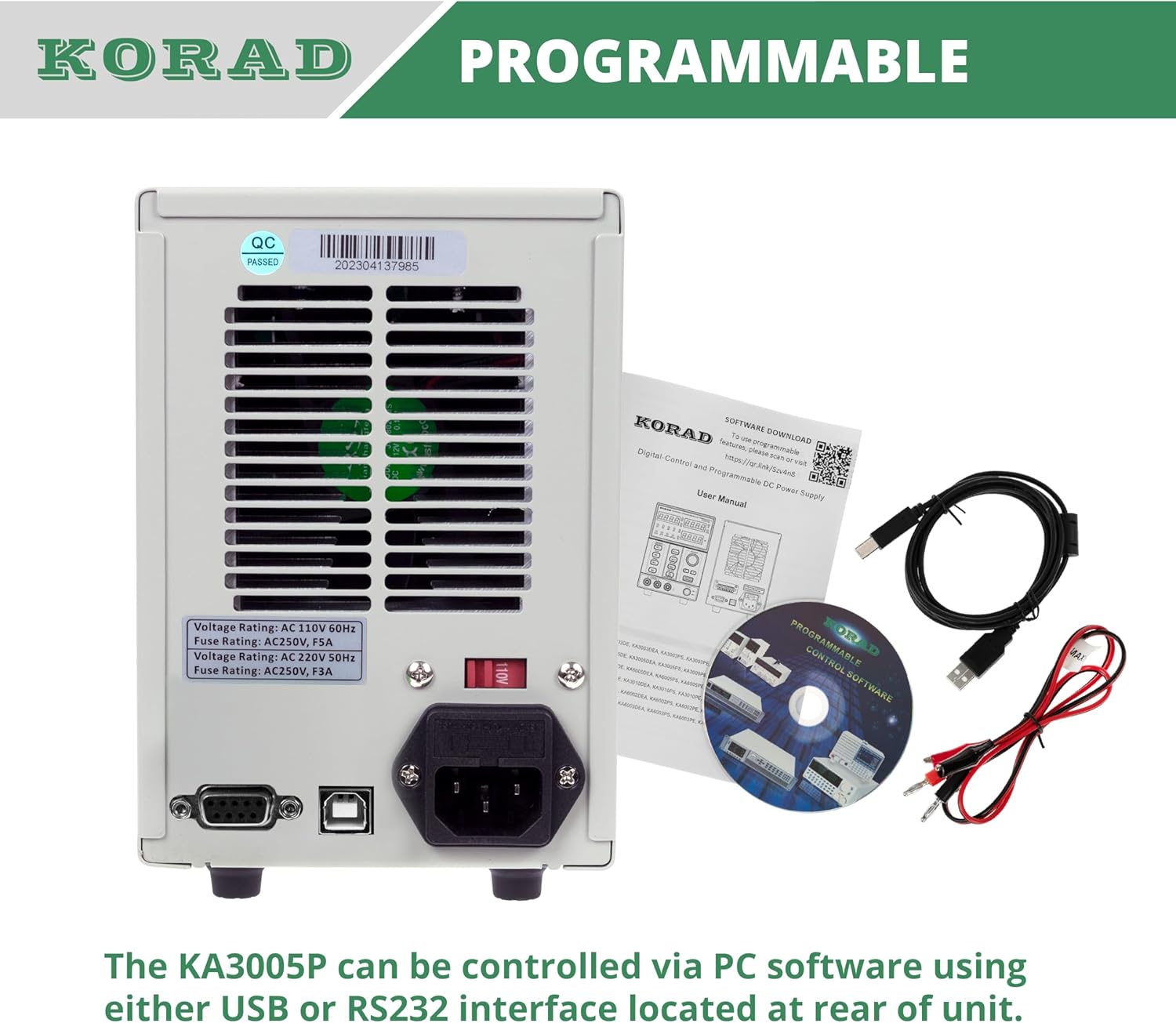
Hình 5.2: Rear Panel Layout of the KORAD KA3005P. This image displays the rear panel, showing the AC input, voltage selector, cooling fan, and communication ports.
- Ổ cắm đầu vào AC: Để kết nối dây nguồn AC được cung cấp.
- Tậptage Selector Switch (110V/220V): Allows selection of the appropriate input voltage cho khu vực của bạn. Ensure this is set correctly before connecting to power.
- Quạt làm mát: Automatically adjusts speed based on internal temperature to maintain optimal operating conditions.
- Cổng USB: For connecting to a computer for programmable control.
- Cổng RS232: For connecting to a computer or other devices for programmable control.
- Giá đỡ cầu chì: Contains the main AC input fuse.
6. Thiết lập
6.1 Kiểm tra ban đầu
Before connecting the power supply, inspect the unit for any signs of physical damage that may have occurred during shipping. If any damage is found, contact your supplier immediately.
6.2 Setting Input Voltage
Xác định vị trí của voltage selector switch on the rear panel of the unit. Ensure it is set to match your local AC mains voltag(110V hoặc 220V). Cài đặt không chính xác có thể làm hỏng thiết bị.

Hình 6.1: Rear panel showing the 110V/220V voltage selector switch. This switch must be correctly set to match the local AC power supply before operation.
6.3 kết nối nguồn
Connect the supplied AC power cord to the AC input socket on the rear panel and then plug it into a grounded wall outlet.
6.4 Kết nối đầu ra
Connect your load to the output terminals on the front panel using the provided test leads or other suitable leads. Ensure correct polarity: Red for positive (+), Black for negative (-). The green terminal is for chassis ground.
7. Hướng dẫn vận hành
7.1 Bật / Tắt nguồn
- Nhấn nút QUYỀN LỰC button on the front panel to turn the unit ON. The display will illuminate.
- Nhấn nút QUYỀN LỰC Nhấn nút một lần nữa để tắt thiết bị.
7.2 Cài đặt âm lượngtage và Hiện tại
- Nhấn nút TẬPTAGE / HIỆN TẠI button to select whether you are adjusting voltage or current. The corresponding display will flash.
- Sử dụng Mũi tên trái/phải buttons to select the digit you wish to adjust. The selected digit will flash.
- Xoay Setting Adjustment Dial to change the value of the selected digit.
- Một khi vol mong muốntage and current limit are set, press the BẬT/TẮT nút để bật đầu ra. ON chỉ báo sẽ sáng lên.

Hình 7.1: Close-up of the bright 4-digit LED display. This display provides precise and clear readouts of voltage and current, essential for accurate power delivery.
7.3 Chức năng bộ nhớ (M1-M4)
The unit allows you to save and recall up to four sets of voltage và cài đặt hiện tại.
- Để lưu: Đặt âm lượng mong muốntage and current. Press and hold the desired memory button (M1, M2, M3 hoặc M4) until you hear a beep or the display indicates saving.
- Để thu hồi: Nhấn nhanh nút bộ nhớ mong muốn (M1, M2, M3 hoặc M4). The saved settings will be loaded.

Hình 7.2: Close-up of the memory save/recall buttons (M1-M4). These buttons allow users to quickly store and retrieve frequently used voltage và cài đặt hiện tại.
7.4 Điều khiển BẬT/TẮT đầu ra
Các BẬT/TẮT button controls the output power to the terminals independently of the main power switch.
- Nhấn BẬT/TẮT to enable output. The ON chỉ báo sẽ sáng.
- Nhấn BẬT/TẮT again to disable output. The ON đèn báo sẽ tắt.
- It is recommended to disable the output before connecting or disconnecting loads.
7.5 Chức năng khóa
To prevent accidental changes to settings during operation, you can lock the front panel controls.
- Nhấn và giữ A/mA nút trong vài giây cho đến khi KHÓA indicator illuminates. All front panel controls will be disabled.
- Để mở khóa, hãy nhấn và giữ nút A/mA một lần nữa cho đến khi KHÓA chỉ báo tắt.
7.6 Over-Current Protection (OCP) and Over-Voltage Bảo vệ (OVP)
These features protect your connected load and the power supply from damage due to excessive current or voltage.
- Setting OCP/OVP: Nhấn nút OCP SET or OVP SET nút. Sử dụng Setting Adjustment Dial Và Mũi tên trái/phải buttons to set the desired protection limit.
- Activating OCP/OVP: Nhấn nút OCP or OVP button to enable the protection. The corresponding indicator will light up.
- When an OCP or OVP event occurs, the output will automatically shut off, and the respective indicator will flash. To reset, disable the protection or resolve the fault, then press the BẬT/TẮT button to re-enable output.

Hình 7.3: Close-up of the protection and control buttons. This image highlights the OCP, OVP, and Lock buttons, which are crucial for safe operation and preventing accidental changes.
8. Programmable Control
The KORAD KA3005P can be controlled remotely via a computer using the USB or RS232 ports located on the rear panel.
- Cài đặt phần mềm: Insert the provided CD into your computer and follow the on-screen instructions to install the remote control software. Drivers for the USB/RS232 interface may also be included.
- Sự liên quan: Connect the power supply to your computer using the supplied USB cable or an RS232 cable (not included for RS232).
- Hoạt động của phần mềm: Launch the installed software. Select the correct COM port corresponding to your connected power supply. The software allows you to set voltage, current, enable/disable output, and configure protection limits from your computer. Some software versions may support programmable sequences or data logging.
- Giao thức nối tiếp: For advanced users, the user manual and CD typically contain documentation on the serial communication protocol, allowing for custom software development or integration with other programming environments (e.g., LabVIEW, Python).
Hình 8.1: Rear panel showing USB and RS232 ports for programmable control. The image also displays the included user manual, USB cable, test leads, and software CD, which facilitate remote operation.
For software downloads or updates, please refer to the official KORAD website or the link provided in the manual (e.g., www.koradtechnology.com).
9. Bảo trì
The KORAD KA3005P is designed for reliable operation with minimal maintenance. Follow these guidelines:
- Vệ sinh: Disconnect the power supply from the AC mains before cleaning. Use a soft, dry cloth to wipe the exterior. Do not use abrasive cleaners or solvents.
- Thông gió: Ensure the ventilation openings on the sides and rear of the unit are free from dust and obstructions. Periodically clean the fan vents with compressed air if necessary.
- Thay thế cầu chì: If the unit does not power on, check the fuse located in the fuse holder on the rear panel. Replace only with a fuse of the same type and rating (e.g., 5A/250V for 110V input, 3A/250V for 220V input). Always disconnect the power cord before replacing the fuse.
- Kho: Khi không sử dụng trong thời gian dài, hãy bảo quản thiết bị ở nơi khô ráo, thoáng mát, tránh ánh nắng trực tiếp và nhiệt độ cao.
KHAI THÁC. Xử lý sự cố
If you encounter issues with your KORAD KA3005P, refer to the following common problems and solutions:
| Vấn đề | Nguyên nhân có thể | Giải pháp |
|---|---|---|
| Thiết bị không bật nguồn. | Không có nguồn điện AC; Cầu chì bị cháy; Âm lượng không chính xáctagcài đặt bộ chọn e. | Check power cord connection and wall outlet. Replace fuse if blown. Verify voltage selector (110V/220V) on rear panel is correct. |
| Không có vol đầu ratage / hiện tại. | Output is OFF; OCP/OVP triggered; Short circuit at output. | Nhấn nút BẬT/TẮT button to enable output. Check if OCP/OVP indicators are flashing; resolve fault and reset. Check for short circuits in the load or test leads. |
| Đầu ra voltagdòng điện e/không ổn định. | Poor load connection; Overheating; Faulty test leads. | Ensure secure connections to the load. Check ventilation and allow unit to cool. Inspect and replace test leads if damaged. |
| Display shows incorrect readings. | Calibration issue; External interference. | If readings are consistently inaccurate, contact support for calibration. Minimize external electromagnetic interference. |
| Software communication issues. | Incorrect COM port; Driver issues; Software incompatibility. | Verify COM port selection in software. Reinstall USB/RS232 drivers. Ensure software version is compatible with your operating system. Refer to software documentation. |
If the problem persists after attempting these solutions, please contact KORAD customer support.
11. Thông số kỹ thuật
Technical specifications for the KORAD KA3005P Programmable DC Power Supply:

Hình 11.1: KORAD KA3005P Unit Specifications. This image provides a visual summary of the key technical parameters of the power supply.
| Tham số | Giá trị |
|---|---|
| Tậptage Phạm vi | 0-30V |
| Phạm vi hiện tại | 0-5A |
| Điều chỉnh tải (Âm lượng)tage) | ≤0.01% + 2mV |
| Điều chỉnh tải (Dòng điện) | ≤0.1% + 10mA |
| Điều chỉnh đường dây (âm lượng)tage) | ≤0.01% + 3mV |
| Điều chỉnh đường dây (Dòng điện) | ≤0.1% + 3mA |
| Thiết lập độ phân giải (Âm lượng)tage) | 10mV |
| Độ phân giải cài đặt (Hiện tại) | 1mA |
| Setup Accuracy (25°C ± 5°C) (Voltage) | ≤0.5% + 20mV |
| Setup Accuracy (25°C ± 5°C) (Current) | ≤0.5% + 10mA |
| Ripple (20-20M) (Voltage) | 2mVrms |
| Ripple (20-20M) (Current) | ≤2mVũ khí |
| Hệ số nhiệt độ (Voltage) | ≤150ppm |
| Hệ số nhiệt độ (Dòng điện) | ≤150ppm |
| Đọc lại Độ phân giải (Vol)tage) | 10mV |
| Độ phân giải đọc lại (Hiện tại) | 1mA |
| Thời gian phản ứng (Thể tích)tage Tăng) | ≤100mS (Voltage Thả) |
| Giao diện | Programmable (USB, RS232) |
| Cân nặng | 9.52 Lbs / 4.32 Kg |
| Kích thước (Rộng x Cao x Sâu) | 100mm (W) x 156mm (H) x 260mm (D) |
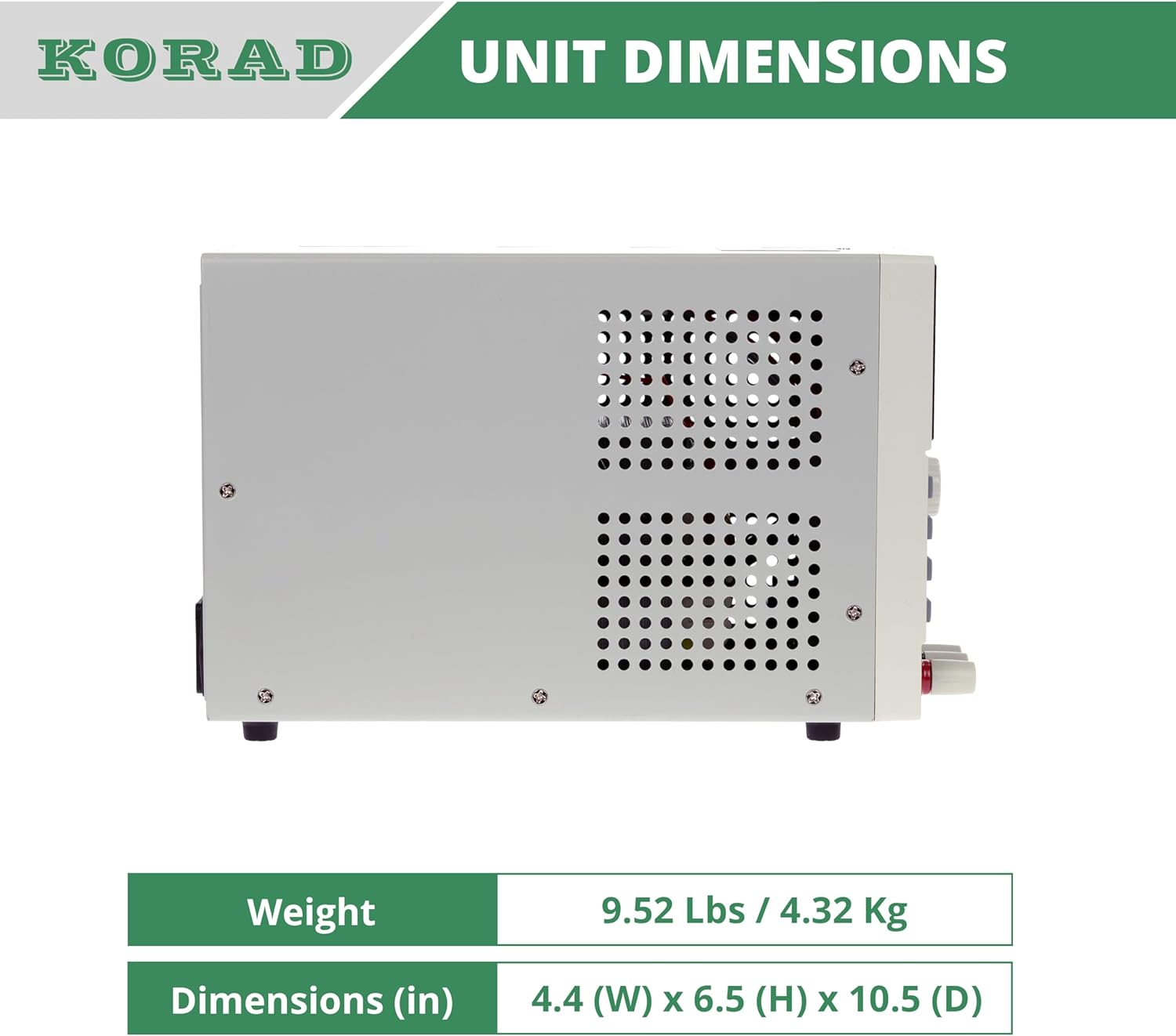
Hình 11.2: Bên view of the KORAD KA3005P, illustrating its physical dimensions. The unit measures 4.4 inches (W) x 6.5 inches (H) x 10.5 inches (D).
12. Bảo hành và Hỗ trợ
KORAD products are manufactured to high quality standards. For warranty information and technical support, please refer to the documentation included with your purchase or visit the official KORAD webđịa điểm.
- Bảo hành: Please retain your proof of purchase for warranty claims. Warranty terms and conditions may vary by region.
- Hỗ trợ kỹ thuật: For technical assistance, troubleshooting beyond this manual, or service inquiries, please contact KORAD customer support through their official channels.
- Tài nguyên trực tuyến: Check the KORAD website for updated manuals, software, and FAQs.


