1. Giới thiệu
The HTC Radar is a smartphone designed for communication and multimedia. It features a unibody metal design and operates on Windows Phone OS 7.5. This manual provides essential information for setting up, operating, maintaining, and troubleshooting your device.
Key features include a 5-megapixel camera, a 3.8-inch touchscreen display, Wi-Fi, and GPS capabilities.
2. Hết thiết bịview

Hình 2.1: Mặt trước, mặt sau và mặt bên views of the HTC C110E Radar smartphone. This image illustrates the phone's overall design, including the display, camera, and various ports.

Hình 2.2: Đằng trước view of the HTC C110E Radar with the Windows Phone interface displayed. This shows the home screen layout with various application tiles.
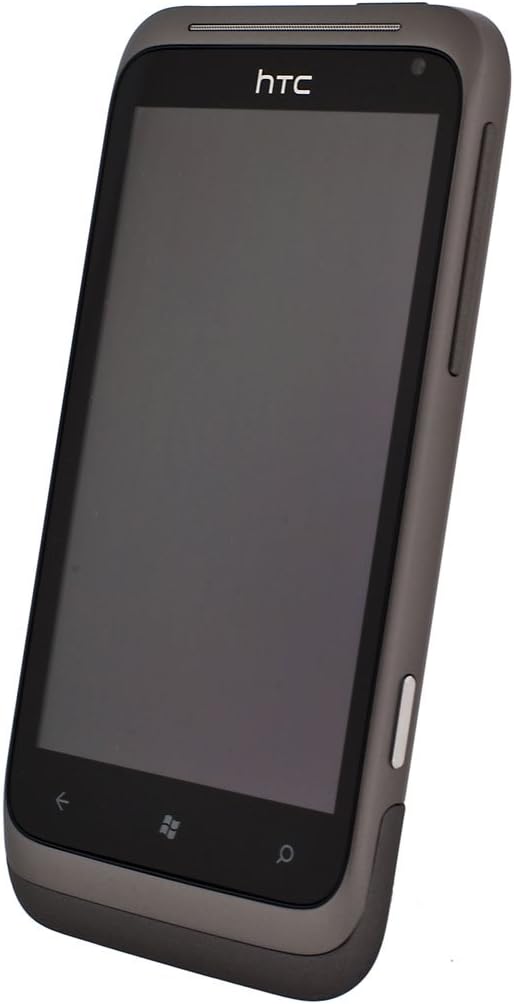
Hình 2.3: Góc cạnh view of the HTC C110E Radar with the screen off, highlighting the device's form factor and button placement.
3. Thiết lập
3.1. Lắp thẻ SIM
The HTC C110E Radar uses a single SIM card. Locate the SIM card slot, typically on the side or top edge of the device. Carefully insert your SIM card into the designated tray or slot until it clicks into place. Ensure the phone is powered off before inserting or removing the SIM card.
3.2. Sạc pin
The device is powered by a 1520 mAh rechargeable Lithium-ion battery. To charge, connect the provided USB cable to the micro-USB 2.0 port on the phone and then to a compatible USB power adapter or computer. A full charge is recommended before first use.
Note: Some users have reported issues with non-standard or ill-fitting USB cables and European chargers. Ensure you are using a compatible USB cable and a North American power adapter if applicable.
3.3. Bật / Tắt nguồn
To power on the device, press and hold the Power button (usually located on the side) until the screen illuminates. To power off, press and hold the Power button, then follow the on-screen prompts to shut down.
4. Hướng dẫn vận hành
4.1. Windows Phone OS 7.5 Interface
The HTC C110E Radar runs on Windows Phone OS 7.5. The home screen features Live Tiles that display real-time information and provide quick access to applications. Swipe left to access the application list.
4.2. Điều hướng cơ bản
- Màn hình cảm ứng: Interact with the device using touch gestures such as tap, swipe, pinch-to-zoom. The display is a 3.8-inch touchscreen with 480 x 800 resolution.
- Nút Quay lại: Trở về màn hình trước đó.
- Nút Bắt đầu: Quay lại Màn hình chính.
- Nút tìm kiếm: Mở chức năng tìm kiếm.
4.3. Chức năng của máy ảnh
The device features a 5-megapixel rear camera with an F2.2 lens, LED flash, and BSI sensor for improved low-light performance. It also includes a VGA front camera. The rear camera supports 720p HD video recording.
- Chụp hình: Open the Camera application, frame your shot, and tap the on-screen shutter button or use the dedicated camera button (if available).
- Quay video: Switch to video mode within the Camera application and tap the record button.
4.4. Kết nối
- Wi-Fi: Connect to wireless networks for internet access. Go to Settings > Wi-Fi to enable and connect.
- Bluetooth: Pair with other Bluetooth-enabled devices such as headsets or car kits. Supports Bluetooth 2.1 with A2DP, PBAP, HFP, and HSP profiles. Go to Settings > Bluetooth to enable and pair.
- GPS: Utilize location services for navigation and location-based applications. The device has an internal GPS antenna.
- USB: Connect to a computer using the micro-USB 2.0 port for data transfer and charging.
- Jack âm thanh: A 3.5 mm stereo audio jack is available for headphones or external audio devices.
5. Bảo trì
5.1. Chăm sóc thiết bị
- Hãy giữ thiết bị luôn khô ráo. Độ ẩm có thể làm hỏng các linh kiện điện tử.
- Avoid extreme temperatures. High or low temperatures can shorten the life of electronic devices and damage batteries.
- Không làm rơi, đập hoặc lắc thiết bị. Việc xử lý thô bạo có thể làm hỏng các bảng mạch bên trong và cơ học tốt.
- Clean the screen and body with a soft, lint-free cloth. Avoid using harsh chemicals or abrasive cleaners.
5.2. Cập nhật phần mềm
Periodically check for software updates to ensure optimal performance and security. Updates can typically be found in the device's settings menu under "Phone update."
KHAI THÁC. Xử lý sự cố
6.1. Các vấn đề thường gặp và giải pháp
- Thiết bị không bật nguồn:
Ensure the battery is charged. Connect the device to a charger for at least 15 minutes before attempting to power on again. If the issue persists, try a different charging cable and adapter.
- Vấn đề sạc:
If the device is not charging, verify that the USB cable is securely connected to both the phone and the power source. Ensure the USB cable is compatible and not damaged. Some users have reported issues with the fit of certain USB cables.
- Không nhận diện được thẻ SIM:
Power off the device, remove the SIM card, and reinsert it carefully to ensure proper seating. Verify that the SIM card is not damaged. If the issue persists, test with another known-good SIM card if available.
- Device unresponsive or frozen:
Thực hiện thao tác khởi động lại mềm bằng cách nhấn và giữ nút Nguồn trong khoảng 10-15 giây cho đến khi thiết bị khởi động lại.
- Kết nối mạng kém:
Check your location for network coverage. Restart the device. Ensure airplane mode is not enabled. Verify SIM card is properly inserted.
7. Thông số kỹ thuật
| Tính năng | Chi tiết |
|---|---|
| Số hiệu mẫu | C110E |
| Hệ điều hành | Windows Phone OS 7.5 |
| Tốc độ CPU | 1 GHz |
| ĐẬP | 512MB |
| Bộ nhớ trong | 8 GB (up to 6.54 GB available) |
| Trưng bày | 3.8-inch Touchscreen, 480 x 800 resolution |
| Camera sau | 5 MP with F2.2 lens, LED flash, BSI sensor, 720p HD video recording |
| Camera trước | VGA |
| Mạng | Quad-band GSM/GPRS/EDGE (850/900/1800/1900 MHz), HSPA/WCDMA (Europe/Asia: 900/2100 MHz) |
| Kết nối | Wi-Fi, Bluetooth 2.1 (A2DP, PBAP, HFP, HSP), GPS, micro-USB 2.0, 3.5 mm audio jack |
| Ắc quy | 1520 mAh Lithium-ion |
| Thời gian nói chuyện | Up to 485 minutes (WCDMA), Up to 600 minutes (GSM) |
| Thời gian chờ | Lên đến 535 giờ |
| Kích thước | 4.74 x 0.42 x 2.42 inch |
| Cân nặng | 4.8 ounce |
8. Bảo hành và Hỗ trợ
This product is sold without a manufacturer's warranty, as indicated in the product description. For technical support or further assistance, please refer to the official HTC support resources available online or contact your retailer.
Nhà sản xuất: HTC


