Giới thiệu
This manual provides detailed instructions for the setup, operation, maintenance, and troubleshooting of your POLY Plantronics Savi Office W730 Convertible Headset. This wireless headset system is designed to unify communication across your PC, desk phone, and mobile phone, offering hands-free mobility and high-quality audio.
Sản phẩm trênview
The Savi Office W730 system includes a convertible headset and a multi-device charging base. It features a noise-canceling microphone, digital sound processing, and wideband PC audio for clear communication. The system allows for seamless switching between different call sources and offers a wireless range of up to 350 feet.

Hình 1: The Plantronics Savi Office W730 headset docked in its base station. The base station serves as a charging dock and connectivity hub for PC, desk phone, and mobile devices.
Cài đặt
1. Giải nén và các thành phần
Xác minh rằng tất cả các thành phần đều có mặt:
- Savi W730 Convertible Headset
- Multi-device Base Station
- Bộ đổi nguồn AC
- Cáp USB
- Cáp giao diện điện thoại
2. Kết nối trạm gốc
- Kết nối nguồn: Plug the AC power adapter into the base station and then into a power outlet.
- Kết nối với PC: Connect one end of the USB cable to the USB port on the base station and the other end to an available USB port on your computer.
- Kết nối với điện thoại bàn:
- Disconnect the handset coil cord from the base of your desk phone.
- Connect the telephone interface cable to the handset port on your desk phone.
- Connect the other end of the telephone interface cable to the designated port on the base station.
- Kết nối ống nghe điện thoại bàn với cáp giao diện điện thoại.
- Pair with Mobile Phone (Bluetooth):
- On the base station, press and hold the Bluetooth pairing button until the Bluetooth indicator light flashes blue and red.
- On your mobile phone, enable Bluetooth and search for new devices. Select "Savi W730" from the list.
- If prompted, enter "0000" as the passcode. The Bluetooth indicator on the base will turn solid blue when paired.
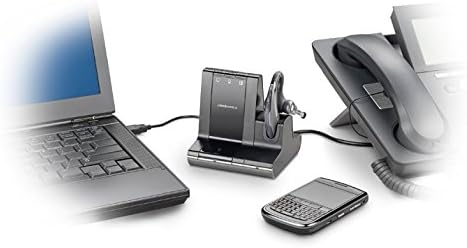
Hình 2: The Savi Office W730 base station demonstrating its multi-connectivity, linking to a laptop via USB, a desk phone via telephone interface cable, and a mobile phone wirelessly via Bluetooth.
3. Sạc tai nghe
Place the headset into the charging cradle on the base station. The charge indicator light on the base will illuminate to confirm charging. Allow approximately 3 hours for a full charge before initial use.
Hướng dẫn sử dụng
1. Thực hiện và nhận cuộc gọi
- Trả lời/Kết thúc cuộc gọi: Press the Call Control button on the headset or the corresponding phone button on the base station.
- Thực hiện cuộc gọi: Select the desired phone source (PC, desk phone, or mobile) on the base station, then dial from your device.
- Chuyển cuộc gọi: During an active call, press the button for another connected device on the base station to switch to that line.
2. Điều khiển tai nghe
- Điều chỉnh âm lượng: Sử dụng các nút Tăng âm lượng (+) và Giảm âm lượng (-) trên tai nghe.
- Tắt tiếng micrô: Press the Mute button on the headset. Press again to unmute.
- Flash (for desk phone): Press the Call Control button on the headset briefly to put a call on hold or switch between calls on the desk phone.
3. Phạm vi không dây
The Savi W730 offers a wireless range of up to 350 feet from the base station. Environmental factors and obstacles may affect actual range.
4. Software Integration (Plantronics Hub)
For advanced features, customization, and firmware updates, install the Plantronics Hub software on your PC. This software enables features like call control for softphones and status updates.
BẢO TRÌ
1. Chăm sóc pin
The headset features a hot-swappable battery, allowing for extended talk time with an optional spare battery (sold separately). To maximize battery life, fully charge the headset before first use and regularly dock it in the base station when not in use. Note that over time, all rechargeable batteries experience reduced capacity.
2. Vệ sinh
Wipe the headset and base station with a soft, dry, lint-free cloth. Avoid using liquid cleaners or abrasive materials.
Xử lý sự cố
| Vấn đề | Giải pháp khả thi |
|---|---|
| No dial tone or audio |
|
| Chất lượng âm thanh kém hoặc nhiễu |
|
| Tai nghe không kết nối được với điện thoại di động |
|
| Tuổi thọ pin hạn chế |
|
Thông số kỹ thuật
- Số hiệu mẫu: 83543-01
- Kết nối: DECT 6.0 (Wireless), USB (PC), RJ-11 (Desk Phone), Bluetooth (Mobile Phone)
- Phạm vi không dây: Lên đến 350 feet (100 mét)
- Trọng lượng tai nghe: 0.8 ounce (khoảng)
- Ắc quy: 1 Lithium Polymer battery (hot-swappable)
- Kích thước sản phẩm: 5.92 x 1.17 x 2.73 inches (Base Station)
- Tính năng đặc biệt: Noise-canceling microphone, digital sound processing, wideband PC audio, one-touch call controls.
Bảo hành và Hỗ trợ
For warranty information, technical support, or to purchase accessories, please visit the official POLY webtrang web hoặc liên hệ với bộ phận chăm sóc khách hàng của họ. Hãy giữ lại hóa đơn mua hàng để yêu cầu bảo hành.


