1. Giới thiệu
This manual provides detailed instructions for the installation, operation, and maintenance of your JVC KDR820BT Wireless Bluetooth Dual USB-CD Receiver. Please read this manual thoroughly before using the unit to ensure proper operation and to prevent damage.
The JVC KDR820BT is designed to provide versatile audio playback and communication features in your vehicle. It includes built-in Bluetooth for hands-free calling and audio streaming, dual USB ports for device connectivity, and CD playback capabilities. The unit also features a customizable display with variable color options.
2. Nội dung gói hàng
Hãy kiểm tra kỹ xem tất cả các vật phẩm có đầy đủ trong gói hàng trước khi bắt đầu cài đặt:
- JVC KDR820BT Head Unit
- Wireless Remote Control (RM-RK52)
- Bộ điều hợp USB Bluetooth
- Micrô có dây
- Khai thác dây
- Phần cứng lắp đặt
- Sổ tay hướng dẫn sử dụng (tài liệu này)
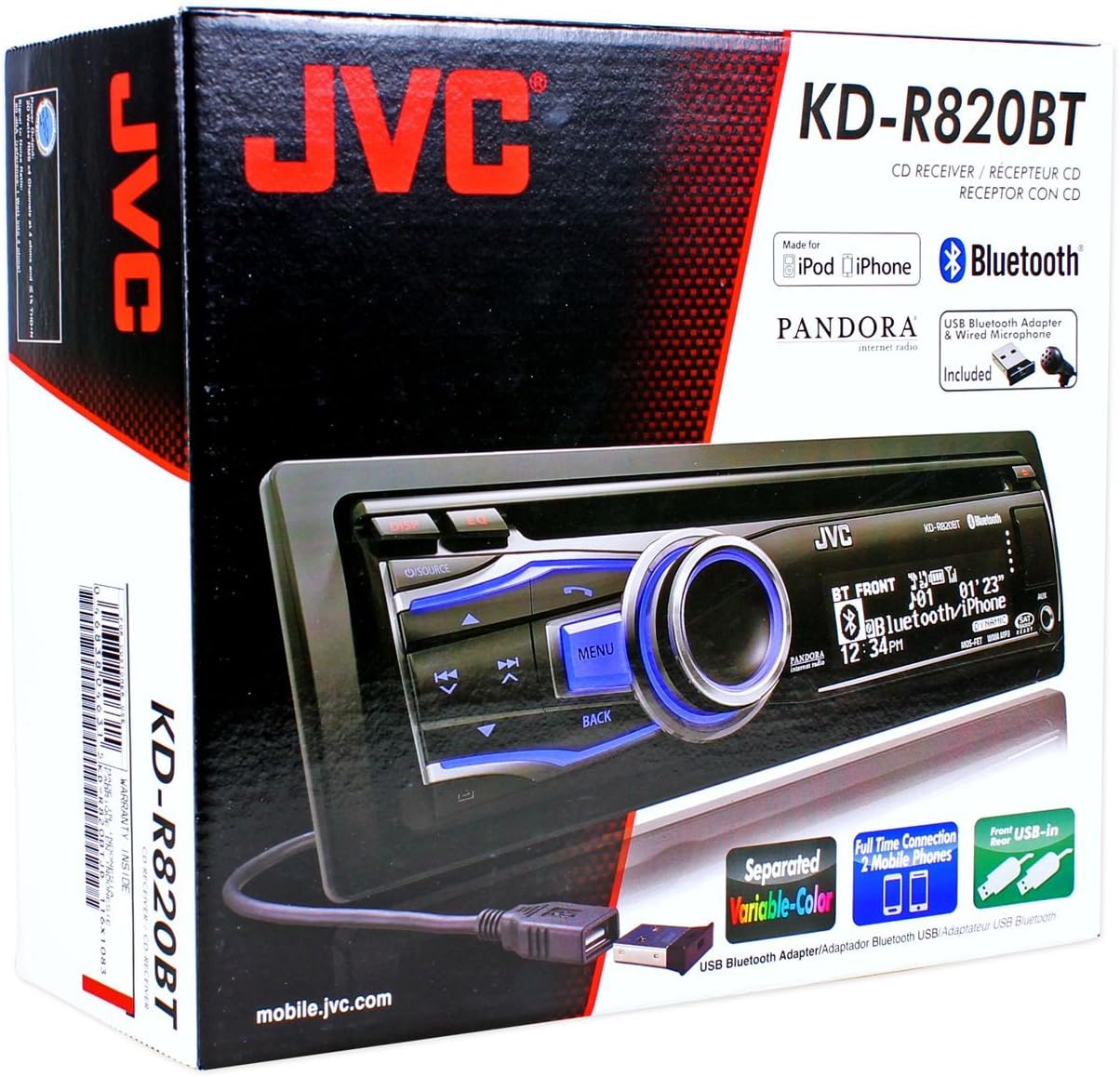
Figure 2.1: JVC KDR820BT Product Packaging. The box illustrates the main unit, remote, USB Bluetooth adapter, and wired microphone.
3. Cài đặt
Professional installation is recommended. Ensure the vehicle's battery is disconnected before starting installation to prevent electrical damage.
3.1 Kết nối dây
Connect the wiring harness to the vehicle's electrical system and speakers. Refer to your vehicle's wiring diagram for specific connections.
- Dây màu vàng: Kết nối với nguồn điện 12V không đổi.
- Dây đỏ: Kết nối với nguồn điện phụ 12V đã chuyển đổi.
- Dây đen: Kết nối với mặt đất khung xe.
- Dây xanh/trắng: Kết nối với ăng-ten nguồn hoặc amplifier dẫn bật từ xa.
- Dây loa: Kết nối với loa xe (đảm bảo đúng cực).
- RCA Pre-out Jacks: Để kết nối bên ngoài amploa (trước, sau, loa siêu trầm).
- Đầu vào micrô: Connect the supplied wired microphone for hands-free calling.
- Cổng USB: Front USB for general connectivity, Rear USB for additional devices or the Bluetooth adapter.

Figure 3.1: Rear Panel Connections. This image displays the rear of the receiver with its wiring harness, RCA pre-outs, and antenna input.
3.2 Gắn thiết bị
Install the mounting sleeve into the vehicle's dashboard opening. Secure the unit by sliding it into the sleeve until it locks into place. Attach the trim ring.
3.3 Connecting the Bluetooth Adapter
The supplied USB Bluetooth adapter must be connected to one of the USB ports (front or rear) for Bluetooth functionality. For a cleaner installation, the rear USB port is often preferred.
4. Thiết lập ban đầu
After installation, reconnect the vehicle battery. The unit will power on. Follow these steps for initial configuration:
- Bật nguồn ban đầu: Nhấn nút NGUỒN để bật thiết bị.
- Cài đặt đồng hồ: Access the system menu to set the current time.
- Cài đặt âm thanh: Adjust basic audio settings such as bass, treble, balance, and fader.
- Màu sắc hiển thị: Customize the display and button illumination colors using the variable color settings.
5. Hướng dẫn vận hành

Hình 5.1: Mặt trướcview. This image shows the main controls and display of the JVC KDR820BT.

Figure 5.2: Receiver with Remote Control. The image displays the head unit and the included wireless remote control (RM-RK52).
5.1 Điều khiển cơ bản
- Nút Nguồn/Nguồn: Press to turn on/off or change audio source (FM/AM, CD, USB, Bluetooth Audio, AUX).
- Núm âm lượng: Rotate to adjust volume. Press to mute/pause audio.
- Nút Menu: Access system settings and advanced options.
- Nút Quay lại: Return to the previous menu or display.
- Nút tua nhanh/vượt chướng ngại vật: Navigate tracks, radio stations, or menu options.
5.2 Hoạt động vô tuyến (AM/FM)
- Nhấn NGUỒN to select FM or AM.
- Sử dụng Tìm kiếm buttons to find stations automatically.
- Để điều chỉnh thủ công, hãy nhấn và giữ nút Tìm kiếm nút bấm.
- To store a preset, tune to the desired station, then press and hold a preset number button (1-6).
5.3 Phát lại CD
- Đưa đĩa CD vào khe đĩa. Thiết bị sẽ tự động chuyển sang nguồn CD và bắt đầu phát lại.
- Sử dụng Nhảy nút để thay đổi bản nhạc.
- Nhấn nút Núm âm lượng để tạm dừng/phát.
- Nhấn nút Đẩy ra nút để tháo đĩa CD.
5.4 USB Device Playback
- Connect a USB device (flash drive, iPod/iPhone, digital audio player) to either the front or rear USB port.
- Nhấn NGUỒN để chọn USB.
- Sử dụng Nhảy các nút để điều hướng bản nhạc.
- Nhấn nút Thực đơn button to browse folders and files.
5.5 chức năng Bluetooth
Ensure the USB Bluetooth adapter is connected to the unit.
5.5.1 Ghép nối thiết bị Bluetooth
- Bật Bluetooth trên thiết bị di động của bạn.
- On the JVC KDR820BT, select the Bluetooth source.
- Tìm kiếm available devices on your mobile phone. Select "JVC unit" (or similar) from the list.
- Enter the PIN code (usually "0000") if prompted.
- Once paired, the Bluetooth indicator on the receiver will illuminate. The unit supports connecting two phones simultaneously.
5.5.2 Gọi rảnh tay
- Thực hiện cuộc gọi: Use your phone's voice dial feature (if supported) or dial directly from your phone. The audio will transfer to the receiver.
- Trả lời cuộc gọi: Nhấn nút Điện thoại button on the receiver when an incoming call is detected.
- Kết thúc cuộc gọi: Nhấn nút Điện thoại một lần nữa để kết thúc cuộc gọi.
- Phone Book Access: The unit supports Phone Book Access Profile (PBAP) for transferring contacts.
5.5.3 Truyền phát âm thanh Bluetooth
- Select Bluetooth Audio as the source.
- Play audio from your paired mobile device. The receiver will stream the audio wirelessly.
- Sử dụng Nhảy buttons on the receiver to control playback (play/pause, skip track).
- The unit supports Pandora Internet Radio control from an iPhone.
5.6 Cài đặt âm thanh
- Bộ cân bằng tham số 3 dải tần (3-Band Parametric iEQ): Access the sound menu to adjust the equalizer settings for customized audio output.
- MOS-FET 50W x 4 Ampngười lót: Provides powerful audio output.
- TI/Burr-Brown 24-bit DAC: Ensures high-quality digital-to-analog audio conversion.
5.7 Cài đặt hiển thị
- Separated Variable Color: Customize the illumination color of the keys and LCD panel from over 30,000 choices. Access this setting through the system menu.
- Kiểm soát độ sáng: Adjust display brightness for day and night viewđang.
6. Bảo trì
- Vệ sinh thiết bị: Dùng khăn mềm, khô để lau mặt trước. Đối với vết bẩn cứng đầu, hãyampLau sạch vải bằng nước. Tránh sử dụng chất tẩy rửa có tính mài mòn hoặc dung môi.
- Hướng dẫn bảo quản đầu đĩa CD: Keep the disc slot free of dust and debris. Use only clean, scratch-free CDs.
- Loại bỏ mặt nạ: The detachable faceplate can be removed for security. Store it in a protective case.
KHAI THÁC. Xử lý sự cố
Review the following common issues and solutions before seeking service.
| Vấn đề | Nguyên nhân có thể / Giải pháp |
|---|---|
| Không có điện | Check power and ground wiring connections. Ensure the vehicle's ignition is on. Check vehicle fuses. |
| Không có âm thanh | Check speaker wiring. Ensure volume is not muted or too low. Verify the power antenna/remote wire is connected if using an external ampchất lót. |
| Bluetooth echo during calls | Adjust microphone gain settings. Reposition the microphone away from reflective surfaces (e.g., windshield). Reduce the receiver's volume during calls. |
| Không thể ghép nối thiết bị Bluetooth | Ensure the USB Bluetooth adapter is securely connected. Make sure Bluetooth is enabled on your mobile device and the receiver is in pairing mode. Delete previous pairings from your phone and try again. |
| Unit loses settings after power off | The yellow constant 12V power wire may not be connected correctly or is losing power. This can also occur if the vehicle battery is disconnected. |
| Display text is truncated or difficult to read | The display has limited character space. Some long names may be truncated. There is no option to increase scroll speed for folder/file tên. |
| Buttons or rotary knob are unresponsive | Ensure the faceplate is securely attached. Clean around the buttons to remove any debris. If the issue persists, it may indicate a hardware malfunction. |
8. Thông số kỹ thuật
| Tính năng | Đặc điểm kỹ thuật |
|---|---|
| Số hiệu mẫu | KDR820BT |
| Công suất đầu ra | MOS-FET 50W x 4 (20W RMS x 4) |
| Bộ chuyển đổi tín hiệu | TI/Burr-Brown 24-bit |
| Bộ cân bằng | Bộ cân bằng tham số 3 dải |
| Kết nối | Bluetooth, Dual USB (Front & Rear), AUX Input |
| Tính năng Bluetooth | Hands-Free Call, Audio Streaming, Phone Book Access Profile, Text Message Receipt Notification, Connects 2 Phones |
| Phát lại phương tiện | CD, MP3, WMA, WAV |
| Kiểu hiển thị | LCD with Separated Variable Color |
| Trướcamp Tậptage | 2 vôn |
| Kích thước khung gầm | Full-DIN |
| Kích thước (Rộng x Cao x Sâu) | 7.19 x 2.06 x 6.25 inch (xấp xỉ) |
| Cân nặng | 4 pound (xấp xỉ) |
| Các dịch vụ Internet được hỗ trợ | Pandora Internet Radio |
| Phương pháp kiểm soát | Remote Control, Android (via USB) |
9. Bảo hành và Hỗ trợ
JVC products are manufactured to high-quality standards. For specific warranty information, please refer to the warranty card included with your product or visit the official JVC webtrang web. Giữ lại biên lai mua hàng làm bằng chứng mua hàng khi yêu cầu bảo hành.
For technical support, service, or inquiries regarding your JVC KDR820BT receiver, please contact JVC customer service or visit their official support channels. Contact information can typically be found on the JVC webtrang web hoặc trong bao bì sản phẩm.


