Giới thiệu
This manual provides comprehensive instructions for the installation, operation, and maintenance of your Aiphone 2-Call DA Series Door Station, model DA-2DS. Please read this manual thoroughly before attempting to install or operate the unit to ensure correct usage and to prevent damage.
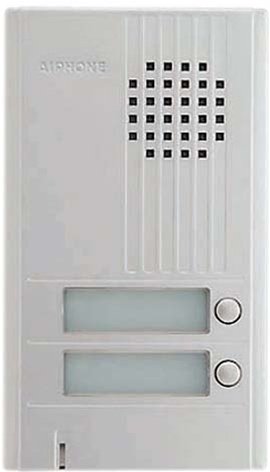
Hình ảnh: Mặt trước view of the Aiphone DA-2DS 2-Call Door Station. This silver unit features two call buttons for multi-tenant or multi-location communication.
Thông tin an toàn
Tuân thủ các biện pháp phòng ngừa an toàn sau đây để tránh thương tích và hư hỏng thiết bị:
- Luôn ngắt nguồn điện trước khi thực hiện bất kỳ công việc đấu dây hoặc bảo trì nào.
- Đảm bảo tất cả hệ thống dây điện tuân thủ các quy định và tiêu chuẩn điện địa phương.
- Do not expose the unit to excessive moisture or extreme temperatures.
- Use only specified power supplies and accessories.
- Việc lắp đặt phải được thực hiện bởi nhân viên có chuyên môn.
Nội dung gói
Xác minh rằng tất cả các mục đều có trong gói hàng:
- Aiphone DA-2DS Door Station Unit
- Vít lắp và neo
- Hướng dẫn sử dụng (tài liệu này)
Cài đặt
Lắp ráp
Select a suitable mounting location, typically near the entrance, at a height that allows easy access for all users. Ensure the surface is flat and secure. Use the provided mounting screws and anchors to firmly attach the door station to the wall.
Dây điện
Connect the door station to the indoor master station using appropriate wiring. The DA-2DS requires a 2-wire connection for each call button to the corresponding indoor station. Refer to the wiring diagram provided with your indoor master station for specific connection points. Ensure all connections are secure and insulated.
Khởi động ban đầu
After all wiring is complete and verified, apply power to the system. Test each call button to ensure proper communication with the indoor stations.
Hướng dẫn sử dụng
Thực hiện cuộc gọi
To initiate a call from the door station, press the desired call button. This will activate the corresponding indoor master station, which will then ring to alert the occupant.
Trả lời cuộc gọi
When a call is initiated from the door station, the indoor master station will ring. The occupant can answer the call by pressing the talk button on the indoor station. Two-way communication will then be established.
BẢO TRÌ
Vệ sinh
Clean the exterior of the door station periodically with a soft, damp cloth. Do not use abrasive cleaners, solvents, or strong chemicals, as these can damage the finish and internal components.
Kiểm tra thường xuyên
Periodically check the mounting screws for tightness and ensure all wiring connections remain secure. Test the call buttons and communication functionality regularly to ensure proper operation.
Xử lý sự cố
| Vấn đề | Nguyên nhân có thể | Giải pháp |
|---|---|---|
| No sound from door station | Loose wiring connection; faulty speaker/microphone | Check wiring connections at both door and master stations. If problem persists, contact support. |
| Call button does not activate indoor station | Incorrect wiring; faulty button | Verify wiring connections for the specific call button. Test button functionality. |
| Interference or poor audio quality | Improper wiring; electrical interference | Ensure wiring is correctly installed and shielded if necessary. Check for nearby sources of electrical interference. |
Thông số kỹ thuật
- Người mẫu: DA-2DS
- Nhà sản xuất: Aiphone
- Mã số sản phẩm: DA-2DS
- Trọng lượng sản phẩm: 3 pound
- Màu sắc: Bạc
- Số lượng gói sản phẩm: 1
- Pin bao gồm: KHÔNG
- Ngày đầu tiên có sẵn: Ngày 8 tháng 2008 năm XNUMX
Thông tin bảo hành
Aiphone products are designed for reliability and performance. This product is covered by a limited warranty against defects in materials and workmanship. For specific warranty terms and conditions, please refer to the warranty card included with your purchase or visit the official Aiphone webtrang web. Giữ lại bằng chứng mua hàng để yêu cầu bảo hành.
Ủng hộ
For technical assistance, troubleshooting, or service inquiries, please contact Aiphone customer support. You can find contact information, including phone numbers and online resources, on the official Aiphone website. When contacting support, please have your model number (DA-2DS) and a description of the issue ready.


