1. Giới thiệu
This manual provides detailed instructions for the proper use and care of your Sigma 70-200mm f/2.8 APO EX DG HSM OS FLD Telephoto Zoom Lens. Designed for Nikon Digital DSLR Cameras, this high-performance lens offers exceptional image quality and versatility for various photographic applications, including sports, wildlife, portraits, and photojournalism.
Please read this manual thoroughly before using the lens to ensure optimal performance and longevity.

Figure 1: Sigma 70-200mm f/2.8 Telephoto Zoom Lens for Nikon DSLR Cameras.
2. Các tính năng chính
- Tiêu cự 70-200mm: Versatile telephoto zoom range.
- Constant f/2.8 Maximum Aperture: Excellent low-light performance and shallow depth of field.
- Bộ ổn định quang học (OS): Provides up to 4 stops of image stabilization, with dual modes for normal and panning shots.
- Hypersonic Motor (HSM): Ensures fast, quiet, and accurate autofocusing with full-time manual focus override.
- FLD Glass Elements: Offers optical performance comparable to fluorite glass, reducing chromatic aberrations.
- Special Low Dispersion (SLD) Glass: Enhances image sharpness and contrast.
- Lớp phủ siêu đa lớp: Minimizes flare and ghosting for clear, high-quality images.
- Internal Focusing and Zooming: Maintains constant lens length during operation.
- Khoảng cách lấy nét tối thiểu: 140cm (55.1 inches) with a maximum magnification of 1:8.
3. Thiết lập
3.1 Lắp đặt ống kính
- Hãy đảm bảo cả máy ảnh và ống kính đều đã tắt nguồn.
- Tháo nắp ống kính phía sau và nắp thân máy ảnh.
- Align the mounting index mark on the lens with the corresponding mark on the camera body.
- Rotate the lens clockwise (for Nikon F-mount) until it clicks into place. Do not force the lens.
3.2 Tháo rời ống kính
- Đảm bảo máy ảnh đã tắt nguồn.
- Trong khi nhấn giữ nút tháo ống kính trên thân máy ảnh, hãy xoay ống kính ngược chiều kim đồng hồ cho đến khi dừng lại.
- Tháo ống kính ra khỏi máy ảnh.
- Attach the rear lens cap to the lens and the body cap to the camera to protect them from dust and damage.
3.3 Gắn ống kính che nắng
The lens hood helps to block extraneous light and reduce flare. Align the lens hood with the front of the lens and twist until it locks into place. For storage, the hood can be reversed and attached to the lens.

Figure 2: Sigma 70-200mm f/2.8 lens with its hood attached.
3.4 Using the Tripod Collar
The lens includes a removable tripod collar for better balance when mounted on a tripod, especially given the lens's weight. Loosen the knob on the collar to rotate the lens for vertical or horizontal shooting, or to remove the collar entirely.
4. Hoạt động
4.1 Autofocus (AF) and Manual Focus (MF)
The lens features a switch to select between Autofocus (AF) and Manual Focus (MF) modes. In AF mode, the Hypersonic Motor (HSM) provides fast and quiet focusing. Full-time manual focus override is available, allowing you to fine-tune focus manually even when in AF mode by simply turning the focus ring.
4.2 Optical Stabilizer (OS)
The Optical Stabilizer (OS) function helps to reduce camera shake, especially useful in low light or when shooting at longer focal lengths. The OS switch allows you to turn the stabilization ON or OFF. This lens offers two OS modes:
- Chế độ 1 (Bình thường): For general shooting, compensating for vertical and horizontal camera shake.
- Mode 2 (Panning): For tracking moving subjects horizontally, compensating only for vertical camera shake.
Ghi chú:
- Turn the OS OFF when using a tripod to prevent potential image blur.
- The OS may produce a slight sound during operation; this is normal.
4.3 Phóng to
Rotate the zoom ring to adjust the focal length between 70mm and 200mm. The internal zooming mechanism ensures the lens length remains constant.
4.4 Using with APS-C Cameras
When used with APS-C (crop sensor) cameras, the effective focal length will be approximately 105-300mm (depending on the camera's crop factor). This provides an even greater telephoto reach.
4.5 Using with Teleconverters
This lens is compatible with Sigma APO teleconverters (sold separately) to further extend its focal length. Refer to the teleconverter's manual for specific attachment and usage instructions.
5. Bảo trì
5.1 Vệ sinh ống kính
- Sử dụng bàn chải thổi khí để loại bỏ bụi bẩn trên bề mặt thấu kính.
- Để lau các vết bẩn hoặc dấu vân tay, hãy sử dụng khăn lau microfiber mềm, sạch chuyên dụng cho quang học, cùng với một lượng nhỏ dung dịch làm sạch thấu kính.
- Never use harsh chemicals or abrasive materials on the lens elements or body.
5.2 Lưu trữ
- Luôn đậy nắp ống kính trước và sau khi không sử dụng.
- Bảo quản ống kính ở nơi khô ráo, thoáng mát, tránh ánh nắng trực tiếp và nhiệt độ cao.
- Nếu bảo quản trong thời gian dài, hãy cân nhắc sử dụng chất hút ẩm để ngăn ngừa nấm mốc.

Figure 3: Sigma 70-200mm f/2.8 lens stored in its soft case.
KHAI THÁC. Xử lý sự cố
| Vấn đề | Nguyên nhân có thể | Giải pháp |
|---|---|---|
| Lens not focusing | AF/MF switch set to MF; dirty lens contacts; insufficient light. | Set switch to AF; clean lens and camera contacts; use adequate lighting. |
| Hình ảnh bị mờ | OS is off; camera shake; incorrect focus; slow shutter speed. | Turn OS ON; use faster shutter speed; ensure proper focus; use a tripod. |
| OS not working | OS switch is OFF; lens not fully mounted. | Turn OS ON; re-mount lens securely. |
| Ống kính không được máy ảnh nhận diện | Dirty lens contacts; improper mounting. | Clean lens and camera contacts; re-mount lens securely. |
7. Thông số kỹ thuật
| Tính năng | Chi tiết |
|---|---|
| Kích thước sản phẩm | 7.76 x 3.39 x 3.39 inch |
| Trọng lượng sản phẩm | 3.2 pound (1.43 kg) |
| Số hiệu mẫu sản phẩm | 589306 |
| Thương hiệu | Sigma |
| Độ dài tiêu cự | 70-200mm |
| Khẩu độ tối đa | f/2.8 |
| Khẩu độ tối thiểu | f/22 |
| Loại ống kính | Zoom Tele |
| Gắn kết tương thích | Nikon F (FX) |
| Khoảng cách lấy nét tối thiểu | 140cm / 55.1 inch |
| Độ phóng đại tối đa | 1:8 |
| Kích thước bộ lọc | 77mm |
| Ổn định hình ảnh | Optical Stabilizer (OS) |
| Động cơ lấy nét tự động | Hypersonic Motor (HSM) |
| Ngày đầu tiên có sẵn | Ngày 1 tháng 2010 năm XNUMX |
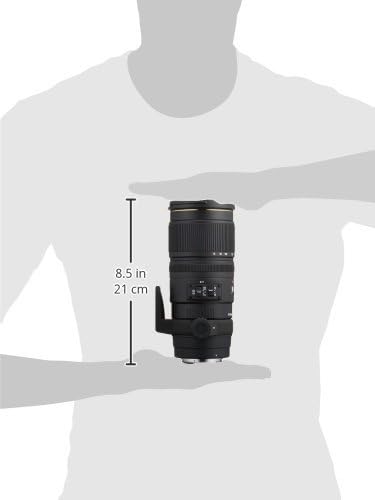
Figure 4: Approximate dimensions of the Sigma 70-200mm f/2.8 lens.
8. Bảo hành & Hỗ trợ
8.1 Thông tin bảo hành
This Sigma lens is covered by a 4-year Sigma USA warranty. Please retain your proof of purchase for warranty claims. For detailed terms and conditions, refer to the warranty card included with your product or visit the official Sigma webđịa điểm.
8.2 Hỗ trợ khách hàng
For technical assistance, service, or any inquiries regarding your Sigma lens, please contact Sigma Corporation of America customer support. Contact information can be found on the official Sigma webtrang web hoặc trong bao bì sản phẩm.
9. Video sản phẩm chính thức
9.1 Sigma 70-200mm f/2.8 APO EX DG HSM OS FLD Large Aperture Telephoto Zoom Lens Overview
Video này cung cấp một hơnview of the Sigma 70-200mm f/2.8 APO EX DG HSM OS FLD Large Aperture Telephoto Zoom Lens, highlighting its key features and benefits for various photography styles. Duration: 2 minutes 39 seconds.
9.2 Sigma 70-200mm Lens Features and Usage
This video delves into the features and practical usage of the Sigma 70-200mm lens, demonstrating its capabilities for professional and enthusiast photographers. Duration: 3 minutes 5 seconds.


