1. Sản phẩm hếtview
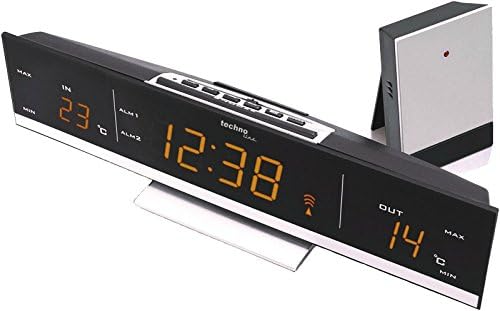
The Technoline WS 6810 amber Weather Station is a sophisticated device designed to provide accurate indoor and outdoor temperature readings, precise timekeeping via DCF-77 radio control, and convenient alarm functions. Its modern design with a warm amber LED display and black high-gloss finish integrates seamlessly into any contemporary home environment. This manual provides detailed instructions for setting up, operating, and maintaining your weather station.

Hình 1.1: Mặt trước view of the Technoline WS 6810 Weather Station, displaying indoor and outdoor temperatures, current time, and alarm indicators.
2. Nội dung gói hàng
Vui lòng kiểm tra kỹ nội dung gói hàng. Nếu thiếu hoặc hư hỏng bất kỳ mặt hàng nào, hãy liên hệ ngay với nhà bán lẻ.
- 1 x Technoline WS 6810 Temperature Station (Main Unit)
- 1 x TX96 (TW004) Outdoor Sensor
- 1 x Power Supply Unit (220V)
- 1 x Hướng dẫn sử dụng (tài liệu này)
Ghi chú: 3 x AAA Micro LR03 batteries for main unit backup and 2 x AAA Micro LR03 batteries for the outdoor sensor are không bao gồm và phải được mua riêng.

Figure 2.1: The Technoline WS 6810 main unit alongside its TX96 outdoor sensor.
3. Các tính năng chính
- DCF-77 Radio-Controlled Clock: Automatic time synchronization for precise timekeeping. Includes manual setting option and time zone adjustment (± 1 hour).
- Indoor and Outdoor Temperature Display: Monitors and displays current temperatures for both indoor and outdoor environments.
- Bộ nhớ nhiệt độ tối thiểu / tối đa: Records and displays the highest and lowest temperatures measured.
- Dual Alarm Clocks: Two independent alarms (ALM1, ALM2) with adjustable settings.
- Chức năng báo lại: Provides a temporary pause for alarms, typically 5 minutes.
- Độ sáng màn hình có thể điều chỉnh: Two brightness levels for optimal visibility in various lighting conditions.
- Bàn đứng: Integrated stand for convenient desktop placement.
- Màn hình LED: Clear, warm amber LED digits for easy readability.
4. Hướng dẫn cài đặt
4.1. Cấp nguồn cho thiết bị chính
- Connect the provided power supply unit to the DC IN port on the back of the WS 6810 main unit.
- Plug the power adapter into a standard 220V electrical outlet. The display will illuminate.
- Để dự phòng nguồn điện trong thời giantages, insert 3 x AAA Micro LR03 batteries (not included) into the battery compartment on the back of the main unit, observing polarity (+/-).
4.2. Installing Batteries in the Outdoor Sensor (TX96)
- Open the battery compartment on the back of the TX96 outdoor sensor.
- Insert 2 x AAA Micro LR03 batteries (not included), ensuring correct polarity.
- Đóng chặt ngăn chứa pin.
4.3. Initial Synchronization and Sensor Placement
- Place the outdoor sensor within effective transmission range (typically up to 30 meters in open air) of the main unit. Avoid placing it near large metal objects, electrical appliances, or direct sunlight.
- The main unit will automatically attempt to receive the DCF-77 radio signal for time synchronization and connect with the outdoor sensor. This process may take several minutes. A signal icon will appear on the display once synchronization is successful.
- If the outdoor temperature does not appear after a few minutes, press the "SENSOR" button on the main unit to manually initiate a search for the outdoor sensor.
4.4. Time Zone Setting (if required)
If you are in a region where the DCF-77 signal's standard time differs from your local time (e.g., outside Central European Time), you may need to adjust the time zone.
- In normal time display mode, press and hold the "SET" button until the time zone offset flashes.
- Use the "+" or "-" buttons to adjust the time zone offset in ±1 hour increments.
- Press "SET" again to confirm and exit.
Hình 4.1: Trên cùng view of the WS 6810, highlighting the control buttons for setup and operation.
5. Hướng dẫn vận hành
5.1. Hiển thị thông tin
The large LED display shows the following information:
- TRONG: Nhiệt độ trong nhà.
- NGOÀI: Outdoor temperature (from TX96 sensor).
- Thời gian: Current time (radio-controlled).
- ALM1 / ALM2: Indicators for Alarm 1 and Alarm 2.
- Biểu tượng tín hiệu: Indicates successful DCF-77 signal reception.
- MIN / MAX: Indicators for minimum and maximum temperature records.
5.2. Đặt báo thức
The WS 6810 features two independent alarms (ALM1 and ALM2).
- Press the "ALARM" button repeatedly to cycle through ALM1, ALM2, and normal time display.
- When ALM1 or ALM2 is displayed, press and hold the "ALARM" button until the alarm time flashes.
- Use the "+" or "-" buttons to adjust the hour, then press "ALARM" to confirm and move to minutes.
- Use the "+" or "-" buttons to adjust the minutes, then press "ALARM" to confirm.
- To activate/deactivate an alarm, select ALM1 or ALM2 display, then press the "+" button. An alarm icon will appear/disappear.
5.3. Chức năng báo lại
When an alarm sounds, press the "SNOOZE/LIGHT" button to activate the snooze function. The alarm will temporarily stop and sound again after approximately 5 minutes.
5.4. Adjusting Display Brightness
Press the "SNOOZE/LIGHT" button (when no alarm is sounding) to toggle between the two available brightness levels for the LED display.
5.5. Viewing Min/Max Temperatures
Press the "MIN/MAX" button to cycle through the current, maximum, and minimum recorded indoor and outdoor temperatures. To reset the min/max records, press and hold the "MIN/MAX" button while the min/max values are displayed.
6. Bảo trì
- Vệ sinh: Lau sạch bộ phận chính và cảm biến ngoài trời bằng khăn mềm.amp vải. Không sử dụng chất tẩy rửa có tính mài mòn hoặc dung môi.
- Thay thế pin: Replace batteries in the outdoor sensor and main unit (for backup) when the low battery indicator appears on the display or when performance degrades. Always replace all batteries of a set at the same time.
- Vị trí cảm biến: Periodically check the outdoor sensor's placement to ensure it is protected from direct sunlight and heavy precipitation for accurate readings and longevity.
- Kho: Nếu cất giữ thiết bị trong thời gian dài, hãy tháo tất cả pin để tránh rò rỉ.
KHAI THÁC. Xử lý sự cố
| Vấn đề | Nguyên nhân có thể | Giải pháp |
|---|---|---|
| Không có màn hình hiển thị trên thiết bị chính. | Power adapter not connected or faulty; batteries (backup) are dead or incorrectly inserted. | Ensure power adapter is securely plugged in. Check and replace backup batteries, ensuring correct polarity. |
| Nhiệt độ ngoài trời không được hiển thị hoặc không chính xác. | Outdoor sensor batteries are dead; sensor out of range; interference; sensor not paired. | Replace outdoor sensor batteries. Move sensor closer to the main unit. Avoid placing near electronics. Press "SENSOR" button on main unit to re-establish connection. |
| Thời gian không chính xác hoặc không đồng bộ. | Weak DCF-77 signal; interference; incorrect time zone setting. | Relocate the main unit to an area with better signal reception (e.g., near a window, away from electronics). Check time zone setting. Manual time setting is available if radio control fails. |
| Báo động không kêu. | Alarm is not activated; alarm volume too low (not applicable for this model, but common issue). | Ensure the alarm icon (ALM1 or ALM2) is displayed, indicating activation. Re-set the alarm time. |
8. Thông số kỹ thuật
| Người mẫu | WS 6810 amber |
| Kích thước đơn vị chính (D x R x C) | 28.5 x 7 x 5.5 cm (khoảng 11.2 x 2.8 x 2.2 inch) |
| Trọng lượng đơn vị chính | 500 g (khoảng 1.1 lbs) |
| Outdoor Sensor (TX96) Dimensions (L x W x H) | 50 x 22 x 104 mm (khoảng 2.0 x 0.9 x 4.1 inch) |
| Nguồn điện (Đơn vị chính) | 220V AC Power Adapter (included) |
| Backup Power (Main Unit) | 3 x AAA Micro LR03 batteries (not included) |
| Nguồn điện (Cảm biến ngoài trời) | 2 x AAA Micro LR03 batteries (not included) |
| Kiểu hiển thị | LED (Màu hổ phách) |
| Đồng bộ thời gian | DCF-77 Radio Controlled |
| Khoảng nhiệt độ (trong nhà) | (Information not provided, typical range is 0°C to 50°C) |
| Khoảng nhiệt độ (Ngoài trời) | (Information not provided, typical range is -20°C to 60°C) |
9. Bảo hành và Hỗ trợ
Technoline products are manufactured to high quality standards. For warranty information, technical support, or service inquiries, please contact your retailer or visit the official Technoline webđịa điểm.
Trang sản phẩm chính thức: http://www.technoline.eu/products/en/4029665068107
Vui lòng giữ lại bằng chứng mua hàng của bạn để yêu cầu bảo hành.


