1. Giới thiệu
This manual provides comprehensive instructions for the safe and efficient use of your Logisys PS480D 480W ATX Power Supply. Please read this manual thoroughly before installation and operation to ensure proper functionality and to prevent damage to the unit or other components.

Figure 1: Logisys PS480D 480W ATX Power Supply, front view with cables bundled.
2. Thông tin an toàn
CẢNH BÁO: Power supplies contain high voltagCác linh kiện điện tử. Không được mở nguồn điện.asing. Không có bộ phận nào bên trong mà người dùng có thể tự sửa chữa.
- Hãy đảm bảo ngắt nguồn điện khỏi ổ cắm điện xoay chiều trước khi lắp đặt hoặc bảo trì.
- Always ground yourself to prevent electrostatic discharge (ESD) when handling internal computer components.
- Không vận hành nguồn điện trong điều kiện ẩm ướt hoặc bị ngập nước.amp điều kiện.
- Đảm bảo thông gió thích hợp xung quanh nguồn điện để tránh quá nóng.
- Use only the provided power cables and connectors.
3. Tính năng sản phẩm
The Logisys PS480D is a 480W ATX power supply designed for personal computers. Key features include:
- Hiệu quả cao
- Low Noise & Ripple
- Trên Voltage Bảo vệ
- Bảo vệ ngắn mạch
- Built-in EMI Filter
- Insulation Resistance 100MΩ min.
- Complies with FCC part 15J class B 115VAC operation and CISPR 22 230 VAC operation.
- Meets UL 1950, CSA 22.2 LEVEL 3 Requirement.
- 100% Burn-in test / Vibration test / Hi-pot test / Leakage current test.
- MTBF above 100,000 hours at 25 °C.

Figure 2: Rear panel of the power supply with fan, AC inlet, and power switch.
4. Thiết lập và Cài đặt
Follow these steps to install the Logisys PS480D power supply into your computer system.
- Sự chuẩn bị: Ensure your computer is completely powered off and unplugged from the wall outlet. Open your computer case according to its manufacturer's instructions.
- Tháo bỏ bộ nguồn cũ (nếu có): Disconnect all cables from the old power supply to the motherboard, drives, and other components. Unscrew and remove the old power supply from the case.
- Lắp đặt bộ nguồn mới: Carefully place the Logisys PS480D into the power supply bay of your computer case. Secure it with screws.
- Kết nối nguồn điện chính: Connect the 20+4 pin ATX mainboard connector to your motherboard. If your motherboard uses a 20-pin connector, detach the 4-pin section. If it uses a 24-pin connector, connect both sections.
- Kết nối nguồn CPU: Connect the 4-pin +12V power connector to the corresponding port on your motherboard.
- Connect Peripheral Power:
- Use the 4-pin standard drive connectors for HDDs and CD/DVD-ROM drives.
- Use the 4-pin 3.5" FDD or ZIP connectors for floppy disk drives or similar devices.
- Use the Serial ATA (SATA) connectors for SATA hard drives and SSDs.
- Quản lý cáp: Route cables neatly to ensure proper airflow within the case.
- Đóng trường hợp: Sau khi tất cả các kết nối đã được thiết lập an toàn, hãy đóng nắp máy tính lại.
- Kết nối nguồn AC: Plug the AC power cord into the power supply's AC inlet and then into a wall outlet.
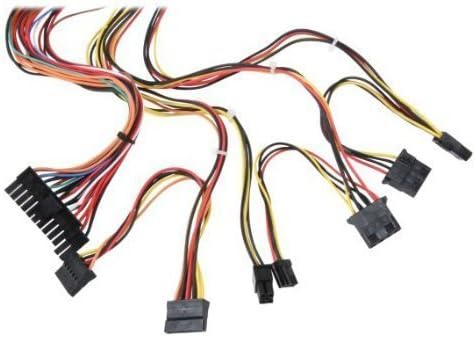
Hình 3: Hếtview of power supply connectors.

Figure 4: Power supply dimensions and included AC power cord.
5. Hướng dẫn vận hành
After successful installation, you can power on your computer.
- Ensure the power switch on the rear of the power supply (Figure 2) is in the "ON" (I) position.
- Nhấn nút nguồn trên vỏ máy tính của bạn.
- The power supply will provide stable power to your system components.
- To power off, shut down your operating system normally. For complete power disconnection, switch the power supply to the "OFF" (O) position and unplug the AC cord.
6. Bảo trì
Việc bảo trì thường xuyên giúp đảm bảo tuổi thọ và hiệu suất tối ưu của bộ nguồn.
- Vệ sinh: Thường xuyên vệ sinh bụi bẩn khỏi quạt và các khe thông gió của bộ nguồn bằng khí nén. Đảm bảo đã rút phích cắm bộ nguồn trước khi vệ sinh.
- Luồng không khí: Ensure that the computer case has adequate airflow and that the power supply's fan is not obstructed.
- Tính toàn vẹn của cáp: Periodically check all power cables for secure connections and signs of wear or damage.
KHAI THÁC. Xử lý sự cố
Nếu gặp sự cố với nguồn điện, hãy tham khảo các bước khắc phục sự cố thường gặp sau đây:
- Không có điện:
- Kiểm tra xem dây nguồn AC đã được cắm chắc chắn vào cả bộ nguồn và ổ cắm điện chưa.
- Ensure the power switch on the rear of the power supply is in the "ON" (I) position.
- Hãy kiểm tra xem ổ cắm điện có hoạt động bình thường không bằng cách cắm thử một thiết bị khác vào.
- Check all internal power connections (20/24-pin ATX, 4-pin +12V, peripheral connectors) are firmly seated.
- Hệ thống không ổn định/Tắt máy ngẫu nhiên:
- This could indicate an overloaded or failing power supply. Ensure your system's power requirements do not exceed the PS480D's 480W capacity.
- Check for proper ventilation and ensure the power supply fan is spinning. Overheating can cause instability.
- Tiếng ồn bất thường:
- A loud fan noise might indicate dust buildup or a failing fan bearing. Clean the fan as described in the Maintenance section.
If problems persist after attempting these steps, contact Logisys customer support or a qualified technician.
8. Thông số kỹ thuật
| Tính năng | Đặc điểm kỹ thuật |
|---|---|
| Thương hiệu | Logisys |
| Số hiệu mẫu | PS480D |
| Đầu ra Wattage | 480 Watt |
| Yếu tố hình thức | ATX |
| Kích thước (DxRxC) | 6" D x 5.5" R x 3.25" C (15.24 x 13.97 x 8.25 cm) |
| Trọng lượng sản phẩm | 2.06 pound (0.93 kg) |
| Đầu nối bo mạch chủ | 1x 20+4 Pin ATX |
| Đầu nối nguồn CPU | 1x 4 Pin +12V |
| Standard Drive Connectors | 4x 4 Pin (Molex) |
| FDD/ZIP Connectors | 1x 4 Pin 3.5" |
| Đầu nối ATA nối tiếp | 1x SATA |
| Phương pháp làm mát | Không khí |
| Bảo vệ | Trên Voltage Bảo vệ, Bảo vệ ngắn mạch |
| Chứng nhận | FCC part 15J class B, CISPR 22, UL 1950, CSA 22.2 LEVEL 3 |
9. Bảo hành và Hỗ trợ
For warranty information, technical support, or service inquiries, please refer to the official Logisys webtrang web hoặc liên hệ với bộ phận chăm sóc khách hàng của họ. Giữ lại hóa đơn mua hàng để làm bằng chứng mua hàng.

