Giới thiệu
The ButtKicker Gamer2 is an immersive haptic transducer system designed to provide powerful and accurate tactile feedback, enhancing your gaming, simulation, and entertainment experiences. Unlike traditional subwoofers that move air, the ButtKicker Gamer2 directly transfers low-frequency sound into physical vibrations, allowing you to feel the action without excessive noise. This manual provides comprehensive instructions for the proper installation, operation, and maintenance of your ButtKicker Gamer2 system.
The system includes a ButtKicker Gamer transducer unit and a 90-watt power amplifier, along with all necessary cables and mounting hardware for easy attachment to most chairs or sim rigs.
Có gì trong hộp
Xác minh rằng tất cả các thành phần đều có trong gói của bạn:
- ButtKicker Gamer transducer with Easy Clamp™ cơ chế đính kèm
- MôngKicker điện Amplifier BKA-130-C (120V Only)
- 13.5' cable with quick release, connecting ButtKicker Gamer to the Ampngười nói dối
- RCA and mini "Y" adapters
- 5' RCA to RCA cable
- 5' RCA to mini cable
- Two Velcro® cable holders

Figure 1: Included components of the ButtKicker Gamer2 system.
Hướng dẫn thiết lập
Follow these steps to properly set up your ButtKicker Gamer2 system:
1. Attaching the ButtKicker Gamer Transducer
The ButtKicker Gamer unit features an Easy-Clamp™ mounting arm designed for quick and secure attachment. It can be clamped to any center post up to 1.4 inches (3.5 cm) in diameter, commonly found on office chairs or sim racing cockpits.
- Identify a sturdy, central post on your chair or sim rig.
- Loosen the adjustment knob on the Easy-Clamp™ mechanism.
- Vị trí của clamp around the post and tighten the adjustment knob until the ButtKicker Gamer is securely fastened and does not wobble. Ensure the unit is positioned to allow for free movement and does not interfere with chair mechanisms.

Figure 2: Detail of the Easy-Clamp™ mounting arm.

Figure 3: ButtKicker Gamer2 mounted on an office chair.

Figure 4: ButtKicker Gamer2 mounted on a sim racing rig.
2. Kết nối nguồn điện Ampngười nói dối
Place the ButtKicker Power Amplifier BKA-130-C in a convenient location, ensuring adequate ventilation. The amplifier is fanless for quiet operation.
- Connect the 13.5' cable from the ButtKicker Gamer transducer to the speaker output terminals on the amplifier. Ensure correct polarity if applicable (though typically not critical for transducers).
- Kết nối amplifier's power cable to a standard 120V AC outlet.

Hình 5: Amplifier placement in a typical setup.
3. Kết nối âm thanh
The ButtKicker Gamer2 operates by converting low-frequency audio signals into vibrations. Connect the amplifier to your audio source (PC, gaming console, home theater receiver) using the provided cables.
- Kết nối PC: Use the 5' RCA to mini cable and the mini "Y" adapter to split the audio output from your PC's sound card. One branch goes to your speakers/headphones, and the other to the ampđầu vào của lifier.
- Kết nối bảng điều khiển: Use the RCA "Y" adapters with the 5' RCA to RCA cable to connect to your console's audio output (if available) or an audio extractor.
- Dedicated Subwoofer Output: For optimal performance, if your audio source has a dedicated subwoofer (LFE) output, connect the amplifier directly to this output using the appropriate RCA cable. This provides a cleaner low-frequency signal.
Lưu ý quan trọng: Some users report static when using the 3.5mm Y-splitter directly from a PC's main audio output. If you experience this, consider using a separate audio output for the ButtKicker (e.g., a secondary sound card, a monitor's 3.5mm output, or an Xbox controller's 3.5mm input if applicable for console setups) to provide a dedicated signal to the ampchất lót.
4. Điều khiển từ xa có dây
Connect the wired remote control to the "Remote" port on the amplifier. This allows for convenient volume adjustment and power control from your seating position.
Hướng dẫn sử dụng
Once the system is set up, follow these steps to operate your ButtKicker Gamer2:
1. Bật nguồn
Press the "Power" button on the amplifier or the wired remote control. The power indicator light will illuminate.
2. Ampđiều khiển lifier

Figure 6: ButtKicker Power Amplifier BKA-130-C front panel.
- Low Filter Cutoff: Adjusts the lowest frequency the ButtKicker will respond to. Typically set between 50-70 Hz for general use.
- High Cutoff Frequency: Adjusts the highest frequency the ButtKicker will respond to. Setting this lower (e.g., 70-110 Hz) can provide a more focused "kick" sensation, while higher settings (up to 160 Hz) can offer a broader range of tactile feedback.
- Âm lượng: Controls the intensity of the vibrations. Start with a low setting and gradually increase to your preferred level. Avoid setting it too high, which can lead to clipping.
- Clip/Signal Indicators: The "Signal" light indicates that an audio signal is being received. The "Clip" light indicates that the amplifier is being overdriven. If the "Clip" light flashes frequently, reduce the volume to prevent damage to the amplifier and transducer.
3. Adjusting for Optimal Experience
Experiment with the Low and High Cutoff Frequency settings to find the ideal tactile response for different games or media. For racing simulations, you might prefer a tighter, more impactful feel for engine RPMs and road textures. For explosions in action games, a broader frequency range might be desired.
Video trình diễn: For a visual guide on the ButtKicker Gamer2's capabilities and setup, please refer to the official product video below.
Video 1: Official ButtKicker video demonstrating the Gamer2's immersive haptic feedback in various gaming scenarios. This video showcases the product's ability to translate in-game audio into physical sensations, enhancing realism.
BẢO TRÌ
The ButtKicker Gamer2 system is designed for durability and requires minimal maintenance.
- Vệ sinh: Use a soft, dry cloth to wipe down the transducer and ampchất tẩy rửa. Tránh sử dụng chất tẩy rửa dạng lỏng hoặc vật liệu mài mòn.
- Thông gió: Đảm bảo amplifier has adequate airflow around it to prevent overheating, especially since it is convection-cooled (fanless).
- Quản lý cáp: Use the provided Velcro cable ties to keep cables organized and prevent them from being snagged or damaged.
- Kho: If storing the unit for an extended period, disconnect it from power and store it in a dry, cool place.
Xử lý sự cố
If you encounter issues with your ButtKicker Gamer2, refer to the following common problems and solutions:
| Vấn đề | Nguyên nhân có thể | Giải pháp |
|---|---|---|
| Không có quyền lực để ampngười nói dối | Power cable disconnected; outlet not active; amptắt lifier. | Check power cable connection; test outlet with another device; ensure amplifier power button is pressed. |
| No haptic feedback | Audio input not connected; volume too low; transducer cable disconnected; amplifier not receiving signal. | Verify all audio connections; increase amplifier volume; check transducer cable connection; ensure audio source is playing low-frequency content. Check "Signal" light on ampchất lót. |
| Weak or inconsistent feedback | Volume too low; filter settings incorrect; transducer not securely mounted; audio source lacking strong bass. | Increase volume; adjust Low/High Cutoff Frequency; tighten transducer clamp; ensure audio content has sufficient bass. |
| "Clip" light flashing frequently | Amplifier bị quá tải. | Giảm bớt amplifier's volume. Persistent clipping can damage the unit. |
| Static or unwanted noise in audio | Ground loop; audio Y-splitter interference. | Hãy thử kết nối amplifier to a different audio output (e.g., a dedicated sound card output, or a monitor's audio out). Consider a ground loop isolator if the issue persists. |
Thông số kỹ thuật
ButtKicker Gamer Transducer
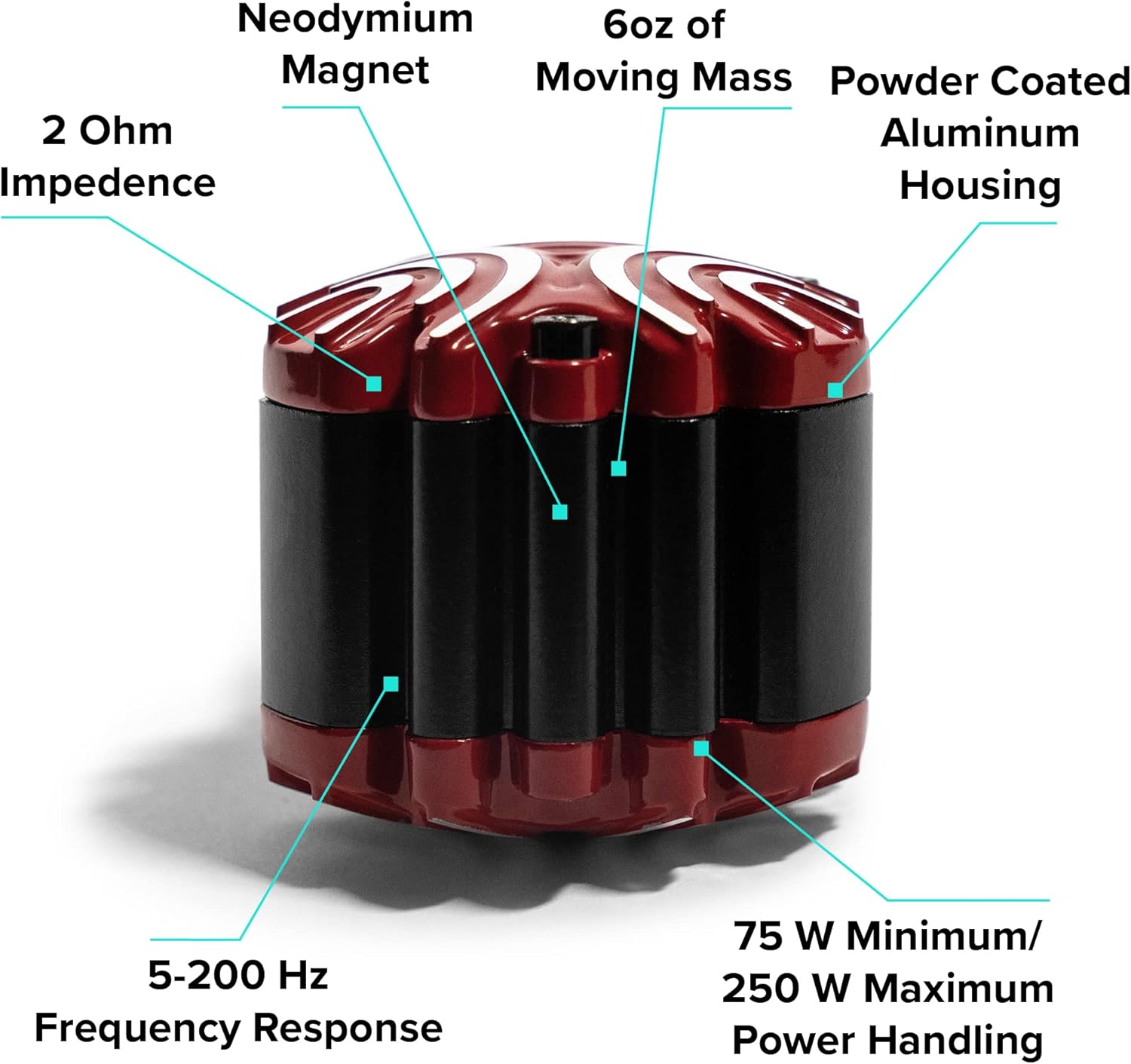
Figure 7: ButtKicker Gamer transducer key features.
- Trở kháng: 2 Ohm
- Đáp ứng tần số: 5-200Hz
- Xử lý công suất: 75 W Minimum / 250 W Maximum
- Di chuyển khối lượng: 6 oz
- Sự thi công: Powder Coated Aluminum Housing, Neodymium Magnet
- Lắp đặt: Easy-Clamp™ mechanism for posts up to 1.4" diameter
MôngKicker điện Ampbộ lót BKA-130-C
- Công suất đầu ra: 90 watt ở 2 ohms
- Làm mát: Fanless (convection-cooled)
- Đầu vào Voltage: CHỈ 120V AC
- Đáp ứng tần số: 10-300Hz
- Kiểm soát: Low Filter Cutoff, High Cutoff Frequency, Volume
- Đặc trưng: Wired remote control port, Pass-through outlet for daisy-chaining multiple units
- Sự thi công: Vỏ kim loại
Thông tin chung về sản phẩm
- Kích thước sản phẩm: 12.2 x 10.83 x 16.14 inch (đã đóng gói)
- Trọng lượng sản phẩm: 10.56 pound (đã đóng gói)
- Số hiệu mẫu: BK-GR2
- ASIN: B000AOTLP6
Thông tin bảo hành
ButtKicker products are manufactured to high standards. For specific warranty details, including coverage period and terms, please refer to the warranty card included with your product or visit the official ButtKicker webtrang web. Giữ lại bằng chứng mua hàng để yêu cầu bảo hành.
Ủng hộ
For technical assistance, troubleshooting beyond this manual, or customer service inquiries, please contact ButtKicker customer support. The manufacturer, Guitammer Company, is known for its responsive customer support.
Please visit the official ButtKicker webtrang web cung cấp thông tin liên hệ và tài nguyên hỗ trợ mới nhất.


