Giới thiệu
This manual provides detailed instructions for the proper use and care of your Audiovox CE-145G Personal CD Player. Please read this manual thoroughly before operating the device to ensure optimal performance and longevity.
Tính năng sản phẩm
- 40-Second Anti-Skip Protection: Ensures continuous audio playback even during movement, utilizing a digital buffer.
- Multi-Directional Anti-Roll Sensors: Provides additional protection against playback interruption from various movements.
- 22-Track Programmable Memory: Allows customization of CD playback order.
- Bass Boost System: Tăng cường chất lượng âm thanh tần số thấp.
- 3-Beam Laser Pickup: Designed for accurate CD tracking and clear sound reproduction.
- Nhiều chế độ phát lại: Includes random play and various repeat functions.
- Giữ phím: Prevents accidental button presses and program changes.
- Tự động tắt nguồn: Conserves battery life by automatically shutting down the player when not in use.
- Line-Out Jack: For connecting to external audio systems or power adapters.
- Built-in Rechargeable Circuitry: Supports the use of rechargeable Ni-Cad batteries (not included).
- Tai nghe âm thanh nổi: Included for immediate listening.
Cài đặt
1. Lắp đặt pin
The Audiovox CE-145G operates on two (2) AA batteries (not included) or an optional AC/car adapter (not included) connected via the line-out jack. For rechargeable Ni-Cad batteries, the unit features built-in charging circuitry.
- Hãy tìm ngăn chứa pin ở mặt dưới của đầu đĩa CD.
- Trượt nắp ngăn chứa pin để mở.
- Lắp hai (2) pin AA, đảm bảo đúng cực (+/-) như chỉ dẫn bên trong ngăn chứa.
- Đóng chặt nắp ngăn chứa pin.

Image: The Audiovox CE-145G Personal CD Player in translucent green, shown with included stereo headphones. This image illustrates the overall product design and the headphones that come with the unit.
2. Kết nối tai nghe
Insert the stereo headphone plug into the headphone jack located on the side of the CD player.

Image: A close-up of the stereo headphones included with the Audiovox CE-145G CD player, showing the earcups and the 3.5mm audio jack.
Hướng dẫn sử dụng
1. Phát nhạc CD cơ bản
- Open the CD compartment lid by pressing the "OPEN" button or sliding the latch.
- Place a CD onto the center spindle with the label side facing up.
- Đóng chặt nắp ngăn đựng đĩa CD cho đến khi nghe tiếng "tách".
- Nhấn nút PHÁT/TẠM DỪNG button to begin playback. The track number and elapsed time will display.
- Để tạm dừng phát lại, nhấn PHÁT/TẠM DỪNG Nhấn lại. Nhấn thêm một lần nữa để tiếp tục.
- Để dừng phát lại, hãy nhấn DỪNG LẠI cái nút.
- Để chuyển sang bản nhạc tiếp theo, hãy nhấn BỎ QUA cái nút (► ►|).
- To return to the beginning of the current track or go to the previous track, press the PHẦN THƯỞNG BỎ QUA cái nút (|◄◄).
- Để tua nhanh hoặc tua chậm trong một bản nhạc, hãy nhấn và giữ nút BỎ QUA or PHẦN THƯỞNG BỎ QUA nút tương ứng.
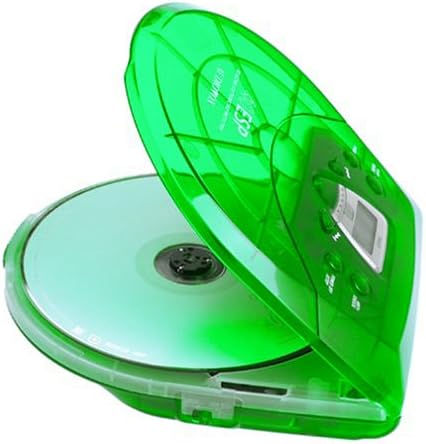
Image: The Audiovox CE-145G Personal CD Player with its translucent green lid open, revealing a compact disc placed inside the compartment.
2. Anti-Skip Protection (ESP)
The CE-145G features a 40-second Electronic Skip Protection (ESP) buffer. This system stores up to 40 seconds of audio data, allowing for uninterrupted playback even if the player experiences minor shocks or vibrations. This feature is automatically active during playback.
3. Programmable Memory (22 Tracks)
Bạn có thể lập trình tối đa 22 bản nhạc để phát theo một thứ tự cụ thể.
- Ở chế độ DỪNG, hãy nhấn nút CHƯƠNG TRÌNH button. The display will show "PROG" and "01".
- Sử dụng BỎ QUA or PHẦN THƯỞNG BỎ QUA buttons to select the desired first track.
- Nhấn CHƯƠNG TRÌNH again to confirm the track. The display will show "02".
- Lặp lại bước 2 và 3 để thêm tối đa 22 bản nhạc vào chương trình của bạn.
- After programming the last track, press PHÁT/TẠM DỪNG to start playback of your programmed sequence.
- Để xóa chương trình, hãy nhấn nút. DỪNG LẠI nhấn nút hai lần.
4. Tăng âm trầm
To enhance the bass frequencies, locate the TĂNG CƯỜNG BASS switch (or button) on the unit and activate it. Deactivate it to return to standard audio output.
5. Chức năng giữ
Các GIỮ switch prevents accidental button presses. Slide the GIỮ switch to the "ON" position to disable all control buttons. Slide it to "OFF" to re-enable controls.
6. Tự động tắt nguồn
To conserve battery life, the CD player will automatically power off after a period of inactivity (e.g., when a CD finishes playing and no buttons are pressed). To restart, press the PHÁT/TẠM DỪNG cái nút.
BẢO TRÌ
- Vệ sinh thiết bị: Wipe the exterior of the player with a soft, damp vải. Không sử dụng chất tẩy rửa có tính mài mòn hoặc dung môi.
- Vệ sinh thấu kính đĩa CD: If playback issues occur due to a dirty lens, use a specialized CD lens cleaning kit. Do not touch the lens directly.
- Chăm sóc CD: Cầm đĩa CD bằng mép. Giữ đĩa sạch sẽ và không bị trầy xước. Cất đĩa CD vào hộp khi không sử dụng.
- Chăm sóc pin: Tháo pin ra nếu không sử dụng thiết bị trong thời gian dài để tránh rò rỉ.
Xử lý sự cố
| Vấn đề | Nguyên nhân có thể | Giải pháp |
|---|---|---|
| Không có điện | Pin đã hết hoặc lắp không đúng cách; bộ chuyển đổi AC chưa được kết nối hoặc bị lỗi. | Replace batteries, check polarity, or ensure AC adapter is properly connected and functional. |
| CD skips or stops | CD is dirty or scratched; unit is subjected to excessive shock; lens is dirty. | Clean CD, use a different CD, avoid strong impacts, clean the CD lens. |
| Không có âm thanh | Headphones not connected properly; volume too low; headphones faulty. | Ensure headphones are fully plugged in, increase volume, try different headphones. |
| Các nút không phản hồi | Công tắc HOLD đang được bật. | Slide the HOLD switch to the "OFF" position. |
Thông số kỹ thuật
- Người mẫu: CE-145G
- Thương hiệu: Âm thanh
- Bảo vệ chống trượt: 40 giây (Chức năng bảo vệ bỏ qua điện tử)
- Các bản nhạc có thể lập trình: 22
- Nguồn điện: 2 x AA batteries (not included) or optional AC/car adapter
- Đầu ra âm thanh: 3.5mm headphone jack, Line-out jack
- Kích thước (Xấp xỉ): 11.8 x 8.3 x 2.6 inch (Kích thước gói)
- Trọng lượng xấp xỉ.): 1.35 pound (Trọng lượng sản phẩm)
- Màu sắc: Xanh lục trong suốt
Bảo hành và Hỗ trợ
The Audiovox CE-145G Personal CD Player is backed by a 90-day parts-and-labor warranty kể từ ngày mua. Vui lòng giữ lại hóa đơn mua hàng để yêu cầu bảo hành.
For technical support or warranty service, please refer to the contact information provided with your product packaging or visit the official Audiovox webđịa điểm.


