Giới thiệu
The Melnor 3060 Digital Water Timer Plus is designed to automate your watering schedule, providing convenience and efficient water management for your lawn or garden. This timer allows you to set precise watering times and durations, ensuring your plants receive the right amount of water without constant manual intervention. It features an easy-to-read LCD menu for programming and supports multiple independent watering cycles.
This manual provides detailed instructions for setting up, operating, and maintaining your Melnor 3060 Digital Water Timer Plus. Please read it thoroughly before use to ensure optimal performance and longevity of your device.
Các tính năng chính
- Tưới nước tự động: Set and forget, program to automatically start and shut off.
- Lập trình dễ dàng: Features an intuitive LCD menu for straightforward setup.
- Khả năng tương thích linh hoạt: Works effectively with low-pressure drip systems and soaker hoses.
- Lịch trình linh hoạt: Program up to 6 independently programmable cycles, allowing watering while away or at night.
- Vận hành thủ công: Includes an on/off function to use like a standard faucet.
- Additional Outlet: Equipped with a second manual outlet for convenient watering.
Thông tin an toàn
CẢNH BÁO: Sản phẩm này có thể khiến bạn tiếp xúc với các hóa chất bao gồm styrene, được Tiểu bang California biết là gây ung thư. Để biết thêm thông tin, hãy truy cập www.P65Warnings.ca.gov.
For outdoor use only. Do not use this timer indoors or for purposes other than watering.
Cài đặt
1. Cài đặt Pin
The Melnor 3060 Digital Water Timer Plus requires two (2) AA batteries (not included) for operation. Ensure batteries are inserted with correct polarity.
- Xác định vị trí ngăn chứa pin ở mặt sau của bộ hẹn giờ.
- Mở nắp ngăn chứa pin.
- Insert two fresh AA alkaline batteries, matching the (+) and (-) terminals correctly.
- Securely close the battery compartment cover to prevent water intrusion.
2. Attach to Faucet
Connect the timer to a standard outdoor hose faucet.
- Đảm bảo vòi nước đã được tắt.
- Thread the timer's inlet connector onto the faucet. Hand-tighten only to prevent damage.
- Attach your garden hose or watering system to the timer's outlet.
- Slowly turn on the faucet completely. The timer is designed to operate with full water pressure.
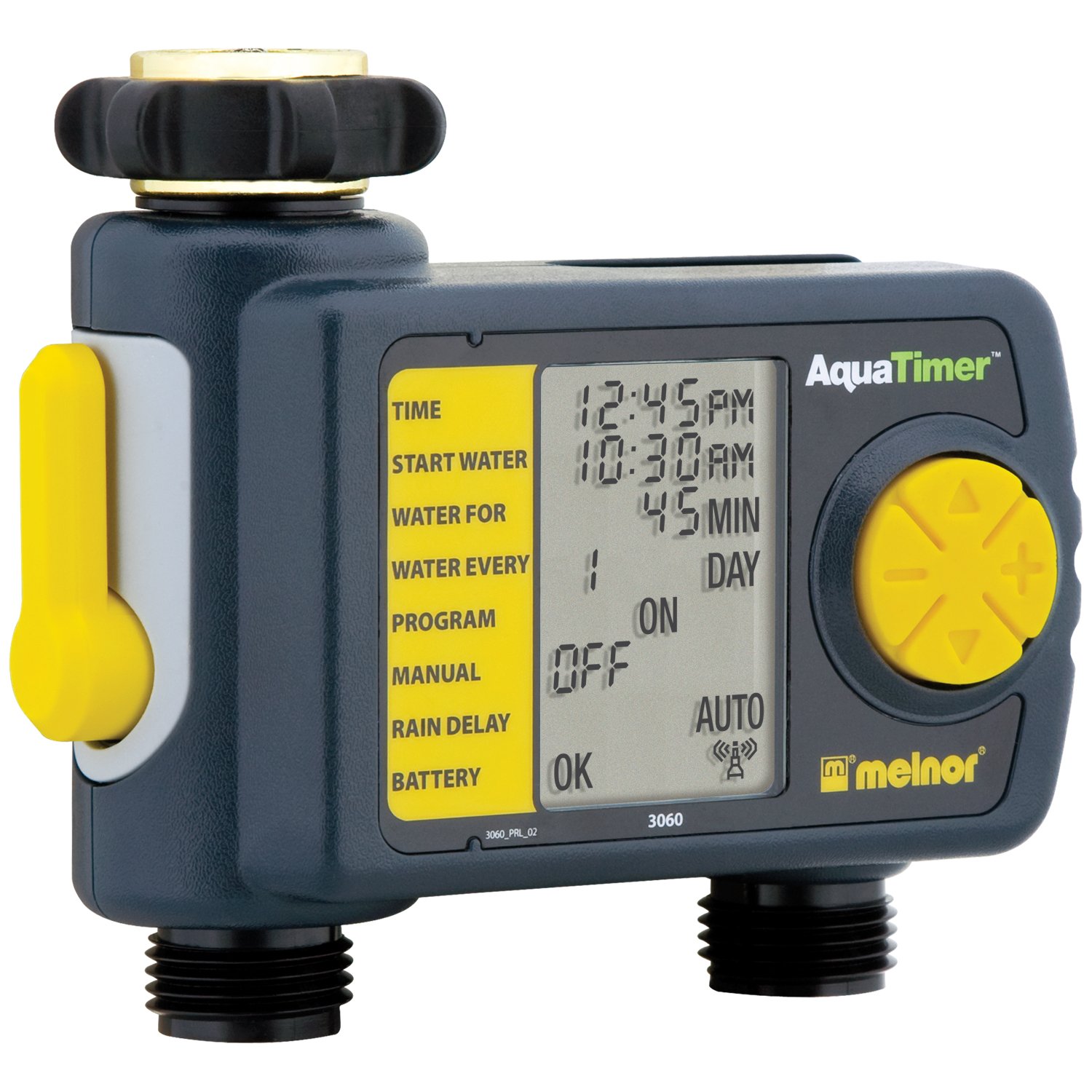
Image: The Melnor 3060 Digital Water Timer Plus, showing its connection points for a faucet and a garden hose.
Hướng dẫn sử dụng
The Melnor 3060 features an LCD display and several buttons for programming. Refer to the on-screen prompts for guidance.
1. Đặt thời gian hiện tại
- Nhấn nút ĐẶT ĐỒNG HỒ cái nút.
- Sử dụng + Và - các nút để điều chỉnh giờ và phút.
- Nhấn OK or ĐẶT ĐỒNG HỒ một lần nữa để xác nhận.
2. Program Watering Schedule
The timer allows for up to six independent watering cycles per day. You can also choose from five preset programs.
- Nhấn nút CHƯƠNG TRÌNH nút để vào chế độ lập trình.
- Sử dụng + Và - buttons to select a program number (1-6) or a preset option.
- Nhấn OK để xác nhận lựa chọn của bạn.
- Follow the on-screen prompts to set the:
- Thời gian bắt đầu: When watering begins.
- Khoảng thời gian: How long watering will last.
- Tính thường xuyên: How often watering occurs (e.g., every day, every other day, specific days of the week).
- Repeat for additional watering cycles as needed.
- Once all programs are set, ensure the timer is in TỰ ĐỘNG chế độ vận hành tự động.
3. Tưới nước bằng tay
Để tưới nước thủ công mà không ảnh hưởng đến lịch trình đã lập trình của bạn:
- Nhấn nút BẬT/TẮT cái nút.
- The water will begin to flow.
- Để dừng tưới nước thủ công, hãy nhấn nút. BẬT/TẮT button again. The timer will return to its programmed schedule.
4. Using the Second Manual Outlet
The timer includes a second, un-timed manual outlet. This outlet functions like a standard faucet and is not controlled by the timer's programming. Simply attach a hose and open the valve on the timer to use it.
BẢO TRÌ
- Thay thế pin: Replace batteries annually or when the low battery indicator appears on the LCD. Always use fresh AA alkaline batteries.
- Mùa đông: To prevent damage from freezing, remove the timer from the faucet before the first frost. Store it indoors in a dry, protected area.
- Vệ sinh: Periodically check the inlet screen for debris and clean if necessary to maintain proper water flow.
Xử lý sự cố
| Vấn đề | Nguyên nhân có thể | Giải pháp |
|---|---|---|
| Bộ hẹn giờ không tưới nước. |
|
|
| Nước rò rỉ từ các mối nối. |
|
|
| Màn hình trống hoặc mờ. |
|
|
Thông số kỹ thuật
- Số hiệu mẫu: 3060 (also referred to as 3100 in some documentation)
- Nguồn điện: 2 pin kiềm AA (không kèm theo)
- Kích thước sản phẩm: 4.5 x 5.2 x 4.5 inch
- Trọng lượng sản phẩm: 12.8 ounce
- Nhà sản xuất: menor
- Watering Cycles: Up to 6 independently programmable cycles
- Các chương trình cài sẵn: 5
Thông tin bảo hành
The Melnor 3060 Digital Water Timer Plus comes with a Bảo hành có giới hạn hai năm. This warranty covers defects in materials and workmanship under normal use. For specific terms and conditions, or to make a warranty claim, please refer to the warranty card included with your product or contact Melnor customer service.
Hỗ trợ khách hàng
If you have any questions, require assistance with setup or programming, or encounter any issues not covered in this manual, please contact Melnor Customer Service. Contact information can typically be found on the product packaging or on the official Melnor webđịa điểm.


