📘 Sổ tay hướng dẫn LTC • PDF trực tuyến miễn phí
Biểu tượng LTC

Sổ tay hướng dẫn sử dụng LTC

LTC cung cấp nhiều loại thiết bị điện tử tiêu dùng đa dạng, chuyên về các thiết bị ngoại vi chơi game như bàn phím và chuột cơ, cùng với thiết bị âm thanh gia đình và thiết bị làm mát.

Mẹo: Hãy ghi rõ số hiệu sản phẩm đầy đủ được in trên nhãn LTC của bạn để có kết quả phù hợp nhất.

Thông tin về cẩm nang LTC trên Manuals.plus

LTC is a versatile consumer electronics brand known for delivering affordable and functional technology solutions. The brand operates prominently in the gaming sector, offering enthusiast-grade peripherals such as the Nimbleback series of mechanical keyboards and precision wireless mice. These products often feature tri-mode connectivity (Bluetooth, 2.4G, Wired), hot-swappable switches, and customizable RGB lighting tailored for gamers.

In addition to gaming gear, LTC manufactures home electronics including floor fans, portable cooling devices, and audio equipment like public address amplifiers and waterproof speakers. Whether facilitating a high-performance gaming setup or improving home comfort, LTC products are designed for ease of use and reliability.

Sổ tay LTC

Hướng dẫn mới nhất từ manuals+ được tuyển chọn cho thương hiệu này.

Hướng dẫn cài đặt nhanh bộ định tuyến không dây LTC 4G

hướng dẫn bắt đầu nhanh
Hướng dẫn toàn diện về cách thiết lập bộ định tuyến không dây LTC 4G, bao gồm kết nối phần cứng, cấu hình không dây và có dây, đèn báo hiệu và các câu hỏi thường gặp để dễ dàng cài đặt và khắc phục sự cố.

Hướng dẫn nhanh và thông tin sản phẩm Chuột chơi game LTC MKM-051

Hướng dẫn bắt đầu nhanh
Hướng dẫn nhanh chính thức dành cho chuột chơi game LTC MKM-051 MMO. Cung cấp chi tiết về chức năng các nút, thông tin bảo hành, hướng dẫn tải xuống trình điều khiển và kích thước sản phẩm. Có 10 nút lập trình được và DPI điều chỉnh được.

Sách hướng dẫn LTC từ các nhà bán lẻ trực tuyến

LTC MC741 Gaming Mini PC Instruction Manual

LTC MC741 • March 16, 2026
Comprehensive instruction manual for the LTC MC741 Gaming Mini PC, detailing setup, operation, maintenance, and troubleshooting. Features AMD Ryzen 7 8845HS, Radeon 780M graphics, 16GB DDR5 RAM, and…

LTC OM021 Wireless AI Mouse Instruction Manual

OM021 • February 24, 2026
Comprehensive instruction manual for the LTC OM021 Wireless AI Mouse, covering setup, operation, maintenance, troubleshooting, and specifications for optimal use.

Hướng dẫn video LTC

Xem video hướng dẫn thiết lập, cài đặt và khắc phục sự cố cho thương hiệu này.

LTC support FAQ

Những câu hỏi thường gặp về hướng dẫn sử dụng, đăng ký và hỗ trợ cho thương hiệu này.

  • How do I pair my LTC wireless mouse?

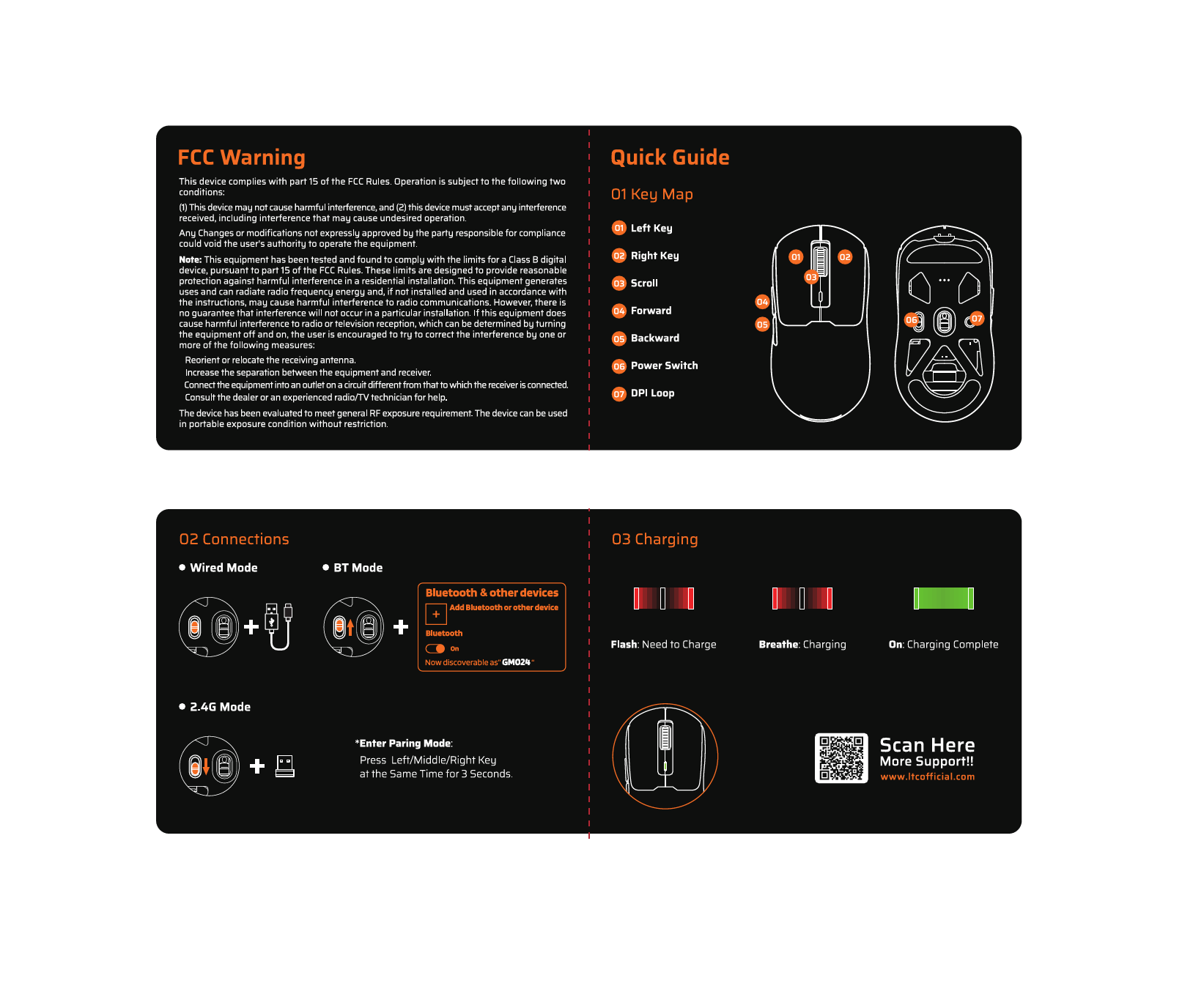
    To enter pairing mode on many LTC mice, press and hold the designated mode button, or hold the Left, Middle, and Right buttons simultaneously for about 3 seconds until the LED flashes rapidly.

  • Where can I download software for my LTC keyboard?

    Drivers and configuration software for LTC gaming keyboards and mice can typically be found on the official website at ltcofficial.com.

  • How do I assemble my LTC standing fan?

    Attach the base to the vertical riser using the included screws. Place the motor on the arm, secure the rear grille cover with the locking nut, attach the propeller blade, and finally snap the front grille frame onto the rear frame.

  • Does my LTC fan have a timer?

    Yes, digital display models like the LXWT114 typically feature a programmable timer (e.g., up to 12 hours) accessible via the control panel or remote.