
1. Giới thiệu
This manual provides detailed instructions for the setup, operation, and maintenance of your Tbaxo TB525 UHF 8-Channel Wireless Microphone System. Please read this manual thoroughly before using the product to ensure proper function and to maximize its lifespan. This system is designed for various applications including live vocal performances, karaoke, church speaking, conference meetings, classroom lectures, weddings, parties, and school events.
2. Nội dung gói hàng
Vui lòng xác minh rằng tất cả các mục được liệt kê dưới đây đều có trong gói hàng của bạn:
- 1 x Tbaxo TB525 UHF Wireless Microphone Receiver
- 8 x Bộ phát Bodypack
- 8 x Lavalier/Lapel Microphones
- 8 micro đeo tai
- 4 x Telescoping Receiver Antennas
- 1 x US 110-240V Power Adapter
- 1 x 1/4" Audio Cable (for mixed output)
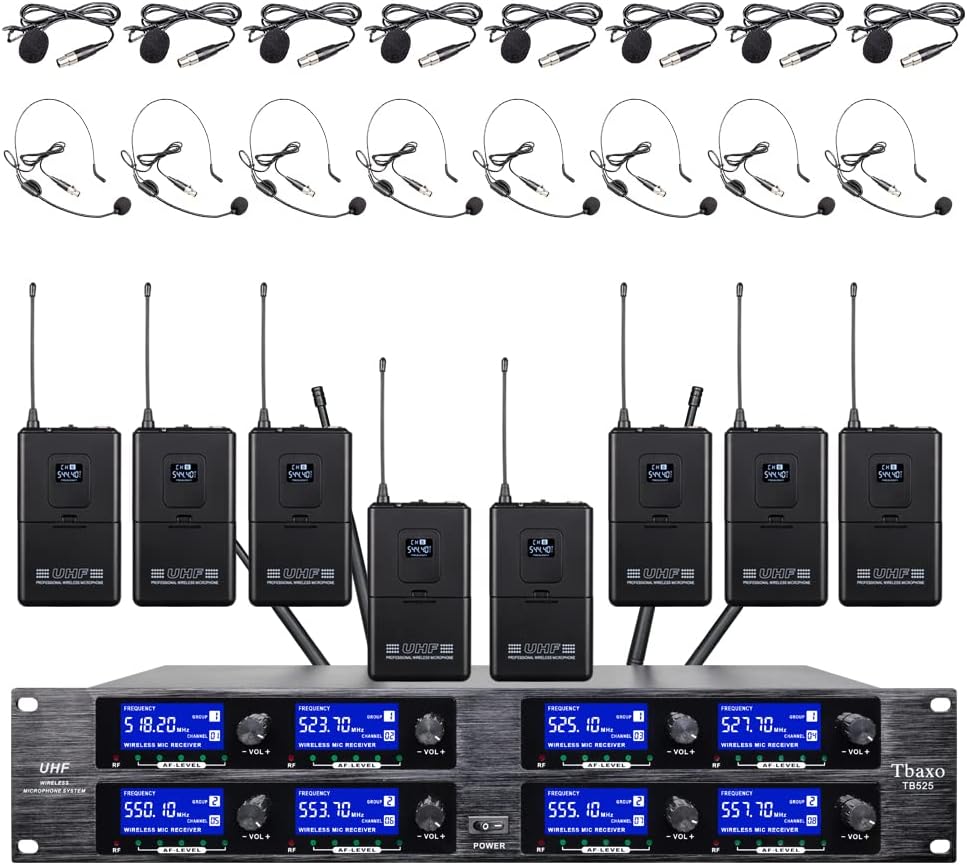
Hình 2.1: Hếtview of the Tbaxo TB525 Wireless Microphone System, showing the receiver, eight bodypack transmitters, and eight headset microphones.
3. Sản phẩm hếtview
3.1 Bộ thu
The receiver unit is the central component of the system, processing audio signals from the bodypack transmitters. It features individual volume controls for each of the 8 channels, frequency displays, and output connections.

Hình ảnh 3.1: Mặt trước view of the Tbaxo TB525 receiver unit, displaying channel frequencies and volume controls.
3.2 Máy phát Bodypack
Each bodypack transmitter is a compact, battery-powered device that sends the microphone's audio signal wirelessly to the receiver. It includes a microphone input, power switch, and a display for channel information.

Hình ảnh 3.2: Mặt trước và mặt sau view of a bodypack transmitter, showing the display and belt clip.
3.3 Microphone
The system includes both lavalier/lapel microphones and headset microphones, offering flexibility for different speaking and performance scenarios.

Image 3.3: Lavalier (lapel) and headset microphones included with the system.
4. Hướng dẫn thiết lập
Hãy làm theo các bước sau để thiết lập hệ thống micro không dây của bạn:
- Vị trí máy thu: Place the receiver unit on a stable surface, away from potential sources of interference such as large metal objects, digital devices, or other wireless equipment. Ensure good line-of-sight to the area where the transmitters will be used.
- Cài đặt Antenna: Screw the four telescoping antennas into the corresponding antenna ports on the rear of the receiver. Extend them fully and position them vertically for optimal signal reception.
- Kết nối nguồn điện: Connect the provided 110-240V power adapter to the DC 16V input on the rear of the receiver, then plug it into a power outlet. Do not power on the unit yet.
- Kết nối đầu ra âm thanh:
- Đầu ra hỗn hợp: For a combined output of all 8 channels, connect a 1/4" audio cable from one of the "MIXED OUT" jacks on the receiver to the input of your mixer or ampchất lót.
- Individual XLR Outputs: For individual channel control, connect XLR cables from the "XLR OUT" ports (one for each channel) on the receiver to the corresponding inputs on your mixer or audio interface.

Image 4.1: Rear panel of the receiver, highlighting the XLR and 1/4" mixed audio output connections.
- Bodypack Battery Installation: Open the battery compartment on each bodypack transmitter. Insert two 1.5V AA batteries, ensuring correct polarity. Close the compartment securely. (Note: Batteries are not included.)
- Microphone Connection to Bodypacks: Connect your chosen lavalier/lapel or headset microphone to the 3-pin mini XLR input on the bodypack transmitter. Ensure a secure connection.

Hình ảnh 4.2: Bên view of a bodypack transmitter, showing the ON/OFF switch and the microphone input port.
5. Hướng dẫn vận hành
Once the system is set up, follow these steps for operation:
- Bật nguồn máy thu: Press the power button on the front panel of the receiver unit. The display screens should illuminate.
- Bật nguồn bộ phát đeo thắt lưng: For each microphone you intend to use, slide the ON/OFF switch on the bodypack transmitter to the "ON" position. The bodypack's display should show its assigned channel and frequency.
- Điều chỉnh âm lượng:
- Âm lượng máy thu: Adjust the individual volume knobs on the receiver for each active channel to a suitable level.
- Máy trộn /Amplifier Volume: Further adjust the overall volume and individual channel volumes on your connected mixer or ampchất lót.
- Cách sử dụng micrô:
- Lavalier/Lapel Microphones: Clip the microphone to clothing, approximately 6-8 inches below the chin, ensuring it is not covered by fabric.
- Headset Microphones: Position the headset microphone boom approximately 1-2 inches from the corner of your mouth.
- Giám sát âm thanh: Speak or sing into the microphone. Observe the AF (Audio Frequency) level indicators on the receiver to ensure a strong, clear signal without clipping. Adjust volume as needed.
- Tắt nguồn: After use, first turn off all bodypack transmitters, then power off the receiver unit.
6. Bảo trì
Proper maintenance ensures the longevity and optimal performance of your system:
- Vệ sinh: Use a soft, dry cloth to clean the exterior of the receiver and transmitters. Do not use liquid cleaners or solvents.
- Chăm sóc pin: Remove batteries from bodypack transmitters if the system will not be used for an extended period to prevent leakage.
- Kho: Bảo quản hệ thống ở nơi khô ráo, thoáng mát, tránh ánh nắng trực tiếp và nhiệt độ quá cao hoặc quá thấp.
- Ăng ten: Handle receiver antennas with care to prevent bending or damage.
KHAI THÁC. Xử lý sự cố
Nếu gặp sự cố, vui lòng tham khảo hướng dẫn khắc phục sự cố sau:
| Vấn đề | Nguyên nhân có thể | Giải pháp |
|---|---|---|
| Không có âm thanh phát ra | Receiver or transmitter not powered on; low battery; incorrect cable connection; receiver volume too low; mixer/ampvấn đề đầu vào lifier. | Ensure all units are powered on. Check bodypack batteries. Verify all audio cables are securely connected. Increase receiver and mixer/amplifier volume. Check mixer/amplifier input settings. |
| Tĩnh hoặc nhiễu | Proximity to other wireless devices; environmental interference; transmitter too far from receiver; weak signal. | Move receiver away from other electronics. Ensure clear line-of-sight between transmitter and receiver. Reduce distance between transmitter and receiver. Ensure antennas are fully extended. |
| Âm lượng nhỏ hoặc âm thanh bị méo | Microphone not positioned correctly; low battery; receiver or mixer volume settings incorrect. | Adjust microphone position. Replace bodypack batteries. Adjust receiver and mixer/amplifier volume levels to avoid clipping or being too low. |
| Phạm vi hoạt động ngắn | Obstructions between transmitter and receiver; environmental interference; receiver antenna position. | Ensure clear line-of-sight. Reposition receiver antennas. Avoid using the system near large metal structures or dense walls. |
8. Thông số kỹ thuật
Technical specifications for the Tbaxo TB525 Wireless Microphone System:
| Tính năng | Đặc điểm kỹ thuật |
|---|---|
| Số lượng kênh | 8 kênh |
| Dải tần số của nhà cung cấp dịch vụ | 500MHz-580MHz (Specific frequencies: 520.1, 523.7, 525.1, 527.7 MHz and 550.1, 553.7, 555.1, 557.7 MHz) |
| Độ ổn định tần số | ±0.006% |
| Độ lệch bình thường | ±22kHz |
| Tỷ lệ S/N | <120dB |
| T.H.D (Total Harmonic Distortion) | <0.6% |
| Đáp ứng tần số | 50Hz-15kHz |
| Độ nhạy của máy thu | >80dB |
| Đầu ra âm thanh | Balanced (XLR) and Unbalanced (1/4" Jack) |
| Receiver Power Requirement | AC 16V, 2000mA |
| Kích thước máy thu | 510 × 290 × 70 mm (Approx. 20.1 x 11.4 x 2.8 inches) |
| Trọng lượng máy thu | Xấp xỉ 13 lbs (5.9 kg) |
| Microphone Cartridge Type | Năng động |
| Bodypack RF Output | <10mW |
| Bodypack Power Source | 2 pin AA 1.5V |
| Vật liệu | Kim loại (Bộ thu) |
| Công nghệ kết nối | XLR, 6.35 mm Jack |
9. Thông tin bảo hành
The Tbaxo TB525 Wireless Microphone System comes with a bảo hành miễn phí ba năm. For warranty service or inquiries, please contact the seller or manufacturer directly. Our maintenance department is located in NY.
10. Hỗ trợ
For further assistance, technical support, or questions not covered in this manual, please refer to the contact information provided by your retailer or the manufacturer. Ensure you have your product model (TB525) and purchase details available when seeking support.